Ozi nchekwa dị mkpa
Ịdọ aka ná ntị: Handle with care to prevent breakage. Keep out of reach of children.
Ihe ngwugwu
- AMIRO 9-inch Lighted Makeup Mirror
- 10X Magnifying Mirror (small, magnetic)
- USB-C eriri USB
- Akwụkwọ ntuziaka (akwụkwọ a)
Ngwaahịa gafereview
The AMIRO 9-inch Lighted Makeup Mirror is designed to provide optimal lighting and magnification for makeup application and personal grooming. It features smart sensor technology, touch controls, multiple lighting modes, and a rechargeable battery for cordless use.
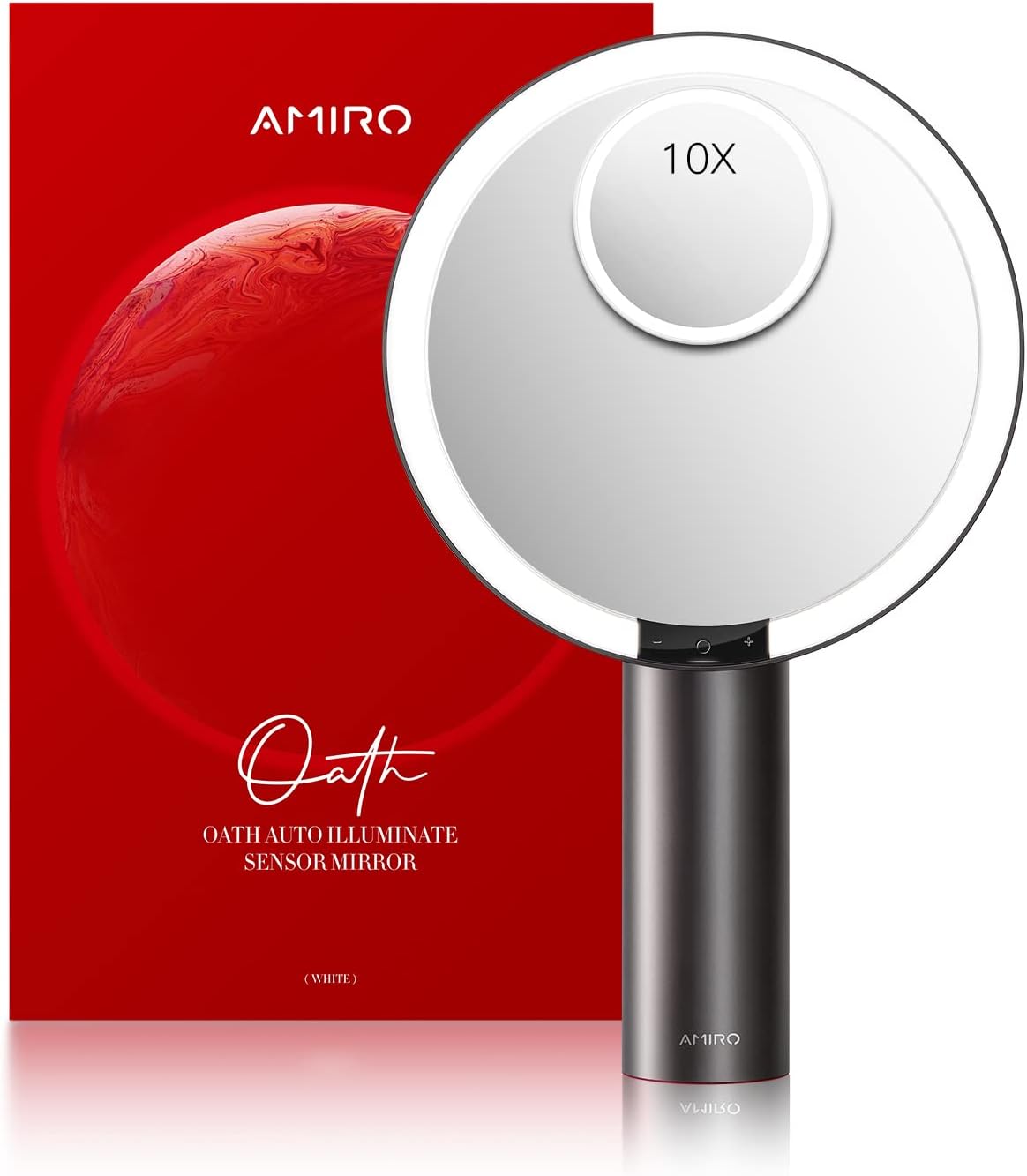
Image: The AMIRO 9-inch Lighted Makeup Mirror, showcasing its main mirror and the detachable 10X magnifying mirror.
Akụkụ ndị bụ isi:
- 9-inch HD mirror: Provides a clear, wide view of your entire face.
- 10X Igwe Ngosipụta: Detachable magnetic mirror for detailed tasks like eyebrow tweezing or contact lens application.
- Ihe mmetụta Smart: Automatically turns the light on/off when human movement is detected within range.
- Touch-Control: Intuitive touch buttons for power, light color mode, and brightness adjustment.
- Ụdị ọkụ agba 3: Warm, natural, and cool white light to simulate various environments.
- Ọkwa 6 ihie: Adjustable brightness from 0% to 100% for precise illumination.
- Ọrụ ebe nchekwa: Remembers your last used light color and brightness settings.
- Enwere ike ibugharị & enweghị eriri: Built-in 2200 mAh lithium battery for portable use.
- Ntugharị efu 50°: Allows adjustment to the optimal viewakụkụ n'akuku.
- Ntọala kwụsiri ike: Features soft, non-slip rubber for secure placement on surfaces.
Melite
- Iwepu: Carefully remove all components from the packaging. Ensure all listed package contents are present.
- Nkwanye: Place the mirror on a flat, stable surface. The non-slip base will help secure it.
- Ebube mbụ: Before first use, fully charge the mirror using the provided USB-C cable. Connect the USB-C end to the mirror's charging port (located on the back of the mirror head) and the USB-A end to a compatible power source (e.g., power bank, PC, wall adapter). The indicator light will show charging status.
- Attach Magnifying Mirror (Optional): The 10X magnifying mirror is magnetic and can be attached to any part of the main mirror surface for detailed work.

Image: Close-up of the mirror's base and charging port, highlighting the USB-C input and indicator light for charging status.
Ntuziaka ọrụ
1. Power On/Off and Light Color Mode
- Gbanwuo/ Gbanyụọ: Lightly touch the center sensor switch (marked with a circle) on the mirror face to turn the light on or off.
- Gbanwee Ụdị agba: While the light is on, short press the left button (marked with a minus sign) to cycle through the three color modes: warm white, natural white, and cool white.
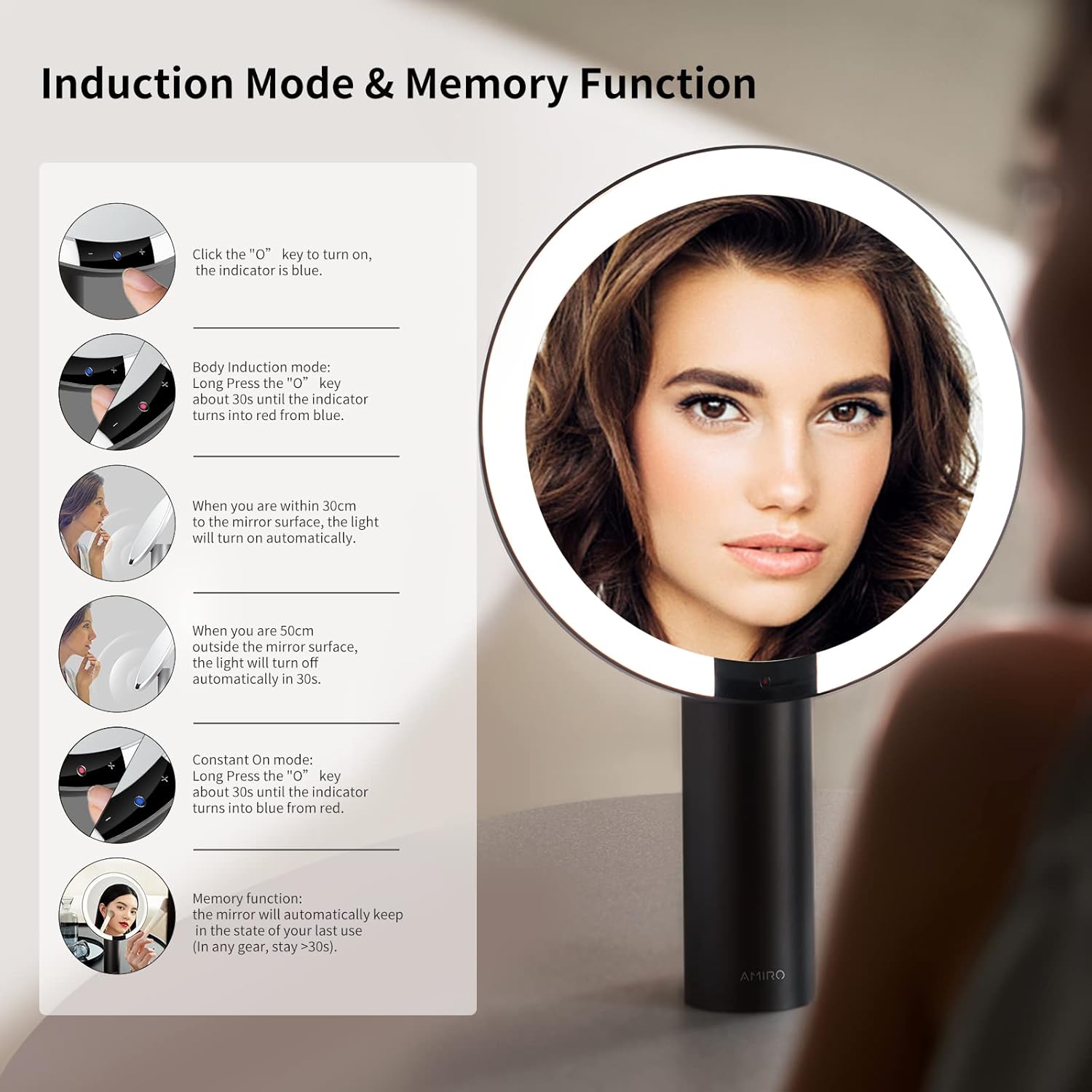
Image: Visual representation of the three color temperature options (White Light, Natural Light, Warm Light) and six brightness levels (15% to 100%).
2. Gbanwee ihie
- Gbanwee ihie: While the light is on, long press the right button (marked with a plus sign) to continuously adjust the brightness from 0% to 100%. Release the button when the desired brightness is reached.

Image: Diagram showing the touch controls for brightness adjustment (+/-) and power/color mode switch.
3. Smart Sensor & Memory Function
- Ihe mmetụta Smart: The mirror can automatically turn on when it detects human movement within 30cm of the mirror surface and turn off after 10 seconds of no detection (if in induction mode).
- Ọrụ ebe nchekwa: The mirror will automatically recall the last used light color mode and brightness setting when turned on.

Image: Visual guide explaining the smart sensor's induction mode (auto on/off) and the memory function.
4. Mirror Rotation
- Gbanwee akụkụ: The mirror head can be freely rotated up to 50 degrees to achieve your preferred viewakụkụ n'akuku.

Image: Illustration demonstrating the 50-degree free rotation capability of the mirror head.
Ịchaji
The AMIRO mirror is equipped with a built-in 2200 mAh rechargeable lithium battery. A full charge provides approximately 3-5 hours of continuous use.
- Connect the provided USB-C cable to the charging port on the back of the mirror.
- Connect the other end of the USB-C cable to a USB power source (e.g., wall adapter, computer, power bank).
- The indicator light will blink green during charging and remain solid green when fully charged.
Nlekọta
- Na-ehicha mirror: Use a soft, lint-free cloth to gently wipe the mirror surface. For stubborn spots, dampen the cloth with water or a mild, non-abrasive glass cleaner. Avoid harsh chemicals.
- Ichacha ntọala: Wipe the base with a soft, dry cloth.
- Nchekwa: Store the mirror in a dry place away from direct sunlight and extreme temperatures.
- Nlekọta batrị: Iji mee ka batrị dị ogologo, zere iwepụ batrị ahụ mgbe niile. Chaji enyo ahụ mgbe niile, ọbụlagodi na ọ naghị adị na ya mgbe niile.
Nchọpụta nsogbu
| Nsogbu | Ihe nwere ike ime | Ngwọta |
|---|---|---|
| Ìhè anaghị agbanwuo. | Batrị dị ala ma ọ bụ mebie ya. | Charge the mirror fully using the provided USB-C cable. |
| Light is too dim/bright. | Ntọala ihie chọrọ mmezi. | Long press the '+' or '-' button to adjust brightness. |
| Smart sensor not responding. | Mirror is not in induction mode or sensor is obstructed. | Ensure the mirror is in the correct mode. Clear any obstructions from the sensor area. |
| Mirror does not hold charge. | Mmebi batrị ma ọ bụ eriri/ọdụ ụgbọ mmiri chaja nwere nsogbu. | Try a different USB-C cable and power source. If the issue persists, contact customer support. |
Nkọwapụta
- Akara: AMIRO
- Nọmba nlereanya: AML009
- Nha enyo: 9 sentimita asatọ
- Mbulite: 1X (main mirror), 10X (detachable mirror)
- Ụdị ọkụ: 3 (Warm, Natural, Cool White)
- Ọkwa ihie: 6 (0%-100% adjustable)
- Batrị: 2200 mAh Lithium Ion (rechargeable)
- Nchaji ọdụ ụgbọ mmiri: USB-C
- Akụkụ ntụgharị: ogo 50
- Ihe: Aluminum (frame), Metal (frame material)
- Akụkụ ngwaahịa: 10.7"L x 17"W
- Ibu ihe: 2.93 pound
- Atụmatụ pụrụ iche: Smart Sensor, Touch Sensor, Memory Function, Cordless
Akwụkwọ ikike na nkwado
AMIRO provides a 1-year limited warranty for this product. For warranty claims, technical support, or any inquiries, please contact AMIRO customer service.
You can find contact information and further support resources on the official AMIRO websaịtị: Visit the AMIRO Store on Amazon.
Vidiyo ngwaahịa ngwaahịa
Vidiyo: Ngwaahịa a kwụsịrịview of the AMIRO 9-inch Lighted Makeup Mirror, demonstrating its features including 3 color modes and 6 brightness levels.