1. Okwu mmalite
The Elitech STC-1000HX is a versatile digital temperature controller designed for precise temperature management in various applications. It features a large display, switchable Fahrenheit and Celsius units, and two relay outputs for controlling both heating and cooling devices. This manual provides detailed instructions for installation, setup, operation, and maintenance to ensure optimal performance and longevity of your device.
Akụkụ ndị bụ isi:
- Wide temperature measurement and control range.
- Fahrenheit (℉) and Celsius (℃) switchable display.
- Two relay outputs for independent control of heating and cooling.
- Large, clear digital display for easy readability.
- Waterproof NTC sensor for reliable temperature detection.
- Sensor failure alarm function.
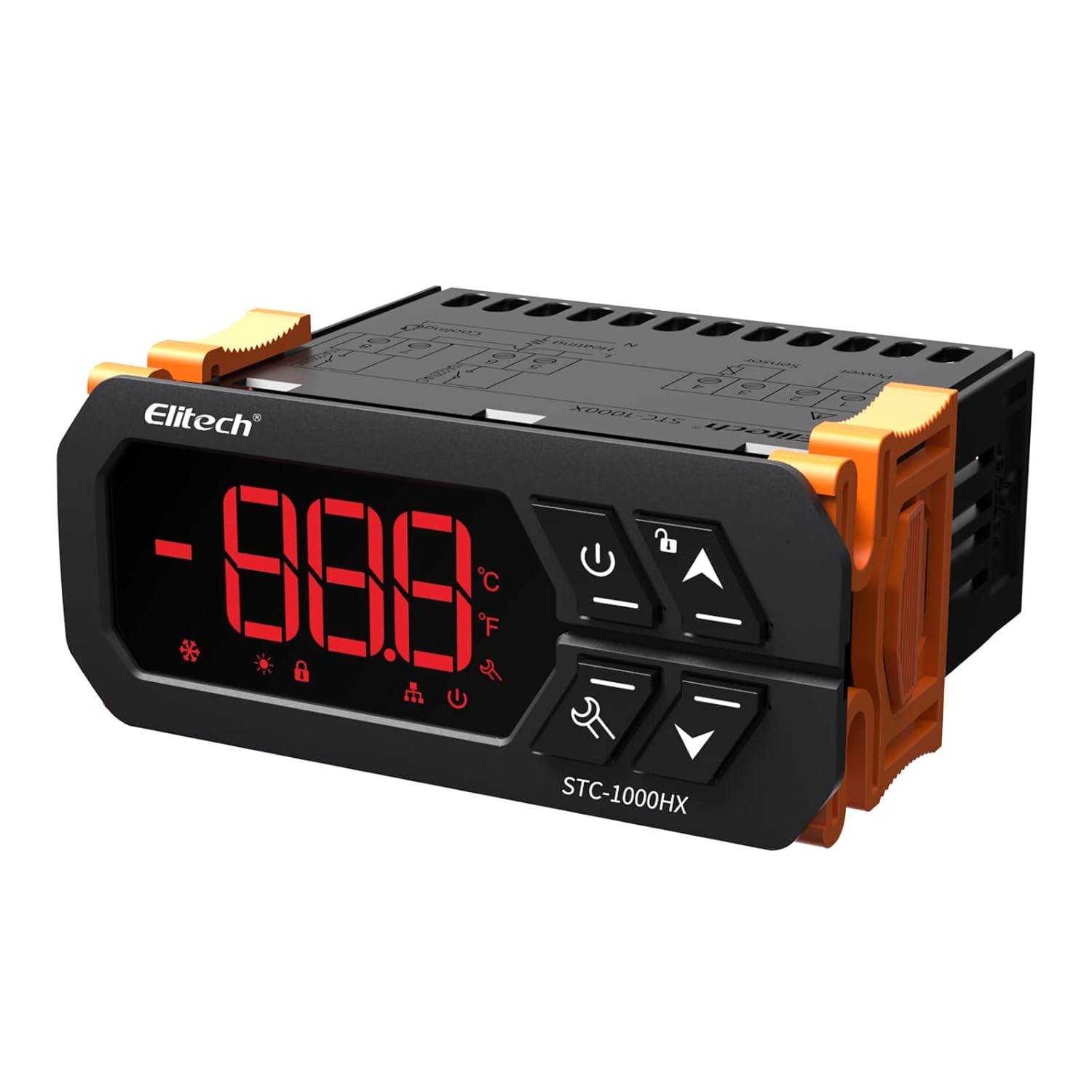
Foto 1.1: N'ihu view of the Elitech STC-1000HX Digital Temperature Controller, showing the digital display and control buttons.
2. Ozi nchekwa dị mkpa
Please read and understand all safety instructions before installing or operating the STC-1000HX. Failure to follow these instructions may result in electric shock, fire, or damage to the device.
- Gbaa mbọ hụ na ọkọnọ ọkụ voltage matches the controller's requirements (220V).
- All wiring should be performed by a qualified electrician or knowledgeable individual.
- Gbanyụọ ike tupu ị rụọ ọrụ waya maọbụ ndozi ọ bụla.
- Do not operate the controller in environments with excessive moisture or corrosive gases.
- Gbaa mbọ hụ na ntọ ala kwesịrị ekwesị iji gbochie ihe egwu eletrik.
- Debe ngwaọrụ ahụ n'ebe ụmụaka nọ.
3. Ngwaahịa gafereview na akụrụngwa
3.1 Product Dimensions and Display
The STC-1000HX features a compact design with a large, easy-to-read LED display. The front panel includes buttons for power, settings, and navigation.

Image 3.1: Elitech STC-1000HX showing key dimensions (71mm width, 66mm depth, 29mm height) and icons for cooling, heating, temperature unit selection, and sensor failure alarm.
3.2 Ngwa gụnyere
Ngwungwu ọkọlọtọ gụnyere:
- 1 x Elitech STC-1000HX Digital Temperature Controller
- 1 x NTC Waterproof Temperature Sensor (6.6 feet / IP67 rated)
- 1 x Akwụkwọ ntuziaka onye ọrụ

Image 3.2: The waterproof NTC temperature sensor, rated IP67, with a 6.6-foot cable, designed for accurate and reliable temperature measurement in various environments.
4. Ntuziaka nwụnye
4.1 eserese waya
Carefully follow the wiring diagram below. Ensure all connections are secure and correctly matched to avoid damage to the controller or connected devices. Disconnect power before wiring.

Image 4.1: Wiring diagram for the STC-1000HX. Terminals 1 & 2 are for Cooling (10A/110VAC), 3 & 4 for Heating (10A/110VAC), 5 & 6 for the Temperature Sensor, and 7 & 8 for Power Supply (110VAC).
Ntuziaka waya:
- Connect the main power supply (110V AC) to terminals 7 (Neutral) and 8 (Live).
- Connect the cooling device to terminals 1 (Neutral) and 2 (Live).
- Connect the heating device to terminals 3 (Neutral) and 4 (Live).
- Connect the NTC temperature sensor to terminals 5 and 6. The sensor is non-polar, so connection order does not matter.
4.2 Na-arịgo
The STC-1000HX is designed for panel mounting. Ensure the cutout dimensions match the controller's size for a secure fit. Allow adequate ventilation around the unit.
5. Nhazi na nhazi
5.1 Gbanyụọ ma ọ bụ gbanyụọ
Pịa ma jide Ike bọtịnụ ( ) for 3 seconds to turn the controller ON or OFF.
5.2 Setting Temperature Parameters
To enter the parameter setting mode, press and hold the Tọọ bọtịnụ () for 3 seconds. Use the Up () na Ala () buttons to navigate through parameters and adjust values. Press the Tọọ bọtịnụ ọzọ iji kwado wee pụọ.
Ihe ndị a na-ahụkarị:
- SP (Setpoint): The desired temperature.
- HD (Heating Differential): The temperature difference above the setpoint before heating activates.
- CD (Cooling Differential): The temperature difference below the setpoint before cooling activates.
- PT (Compressor Delay): Delay time for compressor protection.
- CF (Temperature Unit): Switch between Celsius (℃) and Fahrenheit (℉).
6. Ntuziaka ọrụ
6.1 Cooling Mode Operation
When the measured temperature exceeds the setpoint plus the cooling differential, the cooling relay will activate, turning on the connected cooling device. The cooling relay will deactivate when the temperature drops to the setpoint.
6.2 Heating Mode Operation
When the measured temperature falls below the setpoint minus the heating differential, the heating relay will activate, turning on the connected heating device. The heating relay will deactivate when the temperature rises to the setpoint.

Image 6.1: The STC-1000HX supports both cooling and heating functions, each with a 10A relay capacity, indicated by snowflake and sun icons respectively.
6.3 Ọrụ mkpu
The controller includes a sensor failure alarm. If the sensor circuit is open or short-circuited, the display will show an error code (e.g., 'EE') and an audible alarm may sound. Replace the sensor if this occurs.
7. Menu Parameter Settings
To access and modify the advanced parameters, press and hold the Tọọ button for 3 seconds. Use the Up/Down buttons to navigate and adjust values.
| Ọrụ | Nịm Oke | Ọdabara | Nkọwa |
|---|---|---|---|
| SP | -50℃ ~ 120℃ (-58℉ ~ 248℉) | 10 ℃ (50 ℉) | Okpomọkụ Ntọala |
| HD | 0.1℃ ~ 10.0℃ (0.2℉ ~ 18.0℉) | 2.0 ℃ (3.6 ℉) | Igwe ọkụ dị iche |
| CD | 0.1℃ ~ 10.0℃ (0.2℉ ~ 18.0℉) | 2.0 ℃ (3.6 ℉) | Iche oyi |
| PT | 0 ~ 10 nkeji | 3 nkeji | Oge igbu oge Compressor |
| CF | C / F. | C | Temperature Unit (Celsius/Fahrenheit) |
8. Ntuziaka nchọpụta nsogbu
Rụtụ aka na tebụl dị n'okpuru maka okwu nkịtị na ihe ngwọta ha nwere ike ime.
| Nsogbu | Ihe nwere ike ime | Ngwọta |
|---|---|---|
| Display shows 'EE' | Sensor error (open circuit or short circuit) | Check sensor wiring. Replace sensor if damaged. |
| Controller anaghị agba ọkụ | No power supply or incorrect wiring | Verify power connections to terminals 7 and 8. Check fuse if applicable. |
| Heating/Cooling not activating | Incorrect setpoint/differential, compressor delay active, faulty relay, or device | Check SP, HD, CD, and PT settings. Wait for compressor delay. Test connected heating/cooling device. Check wiring to terminals 1-4. |
| Ọgụgụ okpomọkụ ezighi ezi | Sensor placement, damaged sensor, or calibration issue | Ensure sensor is correctly placed and not exposed to direct heat/cold. Replace sensor if damaged. |
9. Nka na ụzụ nkọwa
- Ụdị: STC-1000HX
- Ịnye ọkụ: 110V AC, 50/60Hz
- Ọnụọgụ okpomọkụ: -50℃ ruo 120℃ (-58℉ ruo 248℉)
- Oke njikwa okpomọkụ: -50℃ ruo 120℃ (-58℉ ruo 248℉)
- Mkpebi: 0.1 ℃ / 0.1 ℉
- izi ezi: ±1℃ (± 2℉)
- Ihe mmetụta: NTC sensor (1PC)
- Mpụta mbugharị: 2 Relays (Cooling 10A/110VAC, Heating 10A/110VAC)
- Oriri ike: <3W
- Okpomọkụ arụ ọrụ: -10℃ ruo 60℃ (14℉ ruo 140℉)
- Okpomọkụ nchekwa: -20℃ ruo 75℃ (-4℉ ruo 167℉)
- Iru mmiri dị n'ihe: 20% ruo 85% (na-abụghị condensing)
- Nha Ogwe ihu: 71mm x 29mm
- Akụkụ ngwaahịa (LxWxH): 7.1 x 6.6 x 2.9 cm
- Ibu ihe: 200 g
10. Nlekọta
To ensure the longevity and accurate operation of your STC-1000HX controller, follow these maintenance guidelines:
- Nhicha: Gently wipe the controller's display and casing na ákwà dị nro ma kpọọ nkụ. Ejila ihe nhicha ma ọ bụ ihe mgbaze.
- Nlekọta ihe mmetụta: Periodically inspect the NTC sensor for any signs of damage or corrosion. Ensure it is clean and free from debris that could affect temperature readings.
- Ọnọdụ gburugburu: Operate the controller within the specified temperature and humidity ranges to prevent damage.
11. Akwụkwọ ikike na nkwado
11.1 Ozi akwụkwọ ikike
Elitech products are covered by a limited warranty against defects in materials and workmanship. For specific warranty terms and conditions, please refer to the warranty card included with your product or visit the official Elitech websaịtị.
11.2 Nkwado ndị ahịa
If you encounter any issues or have questions regarding your Elitech STC-1000HX temperature controller, please contact Elitech customer support through their official websaịtị ma ọ bụ ozi kọntaktị enyere na nkwakọ ngwaahịa gị.


