Ozi nchekwa dị mkpa
Ịdọ aka ná ntị: This product contains a lithium button/coin cell battery. Keep coin cell batteries out of reach of children. Ingestion can lead to severe injury or death in as little as 2 hours due to chemical burns and potential perforation of the esophagus.
Ngwaahịa gafereview
The GE LED+ A21 LED Light Bulb combines efficient LED lighting with a high-quality Bluetooth speaker and color-changing capabilities. It offers a versatile lighting and audio solution for indoor environments, controlled conveniently via an included wireless remote.
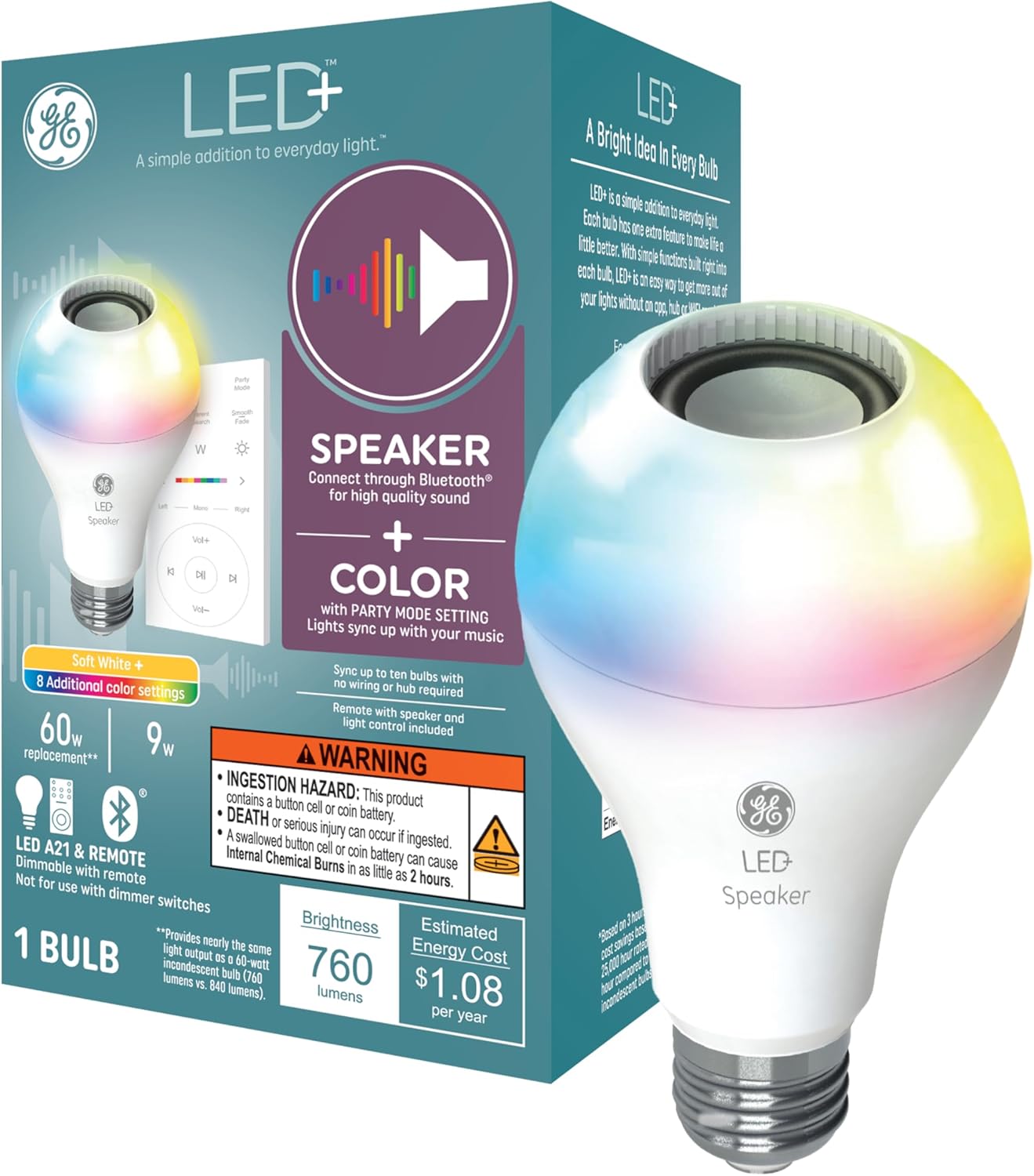
Figure 1: GE LED+ A21 LED Light Bulb and its packaging, highlighting speaker and color features.
Ntuziaka nhazi
- Wụnye bọlbụ: Carefully screw the GE LED+ A21 LED Light Bulb into any standard E26 medium base lamp or light fixture. Ensure the fixture is powered off before installation.
- Ike Na: Turn on the light fixture. The bulb will illuminate in its default soft white setting.
- Jikọọ site na Bluetooth: On your smartphone or tablet, enable Bluetooth and search for available devices. Select the GE LED+ speaker bulb to pair. No app, hub, or Wi-Fi is required for this connection.
- Ntọala njikwa anya: The included remote control is pre-paired with the bulb. Ensure the battery is correctly installed.

Figure 2: The GE LED+ A21 LED Light Bulb installed in a desk lamp, demonstrating remote control functionality.

Figure 3: Visual representation of the Bluetooth connectivity feature of the GE LED+ A21 LED Light Bulb.
Ntuziaka ọrụ
The GE LED+ A21 LED Light Bulb offers versatile control over both lighting and audio through its wireless remote.
Njikwa ọkụ
- Gbanyụọ/ Gbanyụọ: Use the power button on the remote to turn the light on or off.
- Nhọrọ agba: Choose from 8 different color settings or a soft white light using the dedicated color buttons or color slider on the remote.
- Ndozi ihie: Increase or decrease the light brightness using the dimmer buttons on the remote.
- Ụdị nnọkọ Activate Party Mode to sync the light colors with the rhythm of your music, creating a dynamic atmosphere.
Njikwa ọdịyo
- Ngwugwu ọdịyo Bluetooth: Once paired, stream audio wirelessly from your smartphone, tablet, or any other Bluetooth-enabled device directly to the bulb's integrated speaker.
- Ndozi olu: Control the speaker volume using the volume up/down buttons on the remote.
- Njikwa Track: Skip tracks forward or backward using the dedicated track control buttons on the remote.
- Multi-Bulb Sync: For an enhanced surround sound experience, connect up to 10 GE LED+ speaker bulbs within 25 feet of the parent bulb. Turn on all bulbs to automatically sync them to the parent bulb for synchronized light and sound.

Figure 4: Multiple GE LED+ A21 LED Light Bulbs synchronized to provide high-quality sound throughout a room.

Figure 5: The GE LED+ A21 LED Light Bulb's party mode, where light colors sync with music.
Nlekọta
The GE LED+ A21 LED Light Bulb is designed for long-lasting performance and minimal maintenance.
- Nhicha: Hụ na bọlbụ ahụ dị jụụ ma gbanyụọ ọkụ tupu ị sachaa ya. Jiri ákwà dị nro ma kpọọ nkụ hichaa bọlbụ ahụ. Ejila ihe nhicha mmiri ma ọ bụ ihe ndị na-eme ka ọ dị nro.
- Ike ike: This LED bulb uses only 9 watts of power, equivalent to a traditional 60-watt incandescent bulb, contributing to significant energy savings over its lifespan.
- Ogologo ndụ: The bulb has an estimated lifespan of 13.7 years, based on typical usage.
Nchọpụta nsogbu
- Igwe ọkụ anaghị enwu: Ensure the light fixture is receiving power and the bulb is securely screwed into the socket. Test the bulb in another working fixture if possible.
- Okwu njikọ Bluetooth: Ensure Bluetooth is enabled on your device and the bulb is within range (approximately 25 feet). Try unpairing and re-pairing the bulb. If connecting multiple bulbs, ensure they are within range of the parent bulb.
- Enweghị ụda ma ọ bụ ụda dị ala: Check the volume settings on both your connected device and using the remote control. Ensure the bulb is successfully paired via Bluetooth.
- Njikwa anya anaghị aza: Check the battery in the remote control and replace it if necessary. Ensure there are no obstructions between the remote and the bulb.
- Enweghị ndakọrịta: This light bulb is not compatible with voice control devices like Amazon Alexa or Google Assistant. It is also not designed for use with dimmer switches.
Nkọwapụta
| Njirimara | Nkọwapụta |
|---|---|
| Ụdị | GE ọkụ |
| Aha Nlereanya | LED+ Speaker Soft White & Color A21 (1-Pack) |
| Nọmba akụkụ | 93129723 |
| Ụdị ọkụ | Ikanam |
| Nha Ụdị Bọlbụ | A21 |
| Isi Bulb | E26 Ọkara |
| Wattage | 9 watt |
| Incandescent Dị | 60 Watt |
| Icha ọkụ | 760 Lumens (White) |
| Okpomọkụ agba | 2700 Kelvin (Ọcha dị nro) |
| Nhọrọ Agba Dị Ọcha | Multicolor and Soft White |
| Voltage | 120 Volts (100 to 120 Volts and 60 Hertz) |
| Teknụzụ Njikọta | Bluetooth |
| Usoro njikwa | Remote (Push Button) |
| Ojiji ime ime/n'èzí | Ime ụlọ |
| Ogologo ndụ echere | 22 years (based on 3 hrs/day) / 13.7 years (from image) |
| Akụkụ | 3.94"W x 6.38"H |
| Ibu Ibu | 0.66 Pound (10.5 ounces) |
| Batrị gụnyere | Yes (1 Lithium Metal battery for remote) |
| Asambodo | CULU |

Figure 6: Key features and specifications of the GE LED+ A21 LED Light Bulb.

Figure 7: Dimensions of the E26 Medium Base, the most common base size for light bulbs.
Ozi akwụkwọ ikike
The GE LED+ A21 LED Light Bulb is covered by a Akwụkwọ ikike dị afọ 3 from the date of purchase. Please retain your proof of purchase for warranty claims. For detailed warranty terms and conditions, refer to the product packaging or contact GE Lighting customer support.
Nkwado
For further assistance, technical support, or to explore other GE Lighting products, please visit the official GE Lighting websaịtị ma ọ bụ kpọtụrụ ngalaba ọrụ ndị ahịa ha.
GE Lighting Official Store: Gaa na Ụlọ Ahịa na Amazon


