1. Okwu mmalite
Thank you for choosing the Pantum BP5100DN Monochrome Laser Printer. This manual provides essential information for the safe and efficient use of your printer. Please read it thoroughly before operating the device and keep it for future reference.
The Pantum BP5100DN is designed for high-speed, high-quality monochrome printing, featuring automatic two-sided printing and versatile connectivity options including USB and Ethernet.
2. Ozi nchekwa
- Debe ngwa nbipute mgbe niile n'elu ụlọ kwụsiri ike, dịkwa larịị.
- Ensure proper ventilation around the printer to prevent overheating.
- Ewepụla ihe nbipute na mmiri ma ọ bụ oke iru mmiri.
- Use only the specified power supply and connect to a grounded outlet.
- Debe aka na uwe rụrụ arụ pụọ na akụkụ ndị na-akpụ akpụ mgbe ị na-arụ ọrụ.
- Avoid touching the fuser unit, as it can be very hot.
- Do not attempt to service the printer yourself. Refer to qualified service personnel.
3. Kedu ihe dị na Igbe ahụ
Nyochaa na etinyere ihe niile edepụtara n'okpuru na ngwugwu gị:
- Pantum BP5100DN Monochrome Laser Printer
- Ụdọ ọkụ
- eriri USB interface
- Ntuziaka nhazi ngwa ngwa
- Starter cartridge (3000 pages)
- Starter drum (30000 pages)

Figure 3.1: Package Contents. This image displays the Pantum BP5100DN printer along with its accessories: power cord, USB interface cable, quick setup guide, starter toner cartridge, and starter drum unit.
4. Ngwaahịa gafereview
4.1. Printer Components
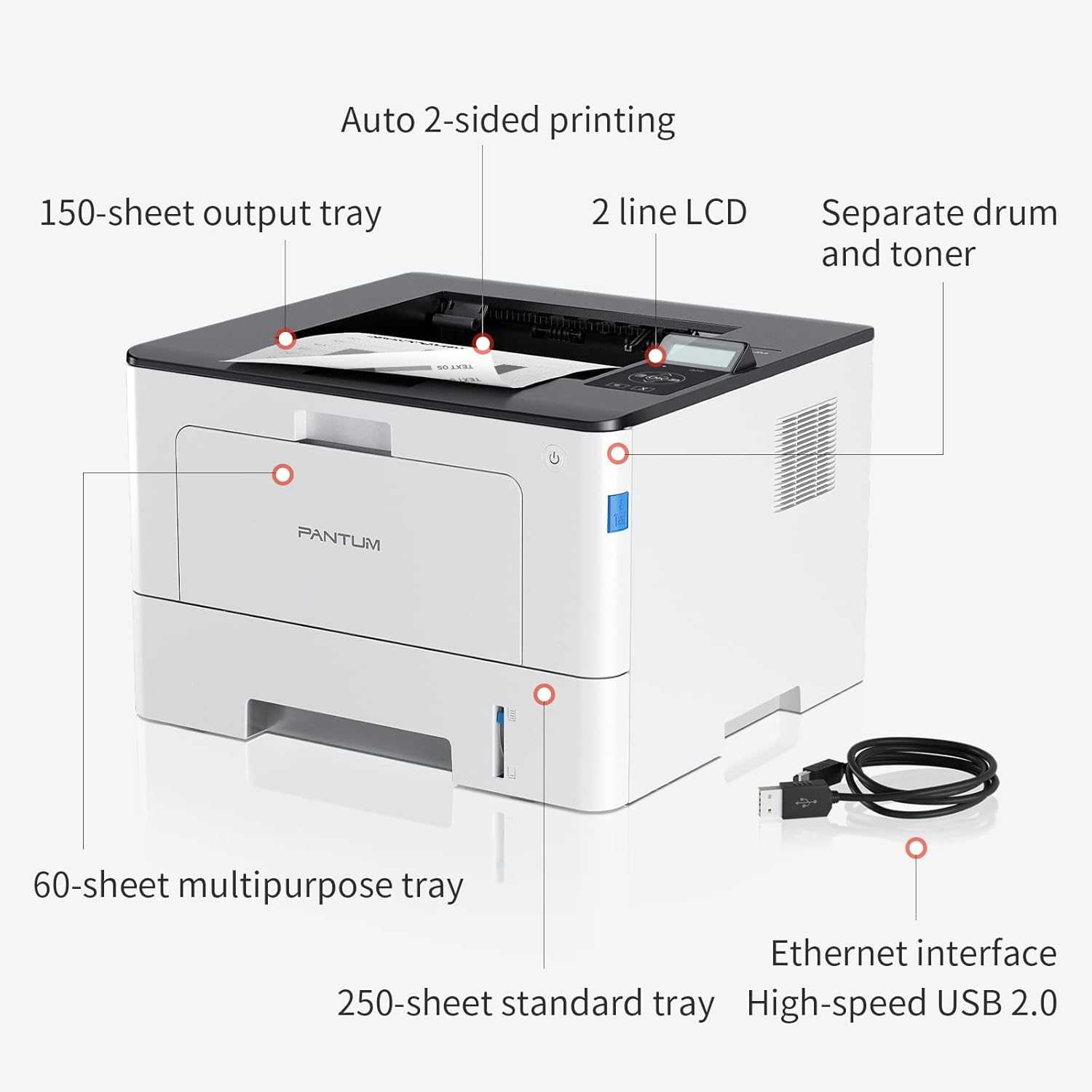
Figure 4.1: Printer Components. Key features include a 150-sheet output tray, a 2-line LCD display, separate drum and toner units, a 60-sheet multipurpose tray, a 250-sheet standard tray, an Ethernet interface, and a High-speed USB 2.0 port.
4.2. Akụkụ

Figure 4.2: Printer Dimensions. The printer measures approximately 14.33 inches (W) x 10.12 inches (H) x 13.54 inches (D).
4.3. Ogwe njikwa

Figure 4.3: Control Panel. The control panel includes a 2-line LCD display for status messages and menu navigation, along with buttons for OK, arrow controls, and cancel functions.
5. Nhazi
5.1. Mwepu na ntinye
- Jiri nlezianya wepụ ihe nbipute na nkwakọ ngwaahịa ya.
- Wepu teepu nchebe na ihe nkwakọba ihe na ngwa nbipute.
- Place the printer on a firm, level surface with adequate space for ventilation.
5.2. Toner and Drum Installation
- Mepee mkpuchi ihu nke ngwa nbipute.
- Unpack the drum unit and toner cartridge.
- Insert the toner cartridge into the drum unit until it clicks into place.
- Insert the combined drum and toner unit into the printer.
- Mechie mkpuchi ihu.
5.3. Mpempe akwụkwọ
- Pull out the standard paper tray or open the multipurpose tray.
- Gbanwee ntuziaka akwụkwọ na nha akwụkwọ gị.
- Load paper into the tray, ensuring it is flat and not exceeding the maximum capacity (250 sheets for standard tray, 60 sheets for multipurpose tray).
- Mechie tray akwụkwọ.
5.4. Power and Connectivity
- Jikọọ eriri ọkụ na ngwa nbipute wee banye na oghere eletrik n'ala.
- For USB connection: Connect the provided USB 2.0 cable from the printer to your computer.
- For Ethernet connection: Connect an Ethernet cable from the printer to your network router or switch.
- Pịa bọtịnụ ike ka ịgbanwuo ngwa nbipute.
6. Ntuziaka ọrụ
6.1. Nwụnye ọkwọ ụgbọala
For optimal performance, install the printer drivers from the official Pantum website or the provided installation media. The printer supports easy one-step installation for quick setup.
6.2. Na-ebi akwụkwọ
- Mepee akwụkwọ ịchọrọ ibipụta na kọmputa gị ma ọ bụ ngwaọrụ mkpanaaka gị.
- Họrọ nhọrọ mbipụta n'ime ngwa gị.
- Choose the Pantum BP5100DN from the list of available printers.
- Adjust print settings as needed (e.g., number of copies, paper size, duplex printing).
- Pịa 'Bipụta'.
The printer offers fast printing speeds of up to 40 pages per minute (A4) / 42 pages per minute (Letter) in black and white. It also supports automatic two-sided printing to save paper.
6.3. Mobile Printing
The Pantum BP5100DN supports direct printing of office documents from mobile devices. Ensure your mobile device and printer are connected to the same network or via USB OTG (if supported by your device and printer).
7. Nlekọta
7.1. Replacing Toner Cartridge and Drum Unit
When the toner is low or the drum unit reaches its end of life, the printer's display will show a message. Refer to the instructions provided with the replacement consumables for proper installation. The starter toner cartridge yields approximately 3000 pages, and the starter drum unit yields approximately 30000 pages.
7.2. Na-ehicha ihe nbipute
- Turn off the printer and unplug the power cord before cleaning.
- Jiri ákwà dị nro, nke na-enweghị ihe e ji ehicha ihe hichaa mpụta nke igwe nbipute ahụ.
- Use a dry cloth to clean the paper path and rollers if paper jams occur frequently.
- Ejila ihe nchacha abrasive ma ọ bụ ihe mgbaze.
8. Nchọpụta nsogbu
Ọ bụrụ na ị hụ nsogbu na ngwa nbipute gị, lee azịza ndị a na-ahụkarị:
- Ihe nbipute anaghị aza: Check power connections, USB/Ethernet cable connections, and ensure the printer is turned on. Restart both the printer and your computer.
- Mpempe akwụkwọ: Open all covers and carefully remove any jammed paper. Ensure paper is loaded correctly and not creased or damaged.
- Ọdịmma Mbipụta na-adịghị mma: Check toner levels. If print quality is faded, especially with cut and paste text, ensure you are using the correct print settings and consider replacing the toner cartridge or drum unit if they are near end-of-life.
- Okwu Njikọta: For Ethernet, verify network cable connection and IP address settings. For USB, try a different USB port or cable.
- Ozi mperi: Consult the printer's display for specific error codes and refer to the quick setup guide or online support for detailed solutions.
For persistent issues, please contact customer service for support.
9. Nkọwapụta
| Njirimara | Nkọwapụta |
|---|---|
| Aha Nlereanya | BP5100DN |
| Teknụzụ obibi akwụkwọ | Laser |
| Mmepụta ngwa nbipute | Monochrome |
| Ọsọ mbipụta kacha (Monochrome) | 40 ppm (A4) / 42 ppm (Letter) |
| Mkpebi Mbipụta kacha | 1200 x 1200 dpi |
| Mbipụta nwere akụkụ abụọ | Ee (akpaghị aka) |
| Teknụzụ Njikọta | Ethernet, USB 2.0 |
| Oke ntinye akwụkwọ ikike | 250 sheets (Standard Tray), 60 sheets (Multipurpose Tray) |
| Mgbasa ozi bipute | Akwụkwọ (dị larịị) |
| Nha mpempe akwụkwọ | A4, Letter, etc. |
| Ngwa dakọtara | Smartphones, PCs |
| Wattage | 650 Watt |
| Ibu Ibu | 9.07 kg (ihe dị ka 9 kg 70 g) |
| Onye nrụpụta | Pantum |
10. Akwụkwọ ikike na nkwado
The Pantum BP5100DN Monochrome Laser Printer comes with a 1-year warranty from the date of purchase. For warranty claims, technical support, or any inquiries, please refer to the contact information provided in your quick setup guide or visit the official Pantum websaịtị.
For a better experience, please kindly refer to the user manual or contact customer service for support.


