Okwu mmalite
Daalụ maka ịzụrụasing the Ysametp Mini Projector M10. This portable video projector is designed to provide a high-quality home theater experience with its 1080P Full HD support and 10000 Lux LED light source. It features dual built-in stereo speakers with an SRS sound system for immersive audio. Its compact size and multi-connection capabilities make it ideal for various entertainment and presentation needs. Please read this manual thoroughly before operating the projector to ensure proper use and maintenance.
Ozi nchekwa
To ensure safe operation and prolong the lifespan of your projector, please observe the following safety precautions:
- Do not block the ventilation openings. Ensure adequate airflow around the projector to prevent overheating.
- Do not expose the projector to rain or moisture to avoid electric shock or fire.
- Emeghela ihe ngosi ahụ casing. Tụtụ aka n'aka ndị ọrụ ruru eru.
- Jiri naanị ihe nkwụnye ike enyere na ihe ngosi ahụ.
- Place the projector on a stable, flat surface to prevent it from falling.
- Zere ka anya gị na-abanye na lenzi ihe ngosi mgbe i jiri anya gị hụ ihe na-egosi ihe mgbe iamp dị na.
- Unplug the projector from the power outlet during lightning storms or when unused for long periods.
Ihe ngwugwu
Biko lelee ọdịnaya nke ngwugwu mgbe ị na-ebupụ igbe:
- 1 x Ysametp Mini Projector M10
- 1 x HDMI USB
- 1 x 3-in-1 AV Line
- 1 x Cdọ Ike
- 1 x njem
- 1 x Drawstring Backpack
- 1 x njikwa anya (batrị etinyeghị)
- 1 x Akwụkwọ ntuziaka onye ọrụ

Ngwaahịa gafereview
Familiarize yourself with the projector's components and connection ports.

Ọdụ ụgbọ mmiri ntinye/mpụta:
- Ọdụ ụgbọ mmiri HDMI: Connect to devices like TV sticks, laptops, gaming consoles.
- Ọdụ ụgbọ mmiri USB: Jikọọ draịva USB maka ịkpọghachi mgbasa ozi.
- Oghere TF Kaadị: Insert TF cards for media playback.
- VGA ọdụ ụgbọ mmiri: Connect to computers or laptops.
- Ọdụ ụgbọ mmiri AV: Connect to older devices like DVD players using the 3-in-1 AV cable.
- Jack Audio: 3.5mm Jikọọ ekweisi ma ọ bụ igwe okwu mpụga.
Melite
1. Placement and Screen Size
Position the projector on a flat, stable surface. The projection size can range from 32 inches to 200 inches, with an optimal projection distance between 3.6 feet and 16.4 feet.

2. Njikọ ike
Connect the supplied power cord to the projector's power input and then plug it into a power outlet.
3. Mgbanwe nke Isi Ihe na Ndozi
After powering on, adjust the focus and keystone knobs located on top of the projector to achieve a clear and rectangular image. The focus ring adjusts image sharpness, while the keystone correction corrects trapezoidal distortion if the projector is not perfectly perpendicular to the screen.
Ntuziaka ọrụ
1. Agbanye / Gbanyụọ
- Ka ịgbanwuo: Pịa bọtịnụ ike na projector ma ọ bụ akara njikwa.
- Ịgbanyụ: Press the power button again. The projector will go through a shutdown sequence.
2. Nhọrọ Isi mmalite ntinye
Use the "Source" button on the remote control or the projector's control panel to select the desired input source (HDMI, USB, TF, VGA, AV).
3. Ijikọ Ngwaọrụ
- HDMI: Connect an HDMI cable from your device (e.g., TV Stick, laptop, game console) to the projector's HDMI port.
- Kaadị USB/TF: Insert a USB drive or TF card into the respective port. The projector will automatically detect the media or prompt you to select it.
- VGA: Connect a VGA cable from your PC/laptop to the projector's VGA port.
- Nke: Use the provided 3-in-1 AV cable to connect to devices with AV output.
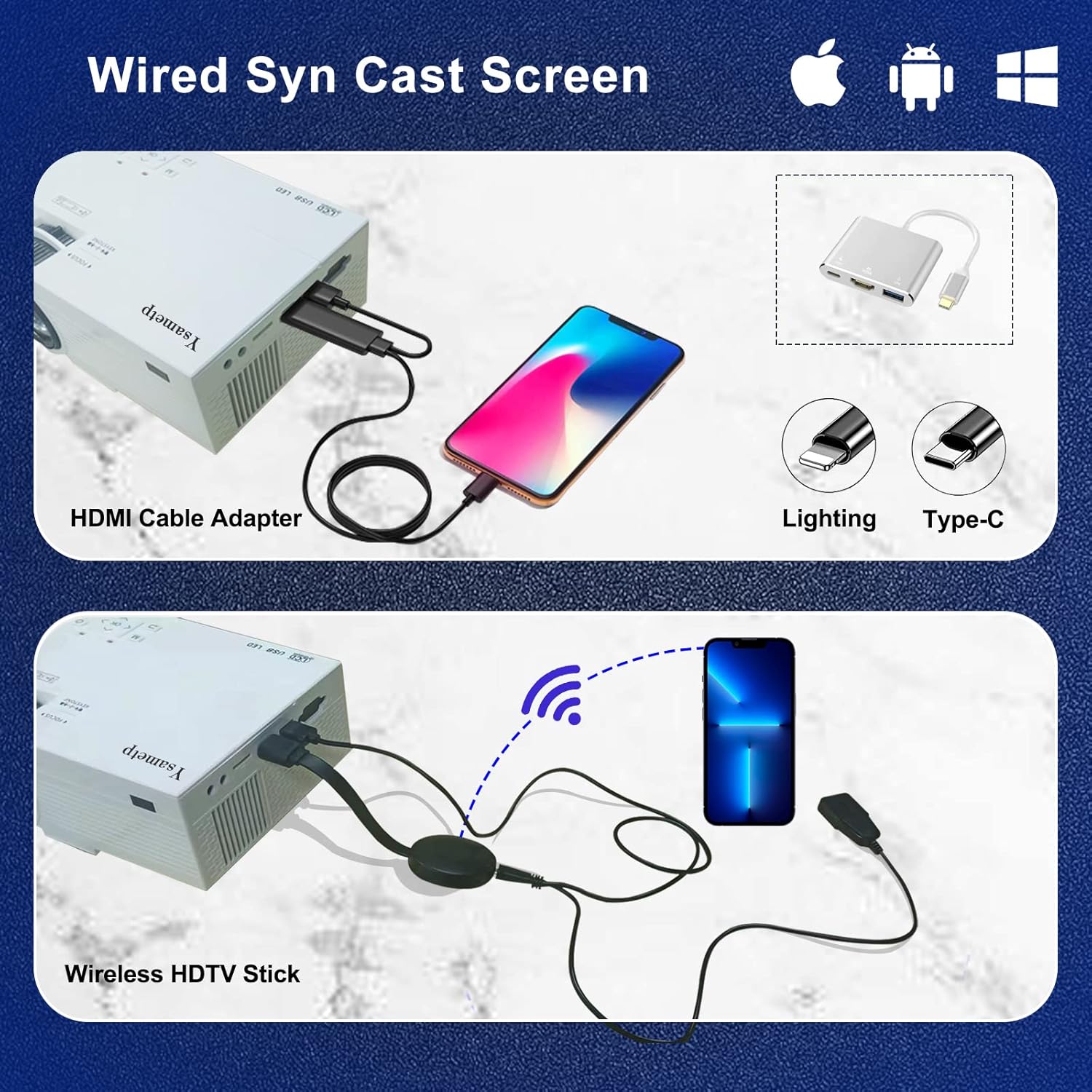
4. Wired Screen Mirroring (for Smartphones)
To mirror your smartphone screen, you will need an HDMI adapter (e.g., Lightning to HDMI for iPhone, USB-C to HDMI for Android) or a Miracast dongle/TV stick (like Roku, Fire TV Stick).

5. Mmepụta ọdịyo
The projector has dual built-in stereo speakers. For external audio, connect headphones or external speakers to the 3.5mm audio jack.

Nlekọta
1. Nhicha
- oghere: Jiri ákwà dị nro, nke na-enweghị ihe e ji ehicha ihe nke e mere maka anya anya. Ejila ihe nhicha aka.
- Casing: Wipe the projector's exterior with a soft, dry cloth. Do not use liquid or aerosol cleaners.
- Igwe ikuku: Regularly check and clean the ventilation openings to prevent dust buildup, which can affect cooling performance.
2. Nchekwa
When not in use, store the projector in a cool, dry place, away from direct sunlight and extreme temperatures. Use the provided drawstring backpack for protection during storage or transport.
3. LED Lifespan
The built-in LED light source is designed to support up to 55,000 hours of use, providing long-lasting performance.
Nchọpụta nsogbu
| Nsogbu | Ihe kpatara/ Ngwọta nwere ike ime |
|---|---|
| Enweghị onyonyo na ihuenyo. |
|
| Onyonyo na-agba agba. |
|
| Foto ahụ bụ trapezoidal. |
|
| Enweghị ụda. |
|
| Njikwa anya anaghị arụ ọrụ. |
|
Nkọwapụta
| Njirimara | Nkọwa |
|---|---|
| Ụdị | Yametp |
| Nlereanya | M10 |
| Ngosipụta teknụzụ | LCD |
| Mkpebi obodo | 1920 x 1080 Pixels (Full HD Supported) |
| Ihe onyonyo | 11000 Lux |
| Foto dị iche na foto | 10000:1 |
| Akụkụ akụkụ | 4:3 |
| Nha amụma | 32 - 200 sentimita asatọ |
| Ogologo amụma | 3.6ft - 16.4ft |
| Ogologo ndụ LED | awa 55,000 |
| Ọkwa mkpọtụ | 31 dB |
| Wattage | 60 watt |
| Ngwaọrụ Akụrụngwa | VGA, USB, HDMI, 3.5mm Audio, TF Card |
| Akụkụ (L x W x H) | 23.88 x 15.49 x 8.13 cm |
| Ibu | 975.22 g (ihe dị ka 2.15 lb) |
Akwụkwọ ikike na nkwado
Ysametp provides a Akwụkwọ ikike ngwaahịa afọ 3 for the Mini Projector M10.
If you encounter any problems or have questions regarding your projector, please do not hesitate to contact our customer support. Refer to the contact information provided on the product packaging or the official Ysametp websaịtị maka enyemaka.


