1. Ngwaahịa gafereview
The Warrior 18V Cordless 3/8 Inch Drill/Driver Kit is designed for various drilling and driving tasks around the home and workshop. This versatile tool features a variable speed trigger, an electric brake, and 20 torque clutch settings for precise control. A keyless chuck allows for quick and easy bit changes, and a built-in LED light illuminates the work area for improved visibility in dark corners. The included 18V Lithium-Ion battery is interchangeable with other 18 Volt Warrior tools, offering convenience and flexibility.
Akụkụ ndị bụ isi:
- Variable speed, reversible operation
- Electric brake for immediate stopping
- 20 torque clutch settings for diverse applications
- Keyless chuck for quick bit changes
- Integrated LED light for enhanced visibility
- 18 Volt Lithium-Ion battery, interchangeable with other Warrior 18V tools
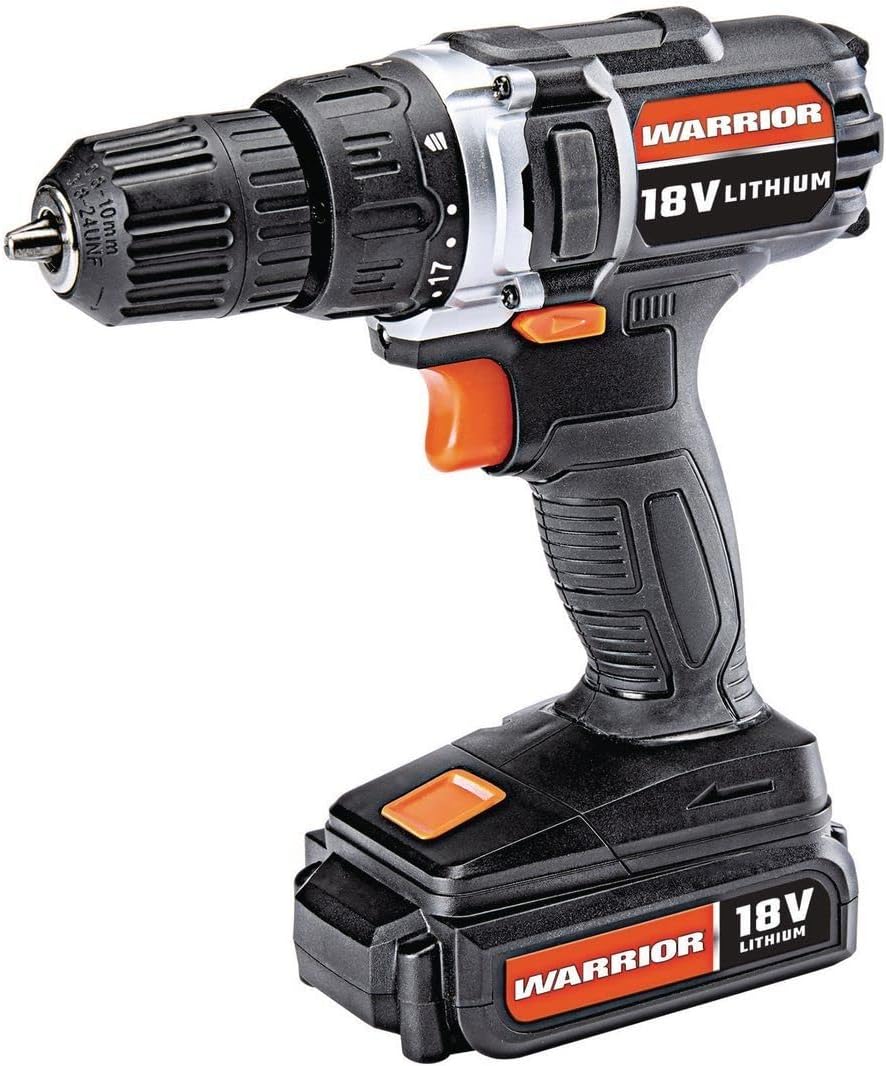
Figure 1: The Warrior 18V Cordless 3/8 Inch Drill/Driver Kit, showcasing ya kọmpat imewe na isi atụmatụ.
2. Nhazi
2.1 Nchaji na ntinye batrị
- Ịchaji batrị: Connect the provided barrel charger to the charging port located on the battery pack. Plug the charger into a standard electrical outlet. The indicator light on the charger will show the charging status (e.g., red for charging, green for fully charged). Ensure the battery is fully charged before first use.
- Ịwụnye batrị: Align the battery pack with the base of the drill handle. Slide the battery into place until it clicks securely. Ensure it is firmly seated to prevent accidental detachment during operation.
- Iwepu batrị: Press the battery release buttons (typically on the sides of the battery pack) and slide the battery out of the drill handle.
2.2 Inserting and Removing Drill Bits
- Mepee Chuck: Rotate the front collar of the keyless chuck counter-clockwise until the jaws are wide enough to accept the desired drill bit or driver bit.
- Tinye Bit: Insert the shank of the drill bit or driver bit into the chuck jaws. Ensure the bit is centered and inserted as far as possible without touching the chuck body.
- Mechie Chuck: Rotate the front collar of the chuck clockwise until the jaws firmly grip the bit. For maximum grip, give it an extra twist by hand.
- Remove the Bit: Rotate the front collar of the chuck counter-clockwise to loosen the jaws and remove the bit.

Nyocha 2: N'eluview of the drill's features, including the 20 clutch settings, LED light, variable speed, and lightweight design.
3. Ntuziaka ọrụ
3.1 Gbanyụọ/ gbanyụọ yana njikwa ọsọ mgbanwe
- To start the drill, press the trigger switch. The speed of the drill is controlled by the amount of pressure applied to the trigger; pressing it further increases the speed.
- To stop the drill, release the trigger switch. The electric brake will engage, stopping the chuck rotation quickly.
3.2 Ntụgharị aga n'ihu/atụgharị
- The forward/reverse selector switch is located above the trigger.
- Pịa mgba ọkụ ahụ gaa n'aka ekpe maka ntụgharị ihu (maka ịgbapụ na ịnya skru).
- Push the switch to the right for reverse rotation (for removing screws or backing out drill bits).
- When the switch is in the center position, the trigger is locked, preventing accidental startup.
3.3 Torque Clutch Settings
- The torque clutch ring is located behind the chuck. It has 20 numbered settings and a drill symbol.
- Rotate the ring to select the desired torque setting. Lower numbers provide less torque, suitable for smaller screws and softer materials to prevent over-driving or stripping. Higher numbers provide more torque for larger screws and harder materials.
- For drilling applications, select the drill symbol setting for maximum torque.
3.4 ọkụ ọkụ ọkụ
- The integrated LED work light automatically illuminates when the trigger is pressed, providing light to the work surface.

Figure 3: The Warrior 18V Cordless Drill in use, demonstrating its application for household tasks like installing a grab bar.
4. Nlekọta
4.1 Nhicha izugbe
- Keep the tool's air vents clean and free of debris to ensure proper motor cooling.
- Jiri ihe dị ọcha hichaa ngwa, damp akwa . Ejila kemịkalụ siri ike ma ọ bụ ihe mkpocha abrasive.
- Regularly inspect the chuck jaws for wear and clean any accumulated dust or debris.
4.2 Nlekọta batrị na nchekwa
- Chekwaa batrị ahụ n'ebe dị jụụ, kpọrọ nkụ na-adịghị na ìhè anyanwụ kpọmkwem na oke okpomọkụ.
- For long-term storage, it is recommended to charge the battery to approximately 50% capacity.
- Avoid completely draining the battery before recharging, as this can reduce its lifespan.
5. Nchọpụta nsogbu
5.1 Drill Does Not Operate
- Gbaa mbọ hụ na chajịrị batrị nke ọma ma tinye ya nke ọma.
- Check that the forward/reverse selector switch is not in the center (locked) position.
- Verify that the charger is disconnected from the battery when attempting to operate the drill.
5.2 Reduced Power or Performance
- Batrị ahụ nwere ike ịdị obere mgbe a na-achaji ya. Fanyeghachi batrị ahụ.
- The torque clutch setting may be too low for the task. Adjust to a higher setting or the drill mode.
- Ensure the drill bit is sharp and appropriate for the material being worked on.
6. Nkọwapụta
| Njirimara | Nkọwapụta |
|---|---|
| Ụdị | dike |
| Nọmba nlereanya | Warior-XXX |
| Isi Iyi Ike | Akwanyere batrị |
| Voltage | 18 volts |
| Ụdị cell batrị | Lithium ion |
| Ọsọ ntụgharị kacha | 900 RPM |
| Ntọala Torque | 20 Ntọala njigide |
| Ckdị Chuck | Chuck na -enweghị isi |
| Ikike osisi | 1 inch |
| Ibu Ibu | 2.47 pound |
| Ihe onwunwe | Plastic |
| Atụmatụ pụrụ iche | Variable Speed, LED Light |
| UPC | 798993496886 |
7. Akwụkwọ ikike na nkwado
Specific warranty information and customer support contact details were not provided in the product data. Please refer to the product packaging or the manufacturer's official websaịtị maka usoro nkwa kachasị ọhụrụ na nhọrọ nkwado.


