1. Ngwaahịa gafereview
The Canon PowerShot A2500 is a compact digital camera designed for ease of use and reliable performance. It features a 16-megapixel sensor, 5x optical zoom, and digital image stabilization, making it suitable for capturing everyday moments in both photos and 720p HD video.

Foto 1: N'ihu view of the Canon PowerShot A2500 digital camera in red.
Akụkụ ndị bụ isi:
- 16 Megapixel, 1/2.3-inch CCD sensor and Canon DIGIC 4 image processor for enhanced image quality.
- 5x optical zoom and 28mm wide-angle lens with Digital Image Stabilizer.
- Capture impressive 720p HD video in stereo sound with a dedicated movie button.
- Smart Auto intelligently selects the proper settings based on 32 predefined shooting situations.
- ECO Mode to reduce power consumption.
2. Ihe ngwugwu
Please ensure all items are present in your product package:
- Canon PowerShot A2500 Digital Camera
- Ngwungwu batrị
- Chaja batrị
- Eriri aka

Image 2: Contents of the Canon PowerShot A2500 package, including the camera, battery, charger, and wrist strap.
3. Mbido Mbido
3.1. Ịchaji batrị
- Insert the battery into the provided battery charger.
- Tinye chaja ahụ n'ime ebe a na-esi enweta ọkụ eletrik. Ọkụ ihe ngosi chaja ga-enwu.
- Once charging is complete, the indicator light will change or turn off. Remove the battery.
3.2. Ịtinye Batrị na Kaadị Ebe Nchekwa
- Open the battery/card compartment cover on the bottom of the camera.
- Insert the charged battery into the compartment, ensuring correct orientation.
- Insert a compatible SD/SDHC/SDXC memory card into the card slot until it clicks into place.
- Mechie mkpuchi nkebi ahụ nke ọma.
4. Ntuziaka ọrụ
4.1. Gbanyụọ / gbanyụọ
Pịa Gbanye/ Gbanyụọ bọtịnụ dị n'elu igwefoto iji gbanye ma ọ bụ gbanyụọ ya.
4.2. Ise foto
- Gbanwuo igwefoto.
- Select your desired shooting mode (e.g., Smart Auto) using the mode dial or menu.
- Jiri ihuenyo LCD nke dị sentimita 2.7 mee ka foto gị dị nkọ.
- Press the shutter button halfway down to focus. The focus frame will appear.
- Press the shutter button all the way down to capture the photo.

Foto 3: N'ihu view of the camera, highlighting the lens and flash for photo capture.
4.3. Ndekọ vidiyo
- Gbanwuo igwefoto.
- Pịa raara onwe ya nye Bọtịnụ ihe nkiri (often marked with a red dot) to start recording.
- Press the Movie Button again to stop recording.
4.4. n'ụdị
- Pịa Bọtịnụ n'ụdị (often marked with a triangle icon) to enter playback mode.
- Use the directional buttons to navigate through your photos and videos.
- Press the Playback Button again to exit playback mode.
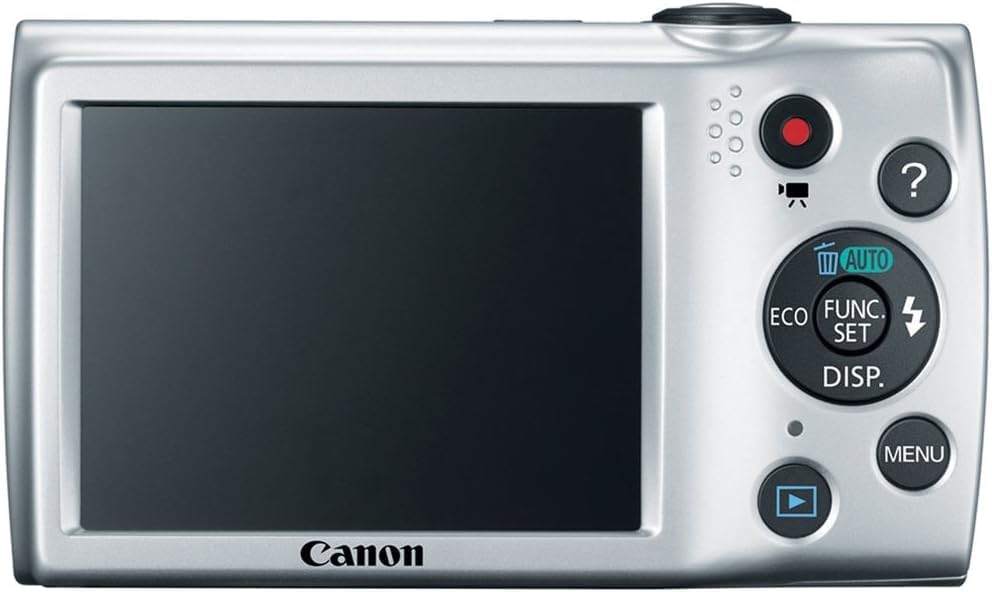
Foto nke atọ: Azụ view of the camera, showing the LCD screen and control buttons for navigation and settings.
5. Nlekọta
5.1. Na-ehicha igwefoto
- Igwe igwefoto: Jiri ákwà dị nro ma kpọọ nkụ hichaa ahụ igwefoto ahụ. Maka unyi siri ike, jiri obere d hichaa ahụ kamera ahụ.ampen akwa na mmiri.
- oghere: Use a lens brush to remove dust, then gently wipe with a lens cleaning cloth. Avoid touching the lens directly with your fingers.
- Ihuenyo LCD: Use a soft, dry cloth to clean the screen. Avoid harsh chemicals.
5.2. Nlekọta batrị
- Chekwaa batrị n'ebe dị jụụ, kpọrọ nkụ mgbe anaghị eji ya.
- Zere ịchaji batrị ugboro ugboro ka ọ gbatịa ndụ ya.
- Ewepụla batrị na oke okpomọkụ.
6. Nchọpụta nsogbu
| Nsogbu | Ihe nwere ike ime | Ngwọta |
|---|---|---|
| Igwefoto anaghị agba ọkụ. | Batrị anwụọla ma ọ bụ tinye na ezighi ezi. | Chajie batrị ahụ nke ọma ma hụ na etinyere ya nke ọma. |
| Foto ndị ahụ adịghị mma. | Ịma jijiji igwefoto, mmegharị isiokwu, ma ọ bụ ilekwasị anya na-ezighi ezi. | Hold the camera steady, ensure adequate lighting, or use a tripod. Allow the camera to focus before fully pressing the shutter. |
| Njehie kaadị ebe nchekwa. | Kaadị ahụ jupụtara, mebie, ma ọ bụ dakọghị. | Hichapụ adịghị mkpa files, format the card (this will erase all data), or try a different compatible memory card. |
| Flash anaghị agba ọkụ. | Flash is disabled or battery is low. | Check flash settings in the menu to ensure it is set to Auto or On. Charge the battery. |
7. Nkọwapụta
| Njirimara | Nkọwa |
|---|---|
| Ụdị | Canon |
| Aha Nlereanya | A2500 |
| Mkpebi ihe mmetụta foto | 16 MP |
| Mbugharị anya | 5x |
| Dijitalụ mbugharị | 4x |
| Ndozi onyonyo | Dijitalụ |
| Nha ihuenyo | 2.7 sentimita asatọ |
| Ụdị ngosi | LCD |
| Mkpebi vidiyo | 720p |
| Akwadoro File Usoro | JPEG (Image), MP4 (Video) |
| Teknụzụ ihe mmetụta foto | CCD |
| Ogologo Fokalụ kacha nta | 28 millimeters |
| Ogologo Focal kacha | 140 millimeters |
| Teknụzụ Njikọta | USB |
| Ụdị ebe nchekwa Flash | SD/SDHC/SDXC |
| Ibu Ibu | 4.4 ounces |
8. Akwụkwọ ikike na nkwado
8.1. Akwụkwọ ikike Ozi
Ngwaahịa a na-abịa na a Akwụkwọ ikike nwere oke ụbọchị 90. Please retain your proof of purchase for warranty claims. For specific terms and conditions, refer to the warranty documentation included with your product or visit the official Canon support websaịtị.
8.2. Nkwado ndị ahịa
For further assistance, technical support, or service inquiries, please visit the official Canon support website or contact their customer service. You can typically find contact information and FAQs on the manufacturer's websaịtị.