Okwu mmalite
This manual provides detailed instructions for the operation and maintenance of your Midland T10 FRS Walkie Talkie. The T10 is a compact and user-friendly two-way radio designed for reliable communication in various settings, including family activities, camping, and hiking. It features 22 FRS channels, NOAA Weather Alert, and eVOX hands-free operation. Please read this manual thoroughly to ensure proper use and to maximize the performance of your device.
Ngwaahịa gafereview
Akụkụ ndị bụ isi:
- 22 FRS Channels for clear communication.
- 38 CTCSS Privacy Codes to minimize interference.
- eVOX (Easy Voice and Sound Activated Transmission) for hands-free operation.
- NOAA Weather Scan + Alert for severe weather updates.
- Channel Scan and Monitor Mode functions.
- Keystroke Tones and Silent Operation options.
- Up to 20-mile range in open areas.
Kedu ihe dị na igbe:
- Midland T10 Two-Way Radios (quantity as purchased, e.g., 4 radios)
- Belt Clips (one per radio)
- Akwụkwọ ntuziaka onye nwe (akwụkwọ a)
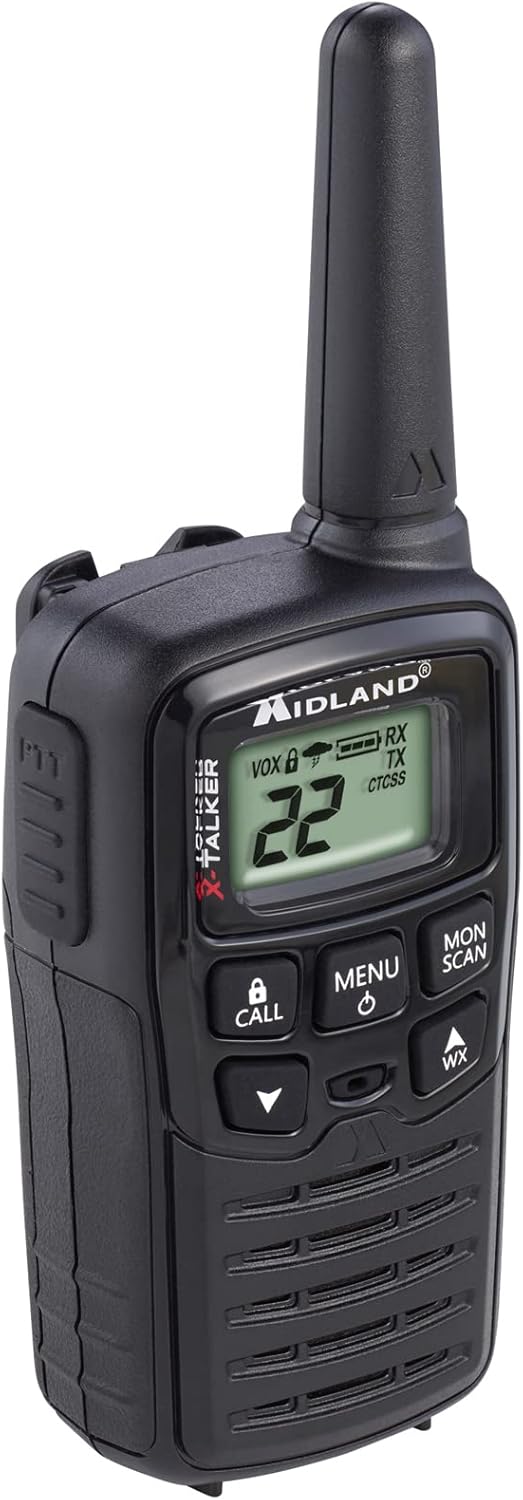
Figure 1: Midland T10 Walkie Talkie, angled front view showing display and buttons.
Melite
1. Ntinye batrị
- Gbaa mbọ hụ na agbanyụrụ redio.
- Chọta mkpuchi nchekwa batrị n'azụ redio.
- Press down on the tab and slide the cover downwards to remove it.
- Insert 3 AAA alkaline batteries (not included) into the compartment, observing the correct polarity (+/-) as indicated.
- Dochie mkpuchi nke batrị ahụ site n'ịtụgharị ya elu ruo mgbe ọ pịa ebe ọ dị.
Ihe dị mkpa: Use only AAA alkaline batteries. Do not mix old and new batteries, or different types of batteries.
2. achinggbakwunye Clip Belt
- Kwado eriri eriri ahụ na oghere dị n'azụ redio.
- Slide the belt clip upwards until it locks securely into position.
- To remove, push the release tab on the belt clip and slide it downwards.

Foto 2: Akụkụ view of the Midland T10 Walkie Talkie with the belt clip attached.
Ntuziaka ọrụ
1. Gbanyụọ / gbanyụọ
- Iji gbanye: Pịa ma jide NHỌRỌ/IKE button until the display illuminates and you hear a tone.
- Iji gbanyụọ: Pịa ma jide NHỌRỌ/IKE bọtịnụ ruo mgbe ngosi gbanyụọ.
2. Na-agbanwe olu
- Pịa UP (v) button to increase the volume.
- Pịa N'ala (▼) button to decrease the volume.
- The current volume level (1-8) will be displayed.
3. Nhọrọ ọwa
- Iji redio agbanyere, pịa MENU bọtịnụ otu ugboro. Nọmba ọwa ga-enwu.
- Jiri ihe UP (v) ma ọ bụ N'ala (▼) buttons to select one of the 22 FRS channels.
- Pịa MENU button again to confirm your selection, or wait 5 seconds for the selection to be automatically saved.
4. Na-ebufe na ịnata
- Iji bufee: Pịa ma jide PTT (Push-To- Talk) button located on the side of the radio. Speak clearly into the microphone. Release the PTT button to stop transmitting.
- Ịnata: Gbaa mbọ hụ na emetụghị bọtịnụ PTT. Redio ga-enweta akara na-akpaghị aka na ọwa ahọpụtara.
5. Privacy Codes (CTCSS)
Privacy Codes help reduce interference from other users on the same channel. Your radio has 38 CTCSS codes.
- Mgbe ịhọrọchara ọwa, pịa MENU button twice. The privacy code number will flash.
- Jiri ihe UP (v) ma ọ bụ N'ala (▼) buttons to select a privacy code (01-38). Code 00 means no privacy code is active.
- Pịa MENU button again to confirm, or wait 5 seconds.
Mara: Both radios must be set to the same channel and privacy code to communicate.
6. eVOX (Hands-Free Operation)
eVOX allows you to transmit without pressing the PTT button.
- Pịa MENU button three times. The eVOX sensitivity level will flash (oF, 1-3).
- Jiri ihe UP (v) ma ọ bụ N'ala (▼) buttons to select a sensitivity level (1 being highest sensitivity, 3 being lowest). Select "oF" to turn eVOX off.
- Pịa MENU button again to confirm, or wait 5 seconds.
7. NOAA Weather Scan + Alert
Your radio can receive NOAA Weather Radio alerts.
- To Activate Weather Scan: Pịa WX button. The radio will scan 10 NOAA weather channels and lock onto the strongest signal.
- To Activate Weather Alert: While in Weather Scan mode, press the MENU button. The "AL" icon will flash. Use UP (v) ma ọ bụ N'ala (▼) to turn the alert ON or OFF. Press MENU to confirm. When activated, the radio will sound an alarm if a severe weather alert is broadcast.
- To Exit Weather Mode: Pịa WX bọtịnụ ọzọ.
8. Call Alert
Pịa Kpọọ button to send an audible call tone to other radios on the same channel and privacy code.
9. Ọrụ Nyocha
The Monitor function allows you to temporarily disable the squelch to listen for weak signals or to check for activity on a channel.
- Pịa ma jide MON/Nyocha button to activate the Monitor function.
- Release the button to deactivate.
10. Nyocha ọrụ
The Scan function allows you to scan all 22 channels for activity.
- Pịa MON/Nyocha button once (do not hold). The radio will begin scanning.
- When activity is detected, the scan will pause on that channel.
- Pịa MON/Nyocha bọtịnụ ọzọ ka ịkwụsị nyocha.
Nlekọta
- Nhicha: Jiri nwayọọ, damp cloth to clean the radio's exterior. Do not use abrasive cleaners or solvents.
- Nlekọta batrị: Remove batteries if the radio will not be used for an extended period to prevent leakage.
- Nchekwa: Chekwaa redio n'ebe dị jụụ, kpọrọ nkụ na-agaghị anwụ kpọmkwem na oke okpomọkụ.
- Nguzogide mmiri: This radio is not water-resistant. Avoid exposure to water or high humidity.
Nchọpụta nsogbu
| Nsogbu | Ngwọta enwere ike |
|---|---|
| Enweghị ike. |
|
| Poor range or static. |
|
| Enweghị ike ibunye. |
|
| Hearing other conversations. |
|
Nkọwapụta
| Nọmba nlereanya | FBA-4PK-T10 |
| Ọwa | Ọwa FRS 22 |
| Koodu nzuzo | 38 CTCSS Codes |
| Oke ugboro ugboro | 462.5625 MHz - 462.7250 MHz |
| Oke Okwu Kachasị | Up to 20 Miles (in open areas) |
| Isi Iyi Ike | Batrị 3 AAA Alkaline (anaghị etinye ya) |
| Ibu Ibu | 1.23 pounds (for the pack of 4) |
| Akụkụ ngwaahịa | 7 x 7 x 4 sentimita asatọ |
| Ọkwa Nguzogide mmiri | Ọ bụghị mmiri na-eguzogide |
Akwụkwọ ikike na nkwado
The Midland T10 FRS Walkie Talkie comes with an industry-leading 3-afọ akwụkwọ ikike against defects in materials and workmanship. This warranty covers normal use and service. For warranty claims or technical support, please refer to the contact information provided with your purchase or visit the official Midland websaịtị.
For additional information, FAQs, or to register your product, please visit www.midlandusa.com.


