1. Okwu mmalite
The My Arcade Gamer V Classic is a portable gaming system designed for on-the-go entertainment. This device comes preloaded with 220 classic video games, offering a wide variety of genres including entertainment, sports, and adventure. Its compact size and 2.5-inch color display make it suitable for use at home, during travel, or at social gatherings. This manual provides essential information for setting up, operating, maintaining, and troubleshooting your Gamer V Classic.
2. Kedu ihe dị na Igbe ahụ
- Gamer V Classic Portable Gaming System
- Ntuziaka onye ọrụ (akwụkwọ a)
3. Akụrụngwa Ngwaahịa
- Enyi na enyi ụmụaka: No console or controllers required.
- Excellent Gaming Experience: Perfect for travel, birthday parties, gifts, and more.
- Rich Collection of Classic Games: Includes 220 preloaded video games including various types such as entertainment, sports, and adventure.
- Dị mma: 2.5" color display, suitable for playing portable games outdoors.
- Njikwa olu: Integrated volume control for adjustable audio.
- Obere ma dị fechaa: Designed for easy portability.
- Isi mmalite ike: Powered by 3 AAA batteries (not included).
4. Nhazi
4.1 Ntinye batrị
- Locate the battery compartment on the back of the Gamer V Classic unit.
- Mepee mkpuchi nke batrị batrị.
- Insert 3 new AAA batteries, ensuring correct polarity (+/-) as indicated inside the compartment.
- Mechie mkpuchi nke batrị batrị nke ọma.
Mara: Batteries are not included. Alternatively, the unit can be powered via a USB-C cable (not included) connected to a 5V power source.
4.2 Na-agbanye ike
Press and hold the power button (usually located on the top left of the device) for a few seconds until the screen illuminates and the My Arcade logo appears.

Image: The Gamer V Classic in use, showing its compact design and screen.
5. Ntuziaka ọrụ
5.1 Na-achịkwaview
- D-Pad (Ntuziaka Pad): Located on the left, used for movement and menu navigation.
- Bọtịnụ A/B: Action buttons located on the right, used for jumping, firing, selecting, etc.
- Bọtịnụ mmalite: Initiates games and pauses gameplay.
- Tọgharịa bọtịnụ: Returns to the main menu or restarts the current game.
- Bọtịnụ ụlọ: Returns to the game selection screen.
- Njikwa olu: Adjusts the audio level of the device.
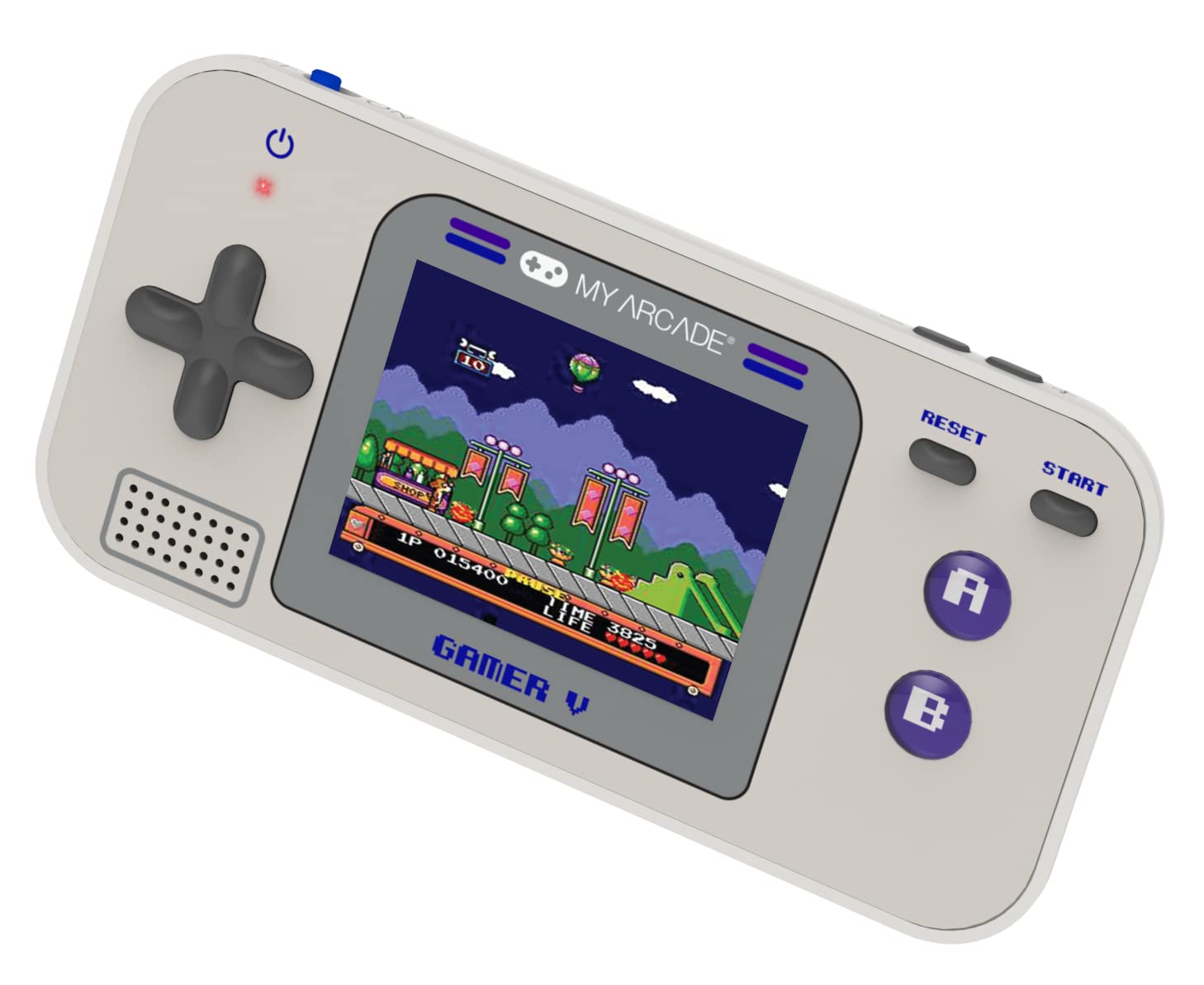
Foto: Zuru ezu view of the Gamer V Classic controls.
5.2 Game Selection and Play
- After powering on, the device will display the main game selection menu.
- Use the D-Pad to scroll through the list of available games.
- Press the 'A' button or 'Start' button to select and launch a game.
- Follow on-screen instructions for specific game controls.
- To return to the game selection menu, press the 'Home' button.
5.3 na-agbanwe olu
Use the dedicated volume control buttons or switch (location may vary slightly by unit) to increase or decrease the sound output.
6. Nlekọta
- Nhicha: Jiri akwa dị nro dị nro hichaa ngwaọrụ ahụ. Ejila ihe nhicha mmiri ma ọ bụ ikuku ikuku.
- Nchekwa: Store the device in a cool, dry place away from direct sunlight and extreme temperatures. If storing for an extended period, remove the batteries.
- Nlekọta batrị: Replace all batteries at the same time. Do not mix old and new batteries or different types of batteries. Dispose of used batteries responsibly.
- Zere Mmetụta: Do not drop or subject the device to strong impacts, as this may damage internal components or the screen.
7. Nchọpụta nsogbu
| Nsogbu | Ihe nwere ike ime | Ngwọta |
|---|---|---|
| Ngwaọrụ anaghị agbanwu. | Low or dead batteries. Incorrect battery installation. | Replace batteries with new ones, ensuring correct polarity. Try powering via USB-C cable. |
| Screen is blank or distorted. | Low battery power. Device malfunction. | Replace batteries or connect to USB-C power. If problem persists, contact customer support. |
| Enweghị ụda ma ọ bụ obere olu. | Volume set too low. Mute function activated. | Adjust volume using the volume controls. Ensure no external headphones are connected if not intended. |
| Bọtịnụ anaghị anabata ya. | Device frozen. Low battery power. | Try pressing the 'Reset' button. Replace batteries. Power cycle the device (turn off and on). |
8. Nkọwapụta
- Akụkụ ngwaahịa: 5"L x 2.5"W x 0.75"H
- Njikwa Type: Njikwa bọtịnụ
- Ibu ihe: 0.15 Kilogram (5.3 ounces)
- Nha ihuenyo: 2.5 sentimita asatọ
- Isi mmalite ike: Akwadoro batrị (batiri AAA 3 achọrọ, etinyeghị ya)
- Ngwa ngwa ngwa: Internal with removable media
- Ogologo afọ (Nkọwa): Kid, Teen
- Ụdị ngosi: LCD ma ọ bụ LED
- Ihe: Plastic
- Ihe kpatara ụdị: Ejidere
- Nọmba Nlereanya ihe: DGUN-3920
- Onye nrụpụta: Arcade m
9. Akwụkwọ ikike na nkwado
For warranty information and customer support, please refer to the official My Arcade websaịtị ma ọ bụ kpọtụrụ ngalaba ọrụ ndị ahịa ha. Debe nnata nzụta gị ka ihe akaebe nke ịzụrụ.


