1. Okwu mmalite
The Amazon Echo Show 5 (3rd Gen) is a smart display designed to integrate seamlessly into your daily life. It features a 5.5-inch screen and enhanced audio capabilities, providing visual and auditory interactions with Alexa. This device is refurbished, tested, and certified to function like a new unit, and comes with the same limited warranty.
The device is constructed with sustainability in mind, utilizing 100% post-consumer recycled polyester yarn for its fabric and 100% recycled aluminum. Its packaging is also 100% recyclable.
2. Kedu ihe dị na Igbe ahụ
Upon unboxing your Amazon Echo Show 5 (3rd Gen), you should find the following items:
- Echo Show 5 (3rd Gen) device
- Power adapter (22W) and cable (4.9ft)
- Ntuziaka mmalite ngwa ngwa
3. Ntuziaka Nhazi
Follow these steps to set up your Echo Show 5:
- Ike Na: Connect the included power adapter to your Echo Show 5 and plug it into a wall outlet. The device will automatically power on.
- Soro ntuziaka na ihuenyo: The device will guide you through the initial setup process on its 5.5-inch touch screen.
- Jikọọ na Wi-Fi: Select your Wi-Fi network from the list and enter the password. The Echo Show 5 supports dual-band Wi-Fi (802.11a/b/g/n/ac). It does not support ad-hoc (peer-to-peer) networks.
- Log in to Amazon Account: Enter your Amazon account credentials when prompted.
- Hazie Ntọala nkeonwe: Configure your time zone, location, and other preferences.
- Nyochaa atụmatụ: Once setup is complete, you can begin interacting with Alexa and exploring the device's capabilities.
The device utilizes Amazon Wi-Fi Simple Setup technology for an easier connection process to your Wi-Fi network.
4. Ịrụ ọrụ Echo Show gị nke 5
The Echo Show 5 allows for various interactions through voice commands and its touch screen.
4.1. Ngosipụta atụmatụ
The 5.5-inch touch screen provides visual information and controls:
- Ozi na ilekiri: View news headlines, weather forecasts, and calendar events.
- Photo Display: Set the background to a rotating slideshow of your favorite photos. You can invite family and friends to share photos.
- Ọdịnaya Viewing: Stream shows, view song titles, and follow along with recipes.

4.2. Audio Atụmatụ
The device features a full-range 1.75-inch built-in speaker, offering enhanced bass and clearer vocals for audio playback.
- Egwu na Podkastị: Stream audio content from services like Amazon Music and Spotify.
- Njikọ Bluetooth: Supports Advanced Audio Distribution Profile (A2DP) maka ịkwanye ọdịyo site na ekwentị mkpanaaka gị gaa na Echo Show 5, ma ọ bụ site na Echo Show 5 gaa na ọkà okwu Bluetooth. Njikwa Remote Audio/Video Pro.file (AVRCP) na-enye ohere ijikwa olu nke ngwaọrụ mkpanaka ejikọrọ. Ekweghị ekwe ka a na-akwado okwu Bluetooth nke chọrọ koodu PIN.


4.3. Akụkụ igwefoto
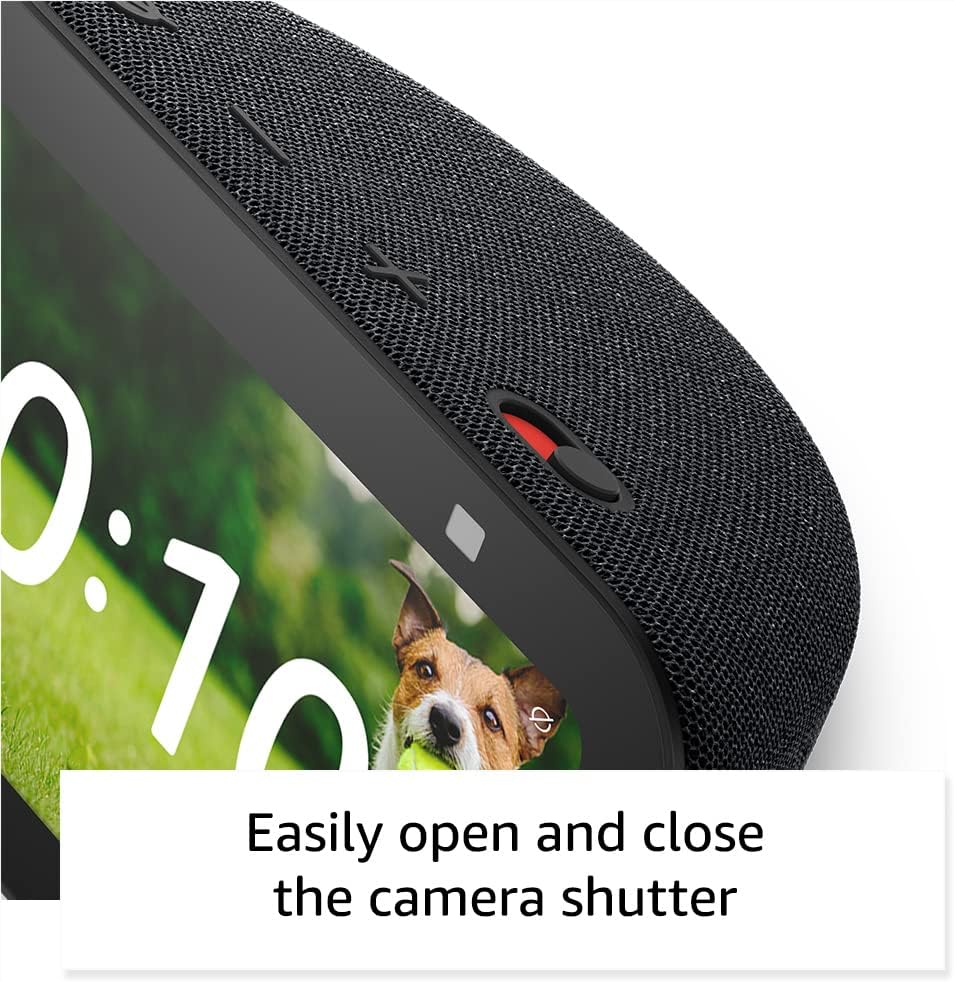
The Echo Show 5 includes a 2 MP camera with a built-in shutter.
- Oku vidiyo: Use the camera to make video calls to friends and family who have the Alexa app or another Echo device with a screen.
- Nlebanya ụlọ: Check in on your home, family, or pets using the built-in camera. You can also view compatible video doorbells.


4.4. Smart Home Control
Control compatible smart devices such as lights and thermostats using voice commands or the touch screen, even when you are away from home. The device supports Wi-Fi, Bluetooth Low Energy Mesh, and Matter for smart home compatibility.
4.5. Atụmatụ Nzuzo
The Echo Show 5 incorporates multiple layers of privacy controls:
- Mic/Camera Off Button: A physical button to electronically disconnect the microphone and camera.
- Igwe mkpuchi igwefoto arụnyere n'ime ya: A physical slider to cover the camera lens.
- Teknụzụ Okwu Wake: The device only begins recording and sending audio to the cloud after detecting the wake word (e.g., "Alexa").
- Ihe ngosi nkwanye ugwu: Visual indicators show when the device is actively streaming to the cloud.
- Njikwa Ndekọ Olu: Ikike iji view ma hichapụ ndekọ olu gị.
- Ring Video Encryption: Na-akwado viewing end-to-end encrypted Ring video.
4.6. Atụmatụ nnweta
The Echo Show 5 includes various accessibility features to personalize Alexa to your abilities. These can be accessed via Ntọala → Nnweta.
- Pịa na Alexa: Nweta Alexa site na imetụ aka site na taịlị ihuenyo ma ọ bụ keyboard.
- Ntị Na-agbanwe Agbanwe: Na-enye oge ka ukwuu iji kwuchaa okwu tupu Alexa azaa.
- Ọnụego okwu a kacha amasị: Jikwaa otú Alexa si ekwu okwu ngwa ngwa ma ọ bụ nwayọ.
- Captioning: Alexa Captioning, Call Captioning, and Closed Captioning provide text captions for supported content.
- Gosi ma Kwuo: Helps users who are blind or visually impaired identify products by saying "Alexa, what am I holding."
- OluView Onye na-agụ ihuenyo: Enables access for users who are blind or visually impaired.
- Ihe na-eme ka ihuenyo dịkwuo mma: Na-enye ohere ibugharị/ịpụpụ na ịtụgharị gburugburu ihuenyo ahụ.
- Gwa mgbe ị nọ nso: Plays notification sounds when detected near the device.
- Gụọ Kindle n'olu dara ụda: Alexa nwere ike ịgụ akwụkwọ Kindle n'olu dara ụda.
- Ederede Oge A: Na-enye ohere ịpịnye ederede dị ndụ na oku vidiyo.
- Additional features include Color Inversion, Color Correction, and Request Sound.
5. Nlekọta
Iji hụ na Echo Show 5 gị dị ogologo ma rụọ ọrụ nke ọma, soro ntuziaka mmezi ndị a:
- Nhicha: Use a soft, lint-free cloth to gently wipe the screen and exterior. Avoid abrasive cleaners, solvents, or aerosol sprays.
- Nkwanye: Place the device on a stable, flat surface away from direct sunlight, heat sources, and excessive moisture. Ensure adequate ventilation around the device.
- Mmelite ngwanrọ: The device receives guaranteed software security updates for at least four years after its last availability for purchase as a new unit. Ensure your device is connected to Wi-Fi to receive these updates automatically.
- okirikiri ike: If the device becomes unresponsive, unplug it from the power outlet, wait for 10 seconds, and then plug it back in.
6. Nchọpụta nsogbu
If you encounter issues with your Echo Show 5, try the following solutions:
- Enweghị ike: Ensure the power adapter is securely connected to both the device and a working wall outlet. Try a different outlet.
- Okwu njikọ Wi-Fi:
- Lelee ma rawụta Wi-Fi gị na-arụ ọrụ nke ọma.
- Malitegharịa ekwentị gị na modem gị.
- On the Echo Show 5, go to Settings → Network and try reconnecting to your Wi-Fi network.
- Gbaa mbọ hụ na ngwaọrụ ahụ nọ n'ime oke nke rawụta Wi-Fi gị.
- Alexa anaghị aza:
- Ensure the microphone is not muted (the light ring will be red). Press the mic/camera off button if it is.
- Kwuo okwu nke ọma na ozugbo na ngwaọrụ ahụ.
- Try restarting the device by unplugging and replugging it.
- Ihe ngosi: If the screen is unresponsive or frozen, try restarting the device.
- Nsogbu ụda:
- Check the volume level on the device.
- Ensure no external Bluetooth speakers are connected if you intend to use the internal speaker.
- Igwefoto anaghị arụ ọrụ: Ensure the camera shutter is open and the camera is not disabled via the mic/camera off button.
Maka enyemaka ọzọ, gaa na nkwado Amazon websaịtị ma ọ bụ kpọtụrụ ndị ahịa.
7. Nkọwapụta
| Njirimara | Nkọwa |
|---|---|
| Nlereanya | Echo Show 5 (3rd Gen) - 2023 release |
| Akụkụ (W x D x H) | 5.8" x 3.6" x 3.2" (147mm x 91mm x 82mm) |
| Ibu | 16.1 oz (456 grams) |
| Ngosipụta | 5.5" ihuenyo mmetụ |
| Igwefoto | 2 MP with built-in shutter |
| Nhazi | MediaTek MT 8169 B |
| Njikọ Wi-Fi | Dual-band 802.11a/b/g/n/ac (does not support ad-hoc networks) |
| Njikọ Bluetooth | A2DP support for audio streaming, AVRCP for voice control (Bluetooth speakers requiring PIN codes not supported) |
| Audio | Full range 1.75” built-in speaker |
| Ndakọrịta Smart Home | Wi-Fi, Bluetooth Low Energy Mesh, Ihe Dị Mkpa |
| Nkwado asụsụ | Bekee na Spanish |
8. Akwụkwọ ikike na nkwado
Your Amazon Echo Show 5 (3rd Gen) comes with a 1-year limited warranty and service. As a refurbished device, it receives the same limited warranty as a new device.
For detailed warranty information and terms of service, please refer to the documentation provided with your device or visit the official Amazon support website. Information regarding software security updates is also available through Amazon's official channels.


