1. Ngwaahịa gafereview
The Enernova ETA Ultra Portable Power Station is a high-capacity LiFePO4 solar generator designed to provide reliable and clean energy for various applications, from outdoor adventures to home emergency backup. Paired with an 80W solar panel, it offers a sustainable and quiet power solution, eliminating the need for traditional gas generators.

Figure 1: Enernova ETA Ultra Portable Power Station with included 80W Solar Panel.
2. Atụmatụ igodo
- Clean, Green & Silent Power: Utilizes 100% clean solar energy, providing a quiet and sustainable alternative to traditional gas generators for camping or emergency power needs.
- Unparalleled Durability: The 80W foldable solar panel features an IP68 waterproof rating, offering robust protection against water damage. It boasts a remarkable 23% high conversion efficiency for optimal energy capture from sunlight.
- Multiple Outlets and Retractable Handle: The power supply offers extensive versatility with 4 AC outlets, 1 Type-C PD 100W output, 2 Type-C PD 65W outputs, 2 USB QC3.0 ports, 1 12.5V/8A carport, 4 USB-A outputs, and 1 wireless output. A retractable handle enhances portability.
- EPS and Bypass Function: With a robust 2000W 2160Wh capacity, the ETA Ultra operates in bypass mode when plugged into a wall outlet, drawing power directly from the grid. In the event of a power outage, it automatically switches to its internal battery supply within 30 milliseconds, providing seamless backup power.
- Advanced LiFePO4 Battery: Features ultra-safe LFP battery cells and a Battery Management System (BMS) for enhanced reliability and durability, offering 10+ years lifespan and 3000+ cycles.
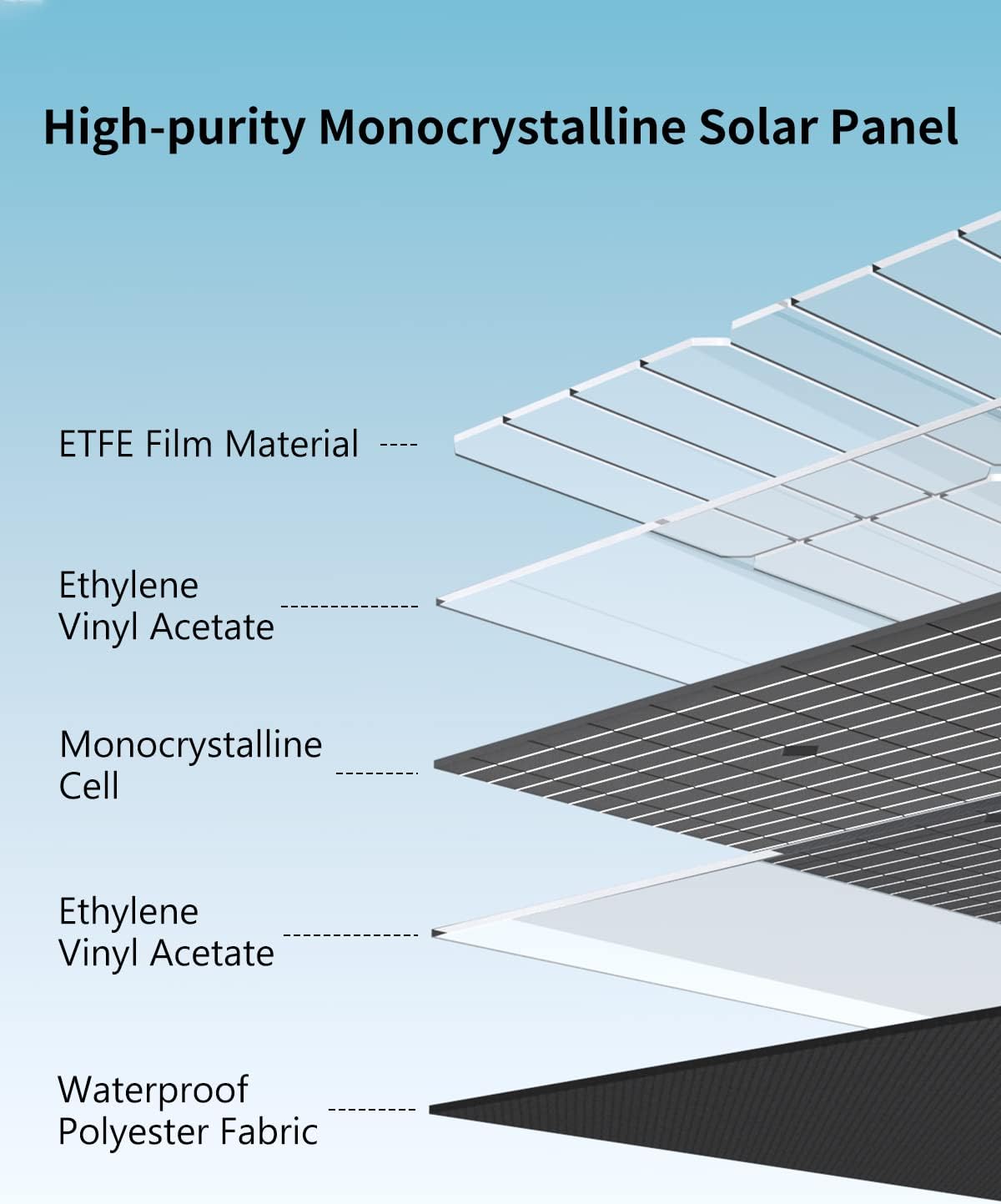
Figure 2: Construction of the high-purity monocrystalline solar panel, highlighting its durable layers.

Figure 3: The 80W foldable solar panel in use, showcasing its high conversion efficiency.

Figure 4: The Enernova ETA Ultra providing power to multiple devices simultaneously.

Figure 5: Illustration of the durable LiFePO4 battery cells within the power station.
3. Gịnị gụnyere
Upon unboxing your Enernova ETA Ultra, you should find the following components:
- 1 * ENERNOVA ETA Ultra Portable Power Station
- 1 * 80W Solar Panel
- 1 * MC-4 to 3 (XT60, DC5521, Anderson) adapter cable
- 1 * AC Charge Cable
- 1 * Car Charge Cable
- 1 * Akwụkwọ ntuziaka onye ọrụ (akwụkwọ a)
4. Nhazi
4.1 Nchaji izizi
Before first use, fully charge your Enernova ETA Ultra. Use the included AC Charge Cable to connect the power station to a standard wall outlet. The display will indicate charging status. It is recommended to fully charge the unit before long-term storage or first use.
4.2 Njikọ Panel Anyanwụ
To charge using the solar panel, unfold the 80W solar panel and position it in direct sunlight. Connect the solar panel to the power station using the MC-4 to 3 adapter cable, plugging it into the Anderson input port. Ensure a secure connection. The display will show solar charging input.
Mara: Do not connect multiple solar panels in series unless specifically instructed by Enernova, as this may exceed voltage limits and damage the power station. Always connect panels in parallel with a Y-Branch cable if combining multiple panels.
5. Ntuziaka ọrụ
5.1 Gbanyụọ/ gbanyụọ
Press and hold the main power button for a few seconds to turn the unit ON or OFF. The LCD display will illuminate, showing battery level, input/output wattage, and active ports.
5.2 Using AC Outlets
To use the AC outlets, press the AC power button. The indicator light for AC will turn on. Plug your devices into any of the 4 AC outlets. Ensure the total wattage of connected devices does not exceed 2000W. The unit provides a pure sine wave output, suitable for sensitive electronics.
5.3 Using DC and USB Outputs
To activate the DC outputs (including the 12.5V/8A carport and 8mm DC ports) or USB outputs (Type-C PD, USB QC3.0, USB-A), press their respective power buttons. Indicator lights will confirm activation. Plug your devices into the appropriate ports.
5.4 Nchaji ikuku
Place your Qi-compatible device on the wireless charging pad located on top of the unit. Ensure the device is properly aligned for optimal charging. For maximum efficiency, direct cable charging via USB ports is generally recommended over wireless charging.
5.5 EPS (Emergency Power Supply) Function
When the ETA Ultra is plugged into a wall outlet, it acts as a bypass, supplying power directly from the grid to connected devices. In the event of a power outage, it automatically switches to its internal battery supply within 30 milliseconds, providing seamless backup power.
6. Nlekọta
6.1 Nlekọta batrị
For optimal battery longevity, it is recommended to keep the LiFePO4 battery charged between 50-80% when not in use. Avoid letting the battery fall below 20% or remain at 0% for extended periods, as this can damage the cells. If storing for a long time, fully charge the battery every 3-6 months, or keep it plugged in and discharge to 50% every 3-4 months.
6.2 Nhicha na Nchekwa
Clean the unit with a dry, soft cloth. Do not use abrasive cleaners or immerse the unit in water. Store the power station in a dry, cool place, away from direct sunlight and extreme temperatures (operating temperature: 32-104°F or 0-40°C). Ensure cooling vents on the sides and back are unobstructed for proper airflow.
6.3 Ụgbọ njem
The unit features a retractable handle for easy transport. While durable, avoid hard falls or bumps to prevent potential damage to internal components. Do not transport the unit in extreme temperatures.
7. Nchọpụta nsogbu
- Nkeji anaghị agbanwu: Ensure the battery has sufficient charge. If completely depleted, connect to an AC power source for initial charging.
- AC Output Not Working While Charging: The AC output is typically disabled while the unit's battery is actively charging via the wall outlet. Only DC-based outputs (USB, 12V) may work during this time. This is a design feature to protect the battery and inverter.
- Device Not Charging/Powering:
- Verify the power station is ON and the specific output port (AC, DC, USB) is activated.
- Check if the device's power consumption exceeds the port's or the unit's maximum output (2000W continuous).
- For devices with high startup (peak/surge) power, the unit may shut off if the surge exceeds its capacity.
- Gbaa mbọ hụ na ejikọrọ eriri na nchekwa.
- Nchaji nwayọ:
- Nchaji AC: Charging speed may decrease as the battery approaches full capacity for safety reasons.
- Ịchaji anyanwụ: Solar charging efficiency is highly dependent on sunlight intensity, panel angle, and weather conditions. Expect 50-75% of rated panel wattage on a good sunny day. Even on overcast days, panels will still collect some energy.
- ekpo oke ọkụ: If the unit feels excessively hot, ensure all cooling vents are clear and unobstructed. Do not operate in tightly enclosed areas. The unit has built-in fans to manage temperature.
- Charging in Cold Temperatures: Do NOT charge the power station itself in below-freezing temperatures (0°C/32°F), as this can damage the LiFePO4 battery and limit its overall capacity. You CAN use it to power other devices in cold temperatures, as the generated heat will warm the battery sufficiently. If operating in cold conditions, consider keeping the unit in an insulated cooler.
8. Nkọwapụta
| Njirimara | Nkọwapụta |
|---|---|
| Ụdị | enernova |
| Aha Nlereanya | D5 |
| Ụdị batrị | LiFePO4 |
| Ike | 2160Wh (54Ah at 21.6V) |
| Mmepụta AC | 2000W (Sine Wave dị ọcha) |
| Ntinye AC | 4 |
| USB-C mmepụta | 1 x PD 100W, 2 x PD 65W |
| USB-A mmepụta | 2 x QC3.0, 4 x USB-A |
| Mmepụta DC | 1 x 12.5V/8A Carport, 2 x 8mm DC ports |
| Mbupute ikuku | 1 (Qi-compatible) |
| Solar Panel (Included) | 80W, IP68 Waterproof, 23% Conversion Efficiency |
| Akụkụ (L x W x H) | 13.38" x 9.09" x 8.11" |
| Ibu Ibu | 24 pound |

Figure 6: Physical dimensions of the Enernova ETA Ultra Portable Power Station.
9. Akwụkwọ ikike & Nkwado
The Enernova ETA Ultra Portable Power Station comes with a 5-year warranty, ensuring peace of mind regarding the quality and reliability of your product. For any technical assistance, troubleshooting beyond this manual, or warranty claims, please contact Enernova customer support through the official Enernova websaịtị ma ọ bụ ikpo okwu ịzụrụ ihe.
Maka ozi ndị ọzọ na nkwado, gaa na Enernova Store on Amazon.