1. Ntuziaka nchekwa dị mkpa
Please read all instructions carefully before using the Baseus A7 Handheld Vacuum. Keep this manual for future reference.
- Do not use the vacuum cleaner near water or in wet conditions.
- Ewepụla ihe ndị nwere ike ire ọkụ ma ọ bụ ọkụ, ntụ ọkụ, ma ọ bụ ihe dị nkọ.
- Debe ntutu isi, uwe na-adịghị mma, mkpịsị aka na akụkụ ahụ niile pụọ na oghere na akụkụ ndị na-akpụ akpụ.
- Use only the charging cable provided by the manufacturer.
- Do not operate the vacuum with a damaged cord or plug.
- Ensure the filter is properly installed before use.
- Ezubere ngwa a maka iji ndị mmadụ (gụnyere ụmụaka) nwere ike anụ ahụ, mmetụta uche ma ọ bụ nke uche, ma ọ bụ enweghị ahụmịhe na ihe ọmụma, ma ọ bụrụ na enyereghị ha nlekọta ma ọ bụ ntụziaka gbasara iji ngwa ahụ site n'aka onye na-ahụ maka nchekwa ha.
- Ekwesịrị ilekọta ụmụaka ka ha hụ na ha ejighi ngwa eji egwu egwu egwu.
2. Ihe ngwugwu
Chọpụta na ihe niile dị na ngwugwu:

Onyonyo 2.1: Akụrụngwa gụnyere
- Baseus A7 Handheld Vacuum Cleaner
- Flagship Flexible Extender Tube
- Silicone Brush / Precision Extensions (2-in-1 Crevice Tool)
- USB-C eriri USB
- Storage Cloth Bag
- Ihe nzacha HEPA (etinyere ma ọ bụ nke echekwara)
- Akwụkwọ ntuziaka onye ọrụ
- Akwụkwọ ikike kaadị
3. Ngwaahịa gafereview
The Baseus A7 is a portable, cordless handheld vacuum designed for efficient cleaning in various environments, including cars, carpets, and other small areas. It features two suction levels and a USB-C rechargeable battery.

Figure 3.1: Suction Power and Runtime
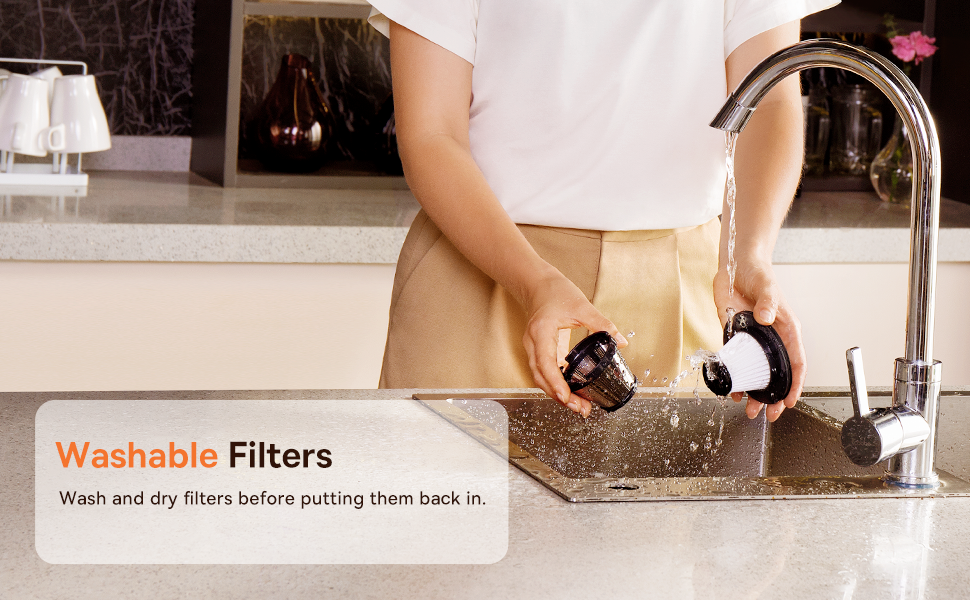
Figure 3.2: Powerful and Portable Design
Akụkụ ndị bụ isi:
- Enweghị eriri na mbugharị: Designed for easy handling and use in various locations.
- Ọkwa mmiri abụọ: Standard (4500PA) for general cleaning and High (8000PA) for tougher debris.
- USB-C enwere ike ịchaji: Convenient charging with a modern USB-C port.
- Nzacha HEPA: Captures fine dust and allergens.
- 500ml Dust Box: Large capacity for extended cleaning sessions.
4. Ntọala na Nchaji
4.1 Ụgwọ mbụ
Before first use, fully charge the vacuum cleaner. The charging time is approximately 3 to 3.5 hours.
Ọgụgụ 4.1: Nchaji USB-C
- Connect the provided USB-C charging cable to the charging port on the vacuum cleaner.
- Plug the other end of the cable into a compatible USB power adapter (not included) or a USB port.
- The indicator light will show charging status (refer to the device for specific light patterns).
- Once fully charged, disconnect the vacuum from the power source.
4.2 Na-agbakwunye Ngwa
Select the appropriate attachment for your cleaning task and firmly attach it to the vacuum's suction inlet.
- Flexible Extender Tube: For reaching deep or awkward spaces.
- 2-in-1 Crevice Tool (Silicone Brush/Precision Extensions): Use the narrow end for tight corners and crevices, or slide the brush attachment forward for delicate surfaces.
5. Ntuziaka ọrụ
5.1 Power On/Off and Suction Levels
- To turn on the vacuum, press the power button. It will start in Standard suction mode (4500PA).
- Press the power button again to switch to High suction mode (8000PA).
- Pịa bọtịnụ ike ugboro atọ ka gbanyụọ oghere ahụ.
5.2 Cleaning Applications
The Baseus A7 is versatile for various cleaning tasks:

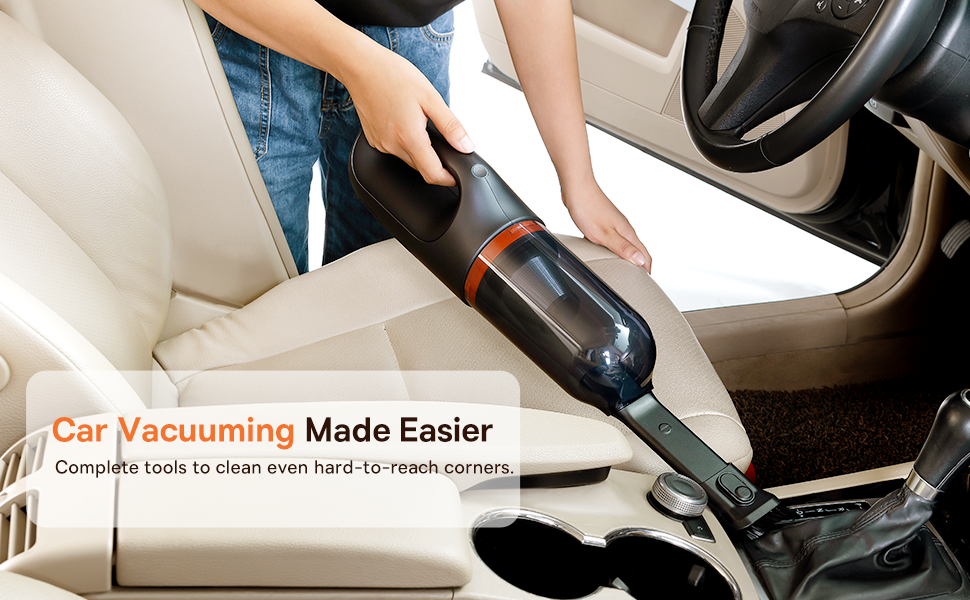
Figure 5.1: Versatile Cleanups

Figure 5.2: Car Vacuuming Made Easier
- Ime ụgbọ ala: Use the crevice tool for tight spots between seats and the flexible tube for under seats.
- Household Surfaces: Effective for quick cleanups on tables, countertops, and furniture.
- Ntutu Anụ Ụlọ: Can be used for light pet hair removal on upholstery.
- Keyboards and Electronics: Use the brush attachment for delicate cleaning.
For optimal performance, ensure the dust box is not overfilled and the filter is clean.
6. Nlekọta
6.1 Emptying the Dust Box
Empty the dust box regularly to maintain suction power and prevent blockages.
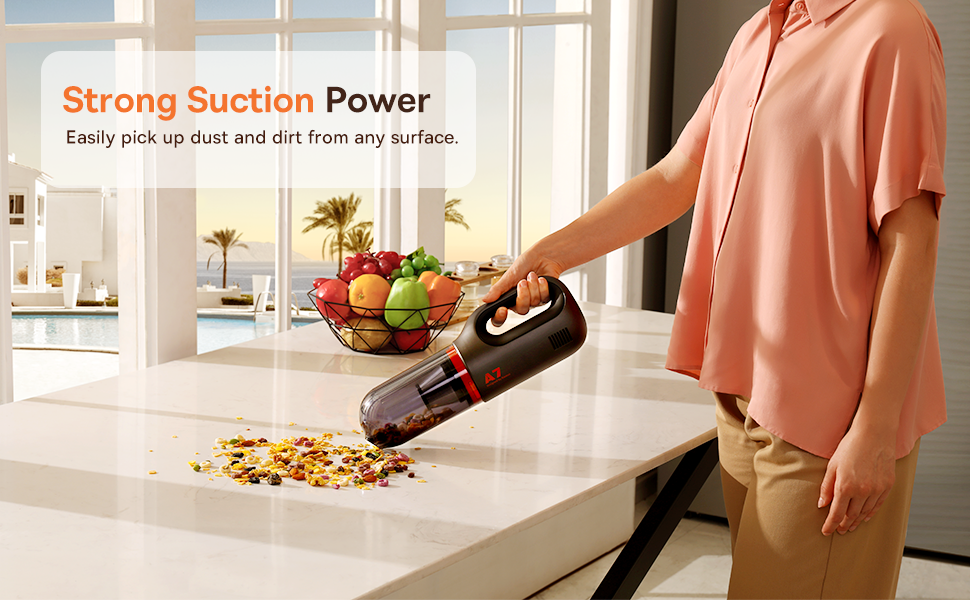
Figure 6.1: Easy to Empty Dust Box
- Hụ na agbanyụrụ igwe nhicha ahụ.
- Twist or unlatch the dust box from the main body of the vacuum (refer to device for specific mechanism).
- Jiri nlezianya wụsa ihe mkpofu ndị ahụ e kpokọtara n'ime ebe a na-edebe ihe mkpofu.
- Reattach the dust box securely.
6.2 Na-ehicha ihe nzacha
The HEPA filter is washable and should be cleaned periodically to ensure efficient filtration and suction.

Figure 6.2: Washing the HEPA Filter
- Remove the dust box and then carefully remove the HEPA filter.
- Rinse the filter under cool, running water until clean. Do not use detergents.
- Hapụ ihe nzacha ahụ ka ọ kpọọ nkụ kpamkpam ruo opekata mpe awa iri abụọ na anọ tupu itinye ya ọzọ n'ime ihe nhicha ahụ. Ejila ihe nhicha ahụ nwere ihe nzacha mmiri.
- Ensure the filter is fully dry and properly seated before reassembling the vacuum.
7. Nchọpụta nsogbu
If you encounter issues with your Baseus A7 vacuum, refer to the following common problems and solutions:
| Nsogbu | Ihe nwere ike ime | Ngwọta |
|---|---|---|
| No power / Not turning on | Batrị agwụla. | Charge the vacuum fully (approx. 3-3.5 hours). |
| Ike mmịpụta adịghị ike | Igbe uzuzu juru eju. Akpọchiela ihe nzacha. Attachment is not properly sealed. | Wepu igbe ájá. Clean and dry the HEPA filter. Ensure attachments are firmly connected. |
| Vacuum na-akwụsị na mberede | Batrị dị ala. Nchekwa ekpo oke ọkụ na-arụ ọrụ. | Fanye batrị. Turn off the vacuum and let it cool down for 30 minutes before resuming use. |
| Ngosipụta chaja anaghị arụ ọrụ | Charging cable or adapter issue. Nsogbu ọdụ chaja. | Try a different USB-C cable and power adapter. Ensure the cable is fully inserted. If the issue persists, contact customer support. |
If the problem persists after trying these solutions, please contact Baseus customer support.
8. Nkọwapụta
| Njirimara | Nkọwa |
|---|---|
| Ụdị | Baseus |
| Aha Nlereanya | A7 |
| Njirimara Pụrụ Iche | HEPA, Portable |
| Ụdị nzacha | Katrij (HEPA) |
| Enweghị eriri | Ee |
| Ike | 500 milliliters |
| Wattage | 120 watt |
| Oge Nchaji | 3-3.5 awa |
| Eji akwadoro | Car, Carpet, Household |
| Ụdị Ihe | Ejidere |
| Agba | Nwa |
| Akụkụ ngwaahịa | 4"L x 3"W x 13"H |
| Ụdị batrị | Lithium-Ion (batrị 2 gụnyere) |
| Ọkwa mkpọtụ | 75 decibel |
| Ampoge | 1.4 Amps |
| Ọnụọgụ nke Ọsọ ọsọ | 2 |
| Ibu Ibu | 3.43 pound |
| Isi Iyi Ike | Akwanyere batrị |
9. Akwụkwọ ikike na nkwado
The Baseus A7 Handheld Vacuum comes with a warranty to ensure your satisfaction.
- Akwụkwọ ikike: Includes a 1-year warranty card and a 3-year guarantee. Please refer to the warranty card included in your package for specific terms and conditions.
- Nkwado ndị ahịa: For any questions, technical assistance, or warranty claims, please contact Baseus customer support through their official websaịtị ma ọ bụ ozi kọntaktị enyere na kaadị akwụkwọ ikike gị.
10. Video ngwaahịa
Watch the official product video for a visual guide on the Baseus A7 Handheld Vacuum's features and usage.
Video 10.1: Baseus A7 Handheld Vacuum Overview and Demonstration. This video showcases the vacuum's design, suction capabilities, and how to use its various attachments for different cleaning scenarios.


