1. Okwu mmalite
This manual provides instructions for the YAOHUIMI Replacement Remote Control, designed for use with various Fujitsu AC Air Conditioner models. This remote control offers essential functions for managing your air conditioning unit.
Ihe ndetu dị mkpa:
This is a replacement remote control and is not a universal remote. Please verify compatibility with your specific Fujitsu air conditioner model or original remote control model before use. Refer to the compatibility list below.
1.1 ndakọrịta
This remote control is compatible with a wide range of Fujitsu AC Air Conditioner models and remote control models, including but not limited to:
- Fujitsu AC Models: ASYG07KETA, ASYG07KETA-B, ASYG09KETA, ASYG09KETA-B, ASYG12KETA, ASYG12KETA-B, ASYG14KETA, ASYG14KETA-B, ASHG14KGTA, ASYG12KMTA, and many others listed in the product description.
- Original Remote Control Models: AR-RED1U, AR-REF1U, AR-REG1U, AR-REM1U, AR-REY1U, AR-REA1E, AR-REA2E, AR-REB1E, AR-REB2E, AR-REF1E, AR-REF2E, AR-REF3E, AR-REF4E, AR-REJ1E, AR-REM1E, AR-REM2E, AR-REM3E, AR-REM4E, AR-REM5E, AR-REM6E, AR-REM7E, AR-REW1E, AR-REW2E, AR-REW3E, AR-REW4E.
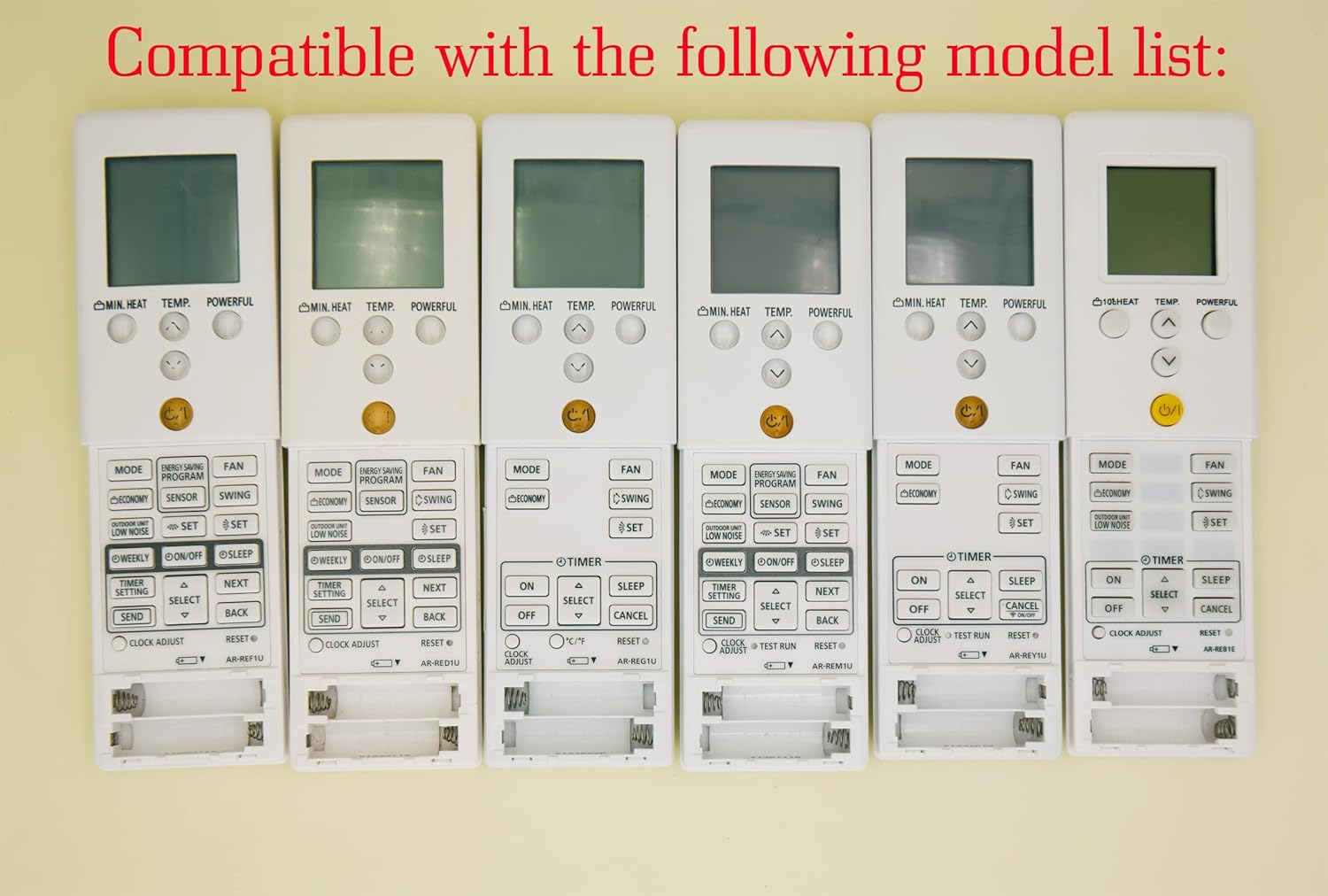
Image 1.1: Various compatible remote control models.
2. Nhazi
2.1 Ntinye batrị
To begin using your remote control, you must install batteries. The remote requires two AAA batteries (not included).
- Chọta mkpuchi mkpuchi batrị n'azụ nke njikwa anya.
- Wetuo mkpuchi ahụ ala ma ọ bụ pịa eriri (ọ bụrụ na ọ dị) ka imepe oghere ahụ.
- Fanye batrị AAA abụọ, na-ahụ na njedebe dị mma (+) na nke na-adịghị mma (-) dabara nke ọma na akara ndị dị n'ime ụlọ ahụ.
- Weghachite mkpuchi nke batrị batrị n'ime ebe ruo mgbe ọ pịrị na nchekwa.
Ịkpachara anya:
- Agwakọtala batrị ochie na nke ọhụrụ.
- Ejikọtala batrị alkaline, ọkọlọtọ (carbon-zinc), ma ọ bụ batrị nwere ike ịgbanye (nickel-cadmium).
- Wepu batrị ma ọ bụrụ na agaghị eji njikwa ime ihe ruo ogologo oge iji gbochie ntapu.

Foto 2.1: N'azụ view nke njikwa dịpụrụ adịpụ nwere ebe batrị.
3. Ntuziaka ọrụ
Nkebi a na-akọwa ọrụ nke bọtịnụ ndị dị na njikwa remote nnọchi gị.

Foto 3.1: Ofeview nke bọtịnụ njikwa anya.
3.1 Ọrụ ndị bụ isi
- Power Button (⑁/⑀): Press to turn the air conditioner ON or OFF. This button is typically yellow and located centrally.
- Bọtịnụ MODE: Cycles through operating modes such as AUTO, COOL, DRY, FAN, and HEAT.
- TEMP. Buttons (▲/▼): Adjusts the desired temperature setting. Press ▲ to increase and ▼ to decrease the temperature.
- bọtịnụ FAN: Adjusts the fan speed (e.g., Auto, Low, Medium, High).
- Bọtịnụ SWING: Activates or deactivates the air swing function, which moves the air outlet louvers.

Foto 3.2: Zuru ezu view of remote control buttons.
3.2 Ọrụ dị elu
- MIN. HEAT Button: Activates a minimum heat setting, often used to prevent freezing in unoccupied rooms.
- Bọtịnụ dị ike: Engages a powerful operation mode for rapid cooling or heating.
- ENERGY SAVING PROGRAM Button: Activates a pre-set energy-saving mode.
- Bọtịnụ SENSOR: May activate a temperature sensor function within the remote itself.
- Bọtịnụ AKỤ̀ NA ỤBA: Engages an economic operation mode to reduce power consumption.
- OUTDOOR UNIT LOW NOISE Button: Reduces the noise level of the outdoor unit.
- WEEKLY Button: Accesses weekly timer settings.
- ON/OFF Button (Timer): Sets the ON/OFF timer for scheduled operation.
- Bọtịnụ Ụra: Activates sleep mode, which adjusts temperature gradually for comfortable sleep.
- TIMER SETTING Button: Used to configure various timer functions.
- SELECT (▲/▼) Button: Used for navigating and selecting options within timer or program settings.
- Bọtịnụ zipu: Confirms and sends timer or program settings to the AC unit.
- Bọtịnụ azụ: Returns to the previous menu or cancels a setting.
- CLOCK ADJUST Button: Ejiri iji tọọ oge dị ugbu a na ngosipụta remote.
- Bọtịnụ Tọgharia: Resets the remote control to its factory default settings.
3.3 Ngosipụta atụmatụ
- Green Backlight: The remote control features a green backlight for easy visibility and operation in low-light conditions or at night.
- Fahrenheit and Celsius Display: The remote can display temperature in both Fahrenheit (℉) and Celsius (℃). Use the ℃/℉ button to toggle between the two units.

Image 3.3: Green backlight and Fahrenheit/Celsius display toggle.
4. Nlekọta
4.1 ihicha njikwa anya
Iji nọgide na-enwe ọdịdị na ọrụ nke njikwa remote:
- Jiri akwa dị nro hichaa elu ya.
- Maka unyi isi ike, obere dampen akwa na mmiri na ihe dị nro, wee hichaa nkụ ozugbo.
- Do not use abrasive cleaners, alcohol, or chemical solvents, as these can damage the remote's finish or internal components.
4.2 nnọchi batrị
Replace the batteries when the remote's display becomes dim or if the remote becomes unresponsive. Typically, batteries should be replaced every 6-12 months, depending on usage. Follow the battery installation steps in Section 2.1.
5. Nchọpụta nsogbu
- Remote anaghị aza:
- Lelee ma arụnyere batrị nke ọma ma nwee ụgwọ zuru oke. Dochie ma ọ dị mkpa.
- Gbaa mbọ hụ na enweghị ihe mgbochi n'etiti njikwa anya na nnata ikuku.
- Jide n'aka na ị nọ n'ime oke ọrụ dị irè nke igwe oyi.
- Incorrect temperature display (Fahrenheit/Celsius):
- Press the ℃/℉ button on the remote control to toggle between Fahrenheit and Celsius display modes.
- Remote functions are erratic:
- Try resetting the remote control by removing the batteries for a few minutes, then reinserting them.
- If the issue persists, replace the batteries with new ones.
6. Nkọwapụta
| Njirimara | Nkọwa |
|---|---|
| Ụdị | YAOHUIMI |
| Nọmba nlereanya | A420220127-8IN1-18 |
| Teknụzụ Njikọta | Infrared |
| Njirimara Pụrụ Iche | Replacement Remote (Not Universal) |
| Ngwa dakọtara | Fujitsu AC Air Conditioners (various models, see Section 1.1) |
| Isi Iyi Ike | Batrị 2 x AAA (anaghị etinye ya) |
7. Akwụkwọ ikike na nkwado
Maka ozi gbasara akwụkwọ ikike ma ọ bụ nkwado teknụzụ, biko lee akwụkwọ enyere gị mgbe ị zụtara ya ma ọ bụ kpọtụrụ onye na-ere ya ozugbo. Debe risit ịzụrụ gị dị ka ihe akaebe nke ịzụrụ ya.


