Okwu mmalite
Thank you for choosing the Xtorm XP300U Portable Power Station. This device is designed to provide reliable and portable power for various applications, from home use to outdoor camping. With a 300W output and multiple charging options, it ensures your devices stay powered wherever you are. This manual provides essential information on the safe operation, setup, maintenance, and troubleshooting of your power station.
Ozi nchekwa
Please read all safety warnings and instructions before using this product to ensure safe operation and prevent damage. Keep this manual for future reference.
- Do not disassemble, repair, or modify the unit. Incorrect reassembly may cause fire or injury.
- Do not expose the unit to fire or high temperatures (above 60°C/140°F).
- Ejila ma ọ bụ debe ngwaọrụ ahụ n'ebe anwụ na-acha kpọmkwem ma ọ bụ n'ebe ọkụ na-ekpo ọkụ.
- Do not use or store the unit in a bathroom or in areas exposed to water or moisture.
- Do not drop, hit, or subject the unit to strong impacts.
- Debe ebe ụmụaka na-apụghị iru.
- Use only the original or certified charging cables and adapters.
- Ensure proper ventilation during use and charging. Do not cover the unit.
- In case of leakage from the battery, do not allow the liquid to come into contact with skin or eyes. If contact occurs, wash with plenty of water and seek medical advice.

Image: Safety features of the Xtorm XP300U, highlighting Pure Sine Wave, Short Circuit Protection, Temperature Control, Overcharge Protection, APM Chip, A-Class Batteries, and High Efficiency.
Ihe ngwugwu
Biko lelee ihe dị n'ime ngwugwu mgbe emepere. Ọ bụrụ na ihe ọ bụla na-efu ma ọ bụ mebie, kpọtụrụ onye na-ere ahịa gị.
- Xtorm XP300U Portable Power Station
- AC Wall Charger
- Igwe chaja ụgbọ ala
- MC4 to DC Cable (for solar panel connection, solar panel not included)
- Akwụkwọ ntuziaka onye ọrụ

Image: The Xtorm XP300U Portable Power Station displayed with its included accessories: AC wall charger, car charger cable, and MC4 to DC cable.
Ngwaahịa gafereview
Familiarize yourself with the different parts of your Xtorm XP300U Power Station.
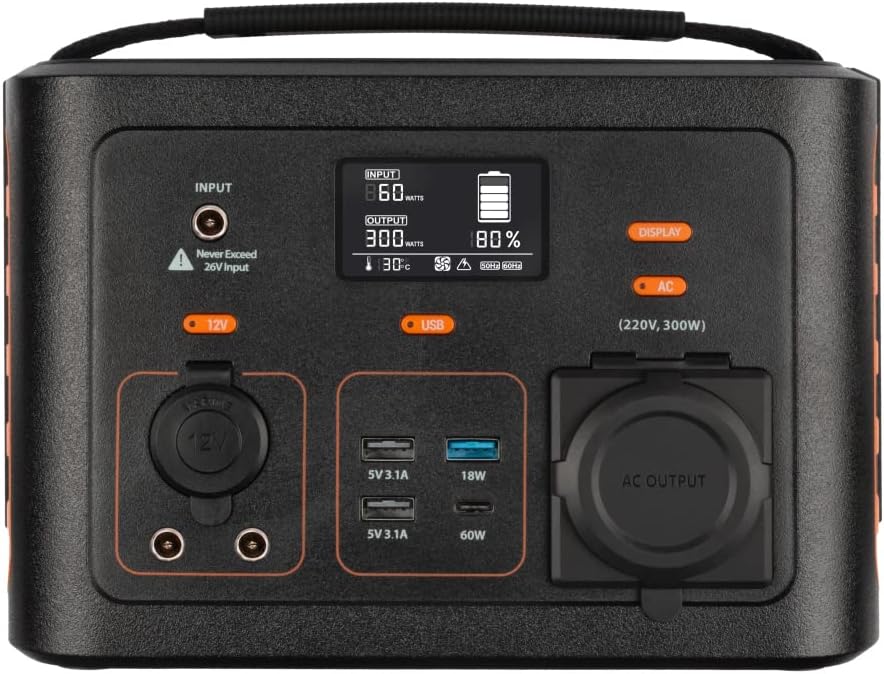
Foto: nso nso view of the Xtorm XP300U's front panel, showing the digital display, input port, 12V DC output, USB-A and USB-C ports, and AC output socket.
Akụkụ ihu panel:
- Ngosipụta LCD: Na-egosi ọkwa batrị, ike ntinye/mpụta, na ihe ngosi ọnọdụ.
- Port ntinye: Maka ịchaji ọdụ ike site na ihe nkwụnye AC, chaja ụgbọala, ma ọ bụ panel anyanwụ.
- 12V DC mmepụta: For powering 12V devices.
- Ọdụ ụgbọ mmiri USB-A: Multiple USB-A outputs for charging various devices (e.g., 5V 3.1A, 18W Quick Charge).
- Ọdụ ụgbọ mmiri USB-C PD: High-speed USB-C Power Delivery output (up to 60W).
- Igwe nrụpụta AC: Standard AC outlet for powering household appliances (220V, 300W).
- bọtịnụ njikwa: Buttons for turning on/off specific outputs (e.g., AC, DC, USB).

Foto: Top view of the Xtorm XP300U, highlighting its integrated carrying handle for portability.

Foto: N'azụ view of the Xtorm XP300U, featuring the Xtorm brand logo and "Portable Power Station 300" text.
Melite
Before first use, it is recommended to fully charge your Xtorm XP300U Power Station.
- Ịkwapu: Jiri nlezianya wepụ ebe ọkụ eletrik na ihe niile dị na ngwugwu ahụ.
- Initial Charge (AC Wall Charger):
- Connect the AC wall charger to the input port on the power station.
- Plug the AC wall charger into a standard wall outlet.
- The LCD display will show the charging status. Charge until the battery indicator shows 100%.
- Nkwanye: Place the power station on a stable, flat surface in a well-ventilated area, away from direct sunlight or heat sources.
Ntuziaka ọrụ
The Xtorm XP300U offers multiple ways to charge and power your devices.
Ịchaji ọdụ ọkụ:
The XP300U can be recharged using four different methods:
Image: Visual representation of the four charging methods for the Xtorm XP300U: via wall socket, USB-C PD, solar panel (not included), and 12V car charger.
- Via Wall Socket (AC Charger): Connect the included AC wall charger to the input port and a wall outlet.
- Via USB-C PD: Use a compatible USB-C Power Delivery charger (not included) to charge the unit via its USB-C port.
- Site na igwe igwe: Connect a compatible solar panel (not included) to the input port using the provided MC4 to DC cable. Ensure the solar panel is placed in direct sunlight for optimal charging.
- Via 12V Car Charger: Connect the included car charger cable to the input port and your vehicle's 12V cigarette lighter socket.
The LCD display will show the input wattage and battery charge status during charging. You can use the outputs even while the power station is charging (pass-through charging).
Using the Outputs:
The XP300U provides various output ports to power different types of devices.

Image: The Xtorm XP300U demonstrating its universal compatibility with icons representing various devices and output types: 1x AC 300W/220V, 1x USB-C PD 60W, 2x DC 5.5mm 60W, 2x USB QC3.0 18W, 1x USB 18W, and 1x 12V Car 120W.
- AC Output (220V, 300W):
- Press the "AC" button to activate the AC output. The AC indicator on the display will light up.
- Plug your device's power cord into the AC outlet.
- Ensure your device's power consumption does not exceed 300W.
- Press the "AC" button again to turn off the AC output when not in use.
- Mpụta DC (12V):
- Press the "12V" button to activate the DC output. The DC indicator will light up.
- Connect your 12V device to the DC port.
- Press the "12V" button again to turn off the DC output.
- USB Outputs (USB-A, USB-C PD):
- The USB outputs are typically always active when the unit is on.
- Connect your USB-powered devices to the appropriate USB-A or USB-C PD ports.
- The display will show the output wattage for connected devices.
The power station can provide power for extended periods, depending on the connected devices' power consumption.

Foto: Examples of device runtimes with the Xtorm XP300U: 17.5 hours for a 10W LED light, 5.5 hours for a 30W small TV, 4 hours for a 40W small coolbox, and 6 hours for a 40W small coolbox (via 12V carplug output).
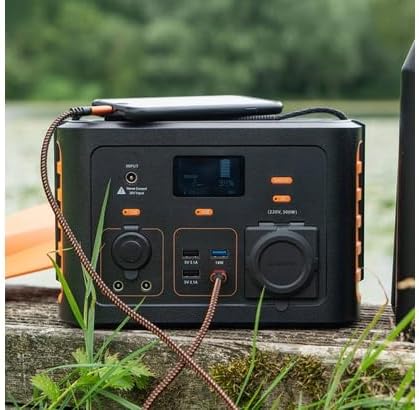
Image: The Xtorm XP300U Portable Power Station being used outdoors on a wooden surface, charging a smartphone, demonstrating its portability and utility in various environments.
Nlekọta
Proper maintenance ensures the longevity and optimal performance of your power station.
- Nhicha: Jiri akwa dị nro dị nro hichaa mpụta nke unit ahụ. Ejila ihe nchacha abrasive ma ọ bụ ihe mgbaze.
- Nchekwa:
- Debe ebe a na-ere ọkụ eletrik n'ebe dị jụụ ma kpọọ nkụ, ebe anwụ na-anaghị anwụ kpọmkwem na oke okpomọkụ dị oke njọ.
- Maka nchekwa ogologo oge, chajịa ngwaọrụ ahụ ihe dịka 50-80% kwa ọnwa 3-6 iji chekwaa ahụike batrị.
- Zere ịchekwa ya n'ebe nwere oke iru mmiri.
- Nlekọta batrị: Do not fully discharge the battery frequently, as this can reduce its lifespan. Recharge promptly when the battery level is low.
Nchọpụta nsogbu
If you encounter issues with your Xtorm XP300U, refer to the following common problems and solutions.
| Nsogbu | Ihe nwere ike ime | Ngwọta |
|---|---|---|
| Unit anaghị agbanye. | Ahapụla batrị kpamkpam. | Connect the power station to an AC wall outlet and charge it for at least 30 minutes. |
| Mbupu AC anaghị arụ ọrụ. | AC output not activated; device exceeds 300W; overheating. | Press the "AC" button to activate. Check device wattage. Allow unit to cool down if overheated. |
| Ọdụ USB anaghị agbacha. | Device not compatible; cable faulty. | Ensure device is compatible. Try a different USB cable. |
| Nchaji nwayọ. | Using a low-power charger; environmental factors (e.g., cloudy for solar). | Use the original AC charger or a higher wattage USB-C PD charger. Optimize solar panel placement. |
If the problem persists, please contact Xtorm customer support.
Nkọwapụta
Detailed technical specifications for the Xtorm XP300U Portable Power Station.
| Njirimara | Nkọwa |
|---|---|
| Aha Nlereanya | XP300U |
| Ụdị | Xtorm |
| Ike mmepụta | Watt 300 (AC) |
| Ntinye Voltage | 12 volts (DC) |
| Isi Iyi Ike | AC Wall, USB-C PD, Solar, Car Charger |
| Eji akwadoro | Home, Camping |
| Ibu | 3300 Grams (3.3 n'arọ) |
| Agba | oroma |
| Ngwa gụnyere | 1 package (Power Station, AC Charger, Car Charger, MC4 to DC Cable) |

Image: Dimensions of the Xtorm XP300U Portable Power Station (240mm x 154mm x 142mm) and its weight (3.3 kg), highlighting its convenient travel size.
Akwụkwọ ikike na nkwado
Xtorm products come with a standard warranty. Please refer to the warranty card included in your package or visit the official Xtorm websaịtị maka nkọwa na usoro akwụkwọ ikike.
For technical support, troubleshooting assistance, or warranty claims, please contact Xtorm customer service:
- Websaịtị: www.xtorm.eu (Check for support contact information)
- Email: Refer to the Xtorm websaịtị maka adreesị ozi-e nkwado kpọmkwem.
- Ekwentị: Refer to the Xtorm websaịtị maka nọmba ekwentị nkwado mpaghara.
When contacting support, please have your product model (XP300U) and purchase details ready.


