1. Okwu mmalite
The ATEM POWER 12V 30A DC to DC Battery Charger is designed for efficient and reliable charging of various battery types in off-grid and mobile applications. This device supports Lead Acid, AGM, Gel, Calcium, and LiFePO4 batteries, offering a versatile solution for dual battery setups. It features an intelligent 3-stage charging process to optimize battery performance and extend lifespan, along with multiple protection designs for safe operation.
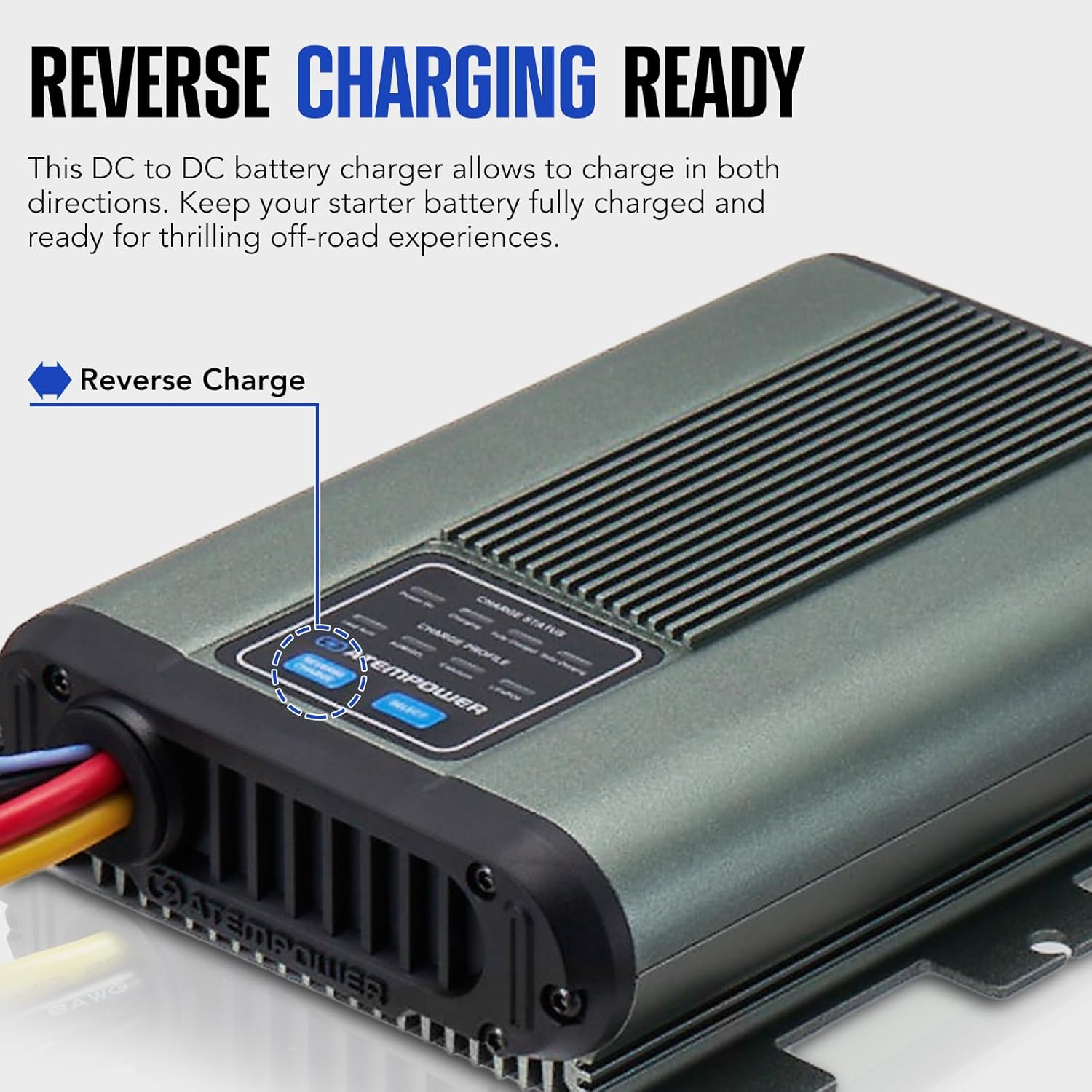
Foto 1.1: N'ihu view of the ATEM POWER 12V 30A DC to DC Battery Charger.

Figure 1.2: The charger is ideal for 4WDs, caravans, RVs, trucks, campers, trailers, campervans, commercial vehicles, and boats.
2. Ozi nchekwa
Always prioritize safety when installing and operating electrical equipment. Read and understand all instructions before use.
- Adịkwa polarity Protection: The charger is equipped with reverse polarity protection. Ensure correct positive (+) and negative (-) connections to prevent damage.
- Mfefetage Nchedo: Wuru n'ime overvoltage protection safeguards the charger and connected batteries from excessive voltage.
- Nchekwa oke okpomọkụ: The unit includes over-temperature protection to prevent overheating during operation.
- Charge Timeout: A charge timeout feature prevents overcharging.
- Lithium Battery BMS Safeguards: Specific safeguards are integrated for LiFePO4 batteries to work with their Battery Management System (BMS).
- Njikọta Kwesịrị Ekwesị: Always use properly rated fuses on both input and output lines as recommended in the installation section to protect against short circuits and overcurrent.
- Igwe ikuku: Ensure adequate ventilation around the charger to prevent heat buildup.
- Gburugburu ala kpọrọ nkụ: Install the charger in a dry area, free from moisture and direct water exposure.
- Nwụnye ọkachamara: If unsure about any installation steps, consult a qualified professional.
3. Nhazi
Proper installation is crucial for the safe and efficient operation of your ATEM POWER DC to DC Battery Charger. Follow these steps carefully.
3.1 Unboxing na akụrụngwa
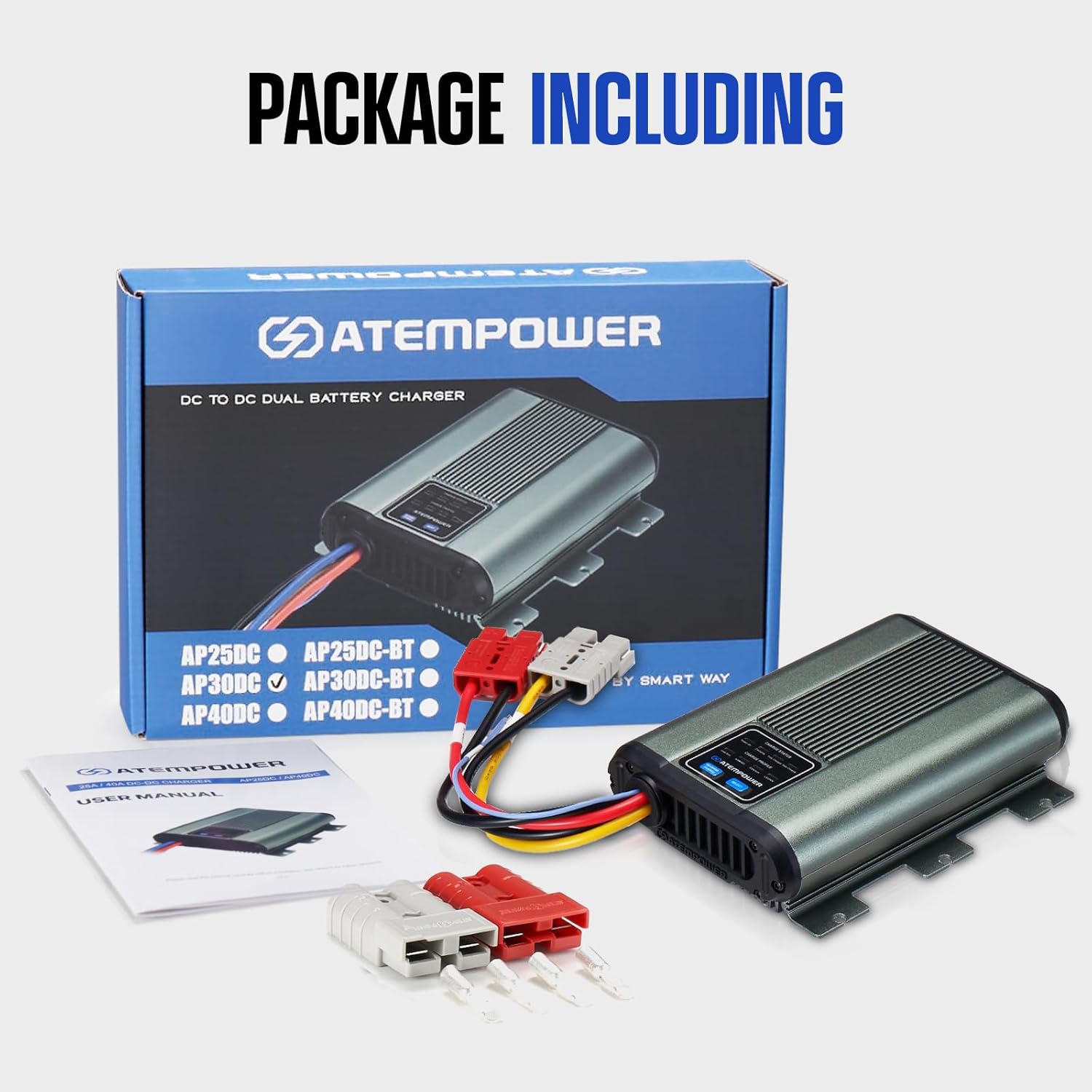
Figure 3.1: The package includes the DC to DC Dual Battery Charger, user manual, and Anderson-style plugs.
3.2 Njikọ njikọ
The charger is equipped with Anderson-style plugs for convenient wiring. Refer to the diagram below for correct connections.

Figure 3.2: Anderson-style plug connections. 1: Yellow: Output (+), 2: Black: GND, 3: Red: DC Input (+), 4: Black: GND, 5: ACC Ignition Line.
Connect the charger to your vehicle's start battery, solar panel (if applicable), and house battery bank as shown in the installation diagram.
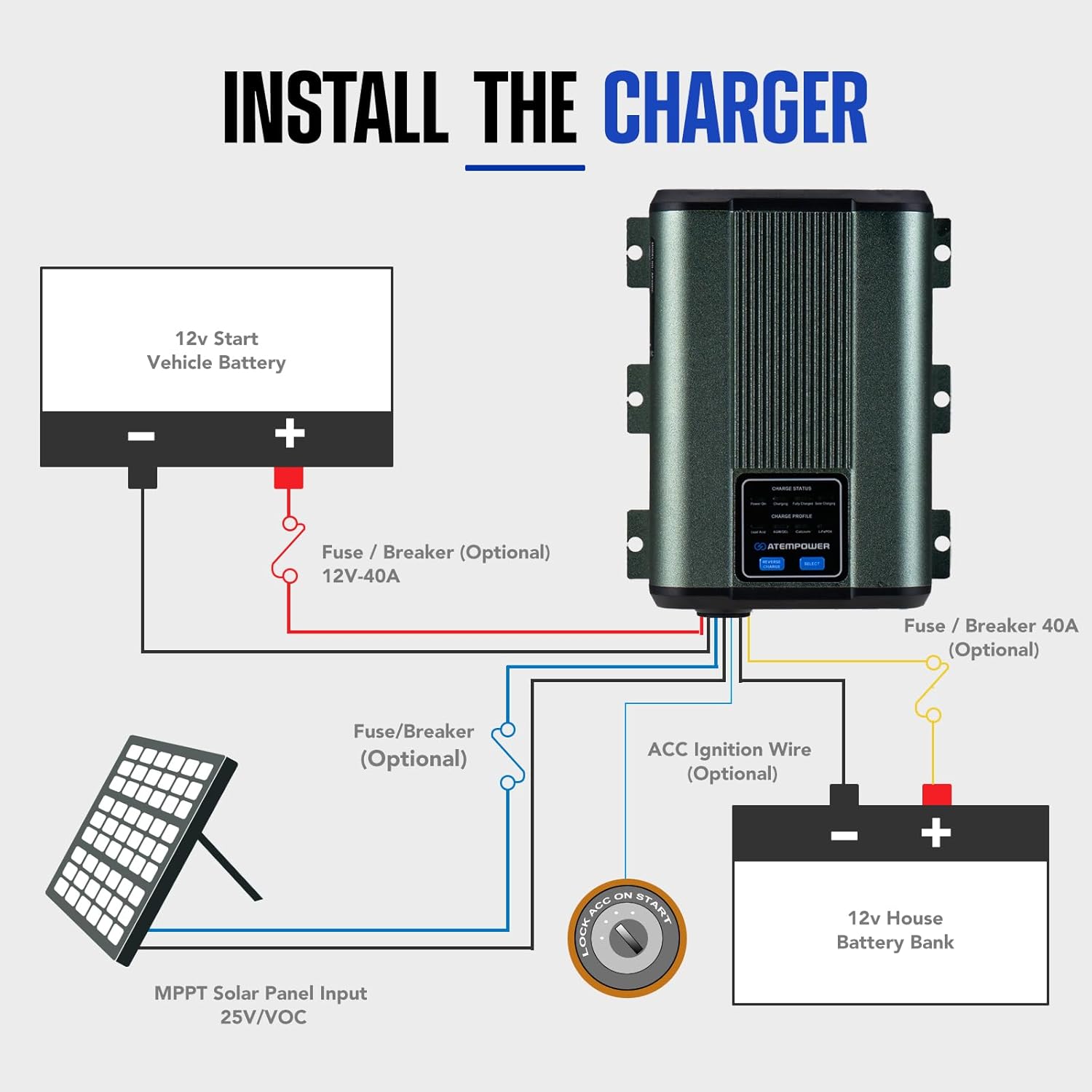
Figure 3.3: Wiring diagram showing connections to 12V Start Vehicle Battery, MPPT Solar Panel Input (25V/VOC), and 12V House Battery Bank. Optional fuses/breakers are recommended.
For smart alternators, connect the ACC Ignition Wire (red) to the vehicle's ignition system to ensure proper operation.
3.3 Nwụnye Examples
The ATEM POWER DC to DC charger is suitable for various vehicle types. Below are typical installation scenarios.
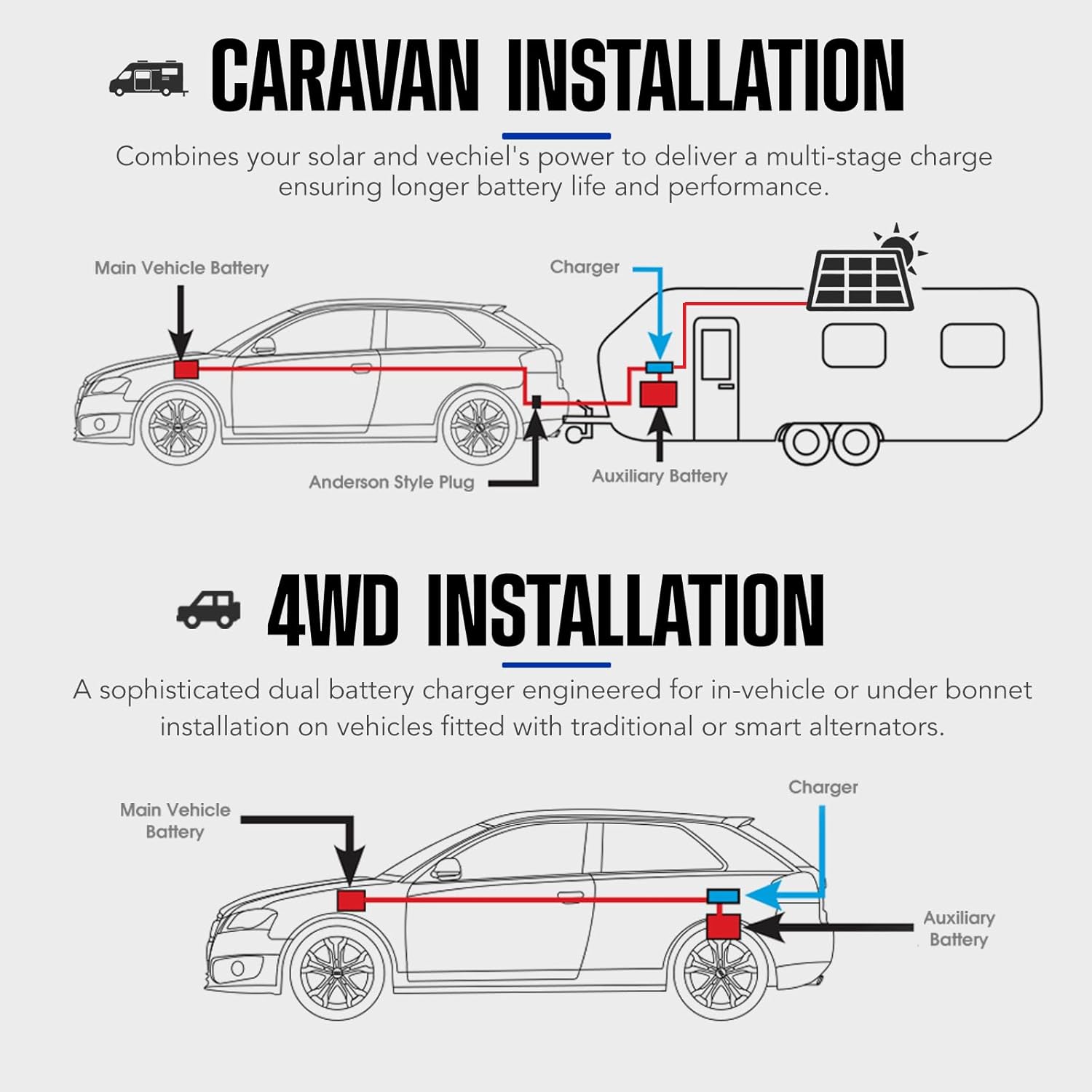
Figure 3.4: Caravan installation combines solar and vehicle power. 4WD installation is engineered for in-vehicle or under-bonnet use with traditional or smart alternators.
3.4 Setup Videos
Video 3.1: General wiring guide for a DC to DC Battery Charger. This video demonstrates how to connect the charger to house and starter batteries, including fuse and temperature sensor installation.
Video 3.2: Installation Guide for a BLUETTI Charger 1. This video provides a step-by-step guide on installing a DC-DC charger in a vehicle, including cable connections and securing the unit.
Vidiyo 3.3: Agafeeview of the Victron Energy Orion XS 12/12-Volt 50A DC-DC Battery Charger. This video highlights features and potential applications of a similar DC-DC charging unit.
4. Ntuziaka ọrụ
The ATEM POWER DC to DC Battery Charger is designed for user-friendly operation with advanced features to manage your battery system.
4.1 Battery Compatibility and Charging Profiles

Figure 4.1: The charger is compatible with AGM, Gel, Lead-Acid, and LiFePO4 battery types.
The charger is compatible with a wide range of battery types: AGM, Gel, Calcium, Lead Acid, and LiFePO4 batteries. It automatically applies the suitable charging profile to prolong their lifespan. Use the intuitive "SELECT" button on the unit to switch between battery types if manual selection is required or to re-select during charging.
4.2 Intelligent 3-Stage Nchaji
The intelligent 3-stage charging process optimizes efficiency and maximizes the lifespan of your batteries. This ensures they remain in top condition for extended periods.
4.3 LiON Mode for LiFePO4 Batteries
The intelligent LiON mode automatically activates sleeping LiFePO4 batteries, ensuring prolonged and reliable use.
4.4 Reverse Charging Function
The reverse charging feature allows you to charge in both directions. Activate the reverse charge button to revive a flat start battery using your auxiliary battery, keeping your starter battery fully charged for off-roading experiences.
Figure 4.2: The 'Reverse Charge' button allows for charging a flat start battery from the auxiliary battery.
5. Nlekọta
Regular maintenance ensures the longevity and optimal performance of your ATEM POWER DC to DC Battery Charger.
- Ịdị ọcha: Keep the charger clean and free from dust and debris. Use a dry cloth for cleaning.
- Njikọ: Na-elele njikọ waya niile mgbe niile iji hụ na ha dị nchebe ma ghara imebi emebi. Njikọ ndị na-adịghị mma nwere ike ibute arụmọrụ adịghị mma ma ọ bụ mmebi.
- Igwe ikuku: Ensure that the ventilation openings on the charger are not blocked to allow for proper heat dissipation.
- Ọnọdụ gburugburu: Avoid exposing the charger to extreme temperatures, direct sunlight, or excessive moisture.
- Ahụike batrị: Monitor the health of your batteries. The 3-stage charging and LiON mode help maintain battery health, but regular checks are still recommended.
6. Nchọpụta nsogbu
This section provides solutions to common issues you might encounter with your charger.
- Charger Not Activating:
- Check all input and output connections for secure fit.
- Verify that the vehicle's ignition is on if using the ACC ignition line.
- Gbaa mbọ hụ na ntinye voltage from the alternator or solar panel is within the specified range.
- Check fuses/breakers on all lines.
- No Charge Output:
- Confirm the correct battery type is selected on the charger.
- Check for any fault indicators on the charger's display.
- Ensure the auxiliary battery is not fully charged, which would stop the charging cycle.
- ekpo oke ọkụ:
- Gbaa mbọ hụ na ikuku ikuku zuru oke gburugburu chaja.
- Check for any obstructions blocking the cooling fins.
- Reduce the load if possible, or ensure the charger is not operating in extreme ambient temperatures.
- Reverse Polarity Alarm:
- Immediately disconnect the charger.
- Verify all positive (+) and negative (-) connections are correctly made to both the input and output batteries.
7. Nkọwapụta
| Njirimara | Nkọwa |
|---|---|
| Ụdị | ATEM IKE |
| Nlereanya | 30A |
| Ntinye Voltage | 12 volts |
| Mmepụta Voltage | 12 volts |
| Ogo dị ugbu a | 30 Amps |
| Ampoge | 30 Amps |
| Ndakọrịta batrị | Lead Acid, AGM, Gel, Calcium, LiFePO4 |
| Ọnụọgụ nke ọdụ ụgbọ mmiri | 1 |
| Akụkụ ngwaahịa | 29.7 x 7.5 x 20.7 cm |
| Ibu Ibu | 1.32 kilogram |
| Agba | Agba ntụ |
| UPC | 769891728447 |
8. Akwụkwọ ikike & Nkwado
8.1 Ozi akwụkwọ ikike
The ATEM POWER 12V 30A DC to DC Battery Charger comes with a 1-afọ akwụkwọ ikike site na ụbọchị ịzụrụ. Akwụkwọ ikike a na-ekpuchi ntụpọ dị na ngwa na arụ ọrụ n'okpuru ojiji nkịtị. Biko dowe ihe akaebe nke ịzụrụ ihe maka akwụkwọ ikike.
8.2 Nkwado ndị ahịa
For technical assistance, troubleshooting, or warranty inquiries, please contact ATEM POWER customer support. Refer to the contact information provided in your product packaging or visit the official ATEM POWER websaịtị maka nkọwa nkwado kachasị ọhụrụ.


