1. Okwu mmalite
The V-MODA Crossfade 2 Wireless headphones offer a versatile audio experience, combining both wireless Bluetooth connectivity and pure analog wired mode. Designed for audiophiles, gamers, musicians, and DJs, these headphones deliver high-resolution audio and exceptional comfort for extended listening sessions. The robust construction, featuring a combination of steel and vegan leather, ensures durability, while the foldable design enhances portability.

Image: V-MODA Crossfade 2 Wireless headphones in Tattoo -Black edition, showcasing the unique design.
2. Kedu ihe dị na Igbe ahụ
Your V-MODA Crossfade 2 Wireless headphones package includes the following items:
- V-MODA Crossfade 2 Wireless Headphones
- Protective Exoskeleton Carry Case
- Kevlar-reinforced 1-button Speakeasy Audio Cable (for wired use)
- V-Micro USB Charging Cable
- Akwụkwọ ntuziaka (akwụkwọ a)
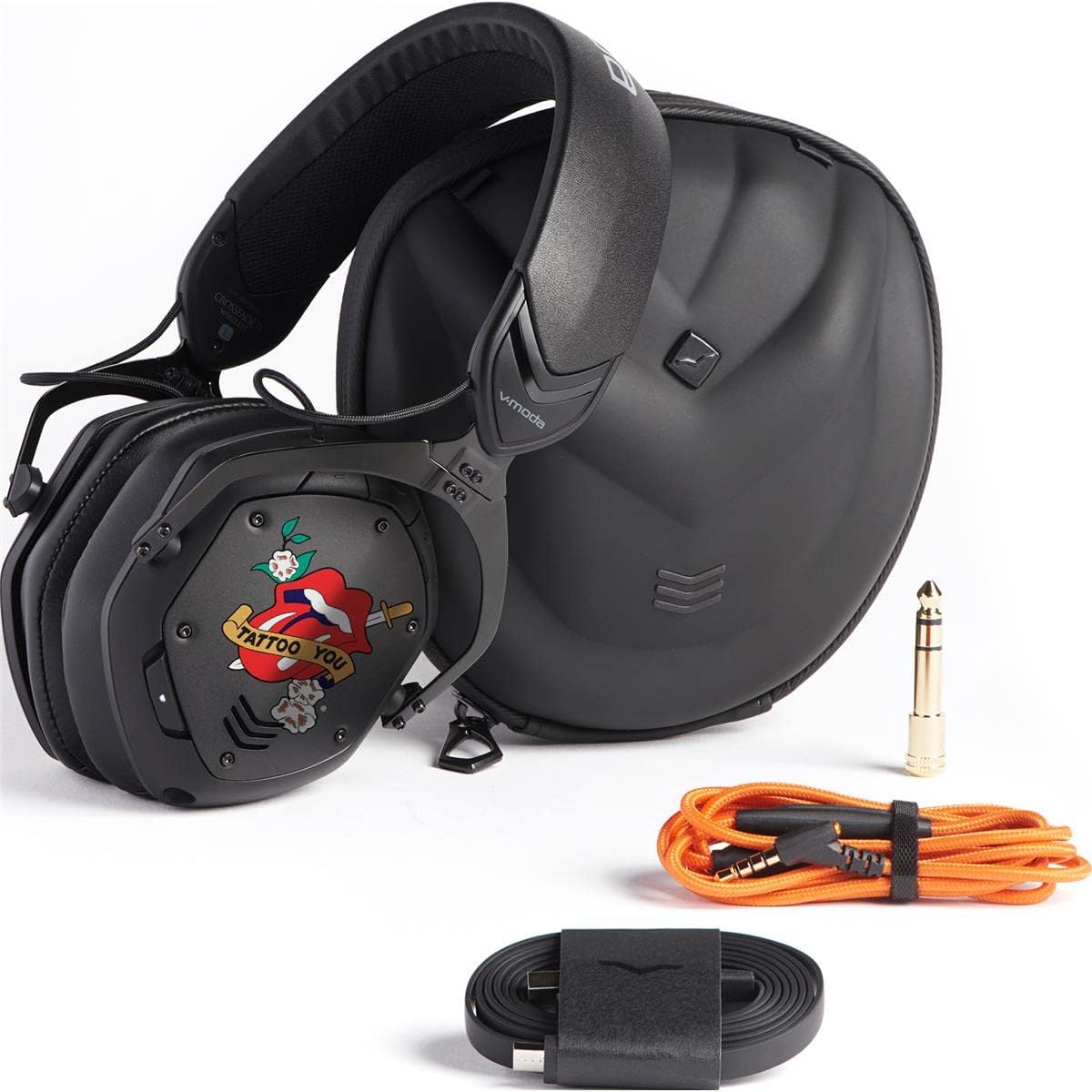
Image: The V-MODA Crossfade 2 Wireless headphones alongside their protective case, audio cable, and charging cable.
3. Atụmatụ
The V-MODA Crossfade 2 Wireless headphones are engineered with advanced features to provide a superior audio experience:
- Dual-Diaphragm 50mm Drivers: Deliver V-MODA's signature sound with deep, rich bass and clear highs.
- Hi-Resolution CCAW Japanese Coils: Certified by Japan Audio Society (JAS) for Hi-Res Audio when used in wired mode.
- Njikọ Bluetooth: Seamless wireless audio experience with a range of up to 33 feet (10 meters).
- Njikọ Multi-point: Pair with two Bluetooth sources simultaneously (e.g., smartphone and laptop).
- Pure Analog Wired Mode: Zero latency audio for critical listening, gaming, and professional use.
- Ndụ batrị agbatịkwuru: Up to 14+ hours of continuous music playback, entertainment, and calls on a single charge.
- Ohiri ntị dị mma: Large memory foam ear cushions provide ergonomic comfort and natural noise isolation.
- SteelFlex Headband: Durable and flexible headband adapts to your head for a secure and comfortable fit.
- CliqFold Hinge: Patented hinge design allows the headphones to fold into a compact size for portability.
- Igwe okwu arụnyere n'ime ya: Hidden microphone optimized for phone calls and voice recognition.
- Ihe owuwu na-adịgide adịgide: Luxuriously crafted with steel and vegan leather, meeting V-MODA's strict durability standards.
4. Nhazi
4.1 Ịchaji ekweisi
Before initial use, fully charge your Crossfade 2 Wireless headphones.
- Connect the V-Micro USB charging cable to the charging port on the left earcup of the headphones.
- Connect the other end of the USB cable to a powered USB port (e.g., computer, wall adapter).
- The LED indicator will show charging status. A full charge typically takes about 100 minutes.
- Once fully charged, the LED indicator will change (refer to the LED indicator section in the full manual for specific light patterns).
4.2 Njikọ Bluetooth
Iji jikọọ ekweisi gị na ikuku ikuku na ngwaọrụ:
- Gbaa mbọ hụ na agbanyụrụ ekweisi.
- Press and hold the power button on the right earcup until the LED indicator flashes blue rapidly, indicating pairing mode.
- Na ngwaọrụ gị (ama, laptọọpụ, wdg), mee ka Bluetooth rụọ ọrụ ma chọọ ngwaọrụ dị.
- Select "V-MODA Crossfade 2 Wireless" from the list of found devices.
- Ozugbo ejikọrọ, ihe ngosi LED ga-atụgharị na-acha anụnụ anụnụ.
For multi-point pairing, connect to the first device, then put the headphones back into pairing mode and connect to the second device. The headphones will remember both connections.
5. .rụ ọrụ
5.1 Gbanyụọ ma ọ bụ gbanyụọ
- To power on: Press and hold the power button until the LED lights up.
- To power off: Press and hold the power button until the LED turns off.
5.2 Ụdị Waya
For pure analog audio with zero latency, use the included Speakeasy Audio Cable.
- Insert the smaller end of the audio cable into the 3.5mm jack on the right earcup.
- Connect the other end of the cable to your audio source (e.g., phone, computer, audio interface).
- In wired mode, the headphones operate passively, and the battery is not used.
5.3 Njikwa
The headphones feature intuitive controls on the right earcup:
- Elu elu/ala: Jiri bọtịnụ olu raara onwe ya nye.
- Gwuo/kwụsịtụ: Pịa bọtịnụ ọtụtụ ọrụ otu ugboro.
- Track na-esote: Pịa bọtịnụ ọtụtụ ọrụ ugboro abụọ.
- Gara aga Track: Pịa bọtịnụ ọrụ ọtụtụ ugboro ugboro atọ.
- Azịza/Kwụsị Oku: Pịa bọtịnụ ọtụtụ ọrụ otu ugboro n'oge oku mbata ma ọ bụ oku nọ n'ọrụ.
- Jụ oku: Pịa ma jide bọtịnụ ọtụtụ ọrụ n'oge oku mbata.
- Mee ka onye enyemaka olu rụọ ọrụ: Press and hold the multi-function button (e.g., Siri, Google Assistant).
Vidiyo: obere ihe ngosi vidiyo nkwaliteasing the V-MODA Crossfade 2 Wireless Rolling Stones Edition headphones, highlighting their design and features.
6. Nlekọta
6.1 Nhicha
- Jiri akwa dị nro hichaa ekweisi.
- Maka ohiri isi ntị, jiri nwayọ hichaa ya na mgbasa oziamp ákwà na ncha dị nro ma ọ bụrụ na ọ dị mkpa, wee kpoo ya nke ọma.
- Ejila kemịkalụ siri ike ma ọ bụ ihe abrasive.
6.2 Nchekwa
When not in use, store the headphones in their protective exoskeleton carry case to prevent damage.
Image: The V-MODA Crossfade 2 Wireless headphones folded compactly, ready to be stored in their durable exoskeleton case.
7. Nchọpụta nsogbu
| Nsogbu | Ihe nwere ike ime | Ngwọta |
|---|---|---|
| Enweghị ike/agaghị agbanye | Batrị dị ala | Charge the headphones using the V-Micro USB cable. |
| Enweghị ike ijikọ site na Bluetooth | Headphones not in pairing mode; device Bluetooth off; too far from device | Ensure headphones are in pairing mode (rapid blue flashing LED). Turn on Bluetooth on your device. Move headphones closer to the device (within 10 meters). |
| No sound in wired mode | Cable not fully inserted; incorrect cable connection | Ensure the audio cable is securely plugged into both the headphone jack and the audio source. |
| Ogo ọdịyo adịghị mma | Interference; low battery; source audio quality | Move away from sources of interference. Charge the headphones. Check the quality of your audio source. |
8. Nkọwapụta
- Aha nlereanya: Crossfade 2
- Teknụzụ Njikọta: Ikuku (Bluetooth), waya (Jack3.5mm)
- Ụdị ọkwọ ụgbọala ọdịyo: Dual-Diaphragm 50mm Dynamic Driver
- Oke ugboro: 5-40,000 Hz
- Ndụ batrị: Up to 14+ Hours (Wireless)
- Oge nchaji: Ihe dị ka nkeji iri
- Ogologo Bluetooth: 10 Mita (33 ụkwụ)
- Ihe: Faux Leather, Memory Foam, Steel
- Ibu ihe: 1.63 pound
- Akụkụ ngwaahịa: 7.2 x 6.1 x 4.4 sentimita asatọ
- Njikwa mkpọtụ: Mwepu ụda
- Ngwa gụnyere: Headphones, Protective Case, Cable
9. Akwụkwọ ikike na nkwado
V-MODA offers a 1-Year Premier Warranty for the Crossfade 2 Wireless headphones, covering manufacturing defects. Additionally, V-MODA provides an "Immortal Life Replacement Program" where you can get a 50% discount on a replacement pair if your headphones are damaged outside of warranty.
For detailed warranty information, technical support, or to inquire about the Immortal Life Replacement Program, please visit the official V-MODA websaịtị ma ọ bụ kpọtụrụ nkwado ndị ahịa ha ozugbo.
Gaa leta V-MODA Store on Amazon maka ngwaahịa na ozi ndị ọzọ.


