1. Okwu mmalite
Thank you for choosing the Edifier W280NB Bluetooth Wireless Neckband Earbuds. These earbuds are designed to provide a high-quality audio experience with features like Active Noise Cancellation (ANC), Ambient Sound Monitoring, and AI call noise reduction. Their lightweight, comfortable design and IP55 water resistance make them ideal for various activities, including gym workouts and running.
2. Kedu ihe dị na Igbe ahụ
- Edifier W280NB Earbuds
- Ịchaji eriri
- Multiple Sizes of Eartips and Ear Wings
3. Ngwaahịa gafereview
Familiarize yourself with the components of your Edifier W280NB earbuds:

Foto 3.1: Edifier W280NB Neckband Earbuds. The image shows the black neckband-style earbuds with the control module visible on the right side of the neckband.
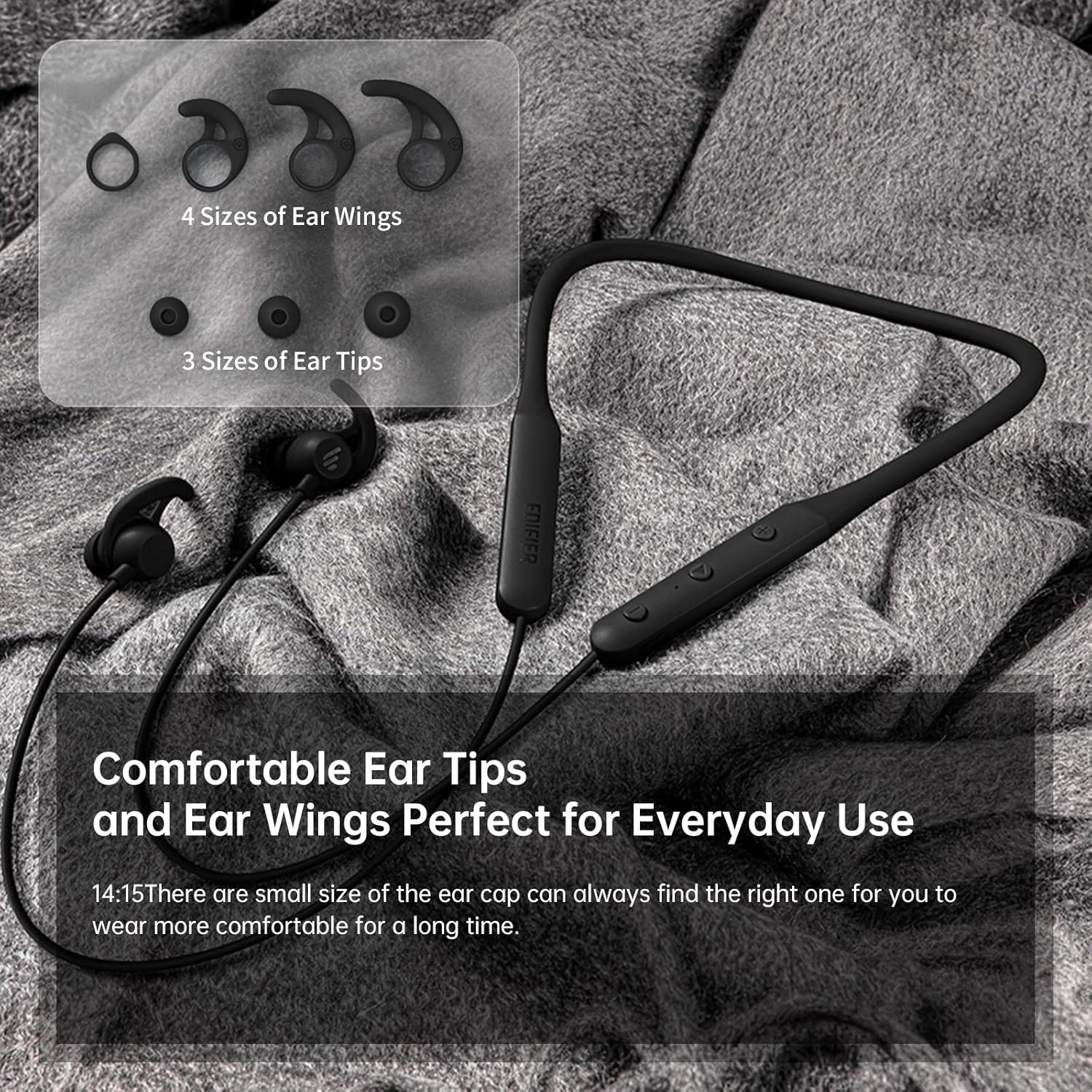
Foto 3.2: Comfortable Ear Tips and Ear Wings. This image displays different sizes of silicone ear tips and ear wings, highlighting the customizable fit for user comfort.
The earbuds feature a flexible neckband for secure wear, with integrated controls for easy access to functions like volume, playback, and call management. The ear tips and ear wings are designed for a comfortable and stable fit during various activities.
4. Nhazi
4.1 Ịchaji ntị ntị
Before first use, fully charge the earbuds. Connect the provided charging cable to the charging port on the neckband and to a USB power source. The indicator light will show charging status. A full charge provides up to 13 hours of playtime (ANC off). For quick use, a 2-minute charge can provide approximately 2 hours of playtime.

Foto 4.1: Fast Charge and Long Playback Time. This image illustrates the battery life with ANC on (11 hours) and ANC off (13 hours), and the quick charge capability (10 minutes charge for 2.5 hours use).
4.2 Njikọ Bluetooth
- Ensure the earbuds are charged and powered off.
- Press and hold the power button until the indicator light flashes blue and red, indicating pairing mode.
- Na ngwaọrụ gị (smartphone, tabletị, laptọọpụ), gbanye Bluetooth wee chọọ ngwaọrụ dị.
- Select "Edifier W280NB" from the list of found devices.
- Ozugbo ejikọtara ya, ìhè ihe ngosi ahụ ga-agbanwe agba anụnụ anụnụ.
5. Ntuziaka ọrụ
5.1 Njikwa
The control module on the neckband allows you to manage various functions:
- Bọtịnụ ike: Pịa ma jide ka ịgbanwuo/gbanyụọ ọkụ. Pịa obere oge iji kpọọ/kwụsịtụ egwu ma ọ bụ zaa/kwụsị oku.
- Elu elu (+): Obere pịa ka iwelie olu. Pịa ogologo maka egwu ọzọ.
- Mpịakọta ọnụ (-): Obere pịa ka ibelata olu. Pịa ogologo maka egwu gara aga.
- Bọtịnụ ọrụ: (Specific button for ANC/Ambient mode, refer to product diagram if available, otherwise assume integrated with power/volume)
5.2 Nkagbu mkpọtụ mkpọtụ (ANC)
The ANC feature reduces ambient noise, providing a more immersive listening experience. Activate or deactivate ANC using the designated control button (often a long press on the power button or a dedicated button).

Foto 5.1: Active Noise Cancellation. A man is shown wearing the earbuds, with text indicating the ANC technology for a quieter experience.
5.3 Ambient Sound Monitoring
This mode allows you to hear your surroundings without removing the earbuds, enhancing safety and awareness. Toggle this mode on/off via the control module.

Foto 5.2: Ambient Sound Mode. A woman is shown wearing the earbuds, with text explaining the real-time sensation of ambient sound monitoring.
5.4 Ọrụ oku
The earbuds support hands-free calling with AI call noise reduction technology, ensuring clear conversations by filtering out ambient noise.
- Azịza/Kwụsị Oku: Obere pịa bọtịnụ ike.
- Jụ oku: Pịa bọtịnụ ike ogologo.

Foto 5.3: Call Noise Cancellation. A woman is shown wearing the earbuds, with text describing the AI call noise-cancelling technology for clear calls.
6. Nlekọta
6.1 Nhicha
- Regularly clean the ear tips with a soft, dry cloth.
- If necessary, remove the ear tips and wash them with mild soap and water, ensuring they are completely dry before reattaching.
- Wipe the neckband and earbud surfaces with a slightly damp akwa . Zere iji kemịkalụ siri ike ma ọ bụ ihe na-emebi emebi.
6.2 Mmiri na Uzuzu Na-eguzogide (IP55)
The Edifier W280NB earbuds are IP55 rated, meaning they are protected against dust ingress and low-pressure water jets from any direction. This makes them suitable for use during workouts and in light rain. However, they are not designed for submersion in water.

Foto 6.1: IP55 Dust and Water Resistance. A man is shown wearing the earbuds, with text highlighting their IP55 protection against dust and water.
6.3 Nchekwa
Store the earbuds in a cool, dry place away from direct sunlight and extreme temperatures. Avoid tangling the neckband to prevent damage.
7. Nchọpụta nsogbu
| Nsogbu | Ihe nwere ike ime | Ngwọta |
|---|---|---|
| Earbuds anaghị agbanye ọkụ | Batrị dị ala | Chajie ntị ntị nke ọma. |
| Enweghị ike ijikọ na ngwaọrụ | Earbuds not in pairing mode; Bluetooth off on device; too far from device | Ensure earbuds are in pairing mode (flashing blue/red). Turn on Bluetooth on your device. Move earbuds closer to your device (within 10 meters). |
| Enweghị ụda ma ọ bụ olu dị ala | Volume too low; earbuds not connected; incorrect audio output selected | Increase volume on earbuds and device. Reconnect earbuds. Check your device's audio output settings. |
| Ogo ụda adịghị mma | Interference; ear tips not sealed properly; dirty earbuds | Move away from sources of interference. Adjust ear tips for a secure fit. Clean ear tips and earbud nozzles. |
8. Nkọwapụta
| Njirimara | Nkọwa |
|---|---|
| Nọmba nlereanya | W280NB |
| Teknụzụ Njikọta | Ikuku |
| Teknụzụ nzikọrịta ozi ikuku | Bluetooth 5.0 |
| Ngwa gụnyere | Cable, Eartip |
| Ihe onwunwe | Silikoni |
| Ihe eji eme ihe maka ngwaahịa | Egwuregwu na mmega ahụ |
| Eji akwadoro maka ngwaahịa | Calling, Running |
| Ngwa dakọtara | Smartphones, Mbadamba ụrọ, Laptọọpụ, Kọmputa |
| Ụdị njikwa | Njikwa Mgbasa ozi |
| Njirimara USB | Enweghị eriri |
| Ọkwa Nguzogide mmiri | Mmiri mmiri (IP55) |
| Oke ugboro ugboro | 20Hz - 20 kHz |
| Usoro njikwa | Metụ aka |
| Ọnụọgụ nke ihe | 1 |
| Ndụ batrị | 13 Hours (ANC off) |
| Ụdị ọkwọ ụgbọ ala ọdịyo | Ọkwọ ụgbọala dị ike |
| Oke Bluetooth | 10 mita |
| Ụdị ntị | N'ime ntị |
| Ọnụọgụ nke ọdụ ụgbọ mmiri USB 2 | 1 |
| UPC | 875674006623 |
9. Akwụkwọ ikike na nkwado
Edifier products typically come with a limited warranty. Please refer to the warranty card included with your product or visit the official Edifier website for detailed warranty terms and conditions. For technical support, product inquiries, or service requests, please contact Edifier customer service through their official channels.


