Okwu mmalite
Thank you for choosing the Aiwa BST-650 Bluetooth Speaker. This manual provides essential information for setting up, operating, and maintaining your speaker. Please read it carefully before use to ensure optimal performance and longevity of your device.
The Aiwa BST-650 is a compact, durable, and powerful TWS Bluetooth speaker featuring Hyper Bass technology, 20W RMS audio output, RGB LED lighting with 9 modes, a Micro-SD card reader, and an IPX6 waterproof rating. It is designed for superior sound quality and robust performance in various environments.
Ihe ngwugwu
Biko lelee igbe maka ihe ndị a:
- Aiwa BST-650 Bluetooth Speaker
- 3.5mm to 3.5mm Stereo AUX Cable
- Braided Nylon USB Type-C Charging Cable with Leather Belt
- Eriri aka
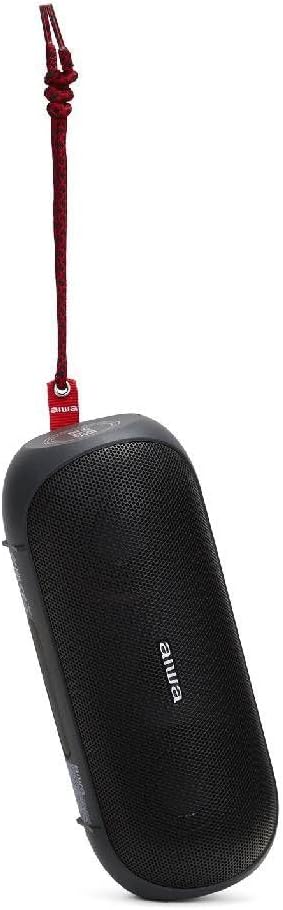
Image: Aiwa BST-650 speaker shown with the included wrist strap.
Ngwaahịa gafereview
The Aiwa BST-650 features a robust rubber casing with twin metallic grilles, housing two 45mm high-performance speakers and a passive HyperBASS radiator. It includes intuitive controls for power, volume, playback, and LED lighting.
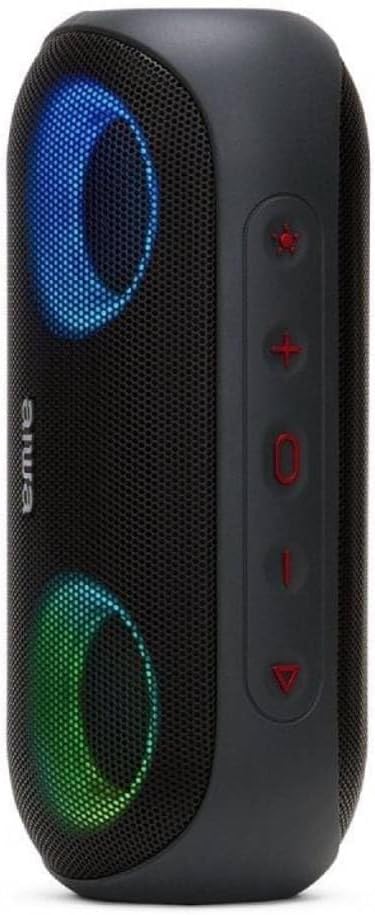
Foto: Akụkụ view of the Aiwa BST-650 speaker, highlighting the control buttons.
Njikwa na ọdụ ụgbọ mmiri
- Bọtịnụ ike: Pịa ma jide iji gbanye ma ọ bụ gbanyụọ ọkà okwu.
- Elu elu (+): Welie olu.
- Mpịakọta ọnụ (-): Belata olu.
- Bọtịnụ Kwụsị/Kwụsị: Play or pause music, answer or end calls.
- Bọtịnụ ọkụ ọkụ LED: Cycle through 9 RGB lighting modes or turn off lights.
- Micro-SD (TF) Card Slot: For MP3 playback from a memory card.
- AUX-IN Port (3.5mm): For wired connection to external audio devices.
- Ọdụ ụgbọ mmiri Ụdị-C USB: Maka ịchaji batrị ime igwe okwu.
Melite
1. gingchaji Okwu Okwu
- Connect the supplied USB Type-C charging cable to the speaker's charging port.
- Jikọọ nsọtụ nke ọzọ nke eriri na ihe nkwụnye ọkụ USB dakọtara (anaghị etinye ya) ma ọ bụ ọdụ ụgbọ USB nke kọmputa.
- Ihe ngosi LED ga-egosi ọkwa nchaji. Ụgwọ zuru ezu na-ewe ihe dị ka awa 4.
- The speaker provides approximately 8.5 hours of music playback on a full charge.
2. Ịgbanye / gbanyụọ
- To power on, press and hold the Power button until you hear an audible prompt and the LED lights activate.
- Iji gbanyụọ ọkụ, pịa ma jide bọtịnụ Ike ọzọ ruo mgbe ọkà okwu ahụ gbanyụrụ.
3. Njikọ Bluetooth
- Hụ na ekwenyere igwe okwu ahụ ma nwee ọnọdụ njikọta Bluetooth (nke LED na-enwu enwu gosiri).
- Na ngwaọrụ mkpanaaka gị (smartphone, tabletị, wdg), gbanye Bluetooth wee chọọ ngwaọrụ dịnụ.
- Select "Aiwa BST-650" from the list of devices.
- Ozugbo ejikọtara ya, ọkà okwu ahụ ga-ewepụta nkwenye olu, LED ahụ ga-akwụsịkwa ịgbawa.
- The speaker supports Bluetooth V5.0 with a wireless range of up to 10 meters (30 feet).
4. TWS (Ezigbo Stereo ikuku ikuku) ijikọ
The BST-650 supports TWS, allowing two BST-650 speakers to connect wirelessly for a stereo sound experience.
- Ensure both Aiwa BST-650 speakers are powered on and not connected to any Bluetooth device.
- On one speaker, press and hold the Play/Pause button for 2-3 seconds. The speaker will enter TWS pairing mode.
- The two speakers will automatically connect to each other. You will hear a confirmation tone once connected.
- Once TWS is established, connect your mobile device to one of the speakers via Bluetooth as described in step 3. Both speakers will then play audio in stereo.
5. Using Micro-SD Card
- Insert a Micro-SD (TF) card containing MP3 audio files n'ime oghere kaadị.
- The speaker will automatically switch to Micro-SD mode and begin playing music.
- Use the Play/Pause, Volume Up, and Volume Down buttons to control playback.
6. Using AUX-IN
- Connect one end of the 3.5mm AUX cable to the speaker's AUX-IN port.
- Jikọọ nsọtụ nke ọzọ nke eriri ahụ na jakị ekweisi ma ọ bụ mmepụta ọdịyo nke ngwaọrụ mpụga gị.
- Ọkà okwu ga-agbanwe ozugbo gaa na ọnọdụ AUX.
- Jikwaa ọkpụkpọ egwu na olu site na ngwaọrụ mpụga gị.
Na-arụ ọrụ
1. Nghaghachi egwu
- Gwuo/kwụsịtụ: Pịa bọtịnụ Play/kwụsịtụ.
- Track na-esote: Pịa ma jide bọtịnụ olu elu (+).
- Gara aga Track: Pịa ma jide bọtịnụ ụda ala (-).
- Njikwa olu: Pịa obere bọtịnụ Mpịakọta Elu (+) ma ọ bụ Mpịakọta Elu (-).
2. Call Management (Hands-free Function)
When connected via Bluetooth, the speaker's built-in microphone allows for hands-free calling.
- Oku azaa: Pịa bọtịnụ Play/kwụsịtụ otu ugboro.
- Oku ngwụcha: Pịa bọtịnụ Play/kwụsịtụ otu ugboro n'oge oku.
- Jụ oku: Pịa ma jide bọtịnụ Play/kwụsịtụ maka sekọnd 2.
3. RGB LED Lighting Modes
The speaker features dual RGB LED lighting with 9 dynamic effects.

Image: Aiwa BST-650 speaker with its RGB LED lights active, displaying blue and green colors.
- Press the LED Light button to cycle through the 9 different lighting modes.
- Continue pressing to turn the lights off.
4. Waterproof Information (IPX6)
The Aiwa BST-650 has an IPX6 water protection rating, meaning it is protected against high-pressure water jets from any direction. This makes it suitable for outdoor use and resistant to splashes and rain.
- Ekpudola ọkà okwu n'ime mmiri.
- Hụ na e mechiri mkpuchi ọdụ ụgbọ mmiri niile nke ọma tupu e tinye igwe okwu n'ime mmiri.
- After exposure to water, wipe the speaker dry before charging.
Nlekọta
Nhicha
- Jiri nwayọ hichaa ọkà okwu, damp akwa .
- Ejila ihe mkpocha abrasive, mmanya, ma ọ bụ ihe mgbaze kemịkal.
Nchekwa
- Chekwaa ọkà okwu n'ebe dị jụụ, kpọrọ nkụ na-adịghị na ìhè anyanwụ kpọmkwem na oke okpomọkụ.
- If storing for an extended period, charge the battery periodically to maintain its lifespan.
Nchọpụta nsogbu
| Nsogbu | Ihe nwere ike ime | Ngwọta |
|---|---|---|
| Ọkà okwu anaghị agbanwuo. | Batrị dị ala. | Chajie ọkà okwu ahụ ruo opekata mpe nkeji iri atọ. |
| Enweghị ike ijikọ site na Bluetooth. | Ọkà okwu adịghị n'ụdị njikọta; gbanyụọ ngwaọrụ Bluetooth; tere aka site n'ikwu okwu. | Ensure speaker is in pairing mode. Turn Bluetooth on/off on your device. Move device closer to speaker (within 10m). |
| Enweghị ụda. | Olu dị oke ala; ọnọdụ ntinye na-ezighi ezi; ngwaọrụ anaghị akpọ egwu. | Increase speaker and device volume. Check if correct mode (Bluetooth, AUX, SD) is active. Ensure audio is playing on the connected device. |
| Njikota TWS ada ada. | Speakers already paired to another device; too far apart. | Disconnect speakers from any other Bluetooth devices. Ensure both speakers are BST-650 models. Place speakers closer together. |
Nkọwapụta
| Njirimara | Nkọwapụta |
|---|---|
| Ike mmepụta ọdịyo | 20W RMS |
| Nha Ọkà Okwu | 2 x 45mm |
| Ụdị Bluetooth | V5.0 |
| Ikuku iche | Ruo mita 10 (ụkwụ 30) |
| Nzaghachi ugboro ugboro | 60 Hz - 20,000 Hz |
| Ogo Nchekwa mmiri | IPX6 |
| Ụdị batrị | Batrị Lithium nwere ike ibugharị |
| Ike batrị | 7.4V, 2000mAh |
| Oge Nchaji | Ihe ruru. awa 4 |
| Oge Egwu Egwu | Ihe ruru. awa 8.5 |
| Nchaji ọdụ ụgbọ mmiri | USB Ụdị-C |
| Akụkụ (L x W x H) | 200 x 85 x 83 mm |
| Ibu | 613g |
| Ngwa dakọtara | Smartphones, Tablets (Android, iOS, Windows) |
| Atụmatụ pụrụ iche | DSP for superior sound, HyperBASS passive radiator, TWS function, Hands-free with microphone, Micro-SD (TF) card reader, 3.5mm AUX-IN, RGB LED lighting (9 modes) |
Akwụkwọ ikike na nkwado
The Aiwa BST-650 Bluetooth Speaker comes with a limited warranty. For specific warranty terms and conditions, please refer to the warranty card included in your package or contact Aiwa customer support.
For technical assistance or support, please visit the official Aiwa websaịtị ma ọ bụ kpọtụrụ ngalaba ọrụ ndị ahịa ha.