1. Okwu mmalite
The SCTEWELL GF22 Magnetic Mini Car Tracker GPS Locator is a versatile and compact device designed for real-time tracking and security. It offers multiple positioning modes (GPS, WiFi, LBS) to ensure accurate location information for various applications, including vehicle tracking, personal safety for the elderly and children, and anti-lost luggage. Its strong magnetic design allows for easy and discreet placement. This manual provides essential information for setting up, operating, and maintaining your GF22 locator.
2. Ngwaahịa gafereview

The compact GF22 GPS tracker held in hand, demonstrating its small size relative to a smartphone displaying a map and a car in the background, highlighting its primary use for vehicle tracking.
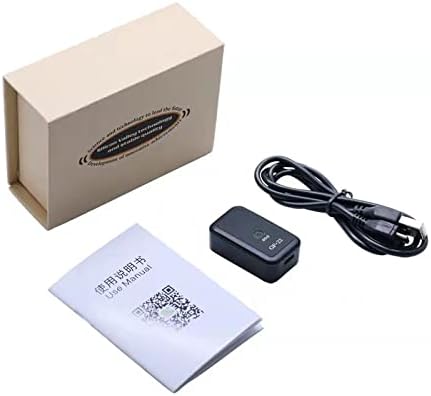
The contents of the GF22 product box, including the GF22 tracker, a charging cable, and the user manual.

Agara nso views of the GF22 tracker, highlighting specific product details such as the power button, charging port, and internal SIM card slot.
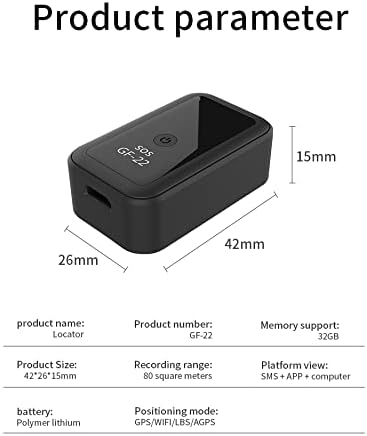
A table detailing the product parameters of the GF22 tracker, including product name, number, size, memory support, recording range, platform view, battery type, and positioning mode.
3. Ntuziaka Nhazi
3.1 Ịchaji ngwaọrụ
Before first use, fully charge the GF22 tracker using the provided USB cable. Connect the cable to the device's charging port and a standard USB power adapter. The indicator light will show charging status.
3.2 nwụnye kaadị SIM
The GF22 requires a mobile phone SIM card for full functionality. Ensure the SIM card is active and has data, call, and SMS capabilities. Follow these steps:
- Carefully open the SIM card slot cover on the device.
- Insert the SIM card into the designated slot, ensuring correct orientation as shown in the diagram or video.
- Mechie mkpuchi oghere kaadị SIM nke ọma.

An illustration showing the GF22 tracker alongside a SIM card, indicating that the device requires a mobile phone card for operation.
3.3 Ngwa nbudata na njikọ
To utilize the full features of your GF22 tracker, download the official mobile application. Scan the QR code provided in the manual or product packaging, or search for the app in your device's app store. Follow the in-app instructions to register and bind your GF22 device using its unique ID (usually found on the device or packaging).
This video demonstrates the step-by-step installation method for the GF22 GPS locator, including opening the device, inserting the SIM card, and connecting it for initial setup.
4. Ntuziaka ọrụ
4.1 Real-Time Tracking and Positioning
The GF22 supports multiple positioning technologies for accurate real-time tracking:
- Ndokwa GPS: Provides highly accurate outdoor location data.
- WiFi Positioning: Enhances accuracy in indoor environments or areas with limited GPS signal.
- LBS Positioning: Utilizes cellular tower signals for location when GPS or WiFi are unavailable.
View the device's current location and historical tracks directly through the mobile application.

A visual representation of multiple precise positioning methods, including GPS, WiFi, LBS, and AGPS, with a satellite and city skyline, highlighting the GF22's advanced tracking capabilities.

The GF22 tracker next to a smartphone, illustrating its WiFi positioning capability with a WiFi signal icon, indicating enhanced accuracy in various environments.
4.2 SOS Emergency Function
In an emergency, press and hold the SOS button on the GF22 device for 3 seconds. The device will automatically send an alert to pre-set emergency contacts and initiate a call for help. Ensure emergency contacts are configured in the mobile application.

An image depicting an elderly person and a child, emphasizing the SOS emergency feature of the GF22 tracker for personal safety and quick assistance.

An image showing an elderly person and a child, reinforcing the 'SOS One Click for Help' feature of the GF22 tracker, designed for immediate assistance in emergencies.
4.3 Geo-Fence Protection
Set up virtual boundaries (geo-fences) in the mobile application. When the GF22 device enters or exits a defined area, you will receive an immediate smart alarm notification on your smartphone, providing timely alerts for monitored assets or individuals.
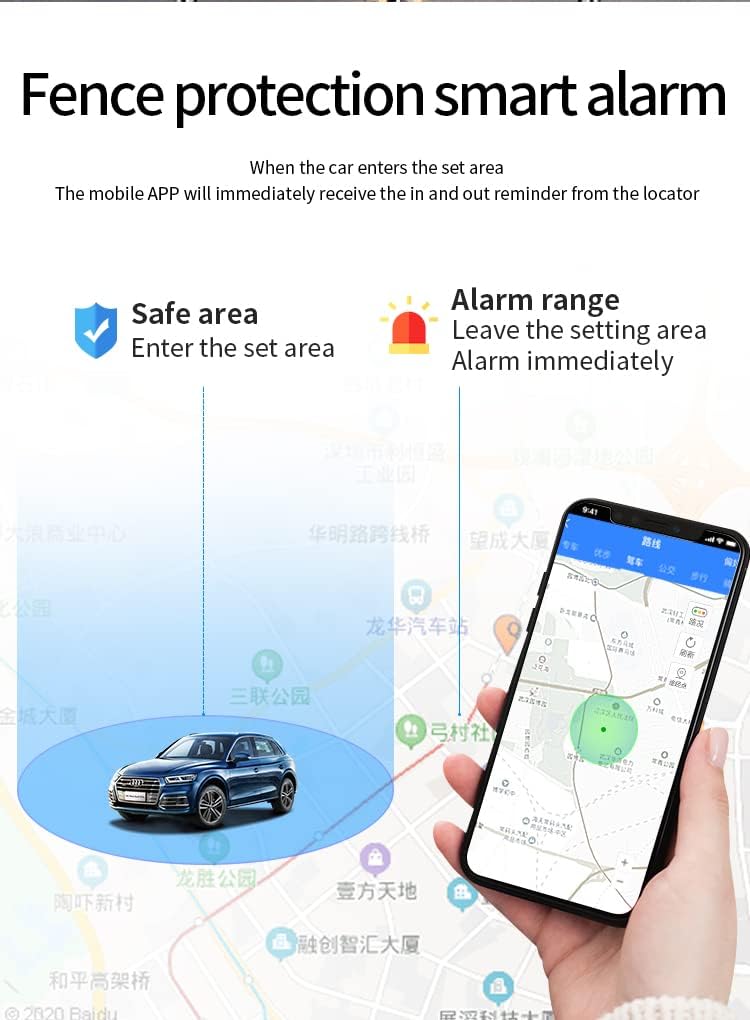
A map interface on a smartphone showing a 'Safe area' and an 'Alarm range' around a car icon, explaining the fence protection and smart alarm features of the GF22 tracker.
4.4 Magnetic Adsorption and Application
The GF22 features strong magnetic adsorption, allowing it to be easily attached to metallic surfaces without the need for complex installation. This makes it ideal for discreet placement in vehicles or on other metal objects.

A diagram showing a car with various points highlighted (under passenger seat, armrest inward, trunk, rear bumper, chassis, door glove box, sub-seat position trash box, front bumper), demonstrating the strong magnetic adsorption feature of the GF22 tracker for versatile and discreet placement.

Ihe ngosi onyonyoasing various applicable models for the GF22 tracker, including a truck, bus, car, and motorcycle, illustrating its versatility for different vehicle types.

The GF22 vehicle locator device positioned prominently with illustrations of a truck, car, and motorcycle in the background, emphasizing its primary function as a vehicle tracking device.
Vidiyo a na-enye nkọwa zuru ezuview of the GF22 car and object locator, showcasing its compact design and highlighting its real-time tracking capabilities.
5. Nlekọta
- Keep the device dry. Avoid exposure to water or moisture.
- Jiri akwa dị nro hichaa ngwaọrụ ahụ. Ejila kemịkalụ siri ike ma ọ bụ ihe mkpocha abrasive.
- Chekwaa ngwaọrụ ahụ n'ebe dị jụụ, kpọrọ nkụ mgbe ọ naghị eji ya.
- Chaji ngwaọrụ ahụ mgbe niile, ọbụlagodi na ọ naghị arụ ọrụ nke ọma, iji hụ na batrị dị mma.
- Avoid extreme temperatures, as they can affect battery life and device performance.
6. Nchọpụta nsogbu
| Nsogbu | Ihe nwere ike ime | Ngwọta |
|---|---|---|
| Ngwaọrụ anaghị agbanye ọkụ | Low battery; incorrect SIM card insertion. | Charge the device fully. Re-insert the SIM card correctly. |
| Inaccurate or no positioning | Poor GPS/WiFi/LBS signal; SIM card issues; device placed in a signal-blocking area. | Move the device to an open area. Check SIM card balance and data plan. Ensure proper SIM card installation. |
| Ngwa anaghị ejikọta na ngwaọrụ | Incorrect device ID; network issues; app not updated. | Verify device ID. Check internet connection on your phone. Update the app to the latest version. Restart both device and app. |
| Ndụ batrị dị mkpụmkpụ | Frequent tracking updates; continuous use in low signal areas; aging battery. | Adjust tracking frequency in app settings. Ensure device is in an area with good signal. Battery life naturally degrades over time. |
| Ọrụ SOS anaghị arụ ọrụ | No emergency contacts set; SIM card issues; insufficient balance. | Set up emergency contacts in the app. Check SIM card functionality and balance. |
7. Nkọwapụta
| Njirimara | Nkọwa |
|---|---|
| Akụkụ ngwaahịa | 1.77 x 0.59 x 0.98 sentimita asatọ |
| Ibu Ibu | 4.2 ounces |
| ASIN | B09MLQPZF7 |
| Teknụzụ Njikọta | Wi-Fi |
| Atụmatụ pụrụ iche | Magnetik |
| Akụkụ ngosi ndị ọzọ | Ikuku |
| Kedu ihe dị na Igbe ahụ | Battery (built-in), Charging Cable, User Manual |
| Onye nrụpụta | sctewell.lt |
| Ụbọchị mbụ dị | Nọvemba 26, 2021 |
| Ụdị | SCTEWELL |
| Teknụzụ Njikọta | Wi-Fi |
| Ngwa akwadoro | Oti mkpu, GPS |
| Ihe eji eme ihe maka ngwaahịa | Elderly monitoring, Children monitoring, Vehicle tracking, Anti-lost luggage |
8. Akwụkwọ ikike na nkwado
For warranty information and technical support, please refer to the contact details provided on the product packaging or the official SCTEWELL websaịtị. Debe nnata nzụta gị dị ka ihe akaebe nke ịzụrụ ihe maka akwụkwọ ikike ọ bụla.


