1. Okwu mmalite
Thank you for choosing the 1Mii RT5066 Wireless Audio Transmitter Receiver. This kit provides a high-fidelity, low-latency solution for wirelessly transmitting audio from your source devices to your audio output systems. Enjoy crystal-clear sound and flexible connectivity without the clutter of cables.

The 1Mii RT5066 Wireless Audio Transmitter and Receiver units.
2. Kedu ihe dị na Igbe ahụ
- 1Mii RT5066 Wireless Audio Transmitter + Receiver
- RCA to 3.5 Male Audio Cable * 2
- RCA Audio Cable * 2
- DC 5V Power Cable + Power Adapter * 2
- Antenna * 2

All components included in the 1Mii RT5066 package.
3. Akụrụngwa Ngwaahịa
- Mbufe ọdịyo ikuku: Wirelessly sends audio to powered speakers, subwoofers, amplifiers, soundbars, home theater systems, or stereos.
- Mbufe Ogologo Ogologo: Supports 2.4 GHz technology with antennae reaching up to 320 feet (100 meters) outdoors and 100-200 feet (30-50 meters) indoors.
- HiFi Audio & Low Delay: Delivers high-quality audio (better than CD quality) with less than 20ms delay, ensuring clear, stable, noise-free, and synchronized sound.
- Flexible Connection: Transmitter connects to any audio source with 3.5mm AUX and RCA output. Receiver connects to any home stereo, amp, or powered wired speaker with 3.5mm AUX and RCA input.
- Nkwụnye & Kpọọ: Simple to use; connect to power, and units will automatically power on and connect.

Extended long-range capability of the 1Mii RT5066.

Zero latency for perfect audio and video synchronization.
4. Ntuziaka Nhazi
Follow these steps to set up your 1Mii RT5066 Wireless Audio Transmitter Receiver kit:
4.1 Connecting the Transmitter
- Connect the DC 5V power cable to the Transmitter unit and plug the other end into a power adapter.
- Connect the Transmitter to your audio source (e.g., TV, PC, CD player, MP4 player) using the appropriate RCA or 3.5mm AUX audio cable. Use the 'Audio In' ports on the Transmitter.
4.2 Jikọọ onye nnata
- Connect the DC 5V power cable to the Receiver unit and plug the other end into a power adapter.
- Connect the Receiver to your audio output device (e.g., powered speaker, amplifier, soundbar) using the appropriate RCA or 3.5mm AUX audio cable. Use the 'Audio Out' ports on the Receiver.
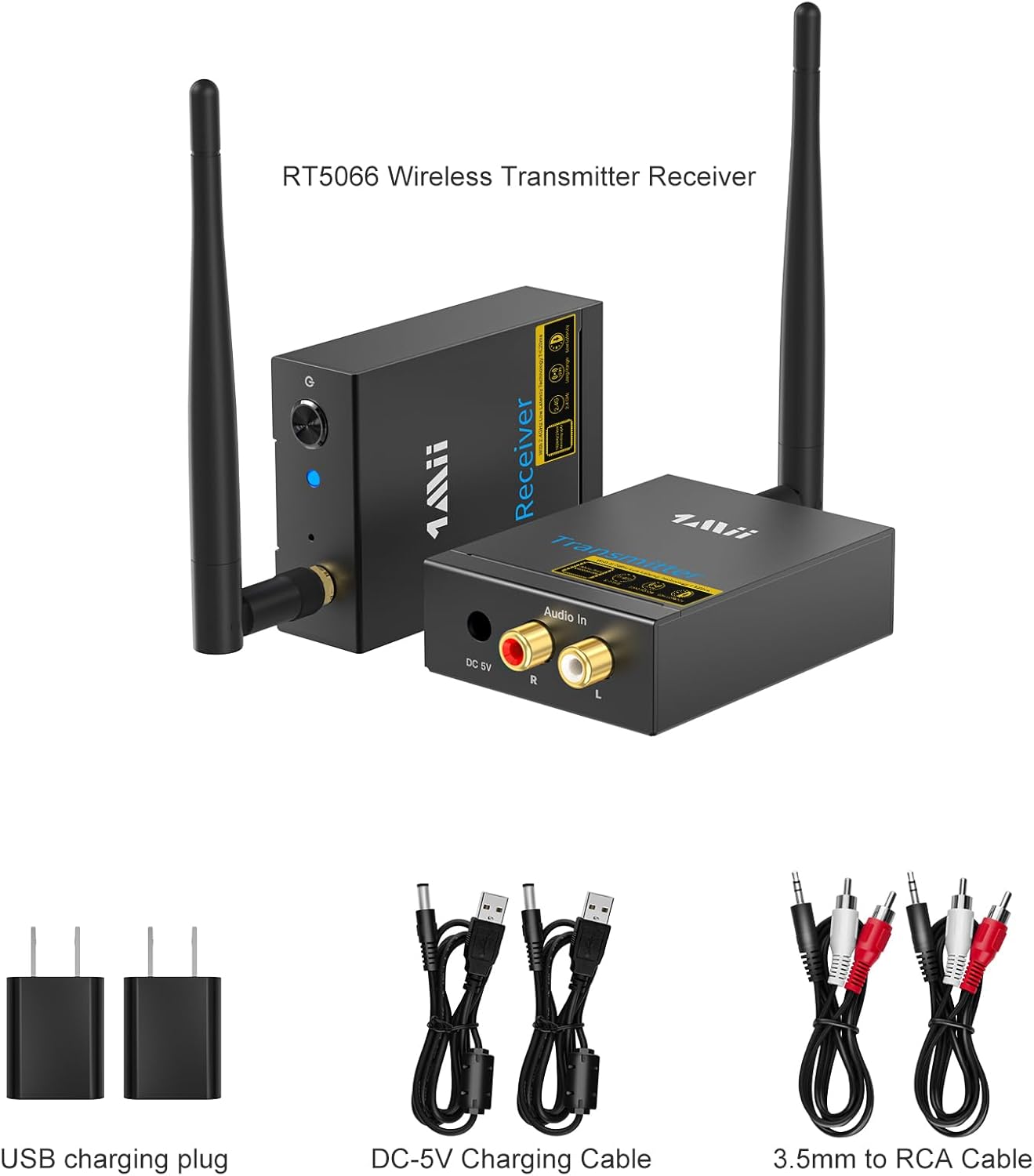
Diagram illustrating the plug and play setup for the transmitter and receiver.
4.3 Nduzi Vidiyo Ntọala
Video: 1Mii Wireless Transmitter Receiver Kit Instructions for Use. This video provides a visual guide on how to set up the transmitter and receiver units.
Video: RT5066 Wireless Audio Transmitter and Receiver. A comprehensive overview of the product and its setup.
5. Ntuziaka ọrụ
Once both the transmitter and receiver are powered on, they will automatically pair. The indicator lights on both units will turn solid blue, indicating a successful connection.
5.1 Usoro njikọ
Video: How to Pair the RT5066 Receiver and the Transmitter? This video demonstrates the automatic pairing process.
If one unit is turned off or loses power, the other unit's light will flash red and blue. To re-establish the connection, ensure both units are powered on. They should automatically re-pair.
6. Nlekọta
To ensure the longevity and optimal performance of your 1Mii RT5066, please follow these maintenance guidelines:
- Keep the devices clean by wiping them with a soft, dry cloth.
- Zere ikpughe akụkụ ahụ na oke okpomọkụ, iru mmiri, ma ọ bụ ìhè anyanwụ kpọmkwem.
- Do not disassemble the units. Any repairs should be performed by qualified personnel.
- Hụ na ikuku na-efegharị nke ọma gburugburu ngwaọrụ ndị ahụ iji gbochie oke okpomọkụ.
7. Nchọpụta nsogbu
If you encounter issues with your 1Mii RT5066, refer to the following common problems and solutions:
7.1 Pairing Issues / Indicator Light Flashing Red and Blue
If the indicator light on either the receiver or transmitter flashes red and blue and cannot be paired, you may need to reset the units. We recommend resetting the receiver first, then the transmitter.
Video: How to Reset the Receiver and Transmitter? This video guides you through the reset process.
7.2 Audio Loss or Cutout
- Ensure the units are within the recommended transmission range (320ft outdoors, 100-200ft indoors).
- Obstacles such as walls, metal objects, or other 2.4GHz devices (like Wi-Fi routers) can affect signal strength and range. Try repositioning the units to minimize obstructions.
- Lelee njikọ niile nke eriri iji hụ na echekwara ha.
7.3 Static Noise or Unclear Sound
- Verify that all audio cables are correctly connected and not damaged.
- Ensure the audio source and output devices are functioning correctly.
- Wedata ndabichi sitere na ngwaọrụ eletrọnịkị ndị ọzọ.
- Confirm that the RT5066 is connected to a powered speaker/subwoofer, not a passive speaker, as it is not an ampna -emegharị ihe.
8. Nkọwapụta
| Njirimara | Nkọwapụta |
|---|---|
| Nọmba nlereanya | RT5066 |
| Akụkụ ngwaahịa | 2.3 x 3.8 x 0.94 sentimita asatọ |
| Ibu Ibu | 1.26 pound |
| Teknụzụ Njikọta | Ikuku, 2.4GHz |
| Ọnọdụ mmepụta ọdịyo | Stereo |
| Nhazi ọwa ụda gburugburu | 2 |
| Ngwa dakọtara | Television, Home Stereo, Speaker |
| Ụdị njikọ | RCA |
| Agba | Nwa |
9. Akwụkwọ ikike na nkwado
1Mii products are designed and manufactured to the highest quality standards. For warranty information and technical support, please refer to the contact details provided in your product packaging or visit the official 1Mii websaịtị. Debe akwụkwọ nnata ịzụrụ maka akwụkwọ ikike.


