1. Okwu mmalite
Daalụ maka ịzụrụasing the Final UX3000 Bluetooth Wireless Headphones. These headphones are designed to deliver premium Hi-Fi sound quality with hybrid noise-cancelling technology, ensuring an immersive audio experience. With long battery life and versatile connectivity options, the UX3000 is ideal for music listening, movies, and gaming.
Please read this manual thoroughly before using the product to ensure proper operation and to maximize your listening enjoyment.

Image: The Final UX3000 headphones in black, showcasing ha sleek imewe.
2. Ihe ngwugwu
Hụ na ihe ndị a niile dị na ngwugwu gị:
- Final UX3000 Headphone
- USB-C eriri USB
- Akpa na-ebu dị nro
- 3.5mm Cable for Wired Connection
- Akwụkwọ ntuziaka (akwụkwọ a)
Note: A USB charger is not included in the package.
3. Ngwaahịa gafereview
3.1 Ihe Ndị E Ji Ekwe Ntị Mee
Familiarize yourself with the various parts and controls of your Final UX3000 headphones.

Foto: nkọwa zuru ezu view of the control buttons located on the ear cup.
Njikwa na egosi:
- Bọtịnụ ike: A na-eji ya eme ka ọ gbanye/gbanyụọ ekweisi ma malite njikọta Bluetooth.
- Volume + / - Buttons: Na-edozi olu ọdịyo.
- Bọtịnụ ọrụ ọtụtụ: Controls playback (play/pause), call management (answer/end calls), and activates voice assistant.
- Bọtịnụ ANC: Toggles Active Noise Cancelling on/off.
- Bluetooth / ANC Status Indicator: LED light indicating power, pairing status, and ANC status.
- Ọdụ ụgbọ mmiri USB-C: Maka ịchaji ekweisi.
- Jack Audio: 3.5mm Maka njikọ waya.

Image: Diagram showing the Power Button and Status Indicator.

Image: Diagram showing the Volume Up and Volume Down buttons.
4. Nhazi
4.1 Ịchaji ekweisi
Before first use, fully charge your UX3000 headphones. Connect the supplied USB-C charging cable to the headphone's USB-C port and the other end to a USB power source (e.g., computer USB port, USB wall adapter). The LED indicator will show charging status and turn off when fully charged.
- Oge nchaji: Ihe dị ka awa 2.5 maka ụgwọ zuru ezu.
- Ndụ batrị: Ruo awa iri abụọ na abụọ nke ịkpọghachi egwu.
4.2 Njikọ Bluetooth
Iji jikọọ ekweisi gị na ikuku ikuku na ngwaọrụ:
- Gbaa mbọ hụ na agbanyụrụ ekweisi.
- Pịa ma jide bọtịnụ Ike ruo ihe dị ka sekọnd anọ ruo mgbe ihe ngosi LED na-egbukepụ egbukepụ na-acha anụnụ anụnụ na ọbara ọbara, na-egosi ụdị njikọ.
- Na ngwaọrụ gị (smartphone, tabletị, kọmpụta), mee ka Bluetooth nwee ike wee chọọ ngwaọrụ dị.
- Select "Final UX3000" from the list of found devices.
- Once connected, the LED indicator will flash blue slowly. A voice prompt will confirm "Device Connected".

Image: The UX3000 headphones positioned beside a smartphone displaying its Bluetooth connection settings.
Njikọ Multipoint:
The UX3000 supports multipoint connection, allowing you to connect to two Bluetooth devices simultaneously. For example, you can be connected to your smartphone and your laptop at the same time, seamlessly switching audio sources.
4.3 Njikọ wired
For a wired audio experience or when the battery is depleted, use the supplied 3.5mm audio cable.
- Connect one end of the 3.5mm cable to the audio jack on the headphones.
- Jikọọ nsọtụ nke ọzọ na mmepụta ọdịyo 3.5mm nke ngwaọrụ gị.
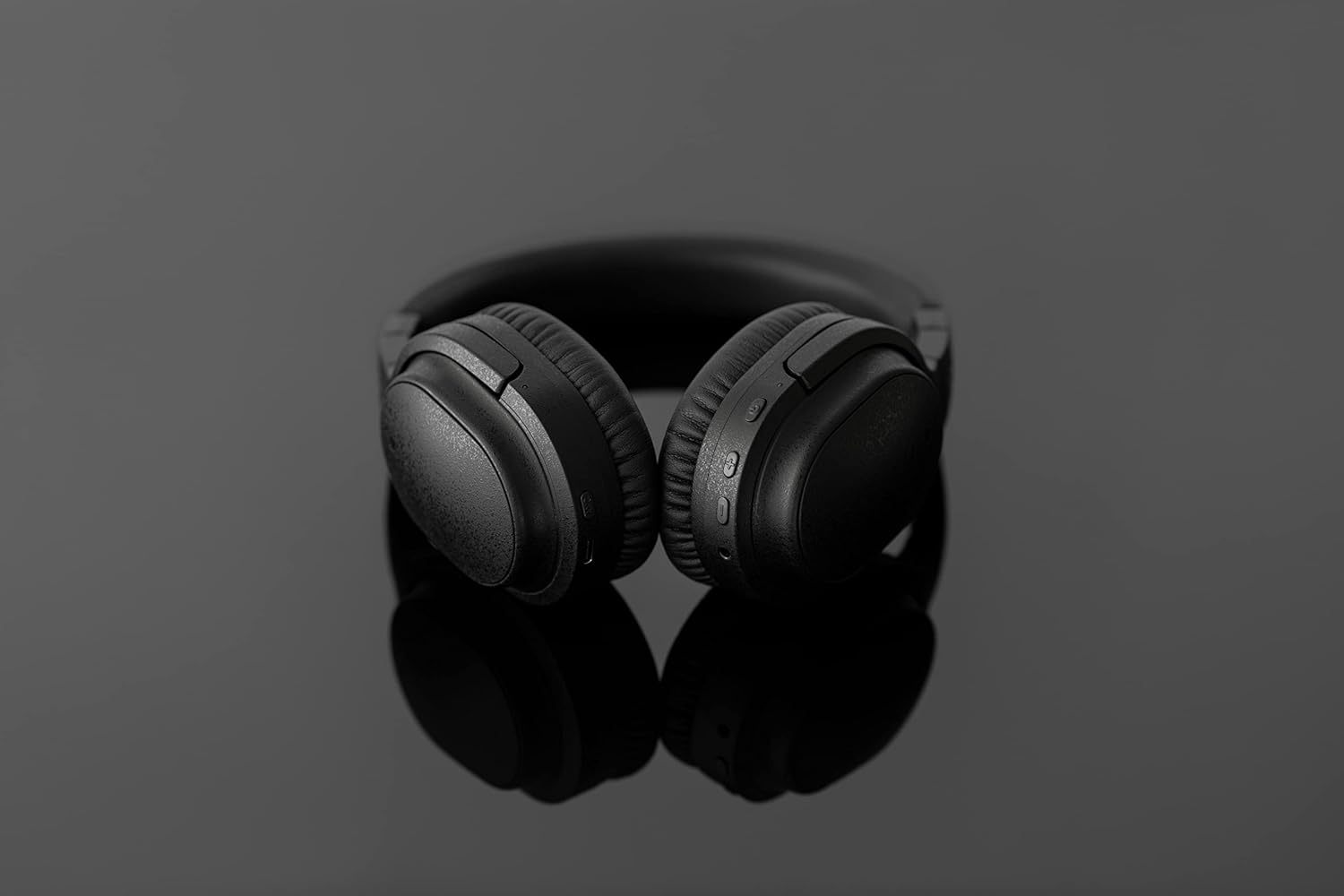
Image: The UX3000 headphones connected to a digital audio player using the 3.5mm audio cable.
5. Ntuziaka ọrụ
5.1 Gbanyụọ ma ọ bụ gbanyụọ
- Ike Na: Press and hold the Power button for 2 seconds. The LED indicator will flash blue.
- Gbanyụọ: Press and hold the Power button for 3 seconds. The LED indicator will turn off.
5.2 Nghaghachi egwu
- Gwuo/kwụsịtụ: Pịa bọtịnụ Multi-function ozugbo.
- Track na-esote: Pịa ma jide bọtịnụ Volume + maka 2 sekọnd.
- Gara aga Track: Pịa ma jide bọtịnụ olu maka sekọnd 2.
- Olu elu: Press the Volume + button briefly.
- Olu ala: Press the Volume - button briefly.
5.3 Hybrid Noise Cancelling (ANC)
The UX3000 features Hybrid Active Noise Cancelling, utilizing two microphones per ear cup to effectively reduce ambient noise. One microphone collects external noise, and the other collects sound from the driver unit, allowing for highly accurate anti-noise signal generation.
- Mee ka ANC rụọ ọrụ/gbanyụọ ya: Press the ANC button once. A voice prompt will confirm the status.

Image: A schematic diagram explaining how the Hybrid Noise Cancelling technology works with external and internal microphones.
5.4 aptX Low Latency Support
The UX3000 supports aptX Low Latency, which minimizes audio delay and ensures proper synchronization with visuals. This feature provides an optimal experience for watching movies and playing games, preventing noticeable lag between audio and video.

Image: A user wearing the UX3000 headphones, engaged with a laptop, highlighting their suitability for media and communication.
5.5 Ọrụ oku
- Azịza/Kwụsị Oku: Pịa bọtịnụ Multi-function ozugbo.
- Jụ oku: Pịa ma jide bọtịnụ ọtụtụ ọrụ maka sekọnd iri na abụọ.
- Mee ka onye enyemaka olu rụọ ọrụ: Pịa bọtịnụ Multi-function ugboro abụọ.
6. Nlekọta
To ensure the longevity and optimal performance of your Final UX3000 headphones, follow these maintenance guidelines:
- Nhicha: Wipe the headphones with a soft, dry cloth. Do not use abrasive cleaners, solvents, or strong chemicals.
- Nchekwa: When not in use, store the headphones in the provided soft carrying pouch to protect them from dust and scratches. The headphones are foldable for compact storage.
- Zere mmiri mmiri: Keep the headphones away from water, humidity, and extreme temperatures.
- Ịchaji: Do not leave the headphones connected to a charger for extended periods after they are fully charged.

Image: The UX3000 headphones shown in their folded configuration, ready for compact storage or travel.
7. Nchọpụta nsogbu
If you encounter issues with your Final UX3000 headphones, refer to the following common problems and solutions:
| Nsogbu | Ihe nwere ike ime | Ngwọta |
|---|---|---|
| Igwe ekweisi anaghị agba ọkụ. | Batrị dị ala. | Chajie ekweisi nke ọma. |
| Enweghị ike ijikọ na ngwaọrụ. | Headphones not in pairing mode; device's Bluetooth is off; too many paired devices. | Ensure headphones are in pairing mode (flashing red/blue). Turn on Bluetooth on your device. Forget previous pairings on your device and try again. |
| Enweghị ụda ma ọ bụ obere olu. | Olu dị oke ala; ekweisi anaghị ejikọ; mmepụta ọdịyo na-ezighi ezi ahọpụtara na ngwaọrụ. | Increase volume on both headphones and device. Reconnect headphones. Check audio output settings on your device. |
| Ịkagbu mkpọtụ adịghị arụ ọrụ. | ANC not activated; environmental noise too high for full cancellation. | Ensure ANC is activated. ANC is most effective for low-frequency, constant noises. |
| Voice prompts (e.g., "Battery Low") occur frequently even when charged. | Potential firmware issue or specific device interaction. | Ensure headphones are fully charged. If issue persists, contact customer support. |
8. Nkọwapụta
| Njirimara | Nkọwa |
|---|---|
| Aha Nlereanya | UX3000 BLK |
| Teknụzụ Njikọta | Wireless (Bluetooth), Wired (3.5 mm Jack) |
| Teknụzụ nzikọrịta ozi ikuku | Bluetooth 5.0 |
| Oke Bluetooth | 10 mita |
| Njikwa mkpọtụ | Mkpọtụ Ngwakọta |
| Ụdị ọkwọ ụgbọ ala ọdịyo | Ọkwọ ụgbọala dị ike |
| Oke ugboro ugboro | 20Hz-20kHz |
| Ndụ batrị | Ruo awa 35 |
| Oge Nchaji | Awa 2.5 |
| Ibu Ibu | 260 grams (9.2 ounces) |
| Ntinye ntị | N'elu Ntị |
| Ụdị Ihe | N'elu Ntị |
| Ngwa dakọtara | Bluetooth-enabled devices supporting HFP, HSP, A2DP, and AVRCP profiles, and specifically compatible with SBC, AAC, aptX, and aptX low latency codecs |
| Ihe eji eme ihe maka ngwaahịa | Ihe nkiri na egwuregwu |
| Onye nrụpụta | Audio ikpeazụ |
| Ụbọchị mbụ dị | Disemba 14, 2021 |
9. Akwụkwọ ikike na nkwado
The Final UX3000 headphones come with Final's 12 Month Worry-Free Warranty. This warranty covers defects in materials and workmanship under normal use for a period of 12 months from the date of original purchase.
For warranty claims, technical support, or any inquiries regarding your product, please contact Final customer service through the official Final website or your point of purchase. Please have your proof of purchase ready when contacting support.
Final is committed to providing friendly and responsive customer service to ensure your satisfaction.


