Okwu mmalite
The Vont App-Controlled Car Lights system allows you to customize your vehicle's interior lighting with a wide range of colors and effects. This system features 16 million color options, 30 unique scene modes, music synchronization, and a DIY mode for personalized lighting. This manual provides essential information for installation, operation, maintenance, and troubleshooting to ensure optimal performance and safety.
Kedu ihe dị na Igbe ahụ
- 21-feet LED strip light
- Onye njikwa
Ozi nchekwa
This product is designed with safety in mind. Please observe the following precautions:
- The LED strip light is flame retardant and water-resistant.
- It features high-temperature resistance for safe operation within a vehicle's interior.
- Ensure all wiring is securely routed and does not interfere with vehicle controls (pedals, steering wheel, gear shift, etc.).
- Do not attempt to modify or disassemble the product, as this may void the warranty and pose a safety risk.
- Debe ebe ụmụntakịrị na-apụghị iru.

Figure 1: Safety features of the Vont App-Controlled Car Lights, highlighting water resistance, high-temperature resistance, and flame retardant materials.
Ntọala na nwụnye
The Vont App-Controlled Car Lights are designed for quick and easy installation in various car models. Follow these steps for proper setup:
- Kwadebe elu: Ensure the surfaces where the strip lights will be placed are clean and dry for optimal adhesion.
- Lay Out the Strip: Unroll the 21-feet single-design LED strip light. Plan the routing of the strip within your car's interior, typically along the dashboard, under seats, and in footwells.
- Chekwaa eriri ahụ: Use the included cable ties or adhesive stickers to secure the strip light in place. Ensure the strip is firmly attached and does not hang loosely or obstruct any moving parts.
- Njikọ Ike: Plug the controller into your car's 12V power outlet (cigarette lighter socket).
- Ike Na: Turn on the car lights using the controller or the Vont Home App.
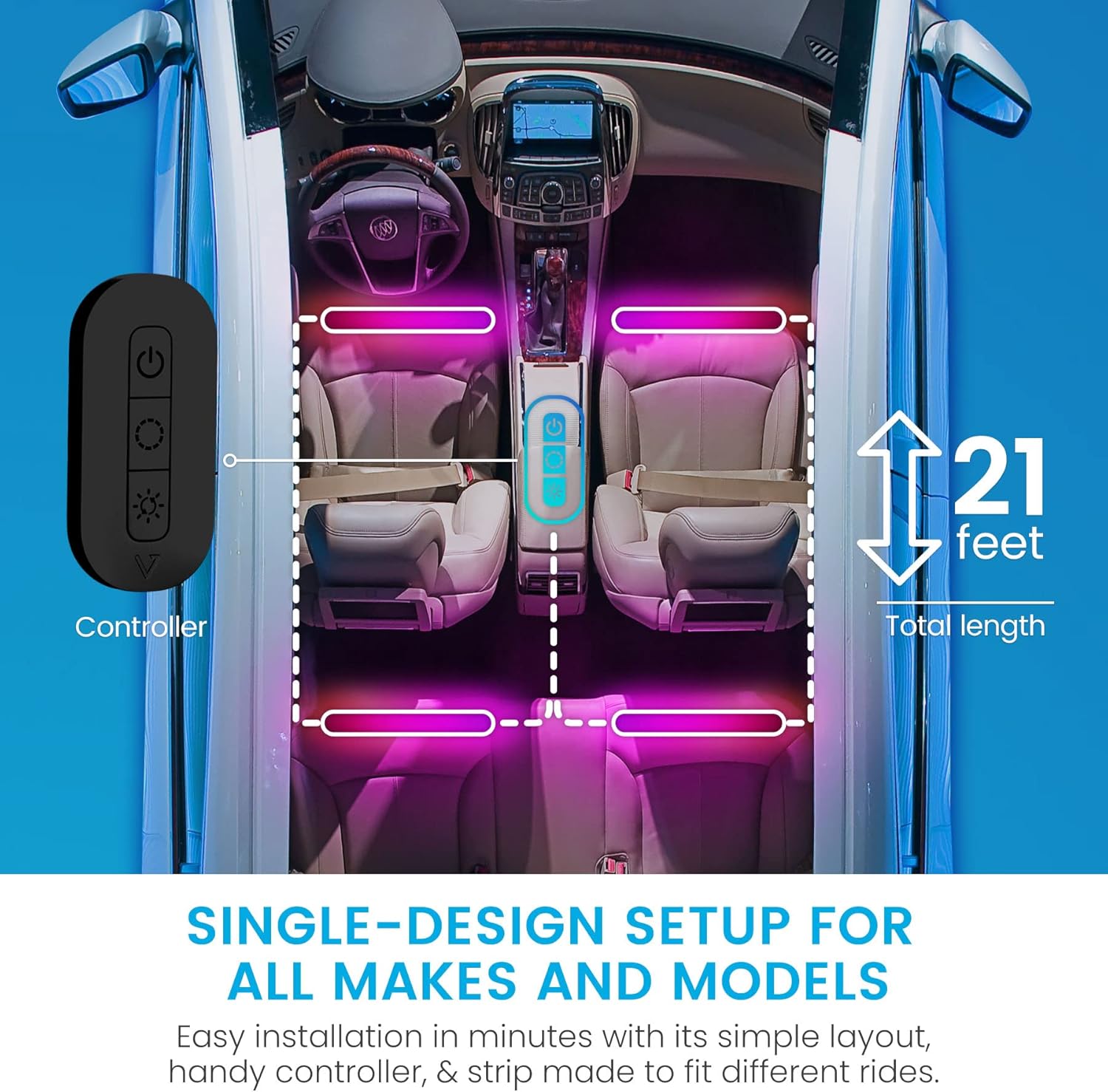
Figure 2: Recommended installation layout for the 21-foot LED strip light and controller.
Ntuziaka ọrụ
The Vont App-Controlled Car Lights can be operated via the included physical controller or the Vont Home App.
Using the Physical Controller
The physical controller provides basic functions:
- Bọtịnụ ike: Gbanyụọ ma ọ bụ gbanyụọ ọkụ.
- Bọtịnụ ụkpụrụ: Cycles through various preset scene modes.
- Bọtịnụ ihie: Adjusts the intensity of the lights.
Using the Vont Home App
For full control and customization, download the Vont Home App on your smartphone. The app allows you to:
- Select from 16 million colors.
- Choose from 30 unique scene modes.
- Create custom DIY lighting effects.
- Gbanwee ọkwa nchapụta.
- Activate Music Sync Mode.

Figure 3: Vont Home App interface for controlling car lights.
Ụdị mmekọrịta egwu
The Vont Car Lights feature a built-in microphone that allows the lights to synchronize with your car's music in real-time. To activate Music Sync Mode:
- Ensure the lights are powered on.
- Open the Vont Home App on your smartphone.
- Navigate to the Music Mode section within the app.
- Select your desired music synchronization settings. The lights will respond to the beats and rhythm of the music playing in your car.

Figure 4: Music Sync Mode in action, where lights respond to audio.
Nlekọta
To ensure the longevity and optimal performance of your Vont App-Controlled Car Lights, follow these maintenance guidelines:
- Nhicha: Gently wipe the LED strip lights with a soft, dry cloth to remove dust and debris. Avoid using harsh chemicals or abrasive cleaners.
- Lelee njikọ: Na-enyocha njikọ niile mgbe niile iji hụ na ha dị nchebe ma ghara imebi emebi.
- Adhesion: If the adhesive begins to weaken, re-secure the strip with additional cable ties or suitable automotive-grade adhesive tape.
- Nchekwa: If removing the lights for an extended period, store them in a cool, dry place away from direct sunlight.
Nchọpụta nsogbu
If you encounter issues with your Vont App-Controlled Car Lights, refer to the following troubleshooting tips:
| Nsogbu | Ihe nwere ike ime | Ngwọta |
|---|---|---|
| Ọkụ anaghị agbanwu. | Enweghị njikọ ike. | Ensure the controller is securely plugged into the 12V power outlet and the car's ignition is on. Check the car's fuse for the 12V outlet. |
| Ọkụ na-ada ada ma ọ bụ na-egbuke egbuke. | Low power or loose connection. | Check all connections for tightness. Ensure the car's battery voltage is sufficient. Adjust brightness via the app or controller. |
| Ngwa enweghị ike ijikọ na ọkụ. | Bluetooth issue or app malfunction. | Ensure Bluetooth is enabled on your phone. Restart the Vont Home App. Try restarting your phone. Ensure the lights are powered on. |
| Music Sync Mode not working. | Microphone obstruction or app setting. | Ensure the controller's microphone is not obstructed. Check Music Mode settings in the Vont Home App. Increase music volume. |
| Adhesive not holding. | Improper surface preparation or environmental factors. | Clean the surface thoroughly before re-applying. Use additional cable ties or stronger automotive-grade adhesive tape for reinforcement. |
Nkọwapụta
- Akara: Vont
- Nọmba nlereanya: CSL01-RBTV1-X1
- Agba: Nwa
- Ihe kpatara ụdị: Mwepu
- Eji akwadoro: Ime ụgbọ ala
- Ngwa gụnyere: 21-feet LED strip light and controller
- Njirimara Pụrụ Iche: Waterproof (Water Resistant)
- Ibu ihe: 8 ounces
- Ihe: Polyvinyl chloride (PVC)
- Agụnyere njikwa anya?: No (App controlled)
- Ọnụọgụ nke Mpekere: 1
- Ụdị Fit Automotive: Universal Fit
- UPC: 850013449538
- Wattage: 18 watt
- Voltage: 12 volts (DC)
- Ụdị isi iyi ọkụ: Ikanam
Akwụkwọ ikike na nkwado
Vont offers a lifetime warranty for this product, covering loss, theft, and defects in materials and workmanship for as long as you own your car lights. For any questions, concerns, or support needs, Vont Customer Satisfaction Wizards are available 24/7. Please refer to the Vont official websaịtị ma ọ bụ akwụkwọ ịzụrụ ihe gị maka nkọwa kọntaktị.


