1. Ngwaahịa gafereview
The USX MOUNT Soundbar Mount (Model XAS009) is designed to securely attach your soundbar either above or below your television. This versatile bracket supports soundbars weighing up to 16 lbs (7.26 kg) and is compatible with various TV wall mounts, including fixed, tilt, and full-motion types. It accommodates TVs with VESA patterns up to 600x400 mm. The design features detachable extension plates that swivel up to 180 degrees, allowing for flexible soundbar positioning.
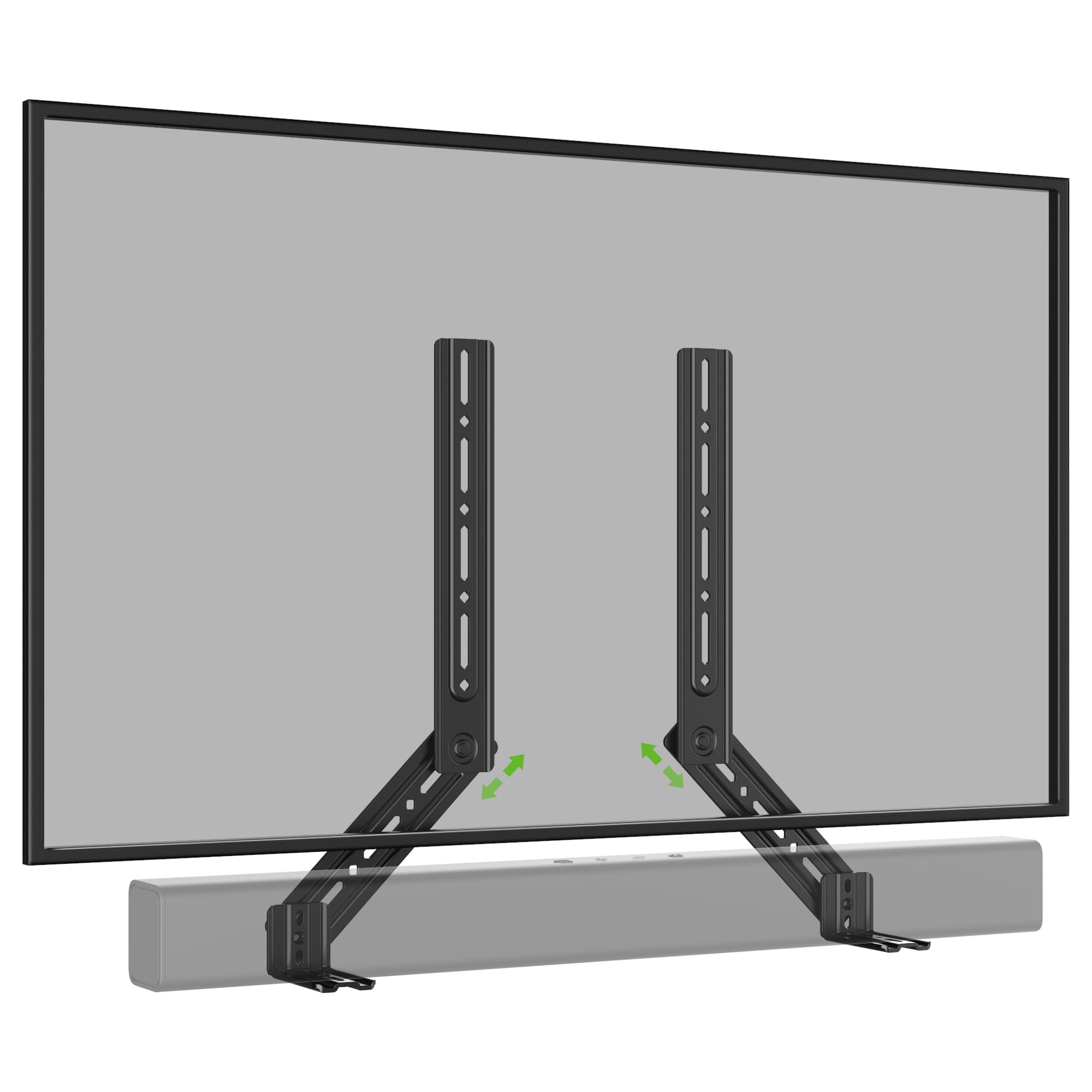
Foto 1: Ofeview of the USX MOUNT Soundbar Mount XAS009.
2. Ozi nchekwa
Please read and understand all instructions before installation and use. Failure to follow these instructions may result in property damage, serious injury, or death. If you have any questions, contact customer service.
- Ike ibu: Agafela ikike ịdị arọ kacha nke 16 lbs (7.26 n'arọ).
- Nha TV: This mount may not fit TVs larger than 83 inches.
- Ndakọrịta VESA: Ensure your TV's VESA pattern is within 600x400 mm.
- Soundbar Mounting Holes: Verify your soundbar's mounting hole specifications match the bracket.
- Elu nwụnye: Ensure the wall or TV mount can safely support the combined weight of the TV, soundbar, and mount.
- Ngwa: Jiri ngwaọrụ kwesịrị ekwesị maka nrụnye.
3. Ihe ngwugwu
Carefully unpack the box and ensure all parts are present and undamaged. If any parts are missing or damaged, do not attempt to install. Contact customer support for assistance.
- Soundbar Mount Brackets (2 pieces)
- Detachable Extension Plates (L-shaped brackets)
- Assorted Screws, Washers, and Spacers for various VESA sizes and soundbar types
- Akwụkwọ ntuziaka

Image 2: Illustration of universal compatibility, maximum load, and VESA size support.
4. Nkọwapụta
| Njirimara | Nkọwapụta |
|---|---|
| Nọmba nlereanya | XAS009 |
| Ike ibu kacha | 16 lbs (7.26 n'arọ) |
| Compatible TV VESA Patterns | Ruo 600x400 mm |
| Ndozigharị Swivel | Ruo ogo 180 |
| Ụdị nkwụnye | Above or Under TV (compatible with TV wall mounts) |
| Ihe onwunwe | Steel (implied by "sturdy") |
| Agba | Agba ntụ |
5. Nwụnye
The USX MOUNT Soundbar Mount offers flexible installation options, allowing you to attach your soundbar above or below your TV. The interlocking teeth on the arm connections ensure a secure fit.
5.1. Determine Mounting Position
Decide whether you want to mount the soundbar above or below your television. The brackets are designed to accommodate both configurations.

Image 3: Visual guide for installing the soundbar mount above or below the TV.
5.2. Attach Brackets to TV Mount
The soundbar mount brackets attach directly to your existing TV wall mount. They are compatible with full-motion, fixed, and tilting TV mounts. The brackets are designed to slide into place with the TV's VESA mounting arms.
Video 1: Demonstration of attaching the soundbar brackets to a TV mount, showing how they integrate with the TV's mounting arms.
5.3. Attach Soundbar to Brackets
Depending on your soundbar's design, you can attach it to the brackets using various methods:
- Back Hole Mounting: Use the provided screws and washers to secure the soundbar through its back mounting holes to the brackets.
- Key Hole Mounting: For soundbars with keyhole slots, align them with the bracket's keyhole screws and slide to lock.
- Bottom Hole Mounting (with L-shaped brackets): If your soundbar requires mounting from the bottom, use the included L-shaped brackets. Attach the L-shaped brackets to the main soundbar brackets, then secure your soundbar to the L-shaped brackets.

Foto 4: Zuru ezu view of different soundbar attachment methods: back hole, keyhole, and bottom hole using L-shaped brackets.
Image 5: Dimensions and design of the practical L-shaped hooks for bottom-mounted soundbars.

Image 6: Visual guide for connecting various soundbars using back, key, or bottom holes.
5.4. Final Adjustments
Once the soundbar is attached, you can make final adjustments to its position. The detachable extension plates allow for up to 180 degrees of swivel, ensuring optimal placement and sound projection.

Image 7: Diagram illustrating the 360-degree swivel capability of the soundbar mount for precise positioning.

Image 8: The soundbar mount allows the soundbar to move in conjunction with a full-motion TV mount, maintaining alignment.
6. Ntuziaka ọrụ
The USX MOUNT Soundbar Mount is designed for a set-and-forget installation. Once installed, the primary operation involves adjusting the soundbar's angle or position if your TV mount allows for movement.
- Ndozi Swivel: The extension plates can swivel up to 180 degrees. Loosen the locking mechanism, adjust the angle, and then re-tighten to secure the soundbar in your desired position.
- TV Mount Movement: If your TV is on a full-motion mount, the soundbar will move in conjunction with the TV, maintaining its relative position.
7. Nlekọta
The soundbar mount requires minimal maintenance to ensure its longevity and continued performance.
- Nhicha: Wipe the mount with a soft, dry cloth to remove dust. Avoid abrasive cleaners or solvents.
- Nyocha oge: Na-elele skru na njikọ niile mgbe niile iji hụ na ha siri ike ma sie ike. Mee ka ọ sie ike ọzọ ma ọ dị mkpa.
- Oke ibu: Do not place additional weight on the soundbar or mount beyond the specified capacity.
8. Nchọpụta nsogbu
If you encounter any issues during or after installation, refer to the following common solutions:
- Soundbar not fitting: Double-check your soundbar's weight and mounting hole pattern against the specifications. Ensure you are using the correct screws and spacers.
- Ugwu ahụ adịghị mma: Verify that all screws are securely tightened, especially those connecting the mount to the TV and the soundbar to the mount. Ensure the TV mount itself is properly installed on the wall.
- Difficulty with swivel adjustment: Loosen the adjustment knobs or bolts slightly before attempting to swivel. Do not force the movement.
- Akụkụ na-efu: Refer to the "Package Contents" section. If parts are missing, contact USX MOUNT customer support.
9. Akwụkwọ ikike na nkwado
USX MOUNT products are manufactured with quality and durability in mind. For warranty information or technical support, please refer to the official USX MOUNT websaịtị ma ọ bụ kpọtụrụ ndị ahịa ha ozugbo. Debe akwụkwọ nnata ịzụrụ maka akwụkwọ ikike.
Ozi mkpọtụrụ: Biko gaa na USX MOUNT Store on Amazon for further details and support resources.


