1. Okwu mmalite
This manual provides essential information for the safe and efficient operation of your Motorola Solutions T380 Talkabout FRS Two-Way Radios. Please read this manual thoroughly before using your radios to ensure proper setup, functionality, and to maximize your communication experience.
2. Kedu ihe dị na Igbe ahụ
Your Motorola Solutions T380 Two-Way Radio package includes the following items:
- 2 x Motorola T380 Two-Way Radios
- 2 x Mpekere eriri
- 2 x Single Unit Charging Docks
- 1 x PSU with Y-Cable (for charging both docks simultaneously)
- 2 x Lanyards
- 2 x Ndị na -eme mkpọtụ
- 2 x Lithium Ion Rechargeable Batteries
- 1 x Akwụkwọ ntuziaka onye ọrụ

3. Ngwaahịa gafereview
The Motorola T380 Talkabout FRS Two-Way Radios are designed for reliable communication in various environments. Key features include:
- FRS Radios: License-free operation, compatible with all FRS two-way radios.
- Channels & Privacy Codes: 22 channels with 121 privacy codes for clear communication.
- Ikpuchi ihu igwe: IP54 rating ensures protection against dust and splashing water.
- NOAA/EC Weather Channels & Alerts: Stay informed about changing weather conditions.
- Mfe ijikọ: Simplifies group communication setup.
- Ngosipụta azụ azụ: Na-enye visibiliti n'ọnọdụ ìhè dị ala.
- Auto Key Lock & Time-Out Timer: Prevents accidental setting changes and conserves battery.
- Batrị enwere ike ịgbanye: Lithium-Ion batteries included for extended use.
3.1 Njikwa na Ngosipụta
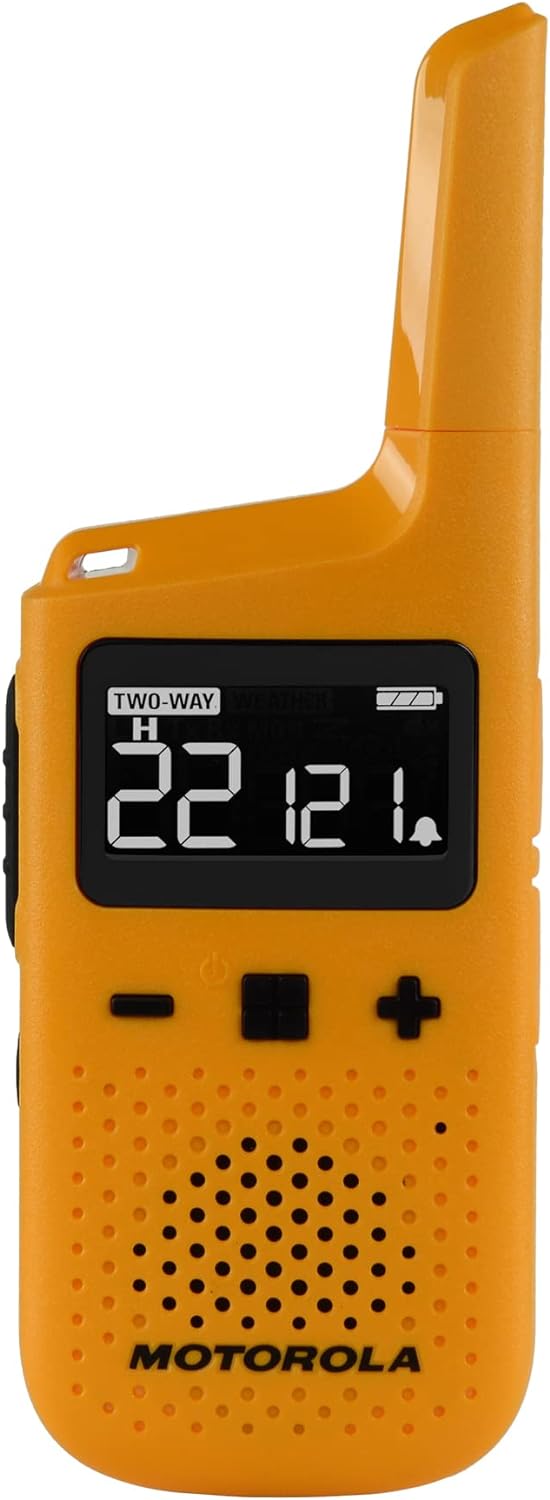
The front panel features a backlit display showing channel, privacy code, battery status, and other indicators. Buttons for channel selection, menu access, and call functions are intuitively placed for ease of use.
3.2 Ike na batrị
The T380 radios utilize rechargeable Lithium Ion batteries. They can be charged using the included single unit charging docks and Y-cable PSU. The battery life is designed for extended use, providing reliable power for your adventures.

3.3 Durability and Design
The compact and durable design of the T380 radios makes them suitable for outdoor activities. Their IP54 weather-resistant rating protects them from light rain and splashes, ensuring functionality in various conditions.

4. Nhazi
4.1 Ntinye batrị na Nchaji
- Gbaa mbọ hụ na agbanyụrụ redio.
- Open the battery compartment cover on the back of the radio.
- Insert the Lithium Ion battery pack, ensuring correct polarity.
- Mechie mkpuchi nke batrị batrị nke ọma.
- Place the radio into one of the charging docks.
- Connect the Y-cable PSU to both charging docks and then to a power outlet.
- The battery indicator on the radio's display will show charging status. Charge fully before first use.
4.2 Na-agbakwunye Ngwa
- Mpempe eriri: Align the belt clip with the slots on the back of the radio and slide it down until it clicks into place.
- Lanyard/Carabiner: Thread the lanyard or carabiner through the designated loop at the bottom of the radio for secure carrying.
5. Ntuziaka ọrụ
5.1 Gbanyụọ/ gbanyụọ
To power on or off the radio, press and hold the Power button (usually located on the front panel) until the display illuminates or turns off.
5.2 Nhọrọ ọwa
Use the Up/Down buttons to select one of the 22 available channels. Ensure all radios in your group are set to the same channel for communication.
5.3 Koodu Nzuzo
To enhance privacy and reduce interference, select one of the 121 privacy codes. All radios in your group must use the same channel and privacy code to communicate.
5.4 Nyefee na ịnata
- To transmit, press and hold the Push-to-Talk (PTT) button on the side of the radio. Speak clearly into the microphone.
- Release the PTT button to receive messages.
5.5 Mkpọchi igodo
Activate the Key Lock feature to prevent accidental button presses. Refer to the full user manual for specific instructions on how to activate and deactivate this feature.
5.6 NOAA Weather Alerts
The T380 radios can receive NOAA/EC Weather Channels and Alerts. Access this feature through the radio's menu to stay updated on severe weather conditions.
5.7 Njikọ dị mfe
The easy pairing function allows for quick synchronization of all radios in your group to the same channel and privacy code. Consult the full user manual for detailed steps on using this feature.
Vidiyo 5.1: Ngwaahịa a kwụsịrịview video for the Motorola Solutions T380 Two-Way Radio, demonstrating its features and components.
6. Nlekọta
- Nhicha: Jiri nwayọọ, damp cloth to clean the radio's exterior. Do not use abrasive cleaners or solvents.
- Nlekọta batrị: To prolong battery life, avoid fully discharging the batteries frequently. Store radios and batteries in a cool, dry place when not in use.
- Nchekwa: If storing for extended periods, remove batteries and store them separately.
7. Nchọpụta nsogbu
If you encounter issues with your Motorola T380 radios, try the following basic troubleshooting steps:
- Enweghị ike: Gbaa mbọ hụ na etinyere batrị nke ọma yana chajịkwa ya nke ọma.
- Enweghị ike ịnyefe/nata: Verify that both radios are on the same channel and privacy code. Check battery levels. Ensure the PTT button is fully pressed when transmitting.
- Ogo ọdịyo adịghị mma: Move closer to the other radio. Check for obstructions between radios. Ensure volume is set appropriately.
- Ntinye aka: Change to a different channel and privacy code combination.
For more detailed troubleshooting or persistent issues, refer to the comprehensive user manual included in your package or contact Motorola Solutions customer support.
8. Nkọwapụta
| Njirimara | Nkọwapụta |
|---|---|
| Nọmba nlereanya | T380 |
| Ụdị | Ngwọta Motorola |
| Akụkụ ngwaahịa | 1.85 x 0.83 x 5.33 sentimita asatọ |
| Ibu Ibu | 3.52 ounces |
| Ọnụọgụ nke ọwa | 22 |
| Koodu nzuzo | 121 |
| Oke ugboro ugboro | 462.5500 - 467.7125 MHz |
| Oke Okwu Kachasị | Up to 25 Miles (range varies based on terrain and conditions) |
| Ọkwa Nguzogide mmiri | IP54 na-eguzogide ihu igwe |
| Ụdị batrị | Lithium ion (gụnyere) |
| Atụmatụ pụrụ iche | Call Alert, NOAA/EC Weather Channels and Alerts, Easy Pairing, Backlit Display, Auto Key Lock, Time-Out Timer |
9. Akwụkwọ ikike na nkwado
Motorola Solutions T380 Talkabout FRS Two-Way Radios typically come with a manufacturer's warranty. Please refer to the warranty card included in your product packaging for specific terms, conditions, and duration of coverage. For technical support, service, or warranty claims, please contact Motorola Solutions customer service through their official websaịtị ma ọ bụ ozi kọntaktị enyere na akwụkwọ ngwaahịa gị.


