1. Okwu mmalite
This manual provides essential information for the safe and efficient operation of your RCF Art 945-A Powered Speaker. Please read this manual thoroughly before using the product and retain it for future reference. The RCF Art 945-A is a high-performance, bi-amplified active speaker designed for professional audio applications, featuring a 15-inch neodymium woofer and a 4-inch titanium/neodymium compression driver, delivering 2,100W of power.
2. Ozi nchekwa
Ntuziaka nchekwa dị mkpa:
- Gụọ ntuziaka ndị a.
- Debe ntuziaka ndị a.
- Ṅaa ntị n'ịdọ aka ná ntị niile.
- Soro ntuziaka niile.
- Ejila ngwa a n'akụkụ mmiri.
- Jiri akwa kpọrọ nkụ hichaa naanị.
- Akwụsịla oghere ikuku ikuku ọ bụla. Wụnye dị ka ntuziaka onye nrụpụta si dị.
- Awụnyela n'akụkụ ebe okpomọkụ ọ bụla dị ka radiators, ndekọ okpomọkụ, stovu, ma ọ bụ ngwa ndị ọzọ (gụnyere amplifiers) nke na-emepụta okpomọkụ.
- Emebila ebumnuche nchekwa nke plọg a na-agbapụta ma ọ bụ ntọ ala. Plọg nwere agụba abụọ nwere otu sara mbara karịa nke ọzọ. Ụdị nkwụnye ala nwere agụba abụọ na oghere mgbada nke atọ. A na-enye oghere sara mbara ma ọ bụ akụkụ nke atọ maka nchekwa gị. Ọ bụrụ na plọg e nyere adabaghị n'ime oghere gị, kpọtụrụ onye na-ahụ maka ọkụ eletrik ka ọ dochie ebe nkwụnye ahụ ochie.
- Chebe eriri ọkụ ka ị ghara ịgagharị ma ọ bụ tuo ya, ọkachasị na plọg, ebe nchekwa dị mma, na ebe ha si na ngwa ahụ pụta.
- Jiri naanị mgbakwunye / ngwa ndị nrụpụta akọwapụtara.
- Kwupu ngwa a n'oge oke mmiri ozuzo ma ọ bụ mgbe ejighi ya ogologo oge.
- Tụtụ aka n'aka ndị ọrụ ruru eru. A na-achọ ọrụ mgbe ngwa ahụ mebiri emebi n'ụzọ ọ bụla, dị ka eriri ọkụ ma ọ bụ plọg mebiri emebi, mmiri mmiri wụfuru ma ọ bụ ihe dabara n'ime ngwa ahụ, ekpughere ngwa ahụ na mmiri ozuzo ma ọ bụ mmiri, anaghị arụ ọrụ nke ọma. , ma ọ bụ ahapụla ya.
Ịkpachara anya: To prevent electrical shock, do not remove the cover. No user-serviceable parts inside. Refer servicing to qualified personnel.
3. Ihe ngwugwu
Nyochaa na etinyere ihe niile edepụtara n'okpuru na ngwugwu gị:
- RCF Art 945-A Powered Speaker
- Igwe ọkụ ọkụ
- Vertical mount bracket
- Osisi ugwu
- Nchekwa mmiri ozuzo
- Akwụkwọ ntuziaka (akwụkwọ a)
4. Ngwaahịa gafereview

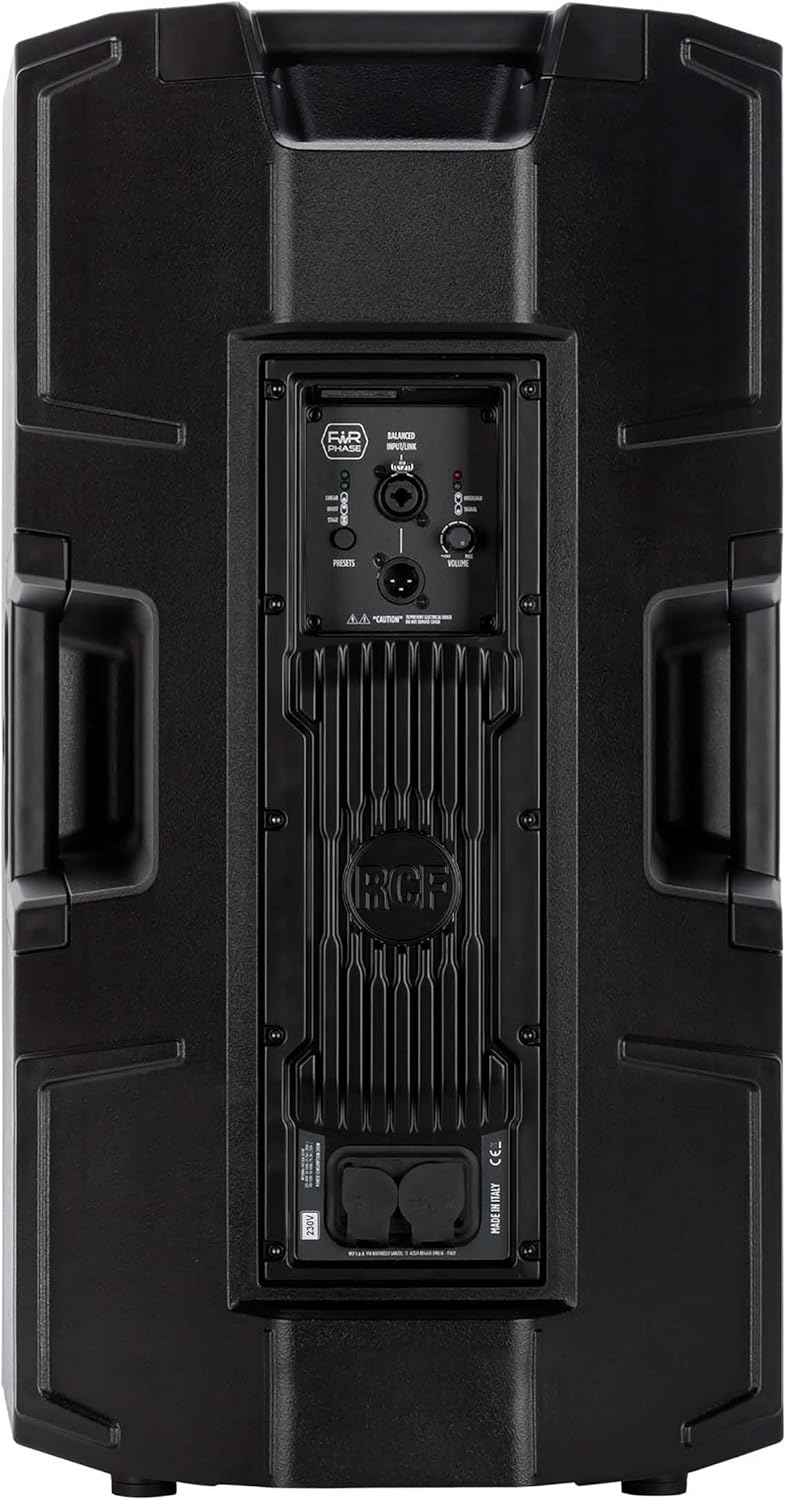


4.1. Rear Panel Controls and Connections
- BALANCED INPUT/LINK (XLR): XLR input for audio signal and XLR link output to connect to another speaker.
- PRESETS Button: Cycles through different DSP presets (LINEAR, BOOST, STAGE) to optimize sound for various applications.
- LINEAR LED: Indicates the 'Linear' preset is active, providing a flat frequency response.
- BOOST LED: Indicates the 'Boost' preset is active, enhancing bass and treble frequencies.
- STAGE LED: Indicates the 'Stage' preset is active, optimized for stage nlekota ngwa.
- Mpịakọta olu: Adjusts the overall output level of the speaker.
- OVERLOAD LED: Illuminates when the input signal is too high, indicating potential clipping. Reduce input level if this LED lights up consistently.
- Ọkụ ọkụ: Illuminates when an audio signal is present at the input.
- POWERCON TRUE1 Input: Secure power connector for AC mains input.
- POWERCON TRUE1 Link: Power output to link power to another speaker.
5. Nhazi
5.1. Ntinye
The RCF Art 945-A speaker can be used in various configurations:
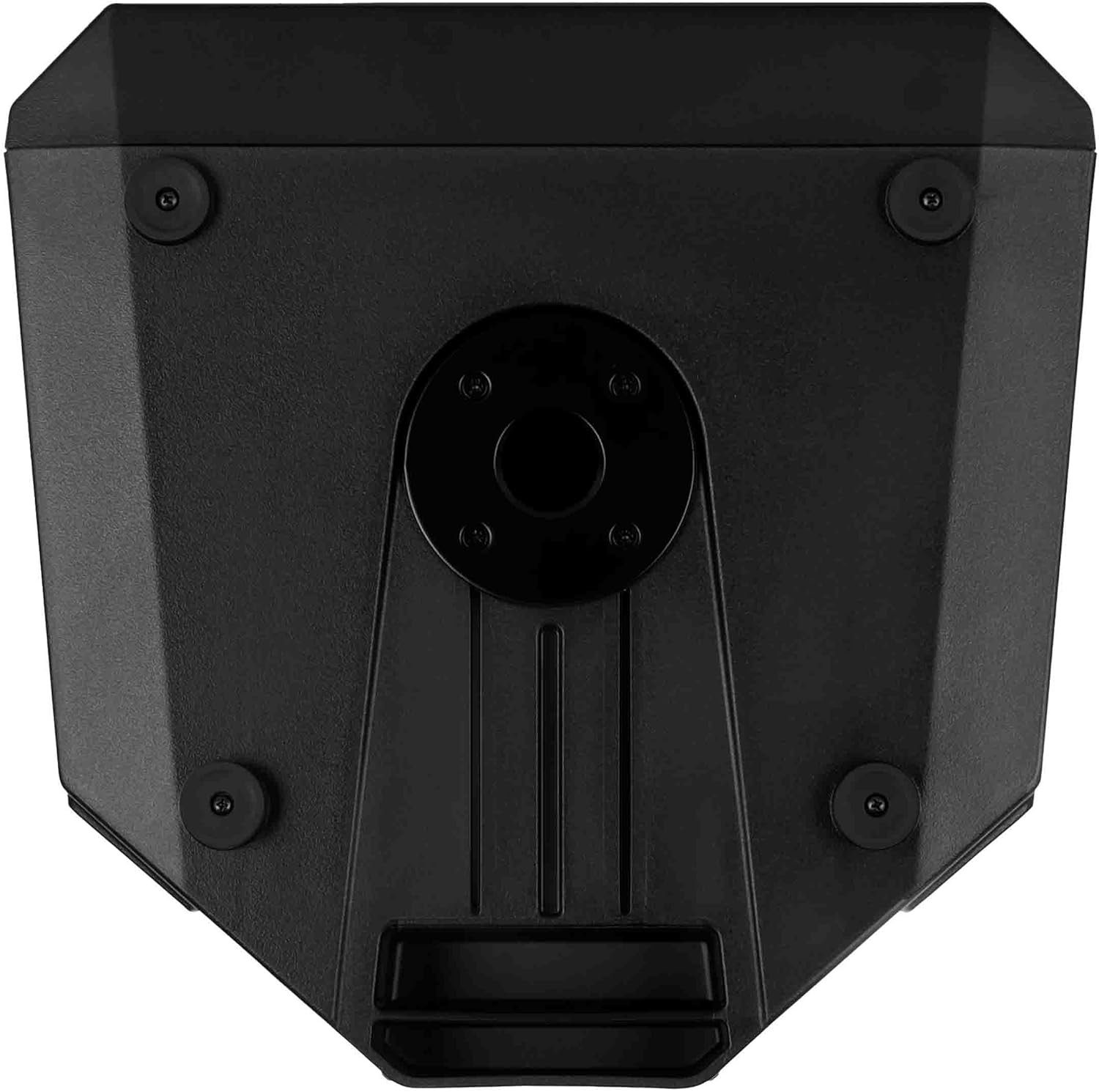
- Ogwe osisi: Insert the speaker onto a standard 35mm speaker pole or tripod stand using the integrated pole mount socket on the bottom of the speaker. Ensure the stand is stable and rated for the speaker's weight (approximately 49.3 lbs / 22.4 kg).
- Ndokwa ala: The speaker can be placed directly on a flat, stable surface. The rubber feet on the bottom provide stability and isolation.
- Stage Nyochaa: Nhazi kabinet na-enye ohere maka ojiji dịkatage monitor. Position the speaker on its side with the appropriate angle for monitoring.
- Ịkwanye mgbidi: Utilize the provided vertical mount bracket for secure wall installation. Ensure the wall structure can support the speaker's weight.
5.2. Njikọ ike
- Ensure the speaker's VOLUME knob is set to minimum (fully counter-clockwise).
- Connect the supplied Powercon TRUE1 power cable to the POWERCON TRUE1 Input on the rear panel of the speaker.
- Connect the other end of the power cable to a suitable AC mains outlet. Verify that the voltage matches the speaker's requirements (e.g., 100-120V or 220-240V).
- If linking power to another speaker, use a Powercon TRUE1 link cable from the POWERCON TRUE1 Link output to the input of the next speaker.
5.3. Njikọ ọdịyo
- Connect your audio source (e.g., mixer, audio interface) to the BALANCED INPUT (XLR) on the rear panel using a balanced XLR cable.
- If connecting multiple speakers in a daisy chain, use an XLR cable from the BALANCED LINK output of the first speaker to the input of the next speaker.
6. .rụ ọrụ
6.1. Ịgbanye / gbanyụọ
- Before powering on, ensure all connections are secure and the VOLUME knob is at its minimum setting.
- Locate the power switch (typically near the power input) and switch it to the 'ON' position. The power LED on the front of the speaker will illuminate.
- To power off, set the VOLUME knob to minimum, then switch the power switch to 'OFF'.
6.2. Njikwa olu
The VOLUME knob on the rear panel controls the output level of the speaker. Slowly turn the knob clockwise to increase the volume to the desired level. Monitor the OVERLOAD LED to prevent clipping.
6.3. Preset Selection
The PRESETS button allows you to select between three different DSP modes:
- LINEAR: Provides a flat frequency response, suitable for general sound reinforcement where a neutral sound is desired.
- kwalite: Enhances low and high frequencies, often used for music playback or when a more pronounced bass and treble response is needed.
- STAGE: Kachasịkwara maka ojiji dị katage monitor, providing clarity and feedback suppression for performers.
Press the PRESETS button repeatedly to cycle through these modes. The corresponding LED (LINEAR, BOOST, or STAGE) will illuminate to indicate the active preset.
6.4. Signal and Overload Indicators
- Ọkụ ọkụ: This green LED illuminates when an audio signal is detected at the input. It indicates that the speaker is receiving an audio signal.
- OVERLOAD LED: This red LED illuminates when the input signal level is too high, causing the amplifier to clip. If this LED lights up frequently or stays on, reduce the input level from your source or the speaker's VOLUME knob to prevent distortion and potential damage.
7. Nlekọta
7.1. Nhicha
To maintain the appearance and performance of your speaker:
- Disconnect the speaker from the power supply before cleaning.
- Use a soft, dry cloth to wipe down the cabinet.
- Maka unyi isi ike, ntakịrị damp cloth with mild soap can be used, followed by a dry cloth.
- Ejila ihe nhicha, ihe mgbaze, ma ọ bụ kemịkalụ siri ike, n'ihi na ha nwere ike imebi njedebe.
- Keep the grille free of dust and debris to ensure proper sound dispersion.
7.2. Nchekwa
Mgbe a naghị eji ya ogologo oge:
- Store the speaker in a cool, dry place, away from direct sunlight and extreme temperatures.
- If possible, use the original packaging or a protective cover to shield the speaker from dust and physical damage.
8. Nchọpụta nsogbu
This section addresses common issues you might encounter with your RCF Art 945-A speaker.
| Nsogbu | Ihe nwere ike ime | Ngwọta |
|---|---|---|
| Enweghị mmepụta ụda |
|
|
| Distorted sound / OVERLOAD LED on |
|
|
| Mkpọtụ mkpọtụ ma ọ bụ mkpọtụ |
|
|
| Ọkà okwu anaghị agbanye |
|
|
If the problem persists after attempting these solutions, please contact RCF customer support or a qualified service technician.
9. Nkọwapụta
The following table outlines the technical specifications for the RCF Art 945-A Powered Speaker:
| Njirimara | Nkọwapụta |
|---|---|
| Aha Nlereanya | 13000691 |
| Nọmba Nlereanya ihe | ART945-A |
| Ụdị Ọkà Okwu | Woofer |
| Dayameta Woofer | 15 sentimita asatọ |
| Dayameta Tweeter | 4 sentimita asatọ |
| Ike Nwepu kacha elu | 2100 Watt |
| Ọnọdụ mmepụta ọdịyo | Klas D |
| Teknụzụ Njikọta | Coaxial |
| Isi Iyi Ike | Igwe ọkụ eletrik |
| Usoro njikwa | Touch (for presets) |
| Akụkụ ngwaahịa | 16.34"W x 28.23"H |
| Ibu Ibu | 49.3 pound (22.4 Kilogram) |
| Ngwa gụnyere | Vertical mount bracket, pole mount, rain protection |
| Ụdị nkwụnye | Ugwu Mgbidi, Ugwu Pole |
| Enweghị mmiri | Ụgha |
| Onye nrụpụta | RCF |
| ASIN | B09GWCSX7R |
10. Akwụkwọ ikike
The RCF Art 945-A Powered Speaker comes with a Akwụkwọ ikike nwere oke. Specific terms and conditions of the warranty may vary by region and retailer. Please refer to the warranty card included with your product or visit the official RCF website for detailed warranty information. Retain your proof of purchase for any warranty claims.
11. Nkwado
For technical assistance, service, or further information regarding your RCF Art 945-A Powered Speaker, please contact RCF customer support:
- Nkwado n'ịntanetị: Visit the official RCF websaịtị (www.rcf.it) for FAQs, product registration, and support resources.
- Ozi mkpọtụrụ: Refer to the contact section on the RCF website for regional phone numbers or email support.
When contacting support, please have your product model (ART945-A) and serial number (if applicable) ready.


