1. Okwu mmalite
Daalụ maka ịzụrụasing the YABER V5 Mini Projector. This manual provides detailed instructions for setting up, operating, and maintaining your projector to ensure optimal performance and longevity. Please read this manual thoroughly before use and keep it for future reference.

Image: The YABER V5 Mini Projector, shown with its included carrying bag and mini tripod, highlighting its portability and accessories.
2. Kedu ihe dị na Igbe ahụ
Upon opening your YABER V5 Mini Projector package, please verify that all the following items are included:
- YABER V5 Mini Projector
- Akpa na-ebu
- Obere Tripod
- Njikwa anya (batrị etinyeghị)
- Igwe ọkụ ọkụ
- HDMI USB
- Igwe AV
- Akwụkwọ ntuziaka onye ọrụ
- Lens mkpuchi

Image: The retail packaging for the YABER V5 Mini Projector, indicating the product and its branding.
3. Akụrụngwa Ngwaahịa
- Dual-Band WiFi Connectivity (5G/2.4G): The V5 supports both 5GHz and 2.4GHz WiFi bands, providing faster and more stable wireless screen mirroring for smoother video and image transmission from your smartphone or tablet.
- Bluetooth Bluetooth: Equipped with Bluetooth 5.0, allowing seamless connection to external Bluetooth speakers, headphones, or AirPods for enhanced audio experience.
- Enhanced Brightness & 1080P Full HD Support: Features enhanced German jade glass lenses and increased brightness for clearer and more vibrant images. Supports Full HD 1080P resolution for a high-quality viewahụmahụ.
- Giant Screen & Zoom Function: Capable of projecting images from 45 to 200 inches. The digital zoom function allows you to reduce the image size from 100% to 50% using the remote control without moving the projector.
- Ndakọrịta sara mbara: Multiple input ports including HDMI, USB, VGA, AV, Audio, and TF card ensure compatibility with a wide range of devices such as TV boxes, Fire Stick TV, Chromecast, PCs, laptops, tablets, and smartphones.
- Ogologo Lamp Ndụ: Utilizes SmarEco technology to minimize power consumption, extending the lamp's lifespan up to 100,000 hours.

Image: Illustration of the projector's dual-band (2.4GHz and 5GHz) WiFi capability, emphasizing faster transmission speeds for a smoother experience.

Image: The projector wirelessly connected to various Bluetooth audio devices like headphones and speakers, demonstrating its Bluetooth 5.0 capability.
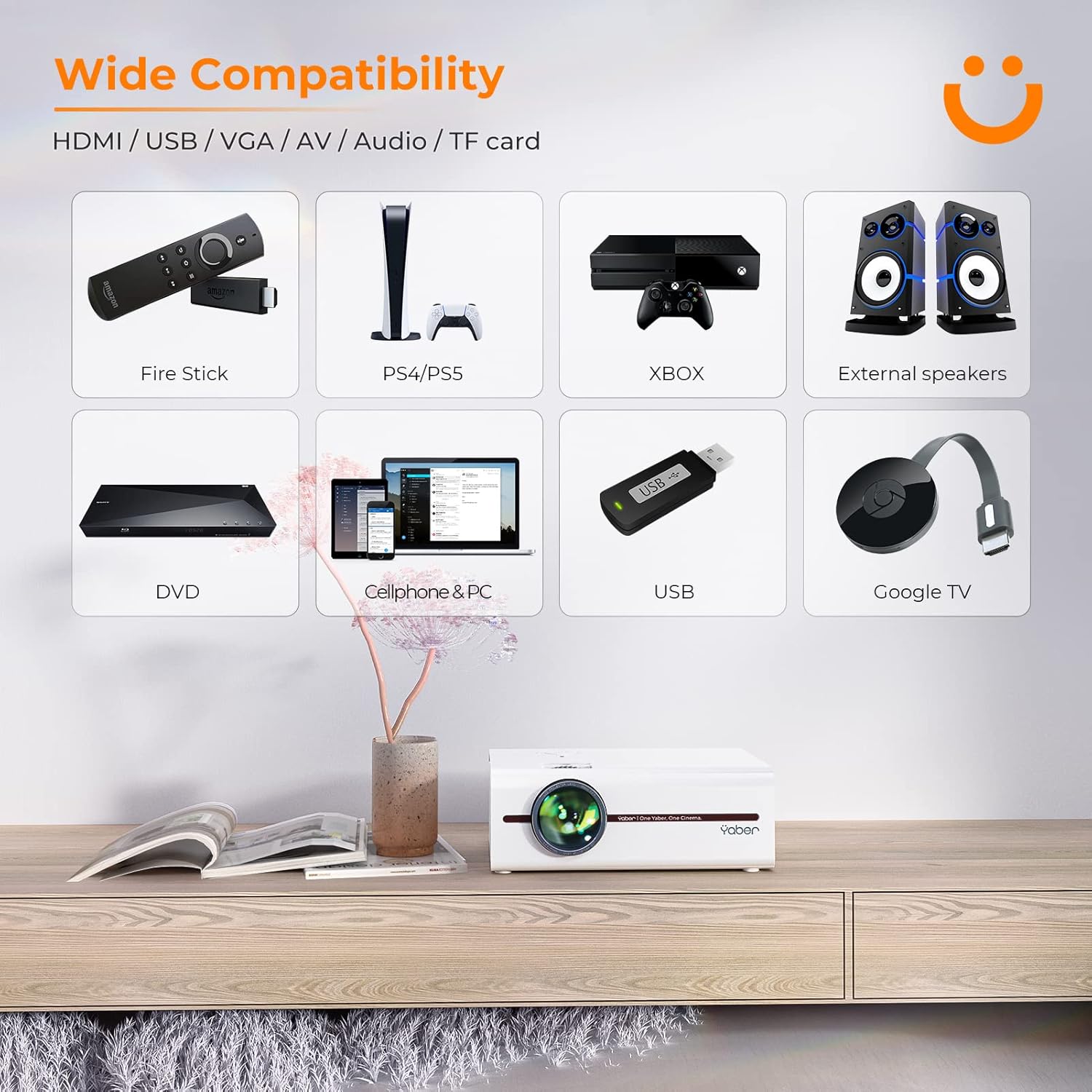
Image: A visual representation of the projector's wide range of compatible devices, including Fire Stick, PS4/PS5, Xbox, external speakers, DVD players, cellphones, PCs, USB drives, and Google TV, connected via various ports.
4. Nhazi
4.1 Initial Placement and Power
- Place the projector on a stable, flat surface or mount it using a compatible tripod. Ensure proper ventilation around the unit.
- Jikọọ eriri ọkụ eletrik ahụ na ntinye ike nke ihe ngosi ahụ wee jikọọ na ebe a na-etinye ọkụ eletrik.
- Pịa bọtịnụ ike na projector ma ọ bụ remote control ka ịgbanwuo ya.
4.2 Adjusting Image Focus and Keystone
After powering on, adjust the focus and keystone correction for a clear, rectangular image.
- Gbado anya: Tụgharịa mgbanaka mgbanaka na oghere projector ruo mgbe onyonyo a pụtara nkọ ma doo anya.
- Ndozi isi okwu: Use the keystone adjustment dial or the remote control to correct any trapezoidal distortion, ensuring the image is perfectly rectangular. The V5 supports both mechanical and digital keystone correction.

Image: A hand holding the projector's remote control, illustrating the ease of adjusting the projected image, including focus and keystone correction.
4.3 Ngwa jikọọ
The YABER V5 offers various connectivity options:
- HDMI: Connect your laptop, game console, or streaming device via an HDMI cable.
- USB: Fanye draịva USB iji kpọọ mgbasa ozi files ozugbo.
- Nke: Use the AV cable for older devices like DVD players.
- VGA: Connect to computers with a VGA output.
- Kaadị TF: Insert a TF card for media playback.
4.4 Wireless Screen Mirroring (WiFi)
To mirror your smartphone or tablet screen wirelessly:
- Ensure your projector and mobile device are connected to the same WiFi network.
- On the projector, select the 'Screen Mirroring' input source.
- For iOS devices, open Control Center and tap 'Screen Mirroring' or 'AirPlay Mirroring', then select the projector from the list.
- For Android devices, enable 'Wireless Display', 'Smart View', 'Multi-screen', or similar function in your device settings, then select the projector.

Image: A visual comparison demonstrating the faster loading and transmission speed of 5GHz WiFi compared to 2.4GHz, highlighting the benefit for screen mirroring.
4.5 Bluetooth Audio Connection
To connect to a Bluetooth audio device:
- Enable Bluetooth on your external speaker or headphones and set it to pairing mode.
- On the projector, navigate to the Bluetooth settings menu.
- Họrọ ngwaọrụ gị n'ime listi ngwaọrụ dị ka ijikọ.

Image: The YABER V5 projector wirelessly connected to an external Bluetooth speaker, illustrating the enhanced audio experience possible.
5. Ntuziaka ọrụ
5.1 Gbanyụọ ma ọ bụ gbanyụọ
- To power on, press the power button on the projector or remote.
- To power off, press the power button again. Confirm shutdown if prompted.
5.2 Nhọrọ Isi mmalite ntinye
Use the 'Source' button on the remote or projector to cycle through available input sources (HDMI, USB, AV, VGA, TF Card, Screen Mirroring).
5.3 Nsorouzọ NchNhr
Use the arrow keys on the remote or projector to navigate through the on-screen menu. Press 'OK' or 'Enter' to confirm selections. Use 'Return' or 'Exit' to go back or close the menu.
5.4 Adjusting Projection Size (Zoom Function)
To adjust the projection size without moving the projector, use the digital zoom function via the remote control. This allows you to shrink the image from 100% down to 50%.

Image: An illustration showing the digital zoom function, allowing the projected image size to be adjusted from 100% down to 50% without physically moving the projector.
6. Nlekọta
6.1 Ihicha oghere
Use a soft, lint-free cloth specifically designed for optical lenses to gently wipe the projector lens. Avoid using abrasive cleaners or excessive pressure.
6.2 Ịhicha Ahụ Ihe Nlereanya
Jiri ákwà dị nro ma kpọọ nkụ hichaa mpụta ihe e ji egosi ihe. Ejila ihe nhicha mmiri ma ọ bụ ihe mgbaze.
6.3 Mgba ikuku
Ensure the projector's ventilation vents are clear and unobstructed to prevent overheating. Do not block the vents during operation.
6.4 Lamp Ndụ
The YABER V5 projector lamp has an estimated lifespan of up to 100,000 hours. No user replacement is typically required for the lamp.
7. Nchọpụta nsogbu
If you encounter issues with your YABER V5 Mini Projector, please refer to the following common problems and solutions:
| Nsogbu | Ihe nwere ike ime | Ngwọta |
|---|---|---|
| No image/No signal | Incorrect input source selected; Loose cable connection; Device not powered on. | Select the correct input source. Check all cable connections. Ensure connected device is powered on. |
| Onyonyo edoghi anya | Focus not adjusted; Keystone not corrected. | Adjust the focus ring on the lens. Use keystone correction to square the image. |
| Enweghị ụda | Volume too low; Muted; External audio device not connected/paired. | Increase volume. Unmute the projector. Ensure Bluetooth device is paired or external speakers are properly connected. |
| Screen mirroring issues (freezing/disconnection) | Weak WiFi signal; Network congestion; Device compatibility. | Ensure strong WiFi signal (preferably 5G). Reduce network traffic. Try a wired connection if wireless is unstable. |
| Njikwa anya anaghị arụ ọrụ | Batrị nwụrụ anwụ; Ihe mgbochi dị n'etiti ihe eji eme ihe na ihe ngosi. | Replace batteries. Ensure no objects are blocking the IR receiver on the projector. |
If the problem persists after trying these solutions, please contact YABER customer support for assistance.
8. Nkọwapụta
| Njirimara | Nkọwa |
|---|---|
| Nọmba nlereanya | YABER-V5-MINI |
| Ngosipụta mkpebi | 1920 x 1080 (Full HD Supported) |
| Teknụzụ Njikọta | Bluetooth, Wi-Fi (5G/2.4G), USB, HDMI, VGA, AV, TF Card |
| Atụmatụ pụrụ iche | Portable, Built-in Wi-Fi, Bluetooth, Digital Zoom, Hi-Fi Stereo Speaker |
| Akwadoro ojiji | Ụlọ ihe nkiri |
| Akụkụ ngwaahịa | 8.19 x 6.63 x 3.07 sentimita asatọ |
| Ibu Ibu | 2.2 pound |
| Lamp Ndụ | Ruo awa iri abụọ |
9. Akwụkwọ ikike na nkwado
YABER provides comprehensive support for your V5 Mini Projector:
- 6-Month Return Policy: Enjoy a 6-month return period from the date of purchase.
- Akwụkwọ ikike nke afọ 3: The projector is covered by a 3-year warranty for repairs.
- Lifetime Professional Technical Support: YABER offers professional technical assistance for the lifetime of the product.
For any inquiries or support needs, please contact YABER customer service through their official channels or the retailer where you purchased the product.


