1. Okwu mmalite
This manual provides essential instructions for the safe and efficient use of your Xiaomi Mi Portable Bluetooth Speaker. Please read this manual thoroughly before using the product and retain it for future reference. The speaker features high-quality sound, True Wireless Stereo (TWS) capability, Bluetooth 5.0 connectivity, and IPX7 waterproofing, making it suitable for various environments.

Foto: Angle view of the Xiaomi Mi Portable Bluetooth Speaker, highlighting its compact design and control panel.
2. Ihe ngwugwu
Gbaa mbọ hụ na ihe niile dị na ngwugwu:
- Xiaomi Mi Portable Bluetooth Speaker x1
- Charging Cable x1 (USB-C)
- Akwụkwọ ntuziaka onye ọrụ x1
3. Akụrụngwa Ngwaahịa
- Ụda dị oke mma: Delivers clear and balanced audio.
- Ezi stereo ikuku ikuku (TWS): Connect two speakers for an immersive stereo experience.
- Bluetooth Bluetooth: Stable and efficient wireless connectivity.
- Ihe mgbochi mmiri IPX7: Protected against immersion in water up to 1 meter for 30 minutes.
- Ogologo oge egwuregwu: Approximately 13 hours of playback at 50% volume.
- Igwe okwu arụnyere n'ime ya: Maka oku na-enweghị aka.
- Ntinye AUX: Maka njikọ ọdịyo wired.
4. Njikwa na egosi
Familiarize yourself with the speaker's control buttons and indicators:
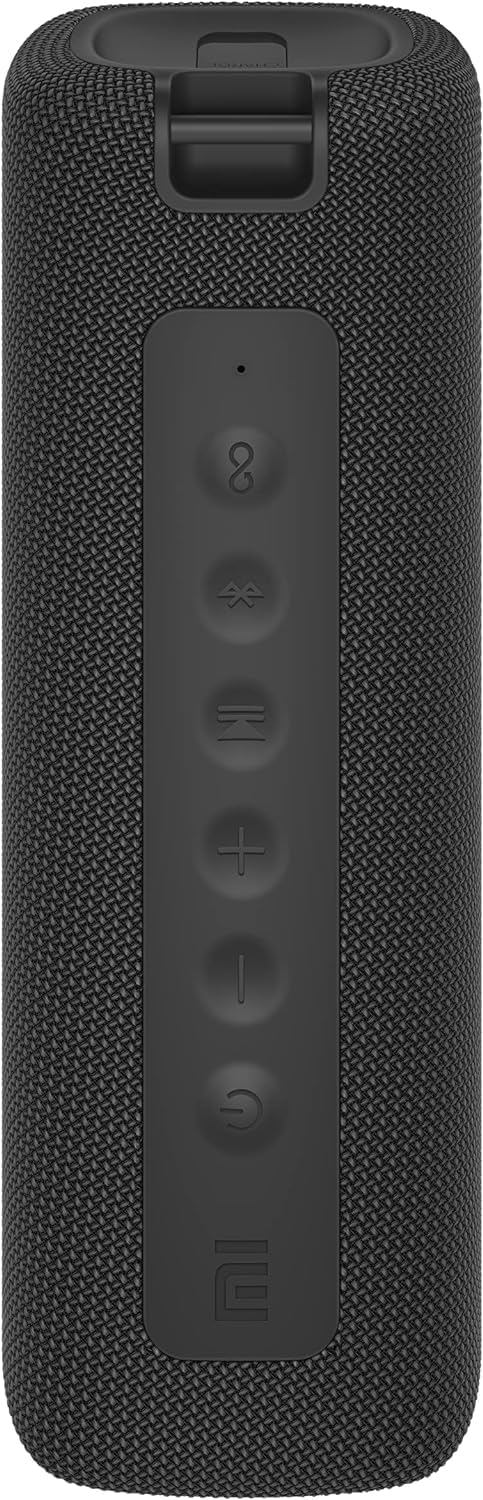
Foto: N'ihu view of the speaker with clearly visible control buttons.
| Bọtịnụ/egosi | Ọrụ |
|---|---|
| bọtịnụ ike (⏻) | Press and hold for 2 seconds to power on/off. Short press to play/pause music or answer/end calls. |
| Mpịakọta ọnụ (-) | Pịa obere oge iji belata olu. Pịa ma jide maka egwu gara aga. |
| Elu elu (+) | Pịa obere oge iji mee ka olu dịkwuo elu. Pịa ma jide maka egwu na-esote. |
| Bọtịnụ Bluetooth (Ⓑ) | Pịa mkpirisi ka ịbanye ọnọdụ njikọ Bluetooth. |
| TWS bọtịnụ (∞) | Press to initiate True Wireless Stereo pairing with another Mi Portable Bluetooth Speaker. |
| Ihe ngosi LED | Indicates power status, charging status, and Bluetooth pairing status. |
5. Nhazi
5.1 Ịchaji ọkà okwu
- Connect the provided USB-C charging cable to the speaker's charging port.
- Connect the other end of the cable to a 5V 1A USB power adapter (not included) or a computer's USB port.
- Ihe ngosi LED ga-egosi ọnọdụ chajị (dịka ọmụmaatụ, ọbara ọbara mgbe a na-achaji, gbanyụọ ya mgbe a na-achaji ya nke ọma).
- Ụgwọ zuru ezu na-ewe ihe dịka awa 4.
5.2 Gbanyụọ ma ọ bụ gbanyụọ
- Iji gbanye: Press and hold the Power button for 2 seconds. You will hear an audible prompt, and the LED indicator will light up.
- Iji gbanyụọ: Press and hold the Power button for 2 seconds. You will hear an audible prompt, and the LED indicator will turn off.
5.3 Njikọ Bluetooth
- Ensure the speaker is powered on. The LED indicator will flash blue, indicating it's in pairing mode.
- Na ngwaọrụ gị (smartphone, tabletị, kọmpụta), mee ka Bluetooth nwee ike wee chọọ ngwaọrụ dị.
- Select "Mi Portable Bluetooth Speaker" from the list of devices.
- Ozugbo ejikọtara ya, ihe ngosi LED ga-agbanwe agbanwe nke ọma, ị ga-anụkwa ụda nkwenye.
- Ọkà okwu ga-ejikọta na ngwaọrụ ejikọrọ ikpeazụ na-akpaghị aka mgbe agbanyere ya, ọ bụrụ na ọ dị nso.
5.4 Ezi ikuku stereo (TWS) ijikọ
To pair two Xiaomi Mi Portable Bluetooth Speakers for stereo sound:
- Hụ na ejiri igwe okwu abụọ ahụ rụọ ọrụ ma ghara ijikọ ha na ngwaọrụ Bluetooth ọ bụla ọzọ.
- On one speaker (this will be the primary speaker), short press the TWS button (∞). The LED indicator will flash.
- On the second speaker, short press the TWS button (∞).
- The two speakers will automatically connect to each other. You will hear a confirmation sound, and the LED indicators on both speakers will turn solid blue.
- Now, connect your device to the primary speaker via Bluetooth as described in section 5.3. The sound will play in stereo through both speakers.
5.5 Njikọ AUX
For wired audio playback:
- Connect a 3.5mm audio cable (not included) from your audio source to the AUX IN port on the speaker.
- Ọkà okwu ga-agbanwe ozugbo gaa na ọnọdụ AUX.
- Control playback and volume from your audio source device.
6. Ntuziaka ọrụ
6.1 Nghaghachi egwu
- Gwuo/kwụsịtụ: Obere pịa bọtịnụ Ike.
- Olu elu: Short press the Volume Up (+) bọtịnụ.
- Olu ala: Short press the Volume Down (-) bọtịnụ.
- Track na-esote: Press and hold the Volume Up (+) bọtịnụ.
- Gara aga Track: Press and hold the Volume Down (-) bọtịnụ.
6.2 Njikwa oku
- Azịza/Kwụsị Oku: Short press the Power button when a call comes in or during a call.
- Jụ oku: Press and hold the Power button for 2 seconds when a call comes in.
7. Nlekọta
- Nhicha: Jiri nwayọ hichaa ọkà okwu, damp akwa . Ejila ihe nchacha abrasive ma ọ bụ ihe mgbaze.
- Nchekwa: Chekwaa ọkà okwu n'ebe dị jụụ, kpọrọ nkụ na-adịghị na ìhè anyanwụ kpọmkwem na oke okpomọkụ.
- Nguzogide mmiri: The speaker is IPX7 waterproof. Ensure the charging port cover is securely closed before exposure to water. Do not submerge the speaker for extended periods or beyond specified depths.
- Nlekọta batrị: To prolong battery life, avoid fully discharging the speaker frequently. Charge it regularly, even if not in use for long periods.
8. Nchọpụta nsogbu
| Nsogbu | Ngwọta enwere ike |
|---|---|
| Ọkà okwu anaghị agba ọkụ. | Gbaa mbọ hụ na agbagoro batrị. Jikọọ na isi iyi ike wee nwaa ọzọ. |
| Enweghị ike ijikọ site na Bluetooth. |
|
| Enweghị ụda ma ọ bụ obere olu. |
|
| Njikota TWS ada ada. |
|
| Ogo ụda adịghị mma. |
|
9. Nkọwapụta

Foto: N'okpuru view of the speaker, displaying model number and certifications.
| Oke | Uru |
|---|---|
| Nlereanya | MDZ-36-DB |
| Akụkụ ngwaahịa | W 213 x D 74 x H 74 mm (approx. 8 x 3 x 3 inches) |
| Njikọta | Bluetooth 5.0, 3.5mm AUX IN |
| Enyere mmepụta | 2 x 8W (mkpokọta 16W) |
| Signgbaàmà-na-Noise ruru | ≥ 70dB |
| TWS Connection Range | ≤5m |
| Ngosi nke enweghị mmiri | IPX7 |
| Ụdị batrị | Lithium-ion, 3.7V |
| Ike batrị | 2600mAh |
| Oge Nchaji batrị | Ihe ruru. awa 4 |
| Oge nkwughachi | Ihe ruru. 13 awa (na 50% olu) |
| Oke ugboro ugboro | 80Hz ruo 20 kHz |
| Enyere nsogbu | 4 Ω |
| Ogologo nnyefe | 15m |
| Ntinye akwadoro | 5V 1A |
| Ibu Ibu | 500 Grams (1.1 pound) |
10. Akwụkwọ ikike na nkwado
For detailed warranty information, please refer to the warranty card included with your product or visit the official Xiaomi websaịtị.
If you encounter any issues not covered in this manual, please contact Xiaomi customer support or visit their official support channels for assistance.


