1. Okwu mmalite
This manual provides essential information for the safe and efficient operation of your Innosilicon T3+ BTC SHA-256 ASIC Miner 57TH. Please read this manual thoroughly before setting up and operating the device to ensure optimal performance and longevity.
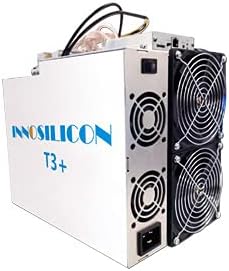
An image showing the Innosilicon T3+ ASIC Miner, a rectangular white unit with cooling fans visible on one side and power connections on the other.
2. Ozi nchekwa
Lee ihe ndị a iji gbochie mmerụ ahụ ma ọ bụ mmebi nke ngwaọrụ ahụ:
- Hụ na e tinyere ntọala kwesịrị ekwesị maka njikọ eletriki niile.
- Do not operate the miner in environments with high humidity or extreme temperatures outside the specified range (0-40°C).
- Maintain adequate ventilation around the device to prevent overheating.
- Akwụchila ọnụ ụzọ ikuku ma ọ bụ mpụta.
- Kwupu ike tupu ime mmezi ma ọ bụ ihicha ọ bụla.
- Only use the provided power supply unit (PSU) or a compatible, certified replacement.
- Debe ebe ụmụaka na-apụghị iru.
3. Ihe ngwugwu
Chọpụta na akụrụngwa niile dị na ngwugwu:
- Innosilicon T3+ BTC SHA-256 ASIC Miner 57TH
- Integrated Power Supply Unit (PSU)
- Power Cable (region-specific)
- Ethernet Cable (optional, may not be included)
4. Nhazi
4.1 Ihe gbasara gburugburu ebe obibi
The T3+ miner requires a stable and controlled environment for optimal performance and longevity. Ensure the operating temperature is between 0-40°C and the humidity is low. A dedicated mining farm with proper cooling and a dust filter environment is highly recommended to prevent dust accumulation and maintain efficient operation.
4.2 Ntinye anụ ahụ
Place the miner on a stable, flat surface. Ensure there is sufficient space around the device for proper airflow, especially around the cooling fans. Do not place the miner near heat sources or in enclosed spaces.
4.3 Njikọ eletrik
- Connect the power cable to the integrated PSU on the miner.
- Plug the other end of the power cable into a grounded electrical outlet. The miner operates at approximately 3300W (+/- 10%) and requires a stable power source with a maximum input voltage of 240 Volts. Ensure your electrical infrastructure can support this load.
4.4 Njikọ netwọkụ
- Connect one end of an Ethernet cable to the Ethernet port on the miner.
- Jikọọ nsọtụ ọzọ nke eriri Ethernet na rawụta netwọk gị ma ọ bụ gbanwee.
- Ensure your network provides a stable internet connection for mining operations.
5. Ntuziaka ọrụ
5.1 Agbanye ike mbụ
Once all connections are secure, power on the miner. The fans will start, and the device will begin its boot sequence. This may take a few minutes.
5.2 Nhazi
The Innosilicon T3+ typically uses a web-based interface for configuration. To access it:
- Determine the IP address of your miner. This can often be found through your router's connected devices list or by using an IP scanner tool on your network.
- Mepee a web browser on a computer connected to the same network and enter the miner's IP address in the address bar.
- Log in using the default credentials (refer to the manufacturer's documentation or common default credentials for Innosilicon devices).
- Configure your mining pool settings (URL, Worker, Password) within the web interface. The T3+ is designed for SHA-256 algorithm mining.
- Chekwaa ntọala ahụ ma malitegharịa ihe na-egwuputa ihe ma ọ bụrụ na achọrọ ya.
5.3 Nleba anya Arụmọrụ
Regularly monitor the miner's performance through its web interface. Key metrics to observe include:
- Hashrate: Aim for the specified 57TH/s (+/-6%). Fluctuations may indicate issues.
- Okpomọkụ: Ensure the operating temperature remains within safe limits to prevent damage to the ASIC chips.
- Ọsọ onye ofufe: Verify fans are operating correctly and at appropriate speeds.
- Oge njedebe: Monitor continuous operation.
6. Nlekọta
Regular maintenance ensures the longevity and efficiency of your T3+ miner:
- Mwepụ uzuzu: Periodically clean the miner, especially the fans and heatsinks, to prevent dust buildup. Dust can impede airflow and lead to overheating. Use compressed air or a soft brush. Ensure the device is powered off and unplugged before cleaning.
- Nyocha gburugburu: Continuously monitor the ambient temperature and humidity of the operating environment. Adjust cooling solutions as needed to maintain optimal conditions.
- Nyocha USB: Regularly inspect all power and network cables for any signs of wear or damage. Replace damaged cables immediately.
7. Nchọpụta nsogbu
Akụkụ a na-eleba anya n'okwu ndị a na-ahụkarị ị nwere ike izute:
| Nsogbu | Ihe nwere ike ime | Ngwọta |
|---|---|---|
| Miner does not power on | No power, faulty cable, PSU issue | Check power cable connection, test outlet, ensure PSU is connected correctly. |
| Low Hashrate / No Hashrate | Incorrect pool settings, network issue, overheating, faulty hashboard | Verify pool settings, check network connection, ensure proper cooling, restart miner. If issue persists, contact support. |
| ekpo oke ọkụ | Insufficient ventilation, dust buildup, fan failure | Improve airflow, clean dust from fans/heatsinks, check fan operation. |
| Enweghị ike ịnweta web interface | Incorrect IP address, network connectivity issue, miner not booted | Verify IP address, check Ethernet cable, ensure miner is fully booted. |
If you encounter issues not listed here or if solutions do not resolve the problem, please contact Innosilicon customer support.
8. Nkọwapụta
| Njirimara | Nkọwa |
|---|---|
| Aha Nlereanya | T3+ |
| Algorithm | SHA-256 |
| Hashrate | 57 TH/s (± 6%) |
| Oriri ike | 3300W (±10%, normal mode, PSU efficiency: 93%, temperature 25°C) |
| Mpụta Wattage | 3300 Watt |
| Oke Ntinye Voltage | 240 volts |
| Akụkụ (L×W×H) | 338mm x 207mm x 293mm |
| Ibu Ibu | 12.3 KG (approx. 30 pounds) |
| Usoro jụrụ oyi | Ikuku jụrụ oyi |
| Okpomọkụ na-arụ ọrụ | 0-40 Celsius C |
| Ngwa dakọtara | Personal Computer (for configuration/monitoring) |
9. Akwụkwọ ikike Ozi
For detailed warranty terms and conditions, please refer to the official Innosilicon website or the warranty card included with your purchase. Typically, warranty coverage addresses manufacturing defects. Any unauthorized modifications, improper installation, or operation outside of specified environmental conditions may void the warranty.
10. Nkwado ndị ahịa
If you require technical assistance, have questions about your miner, or need to report an issue, please contact Innosilicon customer support through their official channels. Have your product model (T3+) and serial number ready when contacting support for faster service.
You can typically find support contact information on the official Innosilicon websaịtị: www.innosilicon.com