Okwu mmalite
The Muse M-195 BT is a 1-DIN car radio featuring a front USB port and a multi-function MCD display. This car radio includes integrated Bluetooth and an SD/MMC card reader, allowing for audio streaming from compatible devices such as laptops, tablets, or smartphones. The integrated hands-free system enables easy call management. The output power is 4 x 40 W.
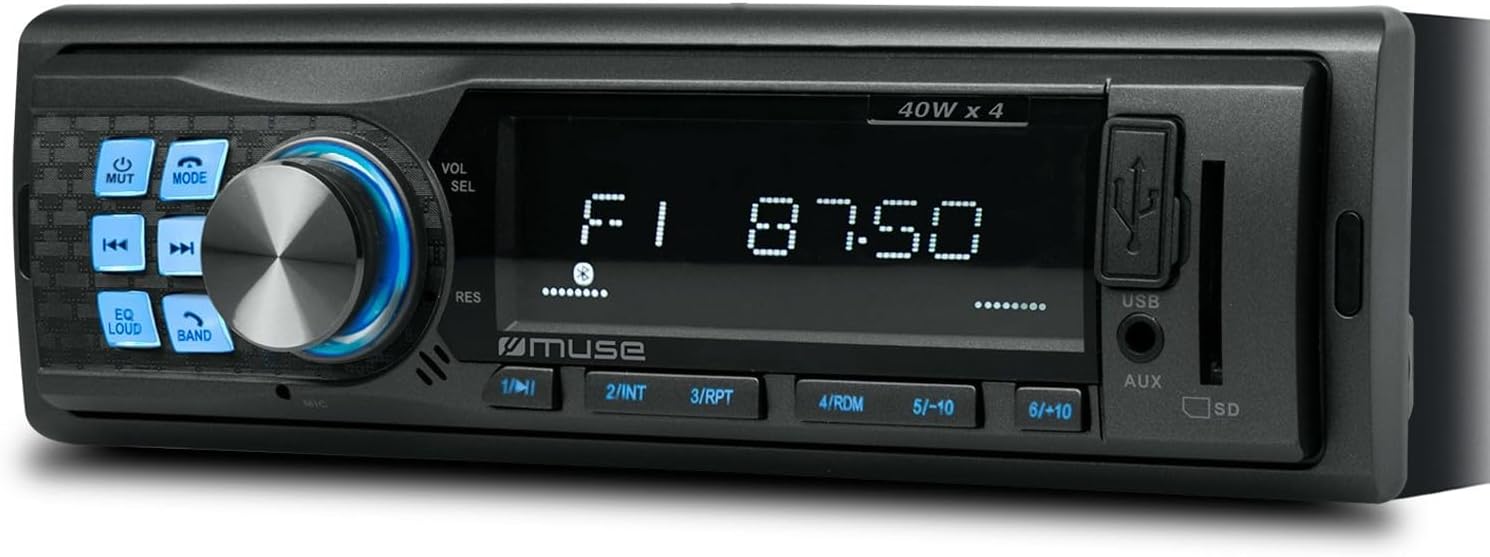
Foto 1: N'ihu view of the Muse M-195 BT car radio. This image displays the main unit with its central display, a large rotary knob for volume and selection, various function buttons (Mute, Mode, EQ, Loud, Band, Skip), and front-facing USB and AUX inputs, along with an SD card slot.
Ozi nchekwa
- Gụọ ntuziaka niile nke ọma tupu echichi na arụ ọrụ.
- Ensure proper wiring to prevent short circuits or damage. Consult a professional if unsure.
- Do not operate the device in a way that distracts you from driving.
- Zere ikpughe ihe dị n'ime ya na oke okpomọkụ, anwụ kpọmkwem, ma ọ bụ mmiri mmiri.
- Agbalịla ịgbasa ma ọ bụ gbanwee ihe dị na ya. Nke a nwere ike imebi akwụkwọ ikike ahụ ma mebie ya.
- Debe ụda n'ogo nke na-enye gị ohere ịnụ ụda n'èzí, dịka ụgbọ ala mberede.
Ihe ngwugwu
Biko lelee ma ihe niile dị na ngwugwu ahụ:
- Muse M-195 BT Car Radio Unit
- Uwe elu arịọnụ
- Wiring Harness (ISO connector)
- Removal Keys (2x)
- Akwụkwọ ntuziaka (akwụkwọ a)
Ntọala na nwụnye
1. Nwụnye
The M-195 BT is designed for a standard 1-DIN dashboard opening (180x50mm). Ensure sufficient space behind the dashboard for wiring and ventilation.

Figure 2: Dimensions of the Muse M-195 BT car radio. The diagram illustrates the standard 1-DIN size, with a width of 185mm and a height of 58mm, crucial for proper fitment in a vehicle's dashboard.
- Prepare the Dashboard Opening: Remove the existing car radio or blanking plate from the 1-DIN slot.
- Install the Mounting Sleeve: Insert the supplied metal mounting sleeve into the dashboard opening. Bend the tabs on the sleeve outwards with a screwdriver to secure it firmly.
- Jikọọ Wiring: Connect the car's wiring harness to the supplied ISO connector. Ensure correct connections for power (constant 12V, ignition 12V, ground), speaker outputs, and antenna.
- Waya odo odo: 12V na-adịgide adịgide (batrị)
- Waya uhie: Ignition 12V (ACC)
- waya ojii: Ala
- waya na-acha anụnụ anụnụ: Antenna ike / Amplifier Remote (Output)
- Wires ọkà okwu: Connect to corresponding vehicle speakers (e.g., White/White-Black for Front Left, Grey/Grey-Black for Front Right, Green/Green-Black for Rear Left, Purple/Purple-Black for Rear Right).
- Slide in the Unit: Carefully slide the M-195 BT unit into the mounting sleeve until it clicks into place.
- Ọrụ nnwale: Turn on the car ignition and test all functions of the radio (power, radio, USB, Bluetooth, sound output).
2. Gbanwee ike mbụ
After successful installation, press the IKE/Ụdị button to turn on the unit. The display will illuminate. The unit will typically start in the last used mode (e.g., FM radio).
Ntuziaka ọrụ
1. Njikwa ntọala
- POWER/MODE Button: Press to turn the unit ON/OFF. Short press to cycle through modes (FM, USB, SD, AUX, Bluetooth).
- Volume Knob (VOL/SEL): Rotate to adjust volume. Press to enter menu settings (e.g., Bass, Treble, Balance, Fader, EQ).
- Bọtịnụ MUTE: Mutes/unmutes audio output.
- EQ bọtịnụ: Cycles through preset equalizer settings (e.g., Pop, Rock, Classic, Flat).
- Bọtịnụ OKPURU OKÈ: Activates/deactivates loudness compensation for enhanced bass and treble at low volumes.
- BAND bọtịnụ: In FM mode, cycles through FM bands (FM1, FM2, FM3).
- SKIP Buttons (◀◀ / ►►): In radio mode, short press to seek previous/next station. Long press for manual tuning. In USB/SD/BT mode, short press for previous/next track.
- Bọtịnụ ọnụọgụ (1-6): In radio mode, short press to recall preset stations. Long press to save current station to a preset.
2. Radio Operation (FM)
- Pịa MODE until "FM" is displayed.
- Pịa BAND to select FM1, FM2, or FM3.
- Obere pịa ◀◀ or ► to automatically seek the next strong station.
- Pịa ogologo ◀◀ or ► to manually tune the frequency.
- To save a station: Tune to the desired station, then long press one of the numeric buttons (1-6) until the display confirms saving.
3. USB / SD Card Playback
- Insert a USB flash drive into the front USB port or an SD/MMC card into the SD card slot.
- The unit will automatically switch to USB/SD mode and begin playing compatible audio files (MP3). If not, press MODE ịhọrọ.
- Jiri ◀◀ or ► ịgafe egwu.
- Use numeric buttons for specific functions like 1/►►I (Play/Pause), 2/INT (Intro scan), 3/RPT (Repeat), 4/RDM (Random).
4. Bluetooth arụ ọrụ
The M-195 BT supports Bluetooth for audio streaming and hands-free calling.
- Na-ejikọta:
- Gbaa mbọ hụ na agbanyere Bluetooth na ngwaọrụ mkpanaka gị.
- Pịa MODE on the car radio until "BT" or "Bluetooth" is displayed. The unit will enter pairing mode.
- On your mobile device, search for available Bluetooth devices. Select "M-195 BT" from the list.
- If prompted for a PIN, enter "0000" (default).
- Once paired, the display will show "CONNECTED" or similar confirmation.
- Ngụgharị ọdịyo (A2DP):
- After pairing, play music on your mobile device. Audio will stream through the car speakers.
- Jiri ◀◀ or ► on the car radio to skip tracks.
- Hands-Free Calling (HFP):
- When a call comes in, the radio display will show "CALL" or the caller ID.
- Pịa Zaa button (often the Play/Pause button or a dedicated call button if available) to answer.
- Pịa Kwụsị oku bọtịnụ ka kpọchie.
- The built-in microphone will be used for conversations.
5. ntinye AUX
Connect an external audio device (e.g., MP3 player, smartphone) to the front 3.5mm AUX input using an audio cable.
- Connect the audio cable from your device to the AUX port on the car radio.
- Pịa MODE until "AUX" is displayed.
- Jikwaa ọkpụkpọ dị na mpụga ngwaọrụ gị.
Nlekọta
- Nhicha: Use a soft, dry cloth to clean the unit's surface. For stubborn dirt, dampen the cloth slightly with water. Do not use abrasive cleaners or solvents.
- Zere Mmiri mmiri: Do not allow liquids to enter the unit, as this can cause damage.
- Okpomọkụ: Avoid exposing the unit to extreme temperatures, direct sunlight, or high humidity.
- USB/SD Slot Care: Debe oghere USB na SD kaadị n'enweghị uzuzu na ihe mkpofu.
Nchọpụta nsogbu
| Nsogbu | Ihe nwere ike ime | Ngwọta |
|---|---|---|
| Enweghị ike | Waya na-ezighi ezi; Fuuz a gbawara agbawa; Njikọ siri ike. | Check power (yellow, red) and ground (black) wire connections. Check vehicle's fuse box and the unit's fuse. Ensure connections are secure. |
| Enweghị ụda | Volume too low; Mute activated; Incorrect speaker wiring; Damaged speakers. | Increase volume. Press MUTE button. Check speaker wire connections. Test with different speakers if possible. |
| Nnabata redio adịghị mma | Antenna not connected; Weak signal; Damaged antenna. | Ensure antenna is properly connected. Try tuning to a stronger station. Check antenna for damage. |
| USB/SD anaghị egwu egwu | Ekwekọrịtaghị file format; USB/SD card corrupted; Incorrect mode selected. | Gbaa mbọ hụ files are MP3 format. Try a different USB/SD card. Press MODE to select USB/SD. |
| Njikọ Bluetooth adaghị | Bluetooth not enabled on device; Device too far; Incorrect PIN; Previous connection interference. | Ensure Bluetooth is ON on your device. Bring device closer. Re-enter PIN "0000". Delete previous pairings on your device and try again. |
Nkọwapụta
- Ụdị: M-195 BT
- Mpụta ike: 4 x 40 W
- Ngosipụta: MCD Multi-function
- Njikọta: Bluetooth, USB, SD/MMC, AUX (3.5mm Jack)
- Ụdị ọdịyo akwadoro: MP3
- Tuner redio: FM (18 presets)
- Oku na-anaghị aka: Igwe okwu agbakwunyere
- Akụkụ (L x W x H): 14 x 18.5 x 5.8 cm (approx. 1-DIN standard)
- Arọ: 550 g
- Tupu-ampNsonaazụ dị mma: 1 pair (RCA audio rear or sub)
Akwụkwọ ikike na nkwado
This product comes with a standard manufacturer's warranty. For detailed warranty terms and conditions, please refer to the warranty card included with your purchase or visit the official Muse website. For technical support, troubleshooting assistance beyond this manual, or service inquiries, please contact your retailer or the Muse customer service department.
Biko dowe ihe akaebe nke ịzụrụ ihe maka akwụkwọ ikike.


