Okwu mmalite
The boAt Rockerz 335 Pro is a wireless neckband designed to provide a high-quality audio experience. It incorporates advanced audio technologies and user-friendly features for convenience and durability.
Atụmatụ igodo
- Qualcomm aptX & aptX HD Audio Technology: Ensures seamless reproduction of immersive sound.
- Qualcomm cVc Noise Cancellation: Captures your voice clearly during calls by reducing background noise.
- Nghaghachi agbatịgoro: Offers up to 50 hours of playback on a single full charge.
- ASAP Charge Technology: Provides up to 10 hours of playtime with just 10 minutes of charging.
- boAt Signature Sound: Delivers an enhanced audio experience for your playlists.
- Power-Sensitive Smartbuds: Simplifies power management; separate earbuds to power on, unite them to power off.
- IPX5 Mgbochi mmiri: Protects the neckband from splashes and sweat, suitable for active use.
- Bluetooth v5.0 & Dual Pairing: Ensures instant connectivity to media devices and allows simultaneous connection to two devices.
- Nkwado onye enyemaka olu: Access Google Assistant or Siri with a single press.
- Ụdị-C Port: Provides a convenient and seamless charging experience.
Kedu ihe dị na Igbe ahụ
Upon unboxing your boAt Rockerz 335 Pro, you should find the following items:
- 1 x boAt Rockerz 335 Pro Neckband
- 1 x Earbuds agbakwunyere (ụzọ abụọ nha dị iche iche)
- 1 x eriri chaja (ụdị-C)
- 1 x Akwụkwọ ntuziaka onye ọrụ
Ngwaahịa gafereview
Familiarize yourself with the components of your boAt Rockerz 335 Pro neckband.

Foto: Ofeview of the boAt Rockerz 335 Pro highlighting its key features and design elements.
Njikwa na egosi
- Metal Control Board: Houses the buttons for playback, volume, and call management.
- Power-Sensitive Smartbuds: Magnetic earbuds that automatically power the device on when separated and off when united.
- Ihe ngosi LED: Displays charging status, pairing mode, and power status.
- Ụdị-C ọdụ ụgbọ mmiri: Located on the control board for convenient charging.

Image: Detail of the power-sensitive smartbuds, illustrating how separating them powers the device on and uniting them powers it off.
Ntuziaka nhazi
1. Charging the Neckband
Before initial use, fully charge your Rockerz 335 Pro.
- Connect the Type-C charging cable to the charging port on the neckband.
- Tinye nsọtụ nke ọzọ nke eriri ahụ n'ime ihe nkwụnye ike USB (anaghị etinye ya) ma ọ bụ ọdụ USB nke kọmputa.
- Ihe ngosi LED ga-egosi ọkwa nchaji (dịka ọmụmaatụ, ọbara ọbara maka ịchaji, acha anụnụ anụnụ maka chaja zuru oke).
The neckband features Ụgwọ ASAP, providing 10 hours of playback with just 10 minutes of charging. A full charge offers up to 50 hours of playback.
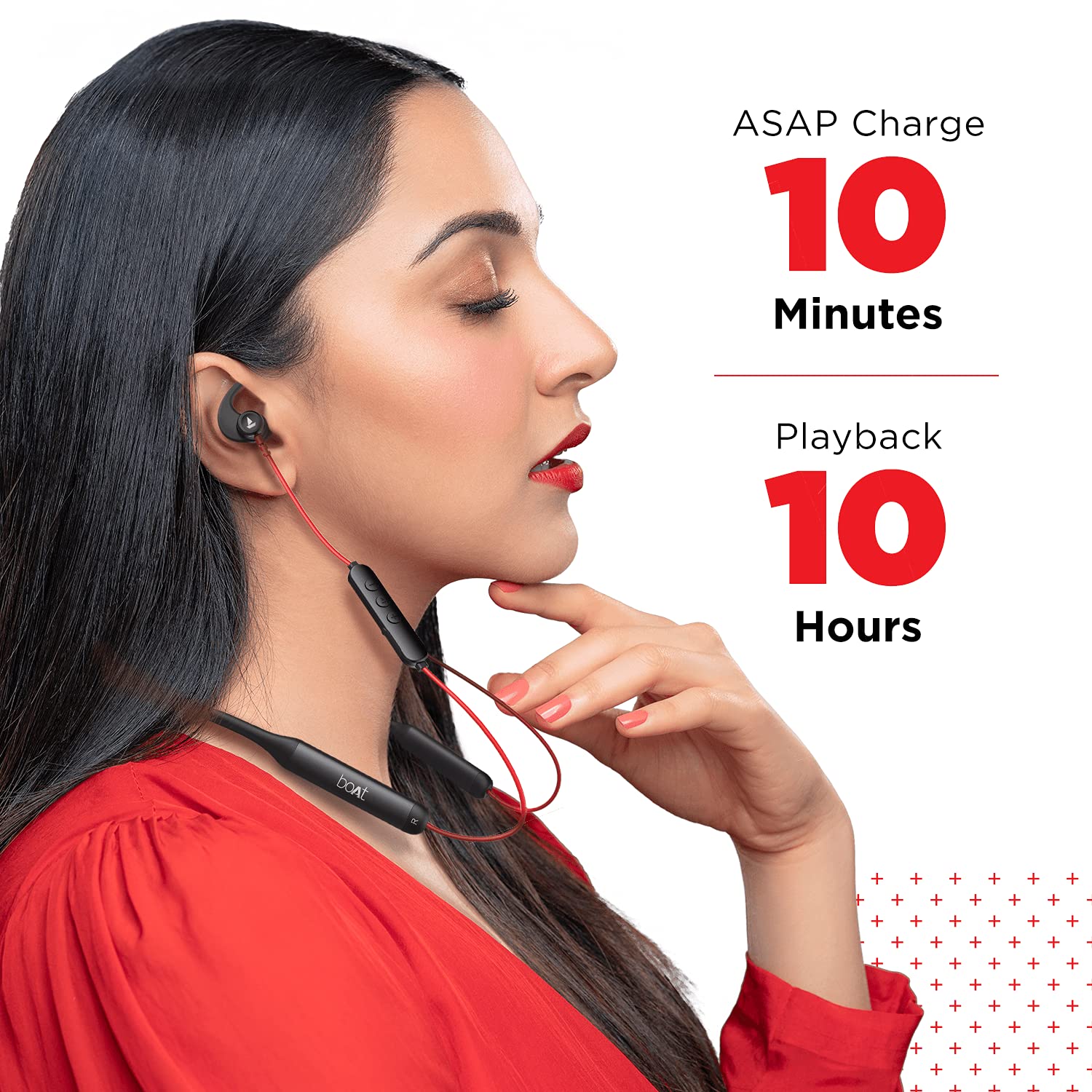
Image: Demonstrates the ASAP Charge feature, highlighting quick charging for extended playback.

Image: Illustrates the impressive 50-hour total playback time of the neckband.
2. Ijikọ na ngwaọrụ
The Rockerz 335 Pro uses Bluetooth v5.0 for wireless connectivity.
- Ike Na: Separate the magnetic earbuds to power on the neckband. The LED indicator will flash, indicating pairing mode.
- Mee ka Bluetooth rụọ ọrụ: On your smartphone, tablet, or laptop, enable Bluetooth.
- Họrọ Ngwaọrụ: In your device's Bluetooth settings, search for and select "boAt Rockerz 335 Pro".
- nkwenye: Once connected, the LED indicator will change, and you may hear an audio prompt.
Mmakọ abụọ: The neckband supports dual pairing, allowing you to connect to two devices simultaneously. After pairing with the first device, disable its Bluetooth, pair with the second device, then re-enable Bluetooth on the first device. The neckband will connect to both.
Ntuziaka ọrụ
Gbanyụọ/ Gbanyụọ
- Ike Na: Separate the magnetic earbuds.
- Gbanyụọ: Unite the magnetic earbuds.
Egwu Egwu
- Gwuo/kwụsịtụ: Press the Multi-function Button (MFB) once.
- Track na-esote: Long press the "+" button.
- Gara aga Track: Long press the "-" button.
- Olu elu: Pịa bọtịnụ "+" nkenke.
- Olu ala: Pịa bọtịnụ "-".
Njikwa Oku
- Azịza/Kwụsị Oku: Pịa MFB otu ugboro.
- Jụ oku: Pịa MFB ogologo oge.
- Agbagharị: Pịa MFB ugboro abụọ.
Onye enyemaka olu
Activate your device's voice assistant (Google Assistant or Siri) with a single press of the dedicated Voice Assistant button on the control board.

Image: Highlights the Qualcomm aptX audio technology for superior sound and cVc noise cancellation for clear calls.
Nlekọta
Nguzogide mmiri (IPX5)
The boAt Rockerz 335 Pro is rated IPX5, meaning it is resistant to splashes and sweat. This makes it suitable for workouts and light rain. However, it is not designed for submersion in water. Avoid exposing the charging port to moisture.
Nhicha
Iji nọgide na-arụ ọrụ kacha mma na ịdị ọcha:
- Wipe the neckband and earbuds with a soft, dry cloth.
- Ejila ihe nchacha abrasive ma ọ bụ ihe mgbaze.
- Gbaa mbọ hụ na ọdụ ụgbọ mmiri ahụ dị ọcha ma kpọọ nkụ tupu ịchaji.
Nchọpụta nsogbu
If you encounter issues with your boAt Rockerz 335 Pro, refer to the following common solutions:
| Nsogbu | Ngwọta enwere ike |
|---|---|
| Enweghị ike ịgbanye | Ensure earbuds are separated. Charge the device fully. |
| Enweghị ike ijikọ na ngwaọrụ | Ensure Bluetooth is enabled on your device. Make sure the neckband is in pairing mode (LED flashing). Forget the device in your phone's Bluetooth settings and try pairing again. |
| Enweghị ụda ma ọ bụ olu dị ala | Check volume levels on both the neckband and your connected device. Ensure the neckband is properly connected. Try re-pairing. |
| Okwu ịdịmma oku | Ensure the microphone is not obstructed. Move closer to your connected device. Check for environmental noise. |
| ASAP Charge not working | Ensure you are using a compatible Type-C cable and power adapter. Check the charging port for debris. |
Nkọwapụta
Detailed technical specifications for the boAt Rockerz 335 Pro:
- Aha nlereanya: Rockerz 335 Pro
- Teknụzụ Njikọta: Ikuku
- Teknụzụ nzikọrịta ozi ikuku: Bluetooth v5.0
- Ụdị ọkwọ ụgbọala ọdịyo: Ọkwọ ụgbọala dị ike
- Ndụ batrị: Ruo awa 50
- Oge nchaji: 10 Minutes (for 10 hours playback via ASAP Charge)
- Nchaji ọdụ ụgbọ mmiri: Ụdị-C
- Ọkwa Nguzogide mmiri: IPX5 (mmiri na-eguzogide)
- Ihe: Metal (Control Board)
- Ibu ihe: 50 grams
- Ụdị njikwa: Njikwa olu
- Atụmatụ pụrụ iche: Nchaji ngwa ngwa, Igwe okwu gụnyere, ọsụsọ na-egbochi
- Atụmatụ Njikwa Mkpọtụ: Noise Cancellation (cVc)
- Ngwa dakọtara: Cellphones, Tablets, Laptops
- Ngwaike Platform: Ekwentị mkpanaaka
- Batrị: 2 batrị lithium ion achọrọ (gụnyere)
- Akụkụ ngwaahịa: 17 x 13 x 13 cm
Akwụkwọ ikike na nkwado
Your boAt Rockerz 335 Pro comes with a Akwụkwọ ikike nke afọ 1 from the date of purchase. For any product-related issues, service requests, or further assistance, please refer to the official boAt customer support channels.
For detailed information on warranty claims, service centers, or to register a complaint, please visit the official boAt support portal. You can also track the status of your service requests online.
Vidiyo: Vidiyo a na-egosi etu esi echekwa iheview of the boAt Rockerz 335 Pro Wireless Neckband, covering its key features, design, and battery life. It also includes a segment on how to utilize the boAt customer support portal for service requests and product replacements.


