1. Okwu mmalite
Thank you for choosing the LENCENT FM Transmitter in-Car Adapter. This device is designed to enhance your in-car audio experience by providing wireless audio streaming, hands-free calling, and fast charging capabilities. It features Bluetooth 5.0 for stable connections, Type-C PD and QC3.0 ports for rapid device charging, and supports various audio playback modes. Please read this manual carefully before use to ensure proper operation and to maximize the product's lifespan.

Image 1.1: LENCENT FM Transmitter in-Car Adapter, showing its compact design and multiple ports.
2. Ozi nchekwa
- Do not expose the device to extreme temperatures, direct sunlight, or humid environments.
- Zere idobe ma ọ bụ idobe ngwaọrụ ahụ na mmetụta siri ike.
- Do not disassemble, repair, or modify the device yourself. Refer to qualified service personnel for any repairs.
- Debe ebe ụmụaka na-apụghị iru.
- Ensure the car's voltage is within the supported range (12-24V) before plugging in the device.
- Always pay attention to the road while driving. Use hands-free functions responsibly.
3. Ihe ngwugwu
Biko lelee ngwungwu maka ihe ndị a:
- LENCENT FM Transmitter in-Car Adapter (Model T70)
- Akwụkwọ ntuziaka onye ọrụ

Image 3.1: The retail packaging for the LENCENT FM Transmitter, indicating the product inside.
4. Ngwaahịa gafereview
Familiarize yourself with the various components and controls of your LENCENT FM Transmitter:
| Akụkụ | Nkọwa |
|---|---|
| Ngosipụta LED | Shows FM frequency, Bluetooth status, and car battery voltage. |
| Multi-function Knob (CH/Call Button) | Press to answer/end calls, long press to activate voice assistant, rotate to adjust volume or change FM frequency. |
| QC3.0 USB Port | Quick Charge 3.0 output for fast charging compatible devices. |
| PD 3.0 Type-C Port | Power Delivery 3.0 output for ultra-fast charging compatible devices. |
| USB Music Port (Blue) | Used for playing music from a U disk (USB flash drive). |
| Igwe okwu | Maka oku na-enweghị aka. |
| Bọtịnụ egwu gara aga/na-esote | Jikwaa egwu egwu. |
| Bọtịnụ ọkụ | Cycles through LED light colors or turns off the light. |
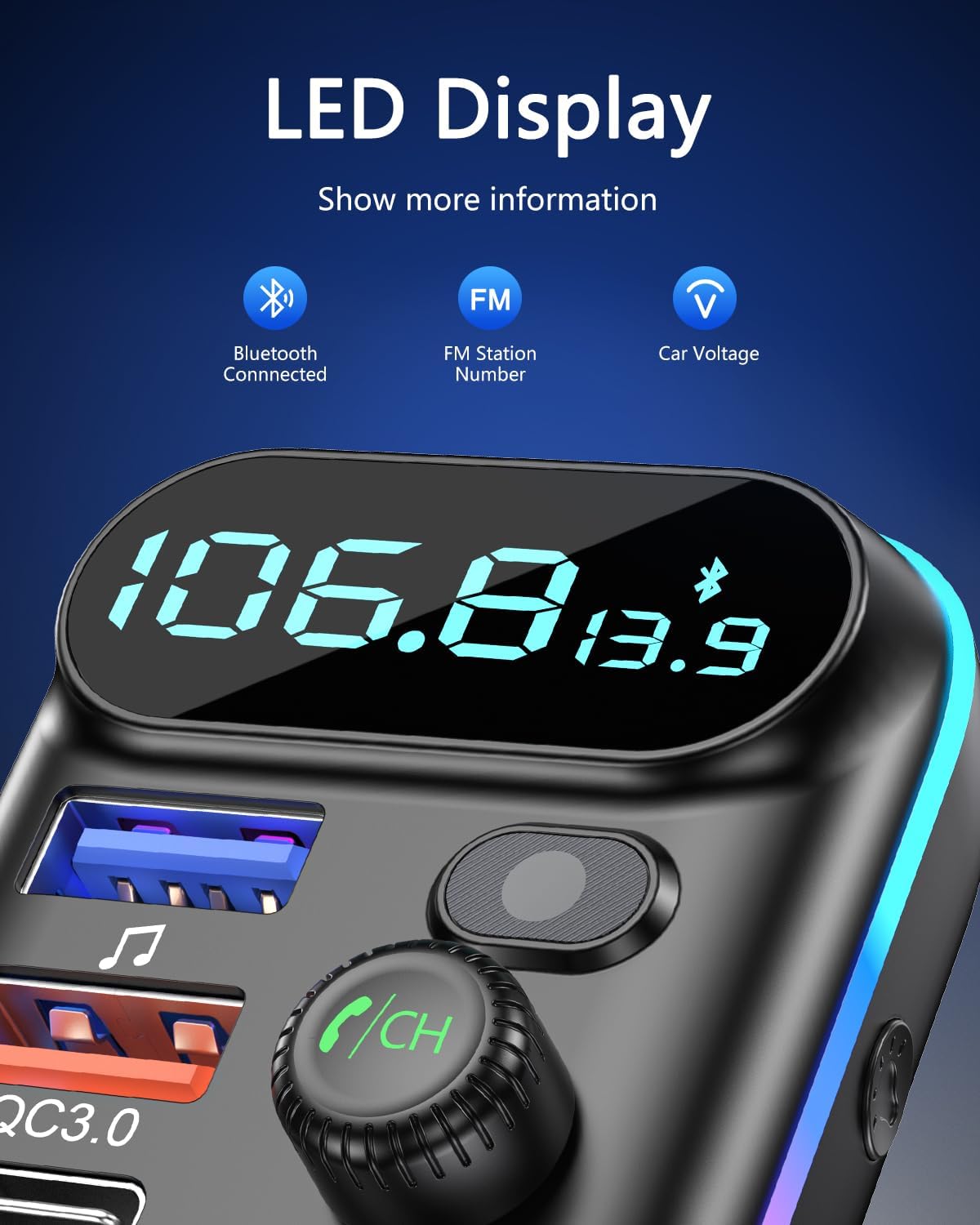
Image 4.1: Close-up of the LENCENT FM Transmitter's LED display, showing Bluetooth connection, FM station number, and car voltage egosi.
5. Nhazi
5.1. Ntinye mbụ
- Insert the LENCENT FM Transmitter into your car's cigarette lighter socket. The LED display will light up, showing the current car battery voltage for a few seconds, then switch to the FM frequency.

Image 5.1: Visual guide demonstrating the easy setup process, starting with inserting the device into the cigarette lighter.
5.2. Finding a Blank FM Station
- Tune your car's FM radio to an empty frequency (one that has no broadcast). This will minimize interference and provide the best audio quality.
- Press and hold the Multi-function Knob (CH/Call Button) on the transmitter until the FM frequency on the LED display starts flashing.
- Rotate the Multi-function Knob to adjust the transmitter's frequency to match the blank FM station you found on your car radio.
5.3. Njikọ Bluetooth
- Once the FM frequencies are matched, the transmitter will automatically enter Bluetooth pairing mode. The Bluetooth icon on the LED display will flash.
- On your mobile device, enable Bluetooth and search for available devices. Select "T70" from the list to connect.
- Once successfully paired, the Bluetooth icon on the transmitter's display will stop flashing and remain solid. You are now ready to stream audio.
6. Ntuziaka ọrụ
6.1. Ịkpọ egwu
The LENCENT FM Transmitter supports three modes for music playback:
- Mgbasa ozi Bluetooth: After successful pairing, open your music app on your phone and start playing. Audio will be transmitted to your car's speakers via the set FM frequency.
- U Disk Playback: Insert a USB flash drive (U disk) containing MP3 files into the blue USB music port. The device will automatically detect and play music from the U disk.
- Mkpọghachi Kaadị SD: (Note: This model supports U Disk, not explicitly SD Card based on product images/specs. If your model has an SD card slot, insert an SD card with MP3 files. The device will automatically play.)
Use the Previous/Next Track buttons on the transmitter to skip songs. Rotate the Multi-function Knob to adjust the volume.

Image 6.1: Illustration showing the three primary methods for playing music through the transmitter: Bluetooth from a phone, directly from a U Disk, and from an SD card (if applicable).
6.2. Oku na-enweghị aka
Mgbe oku batara:
- Oku azaa: Press the Multi-function Knob once.
- Oku ngwụcha: Press the Multi-function Knob once during a call.
- Jụ oku: Press and hold the Multi-function Knob for 2 seconds.
- Nọmba Ikpeazụ emegharịgharịrị: Double-press the Multi-function Knob.

Image 6.2: Diagram highlighting the strong microphone and CVC noise cancellation technology for clear hands-free calls, showing a 35dB noise reduction.
6.3. Voice Navigation & Assistant
- Mee ka onye enyemaka olu rụọ ọrụ: Long press the Multi-function Knob to activate your phone's voice assistant (Siri, Google Assistant, etc.).
- Nsoro olu: Once connected via Bluetooth, voice navigation prompts from your phone's map app will be broadcast through your car's speakers.
6.4. Ngwa ịchaji
The transmitter is equipped with multiple fast-charging ports:
- QC3.0 USB Port: Connect compatible devices for Quick Charge 3.0 fast charging.
- PD 3.0 Type-C Port: Connect compatible devices for Power Delivery 3.0 fast charging.
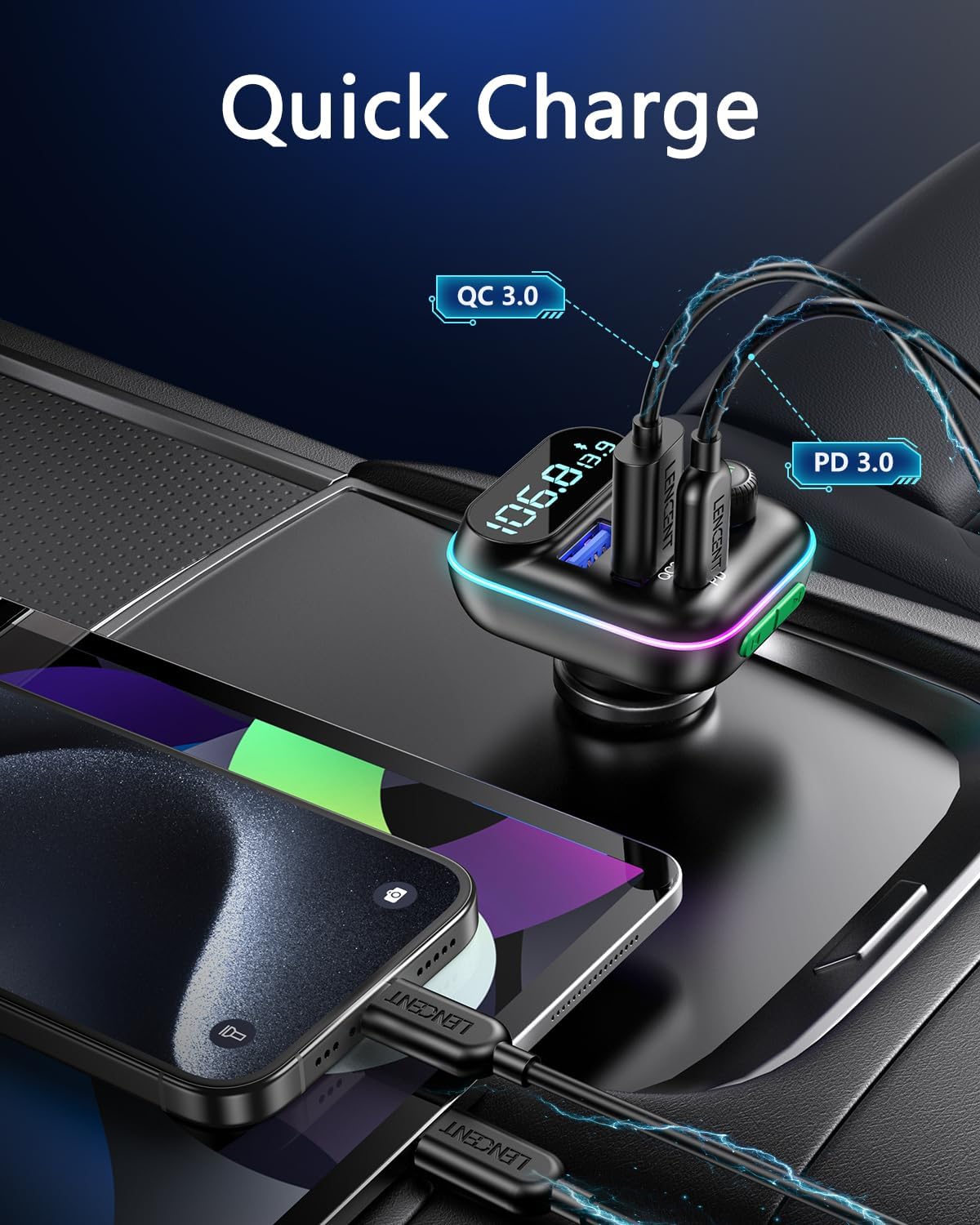
Image 6.3: The LENCENT FM Transmitter connected to a car's power outlet, simultaneously charging two smartphones via its QC3.0 and PD3.0 ports.
6.5. Njikwa ọkụ ọkụ LED
The device features 9-color LED ambient lights:
- Press the Light Button to cycle through different colors (red, blue, green, yellow, purple, cyan, white, rainbow, rainbow flow).
- Press the Light Button again after cycling through all colors to turn the LED lights off.
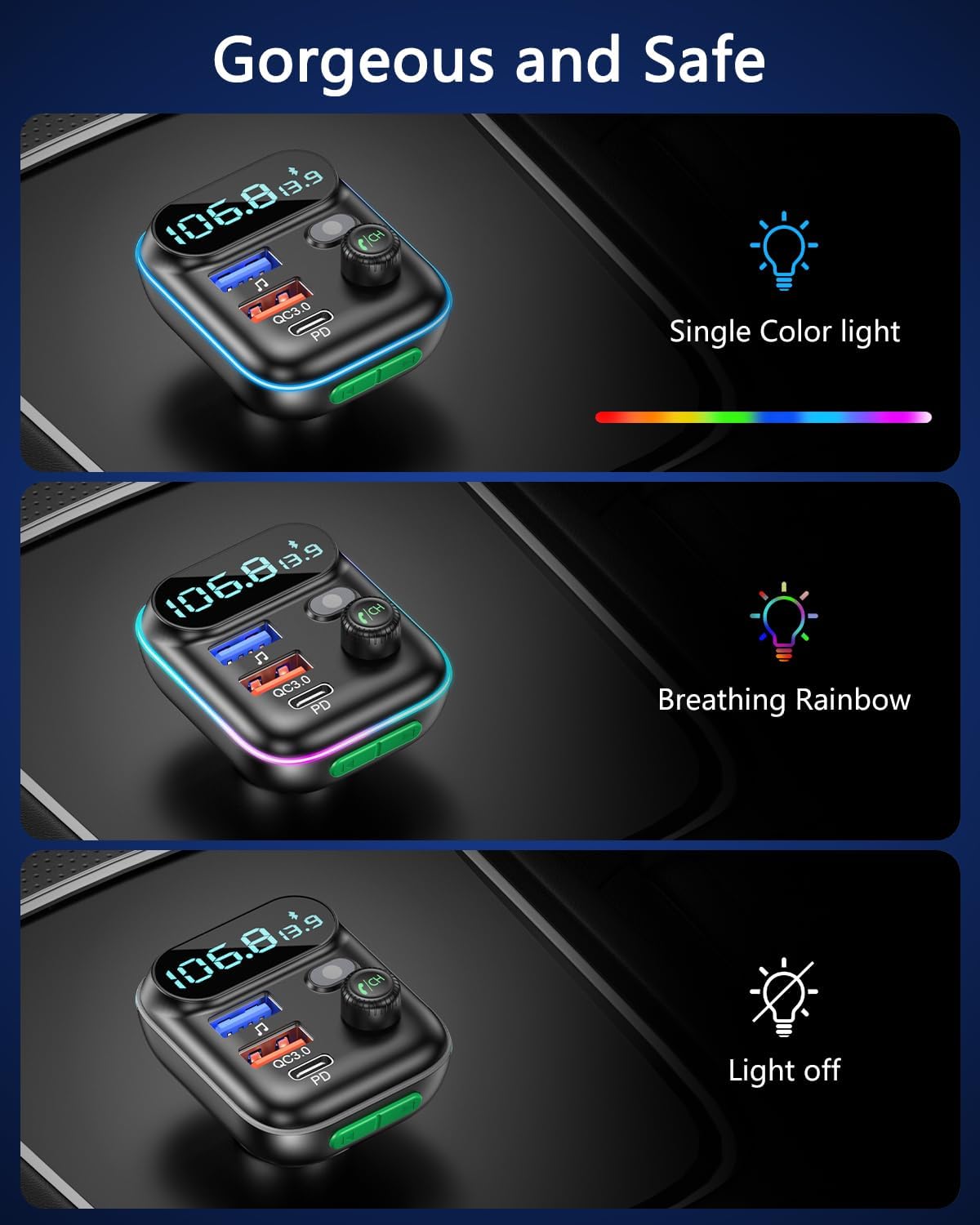
Image 6.4: Depiction of the LENCENT FM Transmitter's LED light options, including single color, breathing rainbow, and light off modes.
7. Nlekọta
- Jiri akwa dị nro hichaa ngwaọrụ ahụ. Ejila ihe nhicha mmiri ma ọ bụ ikuku ikuku.
- Ensure the ports are free from dust and debris to maintain optimal charging and connectivity.
- Chekwaa ngwaọrụ ahụ n'ebe dị jụụ, kpọrọ nkụ mgbe ọ naghị eji ya ogologo oge.
8. Nchọpụta nsogbu
| Nsogbu | Ihe nwere ike ime | Ngwọta |
|---|---|---|
| Enweghị ngosi ọkụ/LED agbanyụrụ | Loose connection; Car cigarette lighter faulty; Car battery low. | Ensure the device is firmly plugged in. Check car's cigarette lighter with another device. Check car battery. |
| Static/Noise during playback | FM frequency interference; Volume too low/high; Strong radio signal nearby. | Find a clearer, unused FM frequency. Adjust volume on both transmitter and car radio. Move to a different location if possible. |
| Enweghị ike ijikọ site na Bluetooth | Bluetooth not enabled on phone; Device not in pairing mode; Already connected to another device. | Ensure Bluetooth is on and visible on your phone. Restart the transmitter. Disconnect from other Bluetooth devices. |
| Ogo oku na-adịghị mma | Microphone obstruction; Background noise; Weak signal. | Ensure microphone is clear. Reduce car noise. Check phone signal strength. |
| Nchaji nwayọ | Cable not fast-charge compatible; Device not supporting fast charge; Multiple devices charging. | Use a high-quality, fast-charge compatible cable. Ensure your device supports QC3.0/PD3.0. Charging multiple devices simultaneously may reduce individual charging speed. |
9. Nkọwapụta
| Njirimara | Nkọwa |
|---|---|
| Ụdị | LENCENT |
| Nlereanya | T70 |
| Teknụzụ Njikọta | Bluetooth 5.0, USB |
| Ntinye Voltage | 12-24VDC |
| ọdụ ụgbọ mmiri USB | 1x QC3.0, 1x PD 3.0 Type-C, 1x USB Music Port |
| Mpụta Wattage | 18 Watts (QC3.0), 20 Watts (PD3.0) |
| Ụdị mmepụta ọdịyo | Bluetooth, FM Redio |
| Ụdị ọdịyo akwadoro | MP3 (from U Disk) |
| Atụmatụ pụrụ iche | Hands-Free Calls, Voice Navigation, 9-Color LED Ambient Lights, CVC Noise Cancelling |
| Akụkụ | 11.18 x 5.49 x 7.29 cm |
| Ibu | 44 g |
| Ihe onwunwe | Plastic |
10. Akwụkwọ ikike na nkwado
LENCENT products come with a standard manufacturer's warranty. For specific warranty terms and conditions, please refer to the warranty card included with your purchase or visit the official LENCENT website. If you encounter any issues or have questions regarding your LENCENT FM Transmitter, please contact our customer support team. Details for contacting support can typically be found on our websaịtị ma ọ bụ na nkwakọ ngwaahịa.


