Okwu mmalite
The Anova Precision Smart Oven is a versatile countertop appliance designed to bring professional-grade cooking capabilities to your home kitchen. It combines convection, steam, bake, broil, roast, and dehydrate functions, offering precise temperature control for a wide range of culinary tasks. This manual provides essential information for the safe and effective operation and maintenance of your Anova Precision Smart Oven.
For optimal performance and longevity, please read this manual thoroughly before first use and retain it for future reference.
Ozi nchekwa
Na-agbaso usoro nchekwa nchekwa mgbe niile mgbe ị na-eji ngwa eletriki iji belata ihe egwu nke ọkụ, ujo eletrik na mmerụ ahụ mmadụ.
- Emetụla ebe dị ọkụ aka. Jiri aka ma ọ bụ mkpọ.
- Iji kpuchido ujo ọkụ eletrik, etinyela eriri, plọg, ma ọ bụ ngwa n'ime mmiri ma ọ bụ mmiri mmiri ọzọ.
- Nleba anya dị mkpa mgbe ụmụaka na-eji ngwa ọ bụla ma ọ bụ nso.
- Kpupu na ntinye mgbe ejighị ya na tupu ihicha. Kwe ka ọ dị jụụ tupu ịtinye ma ọ bụ wepụ akụkụ.
- Ejila ngwa ọ bụla nwere eriri ma ọ bụ plọg mebiri emebi rụọ ọrụ, ma ọ bụ mgbe ngwa ahụ dara ma ọ bụ mebie n'ụzọ ọ bụla.
- Iji mgbakwunye ngwa nke onye nrụpụta ngwa anaghị akwado nwere ike bute mmerụ ahụ.
- Ejila n'èzí.
- Ekwela ka eriri kwụgide n'akụkụ tebụl ma ọ bụ counter, ma ọ bụ metụ ebe dị ọkụ aka.
- Etinyela na ma ọ bụ nso gas na-ekpo ọkụ ma ọ bụ ọkụ eletrik, ma ọ bụ na oven ọkụ.
- Ekwesịrị iji nlezianya mee ihe mgbe ị na-ebugharị ngwa nwere mmanụ ọkụ ma ọ bụ ihe ọ bụla na-ekpo ọkụ.
- Ejila ngwa maka ndị ọzọ na-abụghị ebumnuche ebumnuche.
Ihe karịrịview
Familiarize yourself with the main components of your Anova Precision Smart Oven:
- Ọghe oven: The main cooking chamber.
- tank mmiri: Removable tank for steam generation. Located on the side.
- Ogwe njikwa: Digital display and knobs for setting temperature, time, and cooking modes.
- Nyocha nri: Detachable probe for precise internal temperature monitoring.
- Rak ndị a na-ewepụ ewepụ: Multiple racks for various cooking needs.
- Pan esi esi: Included pan for general baking and roasting.

Foto 1: N'ihu view of the Anova Precision Smart Oven, showing the main oven cavity, control panel, and side-mounted water tank.

Ọgụgụ 2: Ime view of the Anova Precision Smart Oven, illustrating the two removable racks and the included baking pan.

Figure 3: A user demonstrating the removal of the clear water tank from the side of the Anova Precision Smart Oven for refilling or cleaning.
Melite
Iwepu na ntinye
- Jiri nlezianya wepụ oven na ihe niile dị na ngwugwu ahụ.
- Remove any protective film or packaging materials from the oven.
- Place the oven on a stable, level, heat-resistant surface with adequate clearance from walls and other appliances for ventilation. Ensure at least 4 inches of space on all sides and above the oven.
- Gbaa mbọ hụ na oghere ọkụ dị mfe ịnweta.
Nhicha mbụ
- Tupu ojiji mbụ, hichaa ime na mpụta nke oven na mgbasa oziamp akwa .
- Wash the removable racks, baking pan, and water tank with warm, soapy water. Rinse thoroughly and dry completely.
Nkwadebe tankị mmiri
- Remove the water tank from its housing on the side of the oven.
- Fill the water tank with distilled water. Do not use tap water as it can lead to mineral buildup.
- Securely reinsert the water tank into its housing until it clicks into place.
Njikọ Ike
Plug the oven into a grounded electrical outlet. The display will illuminate, indicating the oven is ready for use.
Ntuziaka ọrụ
Ogwe njikwa gafereview
The Anova Precision Smart Oven features an intuitive control panel with a digital display and rotary knobs for setting cooking parameters. The display shows temperature, time, and current cooking mode.
Connecting to the Anova App
For enhanced control and access to a recipe library, download the Anova Oven app on your smartphone. Follow the in-app instructions to connect your oven via Wi-Fi.
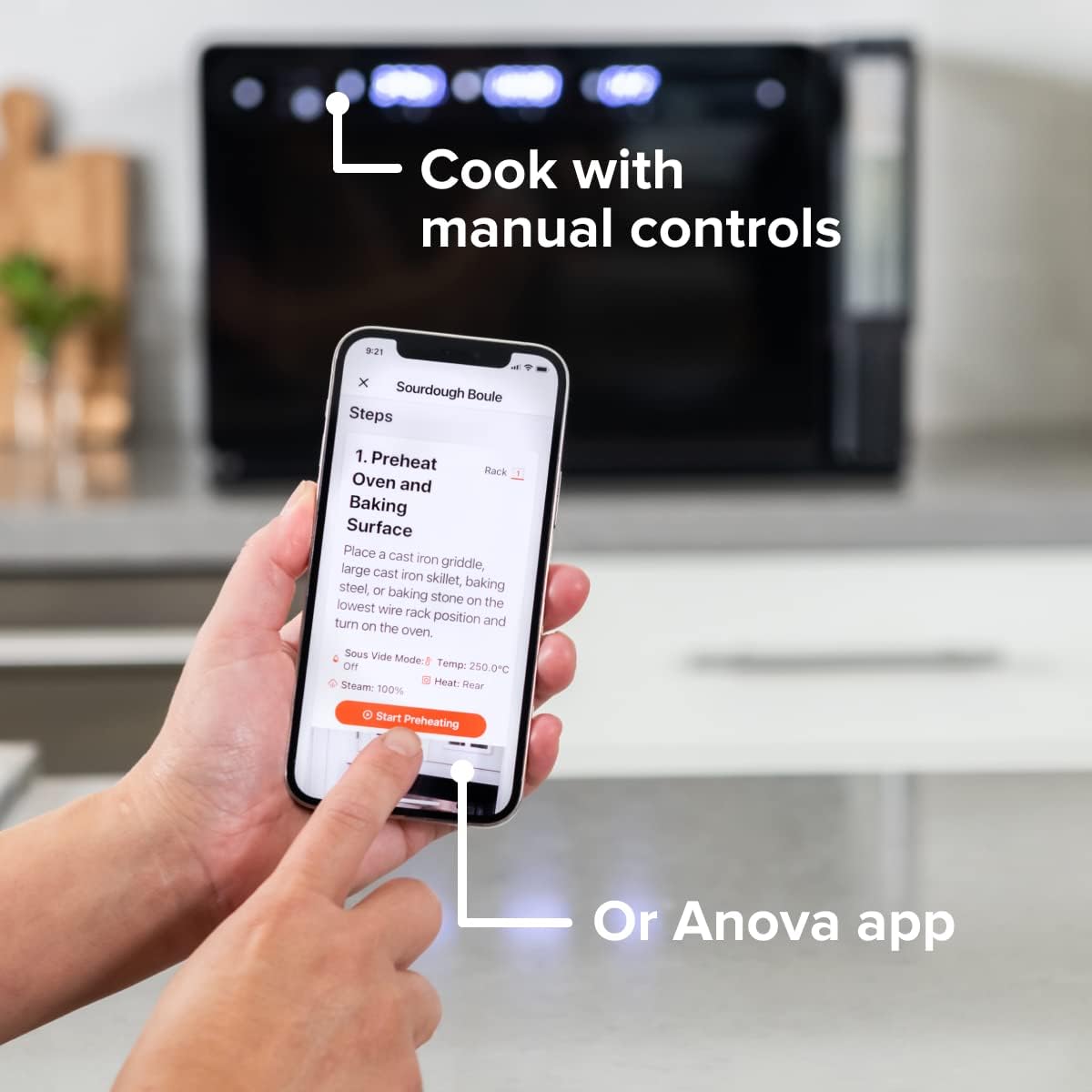
Figure 4: A user interacting with the Anova app on a smartphone, demonstrating remote control capabilities for the oven.
Basic Cooking Modes
The oven offers several cooking modes:
- Convection: Uses a fan to circulate hot air for even cooking and browning.
- Steam: Injects steam into the oven cavity, ideal for baking bread, steaming vegetables, or sous vide style cooking.
- Combi (Convection + Steam): Combines hot air and steam for moist interiors and crispy exteriors.
- Ime/ọkụ: Standard oven functions for baking and roasting.
- Broil: High heat from the top element for searing and browning.
- Mmiri mmiri mmiri: Low heat and fan circulation for drying foods.
Setting a Program (Manual Control)
- Turn the mode knob to select your desired cooking mode.
- Adjust the temperature using the temperature knob.
- Tọọ oge isi nri site na iji akara oge.
- Pịa bọtịnụ Malite/kwụsịtụ ka ịmalite isi nri.
- To use the food probe, insert it into the thickest part of your food before starting. The oven will cook until the target internal temperature is reached.
Ọnọdụ Sous Vide
The Anova Precision Oven can achieve sous vide style results without a water bath. Use the steam function and the food probe to cook food to a precise internal temperature, ensuring tenderness and juiciness.
Steam Injection for Baking
For perfect breads with crispy crusts and soft interiors, utilize the steam injection feature. Ensure the water tank is filled before starting a steam-assisted baking program.

Figure 5: Two loaves of freshly baked bread, showcasing the results of steam injection for a perfect crust and crumb. The Anova Precision Smart Oven is visible in the background.
Nlekọta na nhicha
Regular cleaning and maintenance will ensure the longevity and optimal performance of your Anova Precision Smart Oven.
Nhicha kwa ụbọchị
- After each use, allow the oven to cool completely.
- Jiri mgbasa ozi hichapụ elu ime na mputaamp ákwà na ncha dị nro. Zere ihe nhicha na-ehicha ihe ma ọ bụ ihe nhicha na-ehicha ihe.
- Remove and clean the racks and baking pan with warm, soapy water.
- Empty and rinse the water tank after each use, especially if using steam functions. Allow it to air dry before reinserting.
Descaling (Steam Function Users)
If you frequently use the steam function, mineral buildup may occur. The oven may indicate when descaling is needed. Refer to the Anova app or online resources for detailed descaling instructions using a descaling solution.
Nchekwa
Mgbe a naghị eji oven ahụ ruo ogologo oge, hụ na oven ahụ dị ọcha ma kpọọ nkụ. Debe ya n'ebe dị jụụ ma kpọọ nkụ.
Nchọpụta nsogbu
This section addresses common issues you might encounter with your Anova Precision Smart Oven.
| Nsogbu | Ihe nwere ike ime | Ngwọta |
|---|---|---|
| Oven not turning on. | A naghị etinye ya; ike gitage; ihe mgbawa sekit ahụ gbajiri agbaji. | Ensure oven is securely plugged into a working outlet. Check household circuit breaker. |
| Enweghị uzuoku a na-emepụta. | Water tank empty or not properly seated; mineral buildup. | Fill water tank with distilled water and ensure it is correctly inserted. Perform descaling if necessary. |
| Nri anaghị esi nri nke ọma. | Improper rack placement; overcrowding; fan obstruction. | Refer to recipe for recommended rack position. Avoid overcrowding the oven. Ensure nothing obstructs the convection fan. |
| Nsogbu njikọ Wi-Fi. | Paswọọdụ Wi-Fi na-ezighi ezi; rawụta dị oke anya; nnyonye anya netwọk. | Double-check Wi-Fi password. Move oven closer to router or use a Wi-Fi extender. Restart oven and router. |
If the problem persists after attempting these solutions, please contact Anova Customer Support.
Nkọwapụta
- Akara: Anova nri
- Aha nlereanya: Igwe ọkụ nkenke
- Nọmba Nlereanya ihe: AN900-10
- Akụkụ ngwaahịa: 18"D x 22"W x 14"H
- Ibu ihe: 59 pound
- Agba: Nwa
- Ụdị njikwa: Mkpọchi
- Isi mmalite ike: Eletriki
- Ngwa gụnyere: Water tank, pan, temp probe
- Njirimara Pụrụ Iche: Enwere ike ime mmemme
Akwụkwọ ikike na nkwado
The Anova Precision Smart Oven comes with a manufacturer's warranty. Please refer to the warranty card included with your product or visit the official Anova Culinary websaịtị maka nkọwa na usoro akwụkwọ ikike.
For technical support, troubleshooting assistance, or to inquire about replacement parts, please contact Anova Customer Support:
- Nkwado n'ịntanetị: Gaa leta Anova Culinary Store on Amazon ma ọ bụ onye ọrụ ha websaịtị.
- Ntuziaka onye ọrụ (PDF): A comprehensive user guide is available for download at njikọ a.

Figure 6: The Anova Precision Smart Oven integrated with a smart home assistant (Alexa), demonstrating its connectivity features.


