1. Okwu mmalite
Thank you for choosing the Loluka Invisible Earbuds. This manual provides essential information for setting up, operating, and maintaining your new earbuds. Please read it carefully before use to ensure optimal performance and longevity of your device.
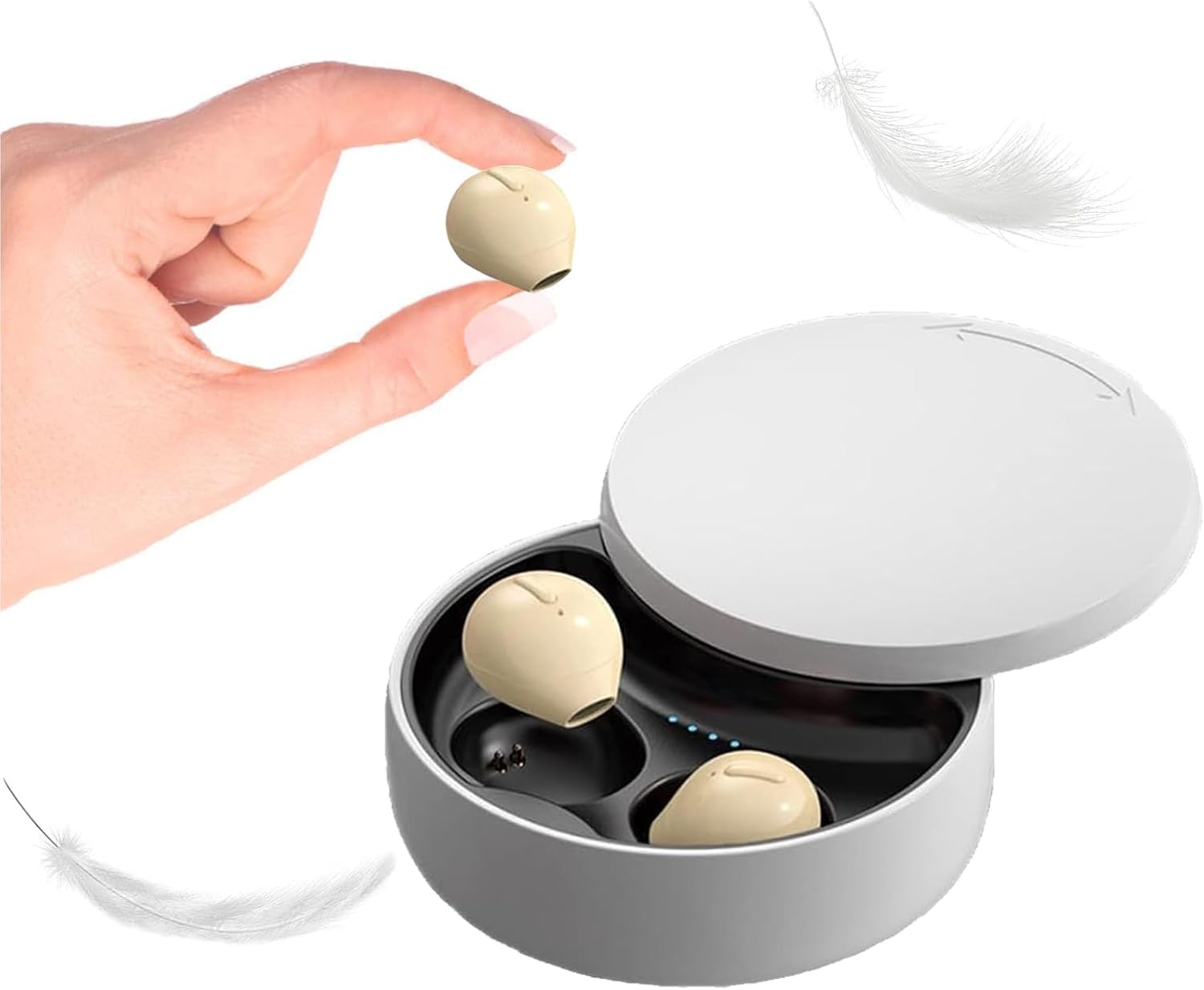
Image 1.1: Loluka Invisible Earbuds with their compact charging case. One earbud is shown held between fingers, highlighting its small size.
These earbuds are designed for discreet and comfortable listening, featuring a mini design, stable Bluetooth 5.1 connectivity, and a long battery life.
2. Ihe ngwugwu
Biko lelee ngwungwu maka ihe ndị a:
- Loluka Invisible Earbuds (Left and Right)
- Nchaji case
- Igwe nchaji USB
- Akwụkwọ ntuziaka onye ọrụ (Akwụkwọ a)
3. Akụrụngwa Ngwaahịa
- Nhazi Obere: Extremely small and lightweight for comfortable, long-term wear.
- Nghaghachi agbatịgoro: Up to 5 hours of single playtime, with the charging case providing an additional 30 hours for a total of 35 hours.
- Otu ihe ekwe ntị eji: Enwere ike iji ntị ntị ọ bụla n'onwe ya.
- One-Key Control: Simple button for power, music playback, and call management.
- Njikọta kwụsiri ike: Bluetooth 5.1 chip ensures a stable connection and low latency.
- Nguzogide mmiri: IPX5 ọkwa mgbochi mmiri.

Image 3.1: Visual comparison of an earbud's size to a US quarter, demonstrating its compact and lightweight design (approximately 3.7g).

Image 3.2: A woman wearing an earbud, illustrating its discreet and hidden-in-ear design.
4. Nhazi
4.1 Nchaji izizi
Tupu ojiji nke mbụ, chajie nke ọma ekwe ntị na akpa nchaji.
- Tinye ntị ntị abụọ n'ime akpa chaja.
- Jikọọ eriri chaja USB na ọdụ chaja dị na akpa ahụ na isi iyi ike.
- The indicator lights on the case will show charging status. A full charge takes approximately 1.5 hours.
4.2 Ijikọ na ngwaọrụ
Ekwe ntị ndị a na-akwado njikọta akpaka maka ịdị mfe.

Image 4.1: Visual guide for connecting the earbuds via Bluetooth, showing a phone's Bluetooth settings and the charging case.
- Njikọ oge mbụ:
- Wepụ ekwe ntị n'ime akpa nchaji. Ha ga-agbanye ọkụ na-akpaghị aka wee banye ọnọdụ njikọta.
- Kwado Bluetooth na ekwentị mkpanaaka gị.
- Chọọ maka "X21S" (or similar model name) in the list of available devices and select it to pair.
- Njikọ ndị na-esote:
- Once paired, the earbuds will automatically connect to your last-paired device when removed from the charging case and Bluetooth is enabled on your device.
5. Ntuziaka ọrụ
5.1 Gbanyụọ ma ọ bụ gbanyụọ
- Ike Na: Take the earbuds out of the charging case. They will power on automatically. Alternatively, long-press the touch area on each earbud.
- Gbanyụọ: Place the earbuds back into the charging case. They will power off automatically. Alternatively, long-press the touch area on each earbud until they power off.
5.2 Njikwa egwu
- Gwuo/kwụsịtụ: Single-click the touch area on either earbud.
- Abụ na-esote: Double-click the touch area on the right earbud.
- Abụ gara aga: Double-click the touch area on the left earbud.
5.3 Njikwa oku
- Azịza/Kwụsị Oku: Single-click the touch area on either earbud.
- Jụ oku: Long-press the touch area on either earbud.
5.4 Ojiji Ntị Otu
You can use either the left or right earbud independently. Simply take one earbud out of the charging case, and it will automatically connect to your device if previously paired.

Foto 5.1: Ọpụamples of discreet earbud usage in different environments, including work, sleep, and communication.
6. Nlekọta
6.1 Nhicha
- Jiri akwa dị nro, kpọrọ nkụ na-adịghị na-ehicha ntị ntị na chaja mgbe niile.
- Ejila ihe mkpocha abrasive, ihe mgbaze, ma ọ bụ aerosol sprays.
- Ensure charging contacts are free of dust and debris.
6.2 Nchekwa
- Chekwaa ntị ntị n'akpa chaja ha mgbe anaghị eji ya iji chebe ha ma debe ya ebubo.
- Zere oke okpomọkụ yana ìhè anyanwụ kpọmkwem.
7. Nchọpụta nsogbu
- Igwe ntị anaghị ejikọta: Ensure both earbuds are charged. Turn off and on your device's Bluetooth. Try resetting the earbuds (refer to manufacturer's websaịtị maka ntuziaka nrụpụta akọwapụtara ma ọ bụrụ na ọ dị mkpa).
- Enweghị ụda: Check the volume level on your device and ensure the earbuds are properly connected.
- Njikọ na-adịte aka: Hụ na ị nọ n'ime oke Bluetooth nke mita 15, ọ dịghịkwa ihe mgbochi dị ukwuu n'etiti ekweisi na ngwaọrụ gị.
- Earbuds anaghị akwụ ụgwọ: Verify the charging cable is securely connected and the charging contacts on both the earbuds and case are clean.
8. Nkọwapụta
| Njirimara | Nkọwapụta |
|---|---|
| Nọmba nlereanya | B09B75DZ89 |
| Ụdị | Loluka |
| Teknụzụ Njikọta | Ikuku (Bluetooth 5.1) |
| Oke Bluetooth | 15 mita |
| Ndụ Batrị Ege ntị Otu | Ruo awa 5 |
| Oge Mkpọghachi (na ikpe) | Ruo awa 35 |
| Oge Nchaji | Ihe dị ka awa 1.5 |
| Ọkwa Nguzogide mmiri | IPX5 (ihe mgbochi mmiri) |
| Ụdị njikwa | Touch / One-key Control |
| Ntinye ntị | Na Ntị |
| Ibu Ibu | 3.52 ounces |
| Akụkụ ngwaahịa | 3.1 x 1.6 x 4.3 sentimita asatọ |
9. Akwụkwọ ikike na nkwado
Loluka products are designed for reliability and performance. For warranty information and customer support, please refer to the contact details provided with your purchase or visit the official Loluka websaịtị. Debe nnata nzụta gị dị ka ihe akaebe nke ịzụrụ maka nkwupụta ikike.
For further assistance, please contact our customer support team.