Jebao MLW-30

Jebao MLW-30 Smart Wave Maker Instruction Manual

Model: MLW-30

1. Okwu mmalite

The Jebao MLW-30 Smart Wave Maker is designed to create diverse wave patterns in saltwater tanks, providing an optimal environment for aquatic life. Featuring a unique control system with multiple wave styles and functions, this device offers wireless control for synchronized operation. Its low voltage DC brushless electronic motor ensures safe and quiet performance.

2. Kedu ihe dị na Igbe ahụ

Upon unboxing your Jebao MLW-30 Smart Wave Maker, ensure all components listed below are present and free from damage.

All components of the Jebao MLW-30 Smart Wave Maker laid out, including the pump, LCD controller, power adapter, and magnetic mounts.

Figure 2.1: Contents of the Jebao MLW-30 Smart Wave Maker package.

3. Ngwaahịa gafereview

Familiarize yourself with the different parts of the Jebao MLW-30 Wave Maker.

N'ihu view of the Jebao MLW-30 Smart Wave Maker pump.

Foto 3.1: N'ihu view of the wave maker pump.

Akụkụ view of the Jebao MLW-30 Smart Wave Maker pump.

Foto 3.2: Akụkụ view of the wave maker pump.

N'elu view of the Jebao MLW-30 Smart Wave Maker pump.

Foto 3.3: Top view of the wave maker pump.

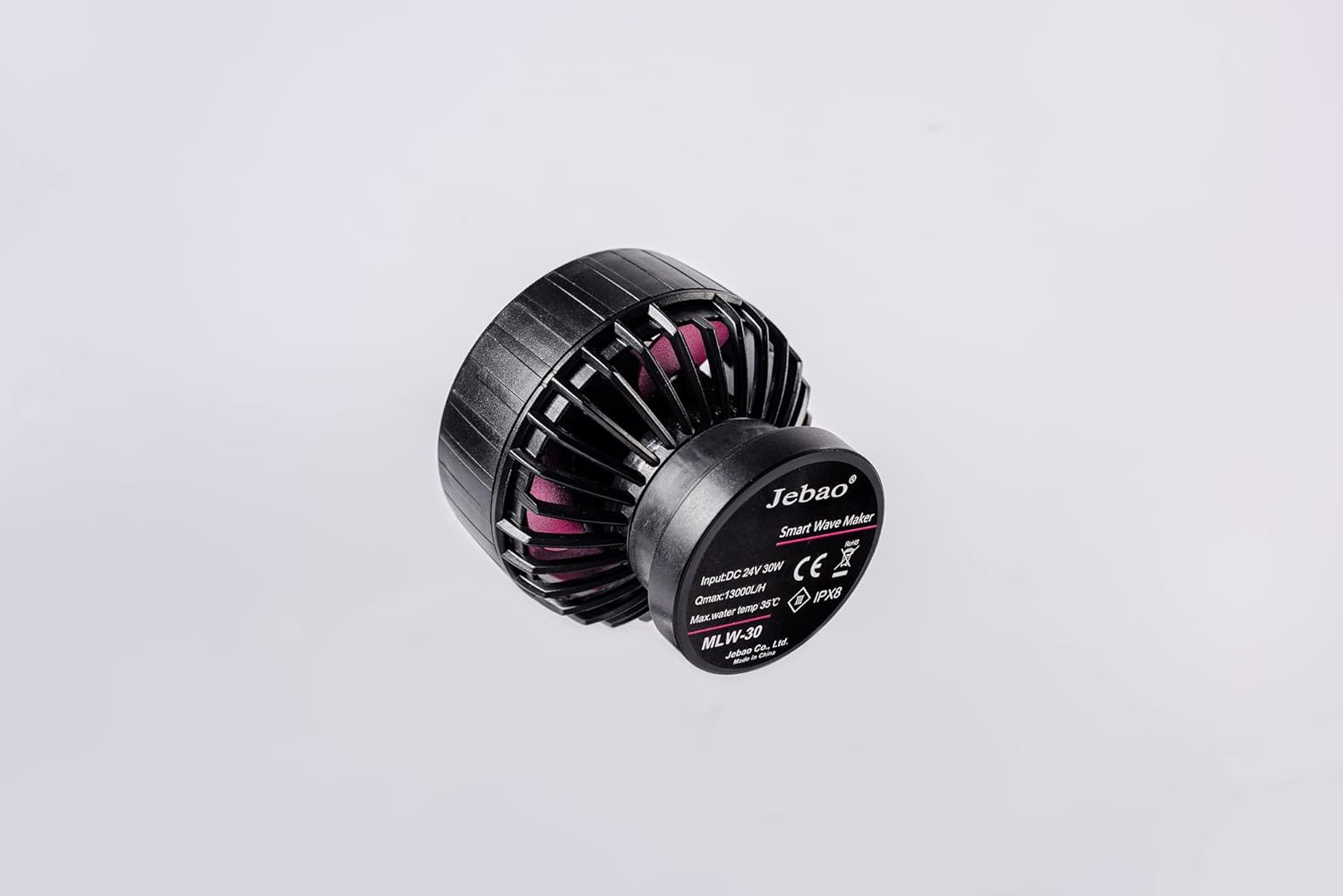
N'azụ view of the Jebao MLW-30 Smart Wave Maker pump showing product label.

Ọgụgụ 3.4: N'azụ view of the wave maker pump with specifications.

4. Nhazi ntuziaka

  1. Ịkwapu: Carefully unbox the Jebao MLW Smart Wave Maker and remove all protective packaging materials.
  2. Position Wave Maker: Place the wave maker inside your aquarium. Ensure the magnetic base is securely attached to the aquarium glass. The angled rubber mount can be used to adjust the pump's direction.
  3. Njikọ Ike: Connect the power cable adapter to the wave maker and then to a power outlet.
  4. Budata ngwa: Download and install the 'Jebao Aqua' app on your iOS or Android device.
  5. Jikọọ Wi-Fi: Follow the in-app instructions to connect the wave maker to your Wi-Fi network.
  6. Initial Control: Once connected, you can begin controlling the wave maker using either the LCD display controller or the mobile app.
  7. Arụmọrụ kacha mma: Always ensure the submerged water intake is not blocked for optimal performance.
  8. Nchekwa: Do not operate the pump without water. Keep the device away from children and pets.

Video 4.1: Unboxing and initial setup guide for the Jebao MLW Series Wavemaker, demonstrating component identification and basic assembly.

5. Ntuziaka ọrụ

5.1. Manual Control (LCD Display Controller)

Video 5.1: Demonstration of manual control functions on the LCD display controller, including power, flow, mode, and frequency adjustments.

5.2. App Control (Jebao Aqua App)

Video 5.2: Detailed guide on connecting the wave maker to the Jebao Aqua app and utilizing its various control features, including manual settings and programming.

6. Nlekọta

7. Nchọpụta nsogbu

If you encounter issues with your Jebao MLW-30 Smart Wave Maker, consider the following general troubleshooting steps:

For more detailed troubleshooting or specific error codes, please refer to the Jebao Aqua app's help section or the official Jebao websaịtị.

8. Nkọwapụta

Njirimara Nkọwa
Nlereanya MLW-30
Ụdị Jebao
Ike 24V 30-watt
Ọsọ kacha 3434 GPH (13000 L/H)
Njikwa 2.4G Wi-Fi (iOS/Android) + LCD Display Controller
Nkà na ụzụ SINE wave technology for ultra-quiet operation
Ụdị mmiri Suitable for both marine and fresh water
Ihe onwunwe Plastic, Stainless Steel (No exposed copper elements)
Dimensions (Pump Only) 2" x 3" diameter
Ibu Ibu 2.07 pound

9. Akwụkwọ ikike na nkwado

For detailed warranty information, product registration, and customer support, please visit the official Jebao websaịtị ma ọ bụ kpọtụrụ ndị ahịa ha ozugbo. Debe nnata nzụta gị dị ka ihe akaebe nke ịzụrụ maka nkwupụta ikike.

Akwụkwọ ndị emetụtara - MLW-30

Tupuview Akwụkwọ ntuziaka onye ọrụ Jebao Smart Wave - Ntọlite, arụmọrụ na nchọpụta nsogbu
Akwụkwọ ntuziaka onye ọrụ zuru oke maka Jebao Smart Wave Maker (MCP, MLW, MOW SERIES), na-ekpuchi nrụnye, njirimara, njikwa ngwa site na Jebao Aqua, ụdị ebili mmiri dị iche iche, nchọpụta nsogbu na mmezi. Mụta otu esi ahazi ma rụọ ọrụ onye na-eme ebili mmiri Jebao maka ọnọdụ akwarium kacha mma.
Tupuview Akwụkwọ ntuziaka onye ọrụ Jebao Cross-Flow Wave Pump: CP-90, CP-120, CP-150
Akwụkwọ ntuziaka onye ọrụ maka mgbapụta Wave Jebao Cross-Flow, ụdị CP-90, CP-120, na CP-150. Gụnyere ntuziaka nchekwa, ntụzịaka mgbakọ, ọrụ njikwa, mmezi, na nkọwa nka.
Tupuview Jebao RF-B Series Automatic Feeder User Manual
Comprehensive user manual for the Jebao RF-B Series Automatic Feeder, detailing installation, operation, features, maintenance, and troubleshooting for aquarium fish feeding.
Tupuview Jebao E Series Wavemaker Pump User Manual
User manual for the Jebao E Series Wavemaker Pump, detailing product features, specifications, installation, operation, maintenance, and troubleshooting.
Tupuview Ntuziaka Onye Ọrụ nke Jebao MDC Series Aquarium Pumps
Akwụkwọ ntuziaka maka igwe eji eme ihe maka ọkpọkọ mmiri Jebao MDC, atụmatụ zuru ezu, ntuziaka nchekwa, ntinye, ọrụ, na nkọwapụta teknụzụ. Gụnyere ụdị MDC-2000 ruo MDC-10000.
Tupuview Ntuziaka Onye Ọrụ nke Jebao AL & AK Series Aquarium Light - Ntọala, Atụmatụ, na Njikwa Ngwa
Akwụkwọ ntuziaka zuru oke maka ọkụ azụ mmiri Jebao AL na AK Series. Na-ekpuchi mmeghe ngwaahịa, nkọwapụta, ntinye, ntọala Wi-Fi, nbudata na njikwa ngwa, ụdịdị, na nsogbu nchọpụta.