Okwu mmalite
The Vieta Pro Note True Wireless Earphones are designed to provide a high-quality audio experience with advanced features. These earphones utilize Bluetooth 5.1 for stable wireless connectivity, offer Active Noise Cancellation (ANC) up to -30dB, and include an integrated microphone for clear communication. With IPX4 water resistance, they are suitable for various activities. The charging case extends the total battery life to up to 20 hours.
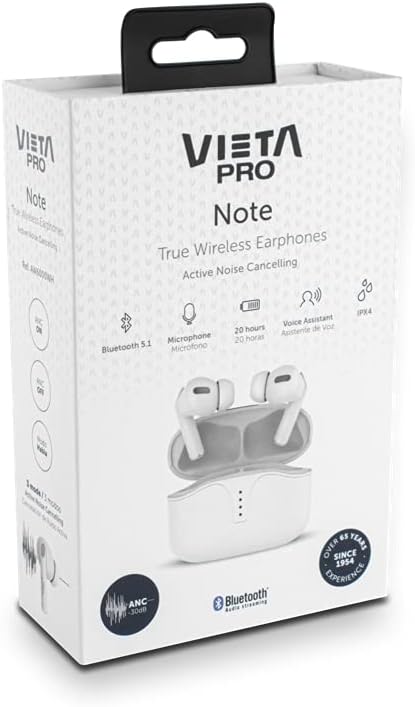
Image: Vieta Pro Note True Wireless Earphones in their retail packaging, highlighting key features like Bluetooth 5.1, microphone, 20 hours battery, Voice Assistant, and IPX4 rating.
Melite
1. Nchaji mbụ
Before first use, fully charge the earphones and the charging case. Connect the provided USB Type-C cable to the charging port on the case and to a power source. The LED indicators on the case will show the charging status and remaining battery level.
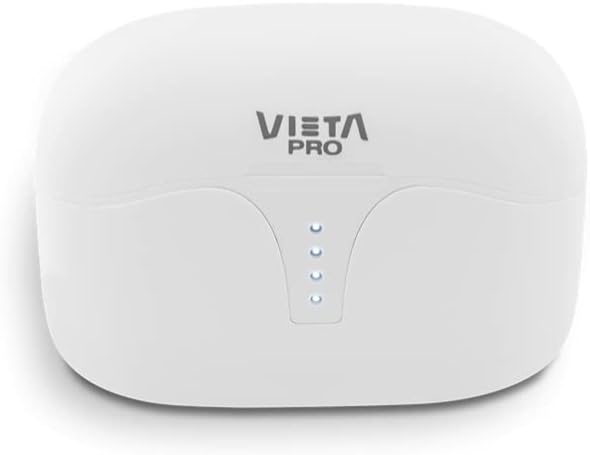
Foto: Top view of the Vieta Pro Note charging case, showing the four LED indicators that display battery status.
2. Ijikọ na ngwaọrụ
- Hụ na ekwe ntị ndị ahụ chajị ma tinye ha n'ime akpa chajị.
- Open the charging case lid. The earphones will automatically enter pairing mode.
- Na ekwentị gị ma ọ bụ ngwaọrụ Bluetooth nyere gị aka, gaa na ntọala Bluetooth.
- Select "Vieta Pro Note" from the list of available devices.
- Once connected, a confirmation sound will play, and the earphones will be ready for use.
The Vieta Pro Note earphones feature Dual Master Technology, meaning both earbuds can function independently. You can use either the left or right earbud alone after initial pairing.
Image: The Vieta Pro Note True Wireless Earphones removed from their open charging case, ready for pairing or use.
Ntuziaka ọrụ
1. Gbanyụọ / gbanyụọ
- Ike Na: Open the charging case lid, or take the earphones out of the case. They will automatically power on and attempt to connect to the last paired device.
- Gbanyụọ: Tinyeghachi ekwe ntị n'ime akpa chaja ma mechie mkpuchi ahụ. Ha ga-agbanyụ ọkụ na akpaghị aka ma malite ịchaji.
2. Aka njikwa
The Vieta Pro Note earphones feature a touch control panel on each earbud for various functions:

Foto: A nso nso view of the left Vieta Pro Note earbud, showing the touch-sensitive area and microphone.
- Gwuo/kwụsịtụ: Otu mgbata na ntị ntị.
- Track na-esote: Pịa bọtịnụ ntị aka nri ugboro abụọ.
- Gara aga Track: Kpatụ ntị ugboro abụọ n'akụkụ aka ekpe.
- Olu elu: Pịa ugboro atọ na ntị ntị aka nri.
- Olu ala: Pịa ugboro atọ na ekwe ntị aka ekpe.
- Azịza/Kwụsị Oku: Otu mgbata na ntị ntị.
- Jụ oku: Pịa ma jide otu ntị ntị maka sekọnd 2.
- Mee ka onye enyemaka olu rụọ ọrụ: Pịa ma jide otu ntị ntị maka sekọnd 3.
3. Ụdị Mkpọtụ Na-arụ Ọrụ (ANC)
The earphones offer three noise cancellation modes:
- Nkagbu mkpọtụ mkpọtụ (ANC): Reduces ambient noise by up to -30dB, ideal for noisy environments.
- Talk Mode (Transparency Mode): Allows you to hear your surroundings and engage in conversations without removing the earphones.
- Agbanyụrụ Turns off noise cancellation for a standard listening experience.
To switch between ANC modes, press and hold the touch panel on the aka ekpe earbud for approximately 2 seconds until you hear a voice prompt indicating the mode change.
Nlekọta
1. Nhicha
- Jiri akwa dị nro, kpọrọ nkụ na-adịghị na-ehicha ntị ntị na chaja mgbe niile.
- Ejila ihe mkpocha abrasive, ihe mgbaze, ma ọ bụ aerosol sprays.
- Jiri nwayọọ wepụ ihe ntị ntị ma ọ bụ irighiri ihe ọ bụla na ndụmọdụ ntị na ntupu okwu site na iji obere ahịhịa dị nro ma ọ bụ swab owu.
2. Nchekwa
When not in use, store the earphones in their charging case to protect them from dust, damage, and to ensure they remain charged.
3. Mgbochi mmiri (IPX4)
The Vieta Pro Note earphones are rated IPX4 for water resistance. This means they are resistant to splashing water from any direction. They are suitable for use during workouts or in light rain. However, they are ọ bụghị designed for submersion in water or exposure to pressurized water jets. Do not use them in a shower or while swimming.
Nchọpụta nsogbu
- Enweghị ụda: Ensure earphones are charged, connected to your device, and volume is turned up on both the earphones and your device.
- Enweghị ike ijikọ: Make sure Bluetooth is enabled on your device and the earphones are in pairing mode. Try turning Bluetooth off and on again on your device. If issues persist, try resetting the earphones (refer to the full manual for specific reset instructions if available).
- Njikọ na-adịte aka: Ensure there are no obstructions between the earphones and your device. Keep the device within the Bluetooth range (typically 10 meters/33 feet).
- Earbuds anaghị akwụ ụgwọ: Check that the charging cable is securely connected and the charging case has power. Ensure the earbuds are correctly seated in the charging case.
Nkọwapụta
| Nọmba nlereanya | AW6000WH |
| Ụdị | Vieta Pro |
| Njikọta | Bluetooth 5.1 |
| Nkagbu mkpọtụ | Active Noise Cancellation (-30dB) |
| Igwe okwu | Ejikọtara |
| Mmiri Nguzogide | IPX4 |
| Ndụ batrị earbud | Ruo awa iri abụọ |
| Mkpokọta ndụ batrị (ya na ikpe) | Ruo awa iri abụọ |
| Nchaji ọdụ ụgbọ mmiri | USB Ụdị-C |
| Ụdị njikwa | Njikwa mmetụ, njikwa olu |
| Ụdị Ihe | N'ime ntị |
| Ihe onwunwe | Plastic |
Akwụkwọ ikike na nkwado
For warranty information, technical support, or further assistance, please refer to the official Vieta Pro websaịtị ma ọ bụ kpọtụrụ ngalaba ọrụ ndị ahịa ha. Debe ihe akaebe nke ịzụrụ ihe maka akwụkwọ ikike.


