1. Okwu mmalite
Thank you for choosing the ZEBRONICS Zeb-Sound Bomb 1 TWS Earbuds. This manual provides detailed instructions for the proper use, setup, and maintenance of your new earbuds. Please read this manual carefully before using the product to ensure optimal performance and longevity.
2. Ihe ngwugwu
- ZEBRONICS Zeb-Sound Bomb 1 TWS Earbuds (Left and Right)
- Akpa Nchaji enwere ike ibugharị
- -Dị-C Nchaji USB
- Atụmatụ Ntị Mgbakwunye (nha dị iche iche)
- Akwụkwọ ntuziaka onye ọrụ
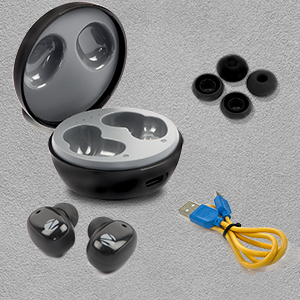
This image shows the complete package contents for the ZEBRONICS Zeb-Sound Bomb 1, including the earbuds, charging case, a Type-C charging cable, and various sizes of ear tips.
3. Ngwaahịa gafereview
The Zeb-Sound Bomb 1 TWS Earbuds feature a compact design with touch controls and a portable charging case. Each earbud is equipped with a 6mm driver for clear audio.

This image shows the ZEBRONICS Zeb-Sound Bomb 1 TWS Earbuds securely placed within their charging case, viewed from the top. The case is open, revealing both earbuds and the charging indicator lights.

Otu akụkụ view of the ZEBRONICS Zeb-Sound Bomb 1 TWS Earbuds inside their open charging case, highlighting the ergonomic design of the earbuds and the compact nature of the case.
4. Nhazi
4.1 Nchaji izizi
Before first use, ensure the earbuds and charging case are fully charged. Remove the protective stickers from the charging contacts on the earbuds.

A close-up of a ZEBRONICS Zeb-Sound Bomb 1 earbud, illustrating the protective sticker on the charging contacts that must be removed before initial use.
Place both earbuds into the charging case. Connect the Type-C charging cable to the case and a USB power source. The indicator lights on the case will show charging status. A full charge takes approximately 4 hours.

The ZEBRONICS Zeb-Sound Bomb 1 charging case with a Type-C charging cable connected, demonstrating the charging port location.
4.2 Njikọ Bluetooth
- Gbaa mbọ hụ na a na-akwụ ụgwọ ekwe ntị ma tinye ya n'ihe nchaji.
- Open the charging case lid. The earbuds will automatically enter pairing mode, indicated by flashing LED lights on the earbuds.
- Na ekwentị mkpanaaka gị, mee ka Bluetooth rụọ ọrụ.
- Chọọ maka available devices and select "Zeb-Sound Bomb 1" from the list.
- Once connected, the earbud LEDs will stop flashing, indicating successful pairing.
5. Ntuziaka ọrụ
5.1 Gbanyụọ ma ọ bụ gbanyụọ
- Ike Na: Open the charging case lid, and the earbuds will power on automatically. Alternatively, long-press the touch area on both earbuds for 3 seconds.
- Gbanyụọ: Place the earbuds back into the charging case and close the lid. They will power off automatically. Alternatively, long-press the touch area on both earbuds for 5 seconds.
5.2 Njikwa egwu
- Gwuo/kwụsịtụ: Otu mgbata na ntị ntị.
- Track na-esote: Kpatụ ntị ntị aka nri ugboro abụọ.
- Gara aga Track: Kpatụ ntị ntị aka ekpe ugboro abụọ.
5.3 Njikwa oku
- Azịza/Kwụsị Oku: Otu mgbata na ntị ntị.
- Jụ oku: Pịa ogologo aka na ntị abụọ ahụ maka sekọnd abụọ.
5.4 Onye enyemaka olu
Triple tap on either earbud to activate your device's voice assistant (e.g., Google Assistant, Siri).
6. Ịchaji
The earbuds charge automatically when placed inside the charging case. The case itself is charged via a Type-C cable. The LED indicators on the case will show the charging status and battery level.
- Nchaji ntị ntị: Place earbuds in the case. LEDs on earbuds will indicate charging.
- Ileba ikpe: Connect the Type-C cable to the case and a power adapter. The case LEDs will indicate charging progress.
7. Nlekọta
To ensure the longevity and optimal performance of your Zeb-Sound Bomb 1 TWS Earbuds, follow these maintenance guidelines:
- Nhicha: Jiri ákwà dị nro ma kpọọ nkụ hichaa ntị ntị na ihe mkpuchi chaja. Ejila kemịkal siri ike ma ọ bụ ihe ndị na-emebi emebi.
- Nchekwa: Store the earbuds in their charging case when not in use to protect them from dust and damage.
- Nguzogide mmiri: Ekwe ntị ndị a anaghị agbaze agbaze. Zere ka mmiri mikpuo ha ma ọ bụ mee ka mmiri zoo. Kpoo ha nke ọma ma ọ bụrụ na mmiri ezoo ha.

An image depicting the ZEBRONICS Zeb-Sound Bomb 1 earbuds with water droplets, visually representing their splash-proof design.
8. Nchọpụta nsogbu
Ọ bụrụ na ị hụ nsogbu na ntị ntị gị, lee ihe ngwọta ndị a na-ahụkarị:
| Nsogbu | Ngwọta enwere ike |
|---|---|
| Igwe ntị anaghị ejikọta ọnụ | Ensure earbuds are charged. Turn off and on Bluetooth on your device. Forget "Zeb-Sound Bomb 1" from your device's Bluetooth list and re-pair. |
| Naanị otu earbud na-arụ ọrụ | Place both earbuds back in the case, close the lid, then open again. Ensure both earbuds are charged. Try re-pairing. |
| Earbuds anaghị akwụ ụgwọ | Ensure protective stickers are removed from earbud contacts. Check Type-C cable and power source. Ensure case is charged. |
| Obere olu ma ọ bụ ogo ụda adịghị mma | Adjust volume on your device. Ensure ear tips fit snugly in your ears. Clean any debris from earbud speakers. |
9. Nkọwapụta
| Njirimara | Nkọwapụta |
|---|---|
| Aha Nlereanya | ZEB-ụda bombu 1 |
| Teknụzụ Njikọta | Bluetooth 5.0 |
| Nha ọkwọ ụgbọ ala | 6mm |
| Oge nkwughachi | Ruo awa 12 (na olu 50%) |
| Oge Nchaji | Ihe dị ka awa 4 (maka ikpe) |
| Nchaji Interface | Ụdị-C |
| Ụdị njikwa | Njikwa aka, Njikwa olu |
| Ọkwa Nguzogide mmiri | Mmiri Na-eguzogide Mmiri (Ihe Na-egbochi Ịgbasa Mmiri) |
| Ibu Ibu | 35 grams |
| Ntinye ntị | Na Ntị |
| Mgbochi | 16 Ohm |
10. Ozi nchekwa
- Ewepụla ngwaahịa a na oke okpomọkụ ma ọ bụ ìhè anyanwụ.
- Avoid using the earbuds at excessively high volumes for prolonged periods to prevent hearing damage.
- Debe ngwaahịa ahụ n'ebe ụmụaka nọ na anụ ụlọ.
- Do not attempt to disassemble or modify the earbuds or charging case. This will void the warranty and may cause damage.
- Tụfuo ngwaahịa ahụ nke ọma dịka iwu mpaghara siri dị.
11. Akwụkwọ ikike na nkwado
Your ZEBRONICS Zeb-Sound Bomb 1 TWS Earbuds come with a standard manufacturer's warranty. For detailed warranty terms, service, or technical support, please refer to the warranty card included in your package or visit the official ZEBRONICS website. You may also contact ZEBRONICS customer service directly for assistance.


