Okwu mmalite
Welcome to your new Matrix Fitness TF30 Treadmill with XER Console. This manual provides essential information for the safe and effective operation, setup, maintenance, and troubleshooting of your treadmill. Designed for a comfortable and high-performance running experience, the TF30 combines robust construction with advanced technology to enhance your fitness journey.

Figure 1: Matrix Fitness TF30 Treadmill with XER Console, showcasing its sleek design and integrated console.
Ozi nchekwa
Before operating the treadmill, please read and understand all safety instructions. Failure to do so may result in serious injury or equipment damage.
- Nkwụsị ihe mberede: Always attach the safety key clip to your clothing before starting a workout. In case of an emergency, pulling the safety key or pressing the emergency stop button will immediately halt the treadmill.
- mkpochapụ: Ensure adequate clearance around the treadmill (at least 6 feet behind and 2 feet on each side) for safe operation and emergency dismount.
- Akpụkpọ ụkwụ: Na-eyi akpụkpọ ụkwụ egwuregwu kwesịrị ekwesị mgbe niile mgbe ị na-eji igwe treadmill.
- Ụmụaka na anụ ụlọ: Debe ụmụaka na anụ ụlọ n'ebe a na-azọ ụkwụ n'ebe a na-arụ ọrụ.
- Ọnọdụ ahụike: Consult a physician before starting any new exercise program, especially if you have pre-existing medical conditions.
- Ike: Connect the treadmill to a properly grounded outlet. Do not use extension cords.
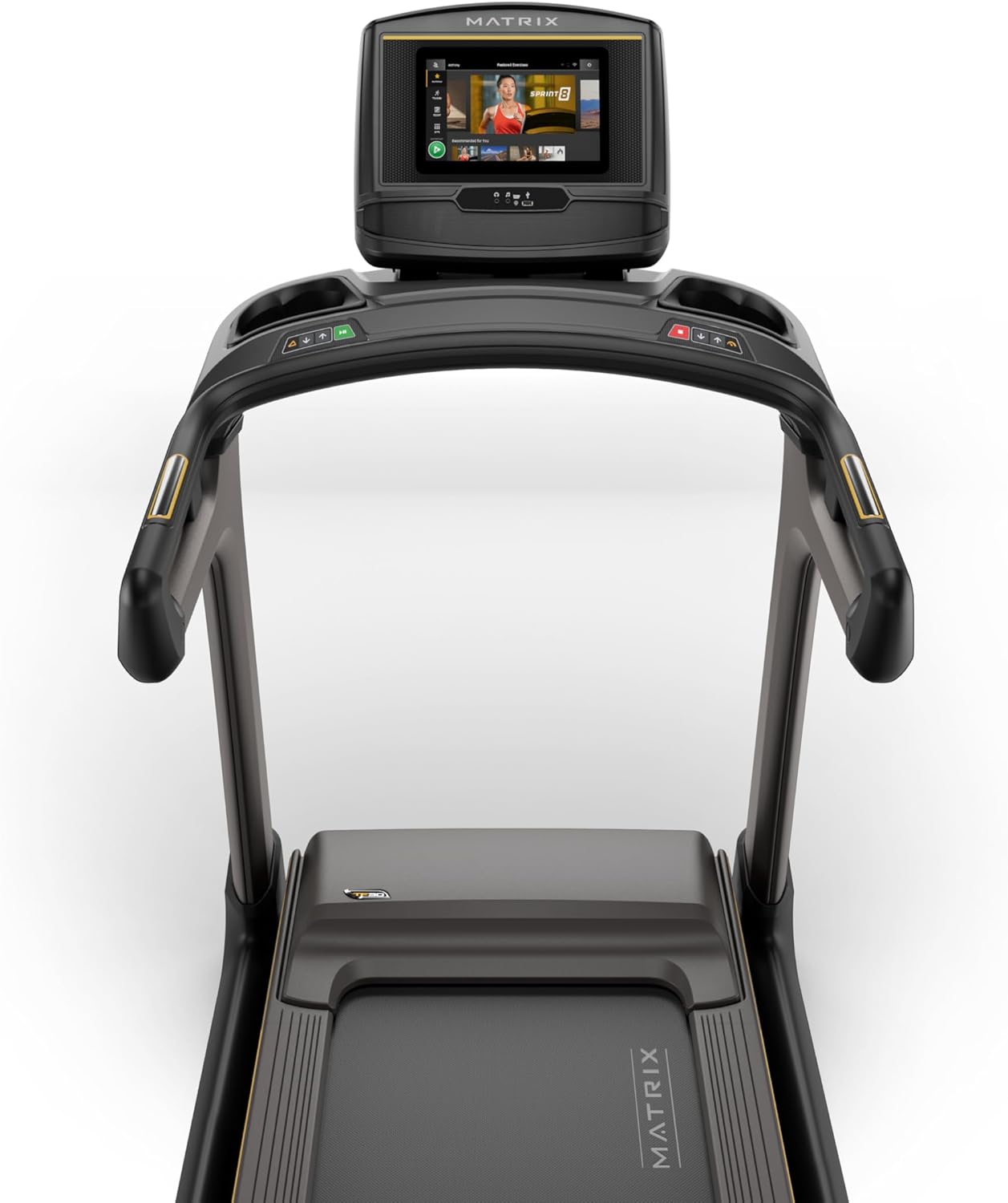
Figure 2: Close-up of the XER Console, highlighting the emergency stop button and safety key attachment point.
Melite
The Matrix Fitness TF30 Treadmill requires some assembly. Please ensure all components listed below are present before beginning assembly.
Ngwa gụnyere:
- Frame Treadmill
- Masts
- Mast Boots
- Ntọala njikwa
- Ogwe aka
- Handlebar Sleeves
- Okpu aka
- Frame Cover Sets
- Mkpuchi azụ
- Ụdọ ọkụ
- Igodo nchekwa
- Akụrụngwa Akụrụngwa
For detailed assembly instructions, please refer to the separate assembly guide provided with your product. Ensure the treadmill is placed on a flat, stable surface.
Ntuziaka ọrụ
Your TF30 Treadmill is equipped with advanced features for an optimal workout.
Akụkụ ndị bụ isi:
- Elu na-agba ọsọ: A spacious 20" x 55" running surface provides ample room for comfortable strides.
- Speed & Incline: Adjust speed from 0.5 to 12.5 mph and incline from 0% to 15% to customize your workout intensity.
- Johnson Drive System: Experience quiet, durable, and responsive performance with the continuous-duty drive system.
- Ultimate Deck System: Benefit from a heavy-duty frame, extra-thick deck, and industrial-grade cushioning for superior comfort and joint protection.
- Ichekwa oghere: The treadmill features a near 90-degree fold for convenient storage when not in use.

Figure 3: Diagram illustrating key features of the TF30 Treadmill, including its folding design, running surface, motor, incline, speed, and cushioning.

Figure 4: Demonstrating the space-saving folding capability of the TF30 Treadmill.
XER Console Operation:
The 10-inch touchscreen XER Console offers a rich interactive experience.
- Ngwa agbakwunyere: Stream entertainment from popular apps like Netflix, YouTube, and Spotify directly on the console.
- Mmemme mgbatị ahụ: Access 12 built-in programs, including Sprint 8, and integrate with iFIT and Virtual Active for diverse workout experiences and scenic routes.
- Njikọta: Connect via Bluetooth FTMS to third-party apps and use Bluetooth HR with the included strap for heart rate monitoring.
- Nchaji ikuku: Conveniently charge your compatible smartphone by placing it on the designated wireless charging pad on the console.
- Onye ọrụ Profiles: The console supports multiple user profiles, allowing personalized settings and tracking for each user.

Figure 5: The XER Console, highlighting its 10-inch touchscreen and integrated apps for entertainment and diverse workouts.

Figure 6: The XER Console's interface showing various entertainment applications available for use during workouts.

Figure 7: The XER Console displaying a virtual active scenic route, enhancing the immersive workout experience.
Nlekọta
Nlekọta anya mgbe niile na-eme ka ogologo ndụ na ịrụ ọrụ kachasị mma nke igwe mgbada gị.
- Nhicha: Wipe down the treadmill and console after each use with a damp cloth to remove sweat and dust. Avoid abrasive cleaners.
- mmanu eriri: Periodically check and lubricate the running belt according to the instructions in your detailed product manual to ensure smooth operation and prevent wear.
- Belt Tension & Alignment: Inspect the running belt for proper tension and alignment. Adjust as needed to prevent slipping or rubbing.
- Mpaghara moto: Debe ebe dị gburugburu moto ahụ ọcha ma ghara inwe uzuzu na ihe mkpofu iji hụ na ikuku na-abata nke ọma.
Nchọpụta nsogbu
If you encounter issues with your treadmill, refer to the following common troubleshooting tips.
| Nsogbu | Ihe nwere ike ime | Ngwọta |
|---|---|---|
| Treadmill anaghị arụ ọrụ. | Power cord not connected, circuit breaker tripped, safety key not engaged. | Ensure power cord is securely plugged in. Check household circuit breaker. Ensure safety key is fully inserted. |
| Belt ịgba ọsọ na-amị amị ma ọ bụ na-ala azụ. | Belt tension too loose, belt needs lubrication. | Adjust belt tension according to manual. Lubricate the running belt. |
| Mkpọtụ na-adịghị ahụkebe n'oge arụ ọrụ. | Loose components, motor issues, belt friction. | Inspect for loose bolts and tighten. Check belt lubrication. If noise persists, contact customer support. |
| Console display is blank or unresponsive. | Nsogbu ike, nsogbu software. | Ensure power is connected. Try restarting the treadmill by unplugging and re-plugging. |
For more complex issues, please refer to the comprehensive troubleshooting section in your full user manual or contact Matrix Fitness customer support.
Nkọwapụta
| Nkọwapụta | Uru |
|---|---|
| Ụdị | Matrix |
| Aha Nlereanya | Matrix Fitness TF30 Treadmill |
| Ụdị | TF30 Treadmill with XER Console |
| Akụkụ ngwaahịa (LxWxH) | 77"D x 35"W x 62"H |
| Nha agbakọtara | 42"x35"x71" |
| Ibu Ibu | 294 pound |
| Nkwanye ịdị arọ kacha | 350 pound |
| Running Surface (Deck Length x Deck Width) | 55 sentimita asatọ x 20 sentimita asatọ |
| Ọsọ kacha | 12.5 kilomita kwa elekere |
| Ọsọ kacha nta | 0.5 kilomita kwa elekere |
| Pasent ndakpọ kachatage | 15% |
| Ike inyinya kachasi | 3.25 Ike inyinya |
| Ụdị ngosi | LCD (10 Inches Screen Size) |
| Ọnụọgụ nke Mmemme | 12 |
| Isi Iyi Ike | Igwe ọkụ eletrik |
| Mgbakọ chọrọ | Ee |
| Metrics tụrụ | Anya |

Figure 8: Dimensions of the Matrix Fitness TF30 Treadmill.
Akwụkwọ ikike na nkwado
Your Matrix Fitness TF30 Treadmill is backed by a comprehensive manufacturer's warranty:
- Frame: Akwụkwọ ikike ndụ
- Motor and Cushioning: Akwụkwọ ikike ndụ
- Console: 5 years parts / 1 year labor
- Frame (Parts/Labor): 5 years parts / 2 years labor
For customer support or warranty claims, please contact Matrix Fitness USA directly.


