1. Okwu mmalite
Welcome to the Matrix Fitness T75 Treadmill with XER Console user manual. This guide provides essential information for the safe and effective operation, maintenance, and troubleshooting of your new fitness equipment. The Matrix T75 Treadmill is designed to deliver a club-quality workout experience in the comfort of your home, featuring robust construction and advanced console technology.
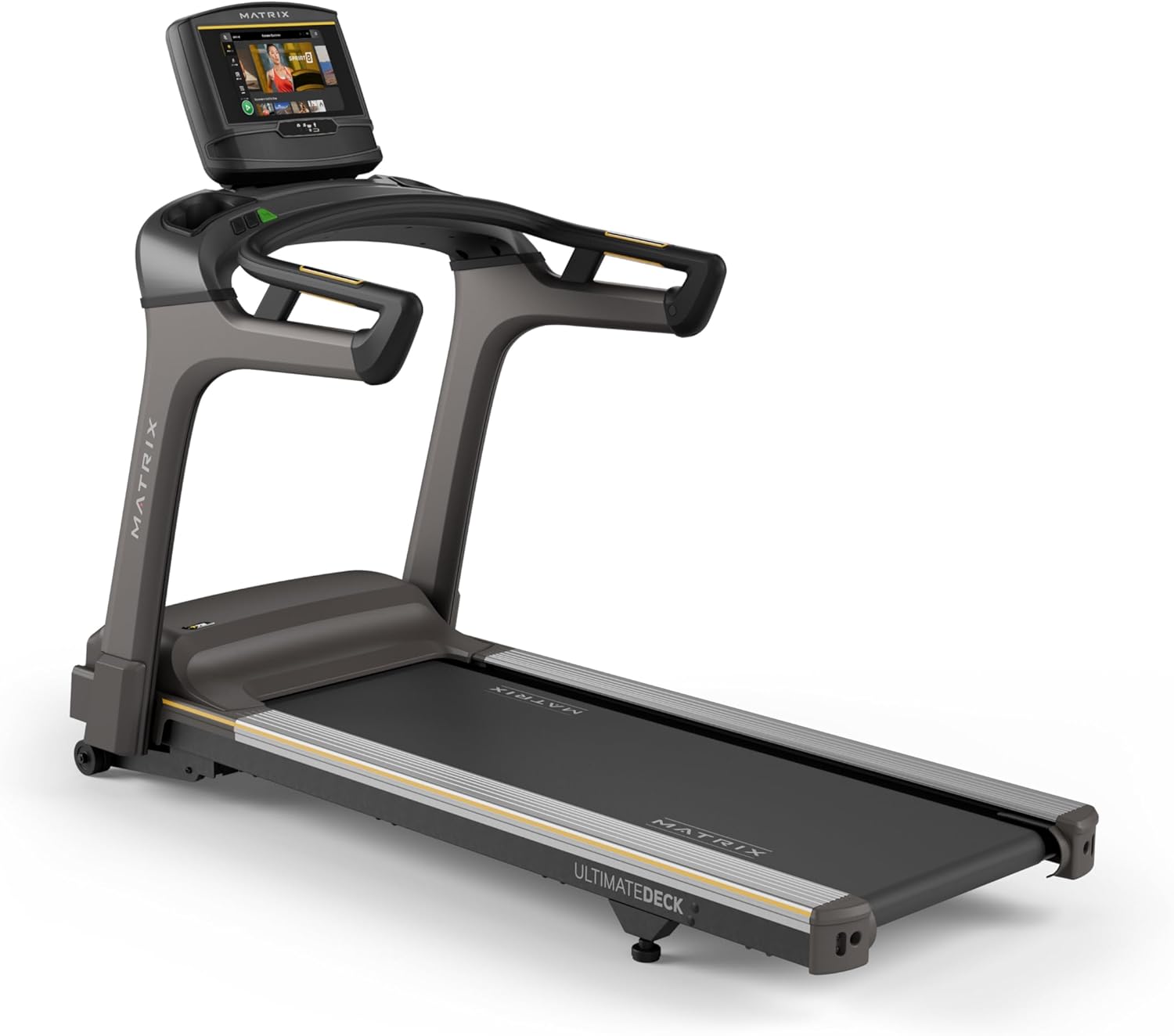
Figure 1.1: Matrix Fitness T75 Treadmill with XER Console. This image shows the complete treadmill unit, highlighting its sleek design and the integrated touchscreen console.
2. Ozi nchekwa
Please read all warnings and instructions in this manual before using the treadmill. Keep this manual for future reference. Failure to follow these instructions could result in injury or damage to the product.
- Gwa onye ọkachamara ahụike oge niile tupu ịmalite mmemme mmega ahụ ọhụrụ ọ bụla.
- Gbaa mbọ hụ na etinyere igwe igwe ahụ n'elu larịị, kwụsiri ike nke nwere oghere zuru oke gburugburu ya.
- Debe ụmụaka na anụ ụlọ n'ebe a na-azọ ụkwụ n'ebe a na-arụ ọrụ.
- Use the safety key at all times. Attach it to your clothing before beginning your workout.
- Do not operate the treadmill if it is damaged or not functioning properly.
- Yiri akpụkpọ ụkwụ na uwe egwuregwu kwesịrị ekwesị.
- Do not attempt to service the treadmill beyond the maintenance instructions provided in this manual.
3. Ihe ngwugwu
Nyochaa na akụrụngwa niile dị tupu ịmalite mgbakọ:
- Frame Treadmill
- Masts
- Mast Boots
- Ntọala njikwa
- Ogwe aka
- Handlebar Sleeves
- Okpu aka
- Frame Cover Sets
- Mkpuchi azụ
- Ụdọ ọkụ
- Igodo nchekwa
- Akụrụngwa Akụrụngwa
4. Ntọala na Mgbakọ
The Matrix T75 Treadmill requires assembly. It is recommended that two people perform the assembly process. Follow the detailed instructions provided in the separate assembly guide for step-by-step procedures. Ensure all connections are secure before use.

Figure 4.1: Treadmill Dimensions. The image illustrates the overall dimensions of the T75 Treadmill: 79 inches (length) x 36 inches (width) x 61 inches (height).
Once assembled, place the treadmill in a location with sufficient space for safe operation. The recommended clearance is at least 6 feet (1.8 meters) behind the treadmill and 2 feet (0.6 meters) on each side.
5. Features and Technology
The Matrix T75 Treadmill is engineered with advanced features for a superior workout experience:
- Expanded 22" x 60" Running Surface: Na-enye ample space for comfortable and natural strides, even during intense runs.
- 0.5–12.5 mph Speed Range: Offers a wide range of speeds suitable for walking, jogging, and high-intensity running.
- 0–15% Incline Range: Simulate various terrains and increase workout intensity with adjustable incline.
- Industrial-Grade AC Motor: A powerful motor designed for durability, quiet operation, and consistent performance with lower RPM and reduced maintenance.
- Exclusive Ultimate Deck System: Features a heavy-duty frame, extra-thick deck, and industrial-grade cushions for superior shock absorption and comfort, extending the life of the deck and belt.
- Johnson Drive System: Ensures smooth, quiet, and responsive operation, maintaining perfect rhythm throughout your workout.
- 10" Touchscreen Console (XER): A vibrant display with best-in-class apps for entertainment and workout tracking.
- iFIT and Virtual Active Integration: Explore global terrains and engage in interactive workouts with a 30-day iFIT membership included.

Figure 5.1: T75 Treadmill Key Features. This diagram highlights the heavy-duty welded steel frame, extra-wide 22" x 60" Ultimate Deck System, commercial-grade AC motor, 0-15% incline range, 0.5-12.5 mph speed range, and industrial-grade cushioning.

Figure 5.2: Ultimate Deck System. An internal view showing the robust construction of the deck and cushioning for enhanced comfort and durability.

Figure 5.3: Johnson Drive System. A cutaway view illustrating the internal components of the motor, emphasizing its quiet and durable design.
Official Product Video: T75 Treadmill - Features & Benefits
Vidiyo 5.1: Vidiyo a na-enye ihe ngosi ọhụụview of the Matrix T75 Treadmill's key features and benefits, including its robust construction, powerful motor, and advanced console capabilities.
6. Ntuziaka ọrụ
The XER Console offers an intuitive interface for controlling your workout and accessing entertainment. Ensure the treadmill is plugged into a grounded outlet and the safety key is in place before starting.
6.1. XER Console Overview
The 10-inch touchscreen console provides access to various workout programs, entertainment apps, and performance metrics.

Figure 6.1: XER Console Features. This image highlights the console's ability to stream apps like Netflix, YouTube, and Spotify, its integration with Virtual Active Sprint 8 and iFIT, Bluetooth FTMS for third-party apps, 12 built-in programs, and Bluetooth HR with included strap.

Figure 6.2: XER Console Main Workout Screen. Displays workout options and progress tracking.
6.2. Ịmalite Mmega Ahụ
- Gaa n'elu eriri treadmill, tinye ụkwụ gị n'akụkụ ihe mgbochi ahụ.
- Tinye obere igodo nchekwa na uwe gị.
- Select your desired workout program or manual mode from the console.
- Press the START button to begin. The belt will start moving at a low speed.
- Adjust speed and incline using the console controls or quick-access buttons on the handlebars.
6.3. Using iFIT and Virtual Active
The XER Console comes with iFIT and Virtual Active pre-installed. Activate your included 30-day iFIT membership to access a vast library of trainer-led workouts and global routes. Virtual Active allows you to experience immersive outdoor scenery that adjusts to your pace and incline.

Figure 6.3: XER Console Virtual Active Display. Shows a scenic route being displayed on the console during a workout.

Figure 6.4: User Interacting with XER Console Apps. A user is shown on the treadmill, engaging with various entertainment and fitness applications available on the console.
7. Nlekọta
Regular maintenance ensures the longevity and optimal performance of your Matrix T75 Treadmill.
- Nhicha: Wipe down the treadmill surfaces, including the console and handrails, with a damp ákwà mgbe ọ bụla ojiji. Zenarị ndị na-ehicha ihe abrasive.
- mmanu eriri: The Ultimate Deck System is designed for low maintenance. Refer to the separate assembly guide or contact customer support for specific lubrication intervals and procedures.
- Belt ahụ erughị ala na nhazi: Periodically check the walking belt for proper tension and alignment. Adjust as needed following the instructions in the assembly guide.
- Nhicha Mkpuchi Moto: Once a year, remove the motor cover and vacuum any dust or debris from the motor and surrounding components. Ensure the treadmill is unplugged before performing this.
8. Nchọpụta nsogbu
Akụkụ a na-ekwu maka nsogbu ndị ị nwere ike izute. Maka nsogbu edepụtaghị ebe a, biko kpọtụrụ nkwado ndị ahịa.
| Nsogbu | Ihe nwere ike ime | Ngwọta |
|---|---|---|
| Treadmill anaghị amalite. | Agbanyeghi eriri ike; Igodo nchekwa adịghị n'ebe; Ihe mgbawa sekit kwụsịrị. | Hụ na e tinyere eriri ọkụ eletrik n'ime ya nke ọma. Tinye igodo nchekwa nke ọma. Lelee ihe mgbochi sekit ezinụlọ. |
| Belt na-amị amị ma ọ bụ na-ala azụ. | Belt tension too loose; Belt requires lubrication. | Adjust belt tension according to manual. Lubricate the belt if necessary (refer to maintenance section). |
| Mkpọtụ na-adịghị ahụkebe n'oge arụ ọrụ. | Loose hardware; Debris under the belt; Motor issue. | Check and tighten all visible hardware. Carefully inspect under the belt for foreign objects. If noise persists, contact customer support. |
| Ngosipụta njikwa bụ oghere. | Power issue; Console cable disconnected. | Verify power connection. Check console cable connections (refer to assembly guide). |
9. Nkọwapụta
| Njirimara | Nkọwa |
|---|---|
| Ụdị | Matrix |
| Aha Nlereanya | Matrix Fitness T75 Treadmill |
| Akụkụ ngwaahịa (LxWxH) | 79"D x 36"W x 61"H |
| Ibu Ibu | 304 pound |
| Ọsọ kacha | 12.5 kilomita kwa elekere |
| Ọsọ kacha nta | 0.5 kilomita kwa elekere |
| Pasent ndakpọ kachatage | 15% |
| Ogologo Deck | 60 sentimita asatọ |
| Obosara oche | 22 sentimita asatọ |
| Nkwanye ịdị arọ kacha | 400 pound |
| Ike ịnyịnya | 3 Horsepower (AC motor) |
| Ụdị ngosi | LCD (10-inch Touchscreen for XER Console) |
| Ọnụọgụ nke Mmemme | 12 |
| Aha Mmemme Njikwa | iFIT |
| Ihe onwunwe | Ígwè Alloy (Frame) |
| Isi Iyi Ike | Igwe ọkụ eletrik |
| Mgbakọ chọrọ | Ee |
10. Akwụkwọ ikike Ozi
The Matrix Fitness T75 Treadmill comes with the following manufacturer's warranty:
- Console: 5 years parts / 1 year labor
- Frame: Oge ndụ
- moto: Oge ndụ
- Nchikota: Oge ndụ
- Akụkụ ndị ọzọ: 7 years parts / 2 years labor
Please retain your proof of purchase for warranty claims. For full warranty terms and conditions, refer to the documentation included with your product or visit the official Matrix Fitness websaịtị.
11. Nkwado ndị ahịa
For technical assistance, parts, or service inquiries, please contact Matrix Fitness customer support. Have your model number (763165008952) and serial number ready when contacting support.
Visit the official Matrix Fitness websaịtị maka ozi kọntaktị kachasị ọhụrụ na akụrụngwa nkwado: Matrix Fitness Store on Amazon


