Okwu mmalite
This manual provides detailed instructions for the installation, operation, maintenance, and troubleshooting of your GIGABYTE GeForce RTX 3080 Vision OC 10G graphics card. This high-performance graphics card is designed for demanding visual tasks, powered by NVIDIA's Ampere architecture, featuring 2nd Generation RT Cores, 3rd Generation Tensor Cores, and 10GB GDDR6X memory. It incorporates the WINDFORCE 3X Cooling System for efficient thermal management and RGB Fusion 2.0 for customizable lighting.
Ntọala na nwụnye
1. System chọrọ
- PCI Express-kwekọrọ motherboard na otu sọrọ-obosara x16 ndịna oghere.
- Minimum 750W power supply with two 8-pin PCIe power connectors.
- Microsoft Windows 10 64-bit or Linux 64-bit operating system.
- 32GB system memory recommended for optimal performance.
- Njikọ ịntanetị maka nbudata onye ọkwọ ụgbọala.
2. Ihe ngwugwu
- GIGABYTE GeForce RTX 3080 Vision OC 10G Graphics Card
- Akwụkwọ ntuziaka (akwụkwọ a)
3. Nwụnye anụ ahụ
- Kwadebe sistemu gị: Gbanyụọ kọmputa gị wee kwupu eriri niile. Mepee akpa kọmputa ahụ.
- Chọta oghere PCIe: Chọpụta oghere PCI Express x16 dị na motherboard gị.
- Remove slot covers: Remove the necessary expansion slot covers from the back of your computer case to accommodate the graphics card.
- Fanye kaadị eserese ahụ: Jiri nlezianya hazie kaadị eserese ahụ na oghere PCIe ma pịa ya nke ọma ruo mgbe ọ nọdụrụ n'ọnọdụ kwesịrị ekwesị. Hụ na mkpọchi njide dị na oghere PCIe ahụ kpọchiri akpọchi.

Foto: N'ihu view of the GIGABYTE GeForce RTX 3080 Vision OC 10G Graphics Card, showcasing the triple WINDFORCE fans and the white/silver shroud design.
- Chekwaa kaadị ahụ: Fasten the graphics card to the computer case using screws.
- Jikọọ eriri ọkụ: Connect the two 8-pin PCIe power connectors from your power supply to the corresponding ports on the graphics card. Ensure a firm connection.
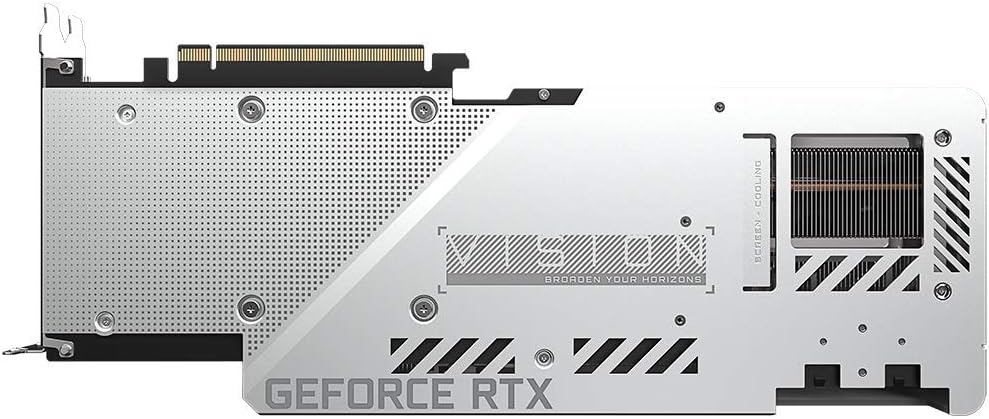
Foto: N'azụ view of the GIGABYTE GeForce RTX 3080 Vision OC 10G Graphics Card, highlighting the protective metal backplate with ventilation cutouts and the GeForce RTX branding.
- Mechie igbe ahụ: Dochie mkpuchi akpa kọmputa wee jikọọ eriri niile.
- Connect display: Connect your monitor to one of the display outputs (HDMI or DisplayPort) on the graphics card.
Ntuziaka ọrụ
1. Nwụnye ọkwọ ụgbọala
- Ike na: Turn on your computer. The system may boot into a lower resolution or use a generic display driver.
- Budata ndị ọkwọ ụgbọ ala: Gaa na GIGABYTE gọọmentị websaịtị (www.gigabyte.com) ma ọ bụ onye ọrụ NVIDIA websaịtị (www.nvidia.com/drivers).
- Select product: Navigate to the support section and locate the drivers for the GeForce RTX 3080 series.
- Install drivers: Download the latest recommended drivers and follow the on-screen instructions to complete the installation. A system restart may be required.
2. Nhazi ngwanrọ
- GIGABYTE Control Center / AORUS Engine: For advanced control over your graphics card, including fan speed adjustment, overclocking profiles, and RGB Fusion 2.0 lighting customization, download and install the GIGABYTE Control Center or AORUS Engine software from the GIGABYTE websaịtị.
- NVIDIA GeForce Ahụmahụ: Install NVIDIA GeForce Experience for optimal game settings, driver updates, and access to features like ShadowPlay.
Nlekọta
- Mwepụ uzuzu: Na-asachapụ uzuzu mgbe niile site na ndị na-akwado kaadị eserese na heatsink site na iji ikuku abịakọrọ. Gbaa mbọ hụ na agbanyụrụ sistemụ ahụ wee wepụ ya tupu ihicha ya.
- Nyocha ndị fan: Periodically check the fans for any obstructions or unusual noises.
- Mmelite ọkwọ ụgbọala: Keep your graphics drivers updated to ensure optimal performance and stability.
Nchọpụta nsogbu
Enweghị mmepụta ihe ngosi
- Hụ na eriri ihe nlele ahụ jikọtara nke ọma na kaadị eserese na ihe nlele ahụ.
- Nyochaa na kaadị eserese ahụ nọ n'oche zuru oke na oghere PCIe.
- Check that all required PCIe power connectors are securely attached to the graphics card.
- Jiri eriri ngosi dị iche nwalee ma ọ bụ nyochaa ma ọ ga-ekwe omume.
Akwụsịghị sistemu ma ọ bụ mkpọka
- Gbaa mbọ hụ na ọkọnọ ike gị tozuru oke kacha ntatagihe achọrọ (750W).
- Melite ndị ọkwọ ụgbọala eserese gị ka ọ bụrụ ụdị kachasị ọhụrụ.
- Monitor GPU temperatures using software like GIGABYTE Control Center to check for overheating.
- Check for conflicts with other installed drivers or software.
Arụmọrụ adịghị mma
- Gbaa mbọ hụ na etinyere ndị ọkwọ ụgbọ ala nke ọma yana emelitere.
- Verify that the graphics card is running at its intended clock speeds (can be checked with monitoring software).
- Check background applications that might be consuming system resources.
- Ensure your system's BIOS/UEFI is updated.
Nkọwapụta
| Ngalaba nhazi eserese | NVIDIA GeForce RTX 3080 |
| Ebe nchekwa vidiyo | 10GB GDDR6X |
| Ọnụnọ ebe nchekwa | 320-bit |
| Nkwalite elekere | 1800 MHz |
| Ọsọ ebe nchekwa | 19000 MHz |
| Ọdụ ụgbọ mmiri mmepụta | DisplayPort, HDMI |
| Mkpebi Dijitalụ Max | 7680x4320 (via DisplayPort 1.4a) |
| Multi-view | 4 |
| Card Dimensions (LxWxH) | 12.6 x 4.96 x 2.17 sentimita (320 x 126 x 55 mm) |
| PSU akwadoro | 750W |
| Njikọ ọkụ | 2 x 8-pin |
| PCI Express | 4.0 x16 |
| Nọmba nlereanya | GV-N3080VISION OC-10GD 2.0 |
Ozi akwụkwọ ikike
GIGABYTE products are covered by a limited warranty. The specific terms and duration of the warranty may vary by region and product. Please refer to the official GIGABYTE website or your product's packaging for detailed warranty information and registration procedures. Keep your proof of purchase for warranty claims.
Nkwado ndị teknuzu
For technical assistance, driver downloads, FAQs, and further support, please visit the official GIGABYTE support websaịtị:
Ị nwekwara ike ịkpọtụrụ ndị ahịa GIGABYTE site na ozi kọntaktị enyere na ha websaịtị maka mpaghara gị akọwapụtara.


