Okwu mmalite
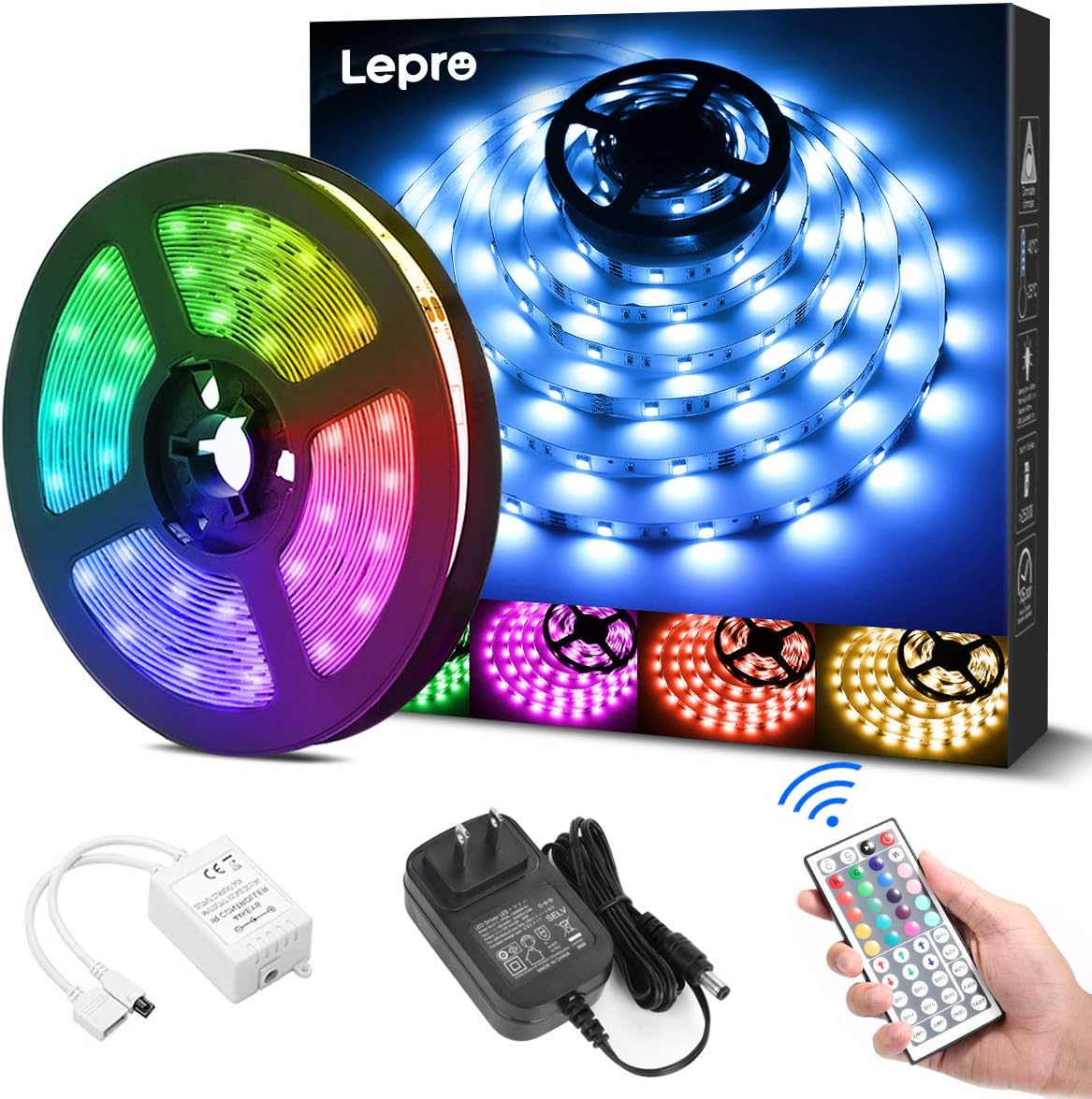
Thank you for choosing the Lepro 5m RGB LED Strip Light. This product is designed to provide versatile and vibrant lighting for various indoor applications. Featuring high-brightness SMD5050 LEDs, a wide range of colors, and easy installation, it enhances the ambiance of any space. Please read this manual carefully before installation and use to ensure proper operation and safety.
Kedu ihe dị na Igbe ahụ
Chọpụta na akụrụngwa niile dị tupu ịmalite nrụnye:
- LED Strip Light (5 meters) x 1
- DC12V Power Adapter x 1
- Connection Receiver x 1
- Ime Remote x 1
- Instruction Manual (Japanese) x 1
Ozi nchekwa
- Emebere ngwaahịa a maka eji naanị ime ụlọ. Do not expose to water or high humidity.
- Gbaa mbọ hụ na agbapụrụ ọkụ ọkụ tupu echichi ma ọ bụ mmezi.
- Use only the provided DC12V power adapter. Using an incompatible power supply may damage the product or pose a fire hazard.
- Do not bend the LED strip sharply or apply excessive force, as this may damage the circuit.
- Debe ebe ụmụaka na-apụghị iru.
- If any part of the product is damaged, discontinue use immediately and contact support.
Melite
Follow these steps for proper installation of your LED strip light:
- Kwadebe elu: Clean the desired installation surface thoroughly. Ensure it is dry, smooth, and free of dust or oil for optimal adhesive performance.
- tụọ na bee (nhọrọ): If a shorter length is required, cut the LED strip along the designated cut marks (indicated by a scissor icon) using scissors. Mara: Only cut at these specific marks. Cutting elsewhere will damage the strip. Cut sections cannot be reconnected without additional connectors (sold separately).
- Apply the Strip: Peel off the backing from the 3M adhesive tape on the back of the LED strip. Carefully press the strip onto the cleaned surface, ensuring firm contact along its entire length.
- Jikọọ akụrụngwa: Connect the LED strip to the connection receiver, ensuring the arrows on both components align. Then, connect the DC12V power adapter to the receiver.
- Ike Na: Plug the power adapter into a suitable power outlet. Remove the insulation sheet from the remote control before first use. Point the remote control towards the receiver and press the power button to turn on the lights.


Ntuziaka ọrụ
The LED strip light is controlled using the included 44-key remote control. Ensure the remote is pointed towards the receiver for effective operation.
Ọrụ njikwa anya:
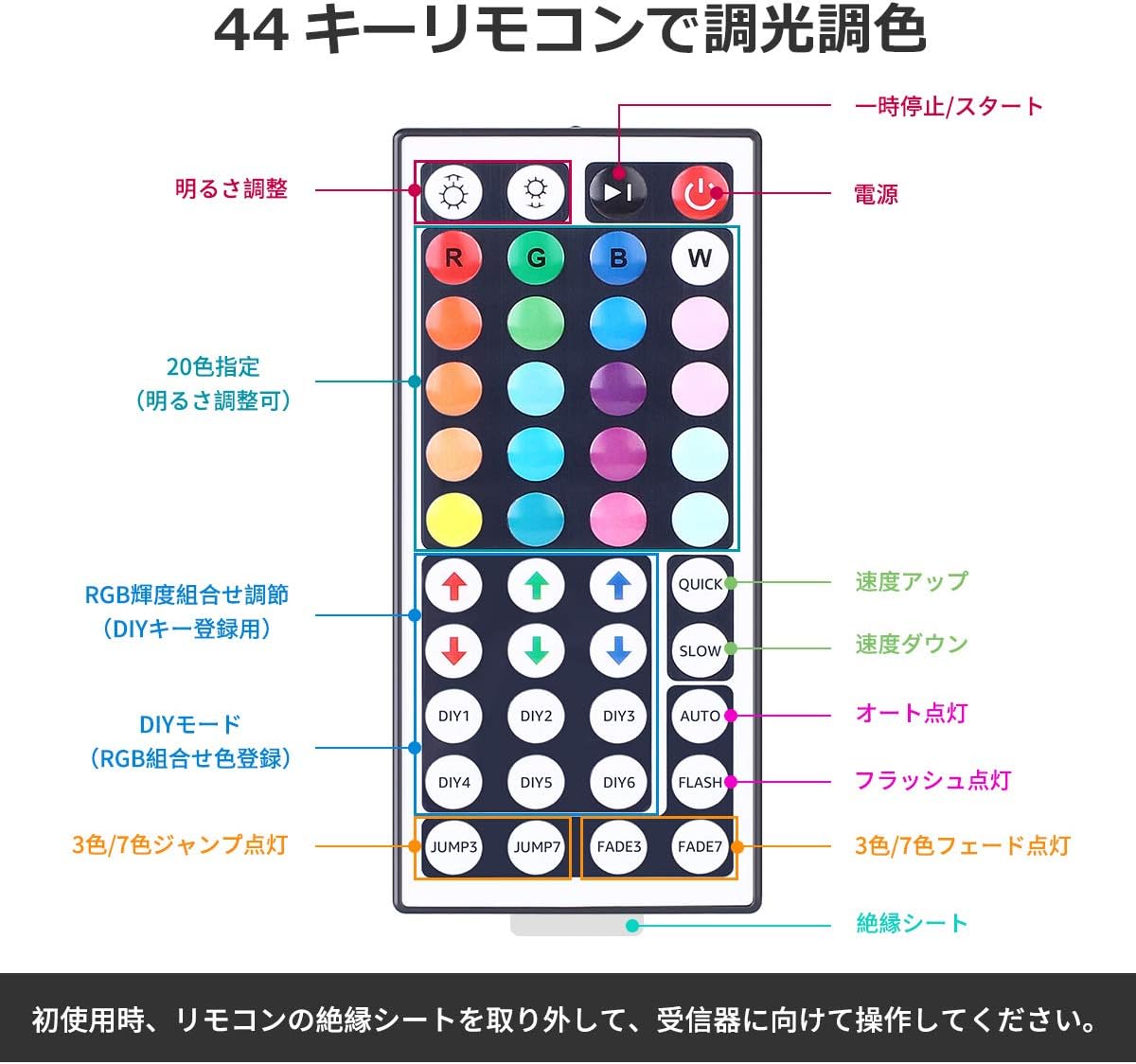
- Gbanyụọ/ Gbanyụọ: Pịa bọtịnụ ike uhie to turn the lights on or off.
- Ndozi ihie: Jiri ihe bọtịnụ akụ elu na ala (labeled 'Brightness Adjust') to increase or decrease the light intensity.
- Nhọrọ agba: Họrọ site na 20 agba agbaziri agba by pressing the corresponding color buttons.
- Ụdị N'onwe Gị: Nke DIY1-DIY6 buttons allow you to create and save custom colors by adjusting the Red, Green, and Blue intensity using the RGB arrow buttons.
- Ụdị dị ike:
- Ngwa ngwa/nwayọọ: Gbanwee ọsọ nke ụdịdị ike.
- UTgbọala: Cycles through all dynamic modes automatically.
- FLASH: Flashes through colors.
- JUMP3/JUMP7: Jumps between 3 or 7 colors.
- FADE3/FADE7: Fades between 3 or 7 colors.
Nlekọta
- Nhicha: Ensure the power is off and unplugged before cleaning. Gently wipe the LED strip with a dry, soft cloth. Do not use harsh chemicals or abrasive cleaners.
- Nchekwa: If storing the strip for an extended period, ensure it is clean and dry. Roll it loosely to prevent damage to the LEDs or circuit. Store in a cool, dry place away from direct sunlight.
- Nlekọta nrapado: The 3M adhesive is strong, but repeated removal and reapplication may reduce its effectiveness.
Nchọpụta nsogbu
| Nsogbu | Ihe nwere ike ime | Ngwọta |
|---|---|---|
| Igwe ọkụ LED anaghị agba ọkụ. | 1. Power adapter not plugged in. 2. Remote control insulation sheet not removed. 3. Connections are loose or incorrect. 4. Remote control battery is dead. | 1. Ensure power adapter is securely plugged into an outlet. 2. Remove the clear plastic insulation sheet from the remote control battery compartment. 3. Check all connections, ensuring arrows align between the strip and receiver. 4. Replace the remote control battery (CR2025 or equivalent). |
| Njikwa ime obodo anaghị azaghachi. | 1. Remote not pointed at receiver. 2. Obstruction between remote and receiver. 3. Remote control battery is dead. | 1. Point the remote directly at the receiver. 2. Remove any objects blocking the line of sight. 3. Dochie batrị njikwa anya. |
| Some sections of the strip are not lighting up. | 1. Damage to the LED strip. 2. Incorrect cutting. | 1. Inspect the strip for physical damage. If damaged, contact support. 2. Ensure cuts were made only at designated marks. |
Nkọwapụta
- Nọmba nlereanya: PR410082-RGB-JP
- Akara: ekpenta
- Ụdị isi iyi ọkụ: LED (SMD5050)
- Ọnụọgụ LED: 150 LEDs (30 LEDs per meter)
- Ogologo eriri: 5 mita
- Oriri ike: 18W
- Ntinye Voltage: DC12V 1.5A
- Nhọrọ agba: RGB (20 preset colors + DIY modes)
- Usoro njikwa: 44-key IR Remote Control
- Ime ụlọ/n'èzí: Ime ụlọ
- Atụmatụ pụrụ iche: Dimmable, Cuttable, 3M Adhesive, PSE Certified
- Nha ngwugwu: 13.1 x 10.7 x 6.7 cm; 230 g

Akwụkwọ ikike na nkwado
This Lepro LED Strip Light comes with a 2-afọ akwụkwọ ikike. If you encounter any issues or have questions regarding the product, please contact Lepro JP customer support through the retailer's platform. Provide your order details and a description of the issue for prompt assistance.
For further assistance, you can visit the official Lepro store on Amazon: Ụlọ Ahịa Amazon Lepro