Okwu mmalite
The Motorola Solutions T260 two-way radio is designed to provide reliable communication for various outdoor activities and professional uses. This manual provides detailed instructions for setting up, operating, and maintaining your T260 radios.
The communication range is influenced by terrain and conditions. Optimal range is achieved in unobstructed line-of-sight conditions. Actual range may vary due to factors such as terrain, weather, electromagnetic interference, and obstructions.
Kedu ihe dị na Igbe ahụ
Your Motorola Solutions T260 6-pack includes the following items:
- 6 x Motorola Solutions T260 Two-Way Radios
- 6 x (AA) NiMH Rechargeable Battery Packs
- 6 x Mpekere eriri
- 2 x Y Cables (for charging multiple units)
- 2 x Single Cable Adaptors

Image: Six Motorola Solutions T260 two-way radios, white with gray accents, displayed together. This image shows the complete 6-pack contents.
Ngwaahịa gafereview
The T260 radio features a compact and durable design, optimized for ease of use and clear communication.

Foto: N'ihu view of a single T260 radio, highlighting the display, control buttons, and speaker grille.

Foto: Akụkụ view of a single T260 radio, showing the textured grip and the Push-to-Talk (PTT) button.

Foto: Azụ view of a single T260 radio, showing the battery compartment cover and the Motorola logo.
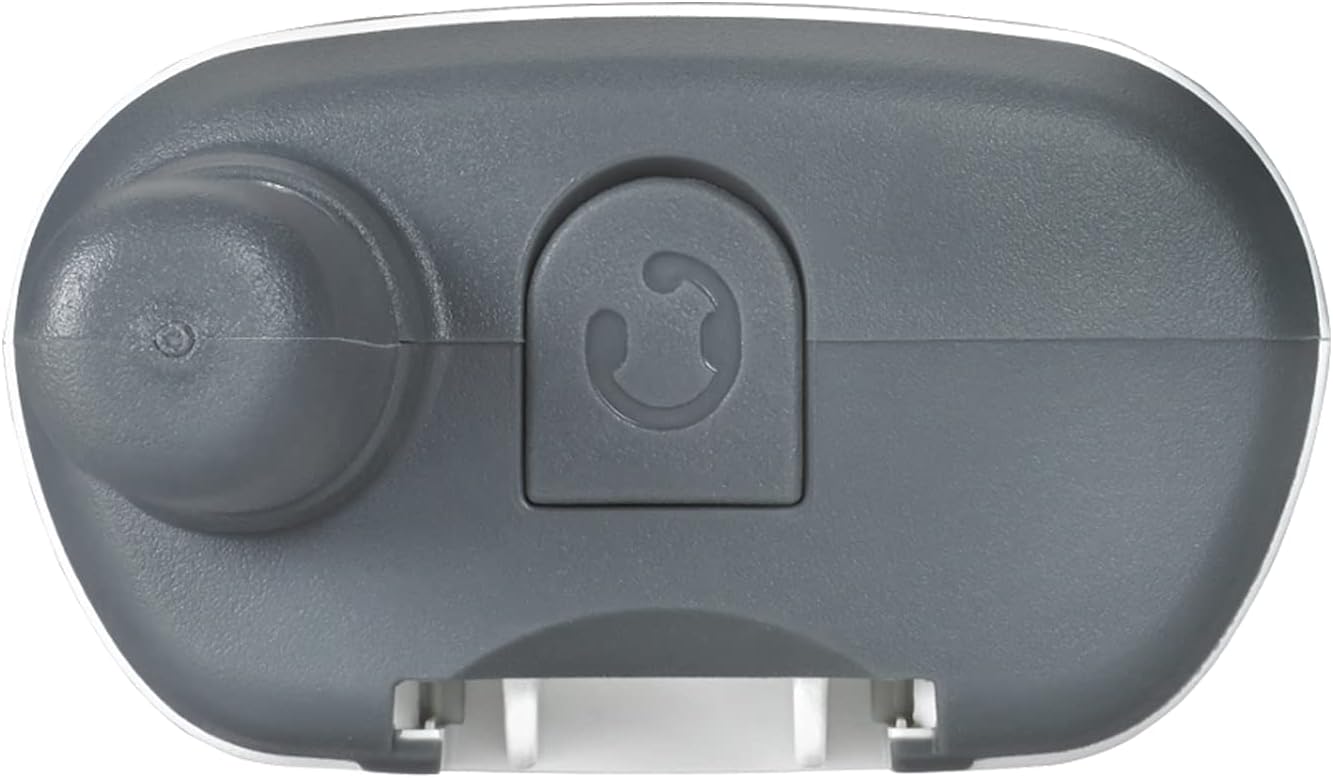
Foto: Top view of a single T260 radio, showing the antenna, power/volume knob, and accessory port cover.
Melite
1. Ntinye batrị
The T260 radios can be powered by either the included NiMH rechargeable battery packs or 3 standard AA alkaline batteries (not included).
- Gbaa mbọ hụ na agbanyụrụ redio.
- Remove the battery compartment cover on the back of the radio.
- Insert the NiMH battery pack or 3 AA batteries, observing the correct polarity (+/-) as indicated inside the compartment.
- Dochie mkpuchi nke batrị batrị, hụ na ọ pịrị na ebe nchekwa.
2. Ịchaji batrị
Use the provided Y-cables and single cable adaptors to charge the NiMH battery packs. The radios consume less power during idle conditions due to their Eco Smart feature.
- Connect the Y-cable or single cable adaptor to a compatible USB power source.
- Plug the charging connector(s) into the charging port(s) on the radio(s).
- The battery indicator on the radio display will show charging status.
- A full charge for NiMH batteries typically takes up to 10 hours.
Ntuziaka ọrụ
1. Gbanyụọ/ Gbanyụọ na olu
- To turn the radio on or off, rotate the Power/Volume knob clockwise or counter-clockwise until you hear a click.
- Adjust the volume by rotating the same knob.
2. Channel Selection and Privacy Codes
The T260 offers 22 channels and 121 privacy codes, providing 2,662 combinations for clear communication.
- Pịa NchNhr button to enter channel selection mode. The channel number will blink.
- Jiri ihe + or - bọtịnụ iji họrọ ọwa ịchọrọ (1-22).
- Pịa NchNhr again to select a privacy code. The privacy code will blink.
- Jiri ihe + or - buttons to select your desired privacy code (1-121).
- Pịa NchNhr to confirm your selection or wait a few seconds for the setting to save automatically.
- To communicate with other FRS radios, ensure both radios are set to the same channel and privacy code.
3. Na-ebufe na ịnata
- Ka ịnyefe, pịa ma jide Push-to- Talk (PTT) bọtịnụ n'akụkụ redio. Kwuo nke ọma n'ime igwe okwu.
- Hapụ ya PTT bọtịnụ ịnata.
4. iVOX/VOX Hands-Free Communication
The iVOX/VOX feature allows for hands-free operation. When activated, the radio transmits automatically when it detects your voice.
- Consult the full user manual for detailed instructions on activating and adjusting iVOX/VOX sensitivity levels.
5. NOAA Weather Channels and Alerts
Stay informed about real-time weather conditions with 11 NOAA weather channels and alerts. NOAA radio service availability may vary by area.
- Access weather channels through the Ụdị or NchNhr button, depending on the specific radio interface.
- Activate weather alerts to receive notifications of severe weather.
6. Scanning Feature
Use the scanning feature to quickly find active channels.
- Pịa Nyochaa button (often labeled 'Z' or 'MON') to initiate channel scanning.
- The radio will cycle through channels and stop on any active transmission.
7. Mkpọchi ahụ igodo
Prevent accidental changes to your personalized settings by activating the keypad lock.
- Typically, press and hold the NchNhr button until a lock icon appears on the display. Repeat to unlock.
8. Customize Call Tones
Choose from 20 call tones to personalize what callers hear before you begin speaking.
- Access call tone settings through the NchNhr button and navigate to the tone options.
Video: A user demonstrates the basic functions of a Motorola Talkabout radio, including power, volume, and channel selection. This video provides a visual guide to operating the device.
Range Information
The Motorola T260 radios are advertised with a range of up to 25 miles. This maximum range is calculated under optimal conditions with an unobstructed line of sight. Actual range will vary significantly based on several factors:
- Ala: Obstructions like buildings, hills, and dense foliage can reduce range.
- Ọnọdụ ihu igwe: Heavy rain, fog, or snow can impact signal quality.
- Ntinye aka elektrọnik: Other electronic devices or radio signals can cause interference.
- Ahịrị nke anya: The clearest communication is achieved when there are no physical barriers between radios.
For best results, operate in open areas with minimal obstructions.
Nlekọta
- Nhicha: Jiri nwayọọ, damp akwa iji hichaa mputa redio. Ejila kemịkalụ siri ike ma ọ bụ ihe mkpocha abrasive.
- Nlekọta batrị: Fully charge NiMH batteries before first use. Store radios with batteries removed if not used for extended periods.
- Nchekwa: Store radios in a cool, dry place away from extreme temperatures and direct sunlight.
Nchọpụta nsogbu
| Nsogbu | Ngwọta |
|---|---|
| Enweghị ike | Check battery installation. Ensure batteries are charged or replace AA batteries. |
| Enweghị ike ịkparịta ụka na redio ndị ọzọ | Verify both radios are on the same channel and privacy code. Check range and obstructions. |
| Ogo ọdịyo adịghị mma | Adjust volume. Ensure radios are within effective range. Check for interference. |
| Akpọchiri ahụ igodo | Pịa ma jide NchNhr bọtịnụ ruo mgbe akara mkpọchi ga-apụ n'anya. |
| Ọkwa batrị dị ala | Recharge NiMH batteries or replace AA batteries. |
Nkọwapụta
- Nọmba nlereanya: T260-6PK
- Akụkụ ngwaahịa: 1.24"D x 2.13"W x 6.42"H
- Ibu ihe: 6.4 ounces (per radio)
- Agba: Ọcha
- Ọnụọgụ ọwa: 22 FRS/GMRS channels
- Koodu nzuzo: 121
- Oke ugboro: FRS/GMRS 462 - 467 MHz
- Oke Okwu Kachasị: Up to 25 miles (optimal conditions)
- Isi mmalite ike: 3 AA batteries (NiMH rechargeable included)
- Voltage: 4.5 volts
- Ọkwa Nguzogide mmiri: Ọ bụghị mmiri na-eguzogide
- Atụmatụ pụrụ iche: Keypad Lock, NOAA Weather Channels/Alerts, iVOX/VOX, Call Tones, Eco Smart
Akwụkwọ ikike na nkwado
Specific warranty information for the Motorola Solutions T260 radios is typically provided with the product packaging or available on the manufacturer's official website. For detailed warranty terms, technical support, or service inquiries, please refer to the documentation included with your purchase or visit the Motorola Solutions support portal.
Please note that protection plans may be available for purchase separately, offering extended coverage beyond the standard manufacturer's warranty.


