Okwu mmalite
This manual provides comprehensive instructions for the operation and maintenance of your Timex DGTL 40mm Digital Watch, Model TW5M419009J. Designed for active wear, this watch features a digital display, alarm, stopwatch, timer, and INDIGLO® backlight. Please read this manual carefully to ensure proper use and to maximize the lifespan of your watch.
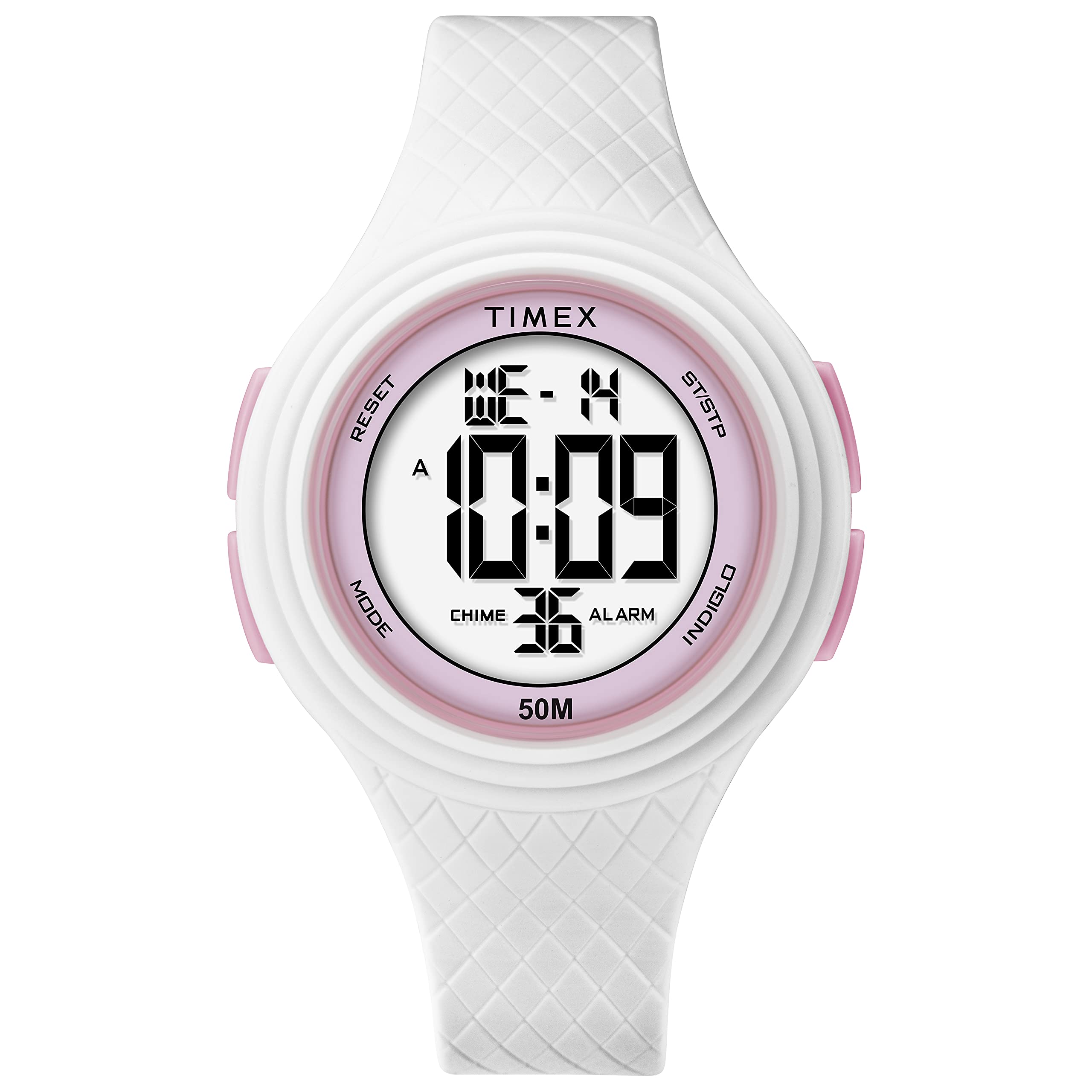
Foto 1: N'ihu view of the Timex DGTL 40mm Digital Watch.
Atụmatụ igodo
- 40 mm Matte White Resin Case with pink accents.
- Digital display with time, date, and day of week.
- Ọrụ mkpu.
- Sports Stopwatch.
- Two Time Zones capability.
- INDIGLO® light-up watch dial for low-light conditions.
- Water resistant to 50 meters (164 feet).
- White Resin Strap, adjustable for wrist circumferences 135 - 190mm (5.3 - 7.5in).
Ntọala na Nhazi Mbụ
Your Timex DGTL watch comes with a pre-installed lithium metal battery. Before first use, you may need to remove a plastic tab from the crown or button area if present, which prevents battery drain during shipping.
Identifying Watch Buttons
Your watch typically features multiple buttons for navigation and setting. While specific labels may vary, common functions include:
- Bọtịnụ ụkpụrụ: Used to cycle through different display modes (Time, Alarm, Stopwatch, Timer, Second Time Zone).
- Set/Adjust Button: Used to enter and exit setting modes, or confirm selections.
- Bọtịnụ mmalite/Kwụsị: Used to start and stop functions (e.g., stopwatch, timer) or increment values during setting.
- Bọtịnụ ọkụ: Activates the INDIGLO® backlight or may be used to reset values.

Foto 2: Akụkụ view of the watch, illustrating button placement. Refer to your watch for specific button labels.
Ịtọ oge na ụbọchị
- Site na ngosipụta oge nkịtị, pịa bọtịnụ oge nkịtị Bọtịnụ ọnọdụ repeatedly until the time setting mode is indicated (often by flashing digits).
- Pịa Set/Adjust Button to select the digit or segment you wish to change (e.g., hours, minutes, 12/24-hour format, year, month, day). The selected segment will flash.
- Jiri ihe Malite/Kwụsị bọtịnụ to increment the flashing value. Hold the button to advance rapidly.
- Gaa n'ihu ịpị Set/Adjust Button to move to the next segment (minutes, AM/PM, year, month, day) and adjust using the Malite/Kwụsị bọtịnụ.
- Ozugbo ntọala niile ziri ezi, pịa bọtịnụ Bọtịnụ ọnọdụ or Set/Adjust Button (depending on model) to exit the setting mode and return to the normal time display.
Setting Second Time Zone (T2)
- Site na ngosipụta oge nkịtị, pịa bọtịnụ oge nkịtị Bọtịnụ ọnọdụ repeatedly until "T2" or "Second Time Zone" is displayed.
- Pịa Set/Adjust Button to enter the T2 setting mode. The hour digits will flash.
- Jiri ihe Malite/Kwụsị bọtịnụ imeghari awa.
- Pịa Set/Adjust Button to move to minutes and adjust using the Malite/Kwụsị bọtịnụ.
- Pịa Set/Adjust Button again to save and exit T2 setting.
Ntuziaka ọrụ
Using the INDIGLO® Backlight
To illuminate the watch face in low-light conditions, press the Bọtịnụ ọkụ. The INDIGLO® backlight will activate for a few seconds.
Iji Oge nkwụsịtụ
- Pịa Bọtịnụ ọnọdụ repeatedly until the stopwatch display appears (usually indicated by "STP" or "CHRO").
- Pịa Malite/Kwụsị bọtịnụ ịmalite oge.
- Pịa Malite/Kwụsị bọtịnụ again to pause the timing.
- Iji maliteghachi, pịa bọtịnụ Malite/Kwụsị bọtịnụ.
- To reset the stopwatch to zero, while paused, press the Bọtịnụ ọkụ or a dedicated Reset Button.
Ịtọlite na Iji Mkpu
- Pịa Bọtịnụ ọnọdụ repeatedly until the alarm display appears (usually indicated by "ALM").
- Pịa Set/Adjust Button to enter alarm setting mode. The hour digits will flash.
- Jiri ihe Malite/Kwụsị bọtịnụ iji hazie oge mkpu.
- Pịa Set/Adjust Button to move to minutes and adjust using the Malite/Kwụsị bọtịnụ.
- Pịa Set/Adjust Button again to save the alarm time.
- Iji mee ka mkpu ahụ rụọ ọrụ ma ọ bụ gbanyụọ ya, pịakarị pịa ebe a na-akpọ mkpu ahụ. Malite/Kwụsị bọtịnụ while in the alarm display mode. An alarm icon will appear when active.
- Mgbe mkpu ahụ dara, pịa bọtịnụ ọ bụla iji mee ka ọ ghara ịgbachi nkịtị.
Nlekọta
Na-ehicha elekere gị
Iji hichaa elekere gị, jiri ihe dị nro hichaa ya, damp cloth. Avoid using harsh chemicals or abrasive cleaners, as these can damage the resin case and strap. For the resin strap, mild soap and water can be used, followed by thorough rinsing and drying.
Mmiri Nguzogide
Your Timex DGTL watch is water resistant to 50 meters (164 feet). This means it is suitable for light swimming and showering. However, it is ọ bụghị suitable for diving or prolonged submersion. To maintain water resistance, do not press any buttons underwater.

Figure 3: Timex Water Resistance Guidelines. Your watch is rated for 50 meters.
Watches labeled water-resistant without a depth indicated can withstand splashes and rain, but should not be submerged. To maintain water resistance, do not press any buttons under water unless your watch is indicated as 200 meter water resistant.
Ngbanwe batrị
The watch uses one Lithium Metal battery. When the display dims or functions become erratic, it may be time to replace the battery. Battery replacement should ideally be performed by a qualified watch technician to ensure proper sealing and maintain water resistance. Attempting to replace the battery yourself may void the warranty and compromise the watch's water resistance.

Ọgụgụ 4: Azụ view of the watch, showing the case back where the battery is accessed.
Nchọpụta nsogbu
| Nsogbu | Ihe nwere ike ime | Ngwọta |
|---|---|---|
| Ngosipụta elekere ahụ enweghị ihe ọ bụla ma ọ bụ na-adịghị mma. | Batrị dị ala ma ọ bụ mebie. | Replace the battery. Refer to the "Battery Replacement" section. |
| Cannot set time/date. | Incorrect button sequence; watch in wrong mode. | Ensure you are in the correct setting mode. Follow the "Setting Time and Date" instructions carefully. Press buttons firmly. |
| Bọtịnụ anaghị anabata ya. | Watch may be in a locked mode; internal malfunction; water ingress. | Try pressing all buttons to see if any respond. If unresponsive after a battery change, contact Timex support. Avoid pressing buttons underwater. |
| INDIGLO® backlight not working. | Low battery; malfunction. | Replace the battery. If the issue persists, contact Timex support. |
| Oti mkpu anaghị ada ụda. | Alarm is not activated; alarm volume too low (if adjustable); malfunction. | Ensure the alarm is set and activated (check for alarm icon on display). Re-set the alarm time. |
Nkọwapụta
- Nọmba nlereanya: TW5M419009J
- Dayameta ikpe: 40 mm
- Ihe gbasara ikpe: Matte White Resin
- Ihe eriri: Resin ọcha
- okirikiri nkwojiaka: 135 - 190mm (5.3 - 7.5in)
- Nguzogide mmiri: Mita 50 (ụkwụ 164)
- Ụdị ngosi: Dijitalụ
- Ìhè azụ: INDIGLO®
- Ụdị batrị: 1 batrị lithium metal (gụnyere)
- Ibu ihe: 38.56 g
- Onye nrụpụta: Timex
- Ngalaba: Unisex-okenye
Akwụkwọ ikike na nkwado
Your Timex watch is covered by a manufacturer's warranty. For detailed information regarding warranty terms, conditions, and duration, please refer to the warranty card included with your purchase or visit the official Timex websaịtị.
For customer support, service, or to find authorized service centers, please visit the Timex official support page: Nkwado Timex.


