1. Okwu mmalite
This user manual provides comprehensive instructions for the setup, operation, and maintenance of your Ematic EPJ590WH Portable Projector. Please read this manual thoroughly before using the projector to ensure proper operation and to maximize its lifespan. Keep this manual for future reference.
The Ematic EPJ590WH is a versatile portable LCD projector designed to support various video sources, including gaming consoles, PCs, laptops, and streaming devices. It features an 800 x 480 native resolution with support for up to 1080p video input, built-in speakers, and multiple connectivity options.
2. Ozi nchekwa
To prevent fire or electric shock, do not expose this appliance to rain or moisture. To avoid electric shock, do not open the cabinet. Refer servicing to qualified personnel only.
- Ekpuchila oghere ikuku. Hụ na oghere zuru oke gburugburu ihe ngosi ahụ maka ikuku ikuku kwesịrị ekwesị.
- Do not place the projector on an unstable cart, stand, tripod, bracket, or table. The projector may fall, causing serious injury and serious damage to the appliance.
- Elela anya ozugbo na oghere projector mgbe lamp Ọ na-agba ọkụ. Ọkụ na-egbuke egbuke nwere ike imebi anya.
- Jiri naanị mgbakwunye / ngwa ndị nrụpụta akọwapụtara.
- Kwụpụ ihe nrụpụta a n'oge oke mmiri ozuzo ma ọ bụ mgbe ejighi ya ogologo oge.
- Jiri akwa kpọrọ nkụ hichaa naanị.
3. Ihe ngwugwu
Please check to ensure all items are present and in good condition:
- Ematic EPJ590WH Portable Projector
- Njikwa anya
- Ihe nkwụnye ọkụ
- Akwụkwọ ntuziaka (akwụkwọ a)

Image: The Ematic EPJ590WH Portable Projector shown with its accompanying remote control, illustrating the main unit and a key accessory.
4. Akụrụngwa Ngwaahịa
- Adjustable Screen Size: Project an image from 50 inches up to 200 inches diagonally.
- Native Resolution: 800 x 480 pixels, supporting up to 1080p video input.
- Built-in Speakers: Integrated audio for convenient playback without external speakers.
- Multiple Connectivity Options: Includes HDMI, VGA, USB, and AUX ports for broad compatibility.
- Portable Design: Compact and lightweight for easy transport and setup.
5. Ngwaahịa gafereview
5.1 kacha View na njikwa

Foto: Top view of the Ematic EPJ590WH projector, highlighting the focus and keystone adjustment dials, along with the navigation and selection buttons on the control panel.
The top panel of the projector features the following controls:
- Mgbado aka mgbanaka: Adjusts the clarity of the projected image.
- Ndozi isi okwu: Corrects trapezoidal distortion of the image.
- Bọtịnụ Nsoroụzọ (Elu, Ala, Aka ekpe, Aka nri): A na-eji ya agagharị na menus ma gbanwee ntọala.
- OK bọtịnụ: Na-akwado nhọrọ dị na menu.
- Isi mmalite: Selects the input source (HDMI, VGA, USB, etc.).
- Bọtịnụ menu: Na-abanye na menu isi nke onye na-egosi ihe onyonyo ahụ.
- Bọtịnụ ike: Gbanyụọ ma ọ bụ gbanyụọ projector.
5.2 Rear and Side Views with Ports

Foto: N'azụ view of the Ematic EPJ590WH projector, displaying its array of input ports including AUX, AV, MicroSD, two HDMI ports, and a USB port, along with the power input.
The rear and side panels provide various connection ports:
- ọdụ ụgbọ mmiri HDMI (x2): For connecting devices like laptops, gaming consoles, and streaming sticks.
- Ọdụ ụgbọ mmiri USB: Maka ijikọ draịva USB iji kpọọ mgbasa ozi files.
- VGA ọdụ ụgbọ mmiri: Maka ijikọ kọmputa ma ọ bụ ngwaọrụ ochie.
- AUX (3.5mm Audio Out): Maka ijikọ ndị na-ekwu okwu mpụga ma ọ bụ ekweisi.
- Ọdụ ụgbọ mmiri AV: For connecting devices using composite video and stereo audio cables.
- Oghere Kaadị MicroSD: Maka egwu mgbasa ozi files directly from a MicroSD card.
- DC N'ime: ọdụ ụgbọ mmiri ntinye ike.

Foto: Akụkụ view of the Ematic EPJ590WH projector, highlighting the VGA port and indicating its approximate height of 3 inches.
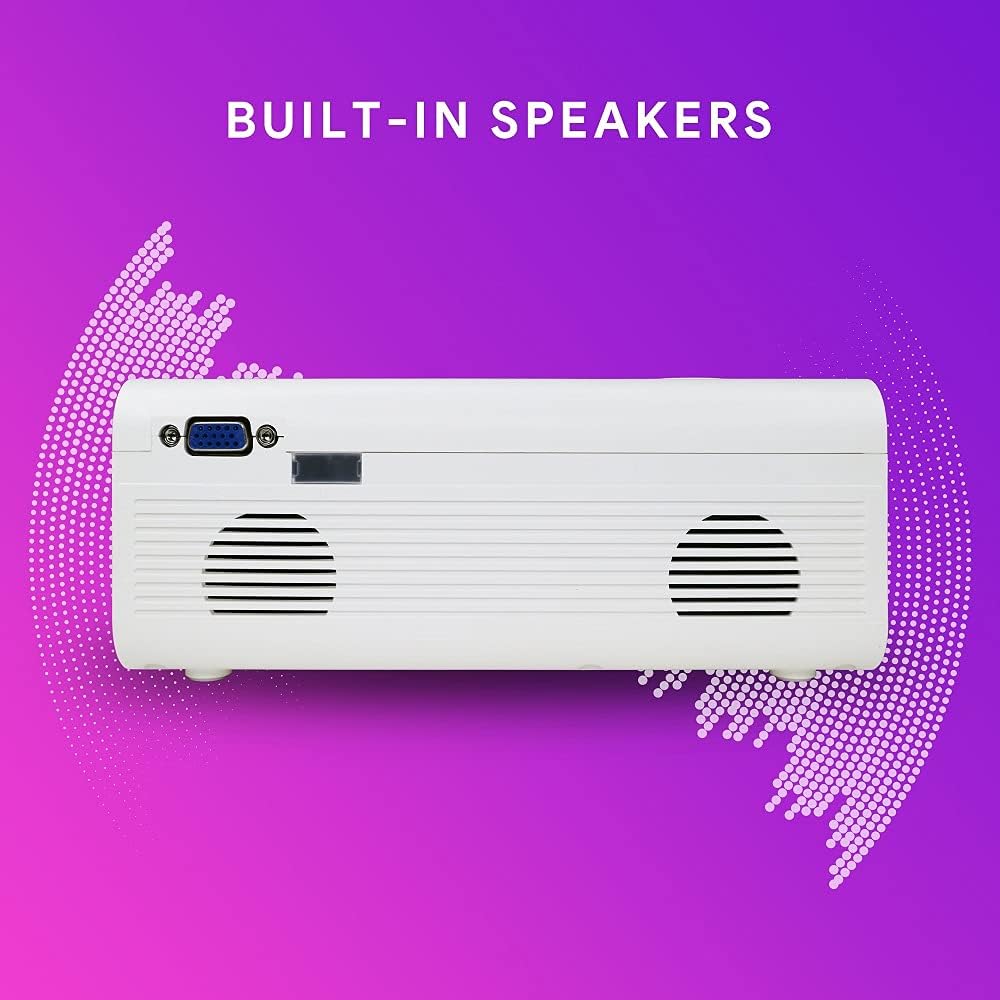
Foto: Akụkụ view of the Ematic EPJ590WH projector, illustrating the location of the built-in speakers on the side panel.
6. Nhazi
6.1 Ntinye
Choose a flat, stable surface for the projector. For optimal image quality, place the projector perpendicular to the projection surface (wall or screen). The projection distance will determine the image size. Ensure there is sufficient space for ventilation around the projector.
6.2 Njikọ ike
- Jikọọ ihe nkwụnye ike ahụ na ọdụ ụgbọ mmiri DC IN na ihe ngosi ahụ.
- Tinye nsọtụ nke ọzọ nke ihe nkwụnye ọkụ eletrik n'ime oghere ọkụ eletrik nkịtị.
- Ihe ngosi ọkụ na-egosi ọkụ na projector ga-enwu.
6.3 Ngwa jikọọ
Connect your desired input device (e.g., laptop, gaming console, USB drive) to the appropriate port on the projector.
- HDMI: Use an HDMI cable to connect to an HDMI port.
- VGA: Use a VGA cable to connect to the VGA port.
- USB: Fanye eriri USB n'ọdụ ụgbọ mmiri USB.
- Nke: Use an AV cable (not included) to connect to the AV port.
- MicroSD: Insert a MicroSD card into the MicroSD slot.
6.4 Mgbanwe nke Isi Ihe na Ndozi
After powering on the projector and selecting an input source:
- Gbado anya: Rotate the focus ring near the lens until the projected image is clear and sharp.
- Nkume isi: If the image appears trapezoidal (wider at the top or bottom), adjust the keystone correction dial until the image is rectangular.
7. Ntuziaka ọrụ
7.1 Gbanyụọ ma ọ bụ gbanyụọ
- Iji gbanye: Press the Power button on the projector or the remote control. The indicator light will turn blue.
- Iji gbanyụọ: Press the Power button again. The indicator light will turn red.
7.2 Nhọrọ Isi mmalite ntinye
After connecting your device, you need to select the correct input source:
- Press the "Source" button on the projector or remote control.
- Use the navigation buttons to select the desired input (e.g., HDMI1, HDMI2, VGA, USB, AV, MicroSD).
- Press "OK" to confirm your selection.
7.3 Nsorouzọ NchNhr
To access and adjust projector settings:
- Press the "Menu" button on the projector or remote control.
- Use the navigation buttons to move through menu options (Picture, Sound, Time, Option).
- Press "OK" to enter a sub-menu or confirm a setting.
- Press "Menu" again to exit the menu.
7.4 Mmepụta ọdịyo
The projector has built-in speakers. For external audio, connect headphones or external speakers to the AUX (3.5mm audio out) port.
8. Nlekọta
8.1 Nhicha
- Ihe ngosiputa Casing: Use a soft, dry cloth to wipe the surface. Do not use abrasive cleaners or solvents.
- oghere: Use a lens cleaning cloth or specialized lens paper. Avoid touching the lens with your fingers.
- Mmeghe ikuku: Jiri ahịhịa dị nro ma ọ bụ ikuku a kpọchiri akpọchi hichaa oghere ikuku ikuku mgbe niile iji gbochie uzuzu ịbata, nke nwere ike imetụta arụmọrụ na ndụ.
8.2 Nchekwa
Ọ bụrụ na e jighị ihe ahụ ruo ogologo oge, debe ihe ngosi ahụ n'ebe dị jụụ ma kpọọ nkụ, ebe anwụ na-anaghị apụta kpọmkwem ma ọ bụ oke okpomọkụ. A na-atụ aro ka e jiri ihe mkpuchi mbụ ma ọ bụ ihe mkpuchi nchebe gbochie uzuzu na mmebi.
9. Nchọpụta nsogbu
| Nsogbu | Ihe nwere ike ime | Ngwọta |
|---|---|---|
| Ọnweghị onyonyo atụpụtara |
|
|
| Onyonyo na-agba agba |
|
|
| Foto a bụ trapezoidal |
|
|
| Enweghị ụda |
|
|
10. Nkọwapụta
| Njirimara | Nkọwa |
|---|---|
| Nlereanya | EPJ590WH |
| Ngosipụta teknụzụ | LCD |
| Mkpebi obodo | 800 x 480 pikselụ |
| Mkpebi akwadoro | Up to 1920 x 1080 (1080p) |
| Foto dị iche na foto | 1000:1 |
| Nha amụma | 50 ruo 200 sentimita asatọ |
| Njikọta | HDMI (x2), VGA, USB, AV, MicroSD, AUX (3.5mm Audio Out) |
| Ndị na-ekwu okwu arụrụ arụ | Ee |
| Oriri ike | 10 watt |
| Akụkụ (L x W x H) | 33.2 x 22.3 x 11.91 cm |
| Ibu | 1.38 n'arọ |
11. Akwụkwọ ikike na nkwado
For warranty information and technical support, please refer to the warranty card included with your product or visit the official Ematic websaịtị. Debe nnata nzụta gị dị ka ihe akaebe nke ịzụrụ maka nkwupụta ikike.
For further assistance, you may contact Ematic customer service through their official channels.


