Okwu mmalite
This manual provides detailed instructions for the Google Pixel Buds A-Series wireless earbuds. These earbuds are designed to deliver high-quality audio and feature a comfortable, secure fit with multiple eartip sizes and a stabilizer arc. They are compatible with Android, iOS, and other Bluetooth 4.0+ devices.
Kedu ihe dị na Igbe ahụ
- Eriri ntị nke usoro A nke Google Pixel Buds
- Nchaji case
- USB-C eriri USB
- Ntị ntị (obere, ọkara, nnukwu)
- Ntuziaka mmalite ngwa ngwa (anaghị etinye ya na akwụkwọ ntuziaka dijitalụ a)

Image: Google Pixel Buds A-Series earbuds securely placed within their white charging case, which is open to reveal the earbuds.
Melite
1. Mmakọ mbụ
For Android Devices (One-Tap Pairing):
- Ensure your Android device is unlocked and has Bluetooth enabled.
- Open the charging case of your Pixel Buds A-Series next to your Android device.
- A pairing notification will appear on your device's screen. Tap to connect.
- Follow any on-screen prompts to complete the setup, including installing the Pixel Buds app for additional features.
For iOS and Other Bluetooth 4.0+ Devices:
- With the earbuds in the charging case, open the lid.
- Press and hold the pairing button on the back of the charging case until the status light begins to pulse white.
- On your device, navigate to Bluetooth settings and select "Pixel Buds A-Series" from the list of available devices.
- Confirm the pairing on your device.
2. Inweta Nchekwa Dị Mma
The Pixel Buds A-Series come with three sizes of eartips (small, medium, large) and a flexible stabilizer arc to ensure a comfortable and secure fit.
- Experiment with different eartip sizes to find the best seal for your ears. A good seal is crucial for optimal sound quality and bass response.
- Gently insert each earbud into your ear, rotating slightly until the stabilizer arc tucks comfortably into your ear's concha.

Foto: A nso nso view of a single Google Pixel Bud A-Series earbud, highlighting its ergonomic design, eartip, and stabilizer arc.
Ntuziaka ọrụ
1. Aka njikwa
The Pixel Buds A-Series feature touch controls on the outer surface of each earbud.
- Single Mgbata: Kpọọ/Kwụsịtụ ọdịyo, Zaa/Kwụsị oku.
- Ugboro abụọ Mgbata: Skip forward a track, Decline call.
- Mmaji Atọ: Skip backward a track.
- Pịa ma jide: Activate Google Assistant (Android only), or hear notifications.
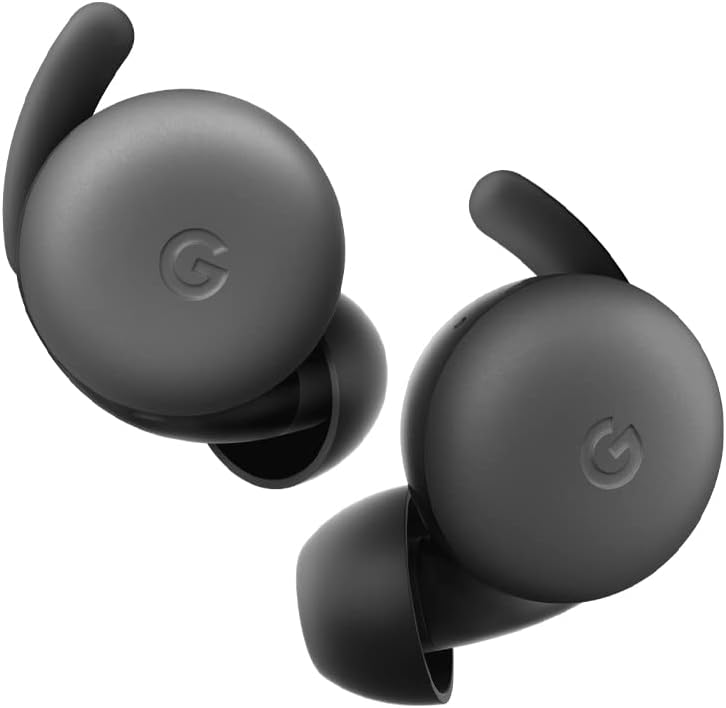
Image: A pair of Google Pixel Buds A-Series earbuds, showcasing their compact design and the 'G' logo on the touch-sensitive surface.
2. Njikọta Google Assistant
With a compatible Android device, you can access Google Assistant directly from your Pixel Buds A-Series.
- Say "Hey Google" or "Ok Google" to activate the Assistant hands-free.
- Alternatively, press and hold either earbud to speak to Google Assistant.
- You can ask for directions, check weather, control music, or have notifications read aloud.
3. Ịchaji
The Pixel Buds A-Series provide up to 5 hours of listening time or 2.5 hours of talk time on a single charge. The charging case extends this to up to 24 hours of total listening time.
- To charge the earbuds, place them inside the charging case. The indicator light on the case will show their charging status.
- To charge the case, connect it to a USB-C power source using the provided cable. The case's indicator light will show its charging status.
Nlekọta
1. Nhicha
- Regularly clean your earbuds and charging case to maintain performance and hygiene.
- Use a soft, dry, lint-free cloth to wipe the exterior of the earbuds and case.
- For eartips, gently remove them and clean with a mild soap solution and water, then rinse and dry thoroughly before reattaching.
- Zere iji ihe na-emebi emebi ma ọ bụ kemịkalụ siri ike.
2. Nchekwa
- Always store the Pixel Buds A-Series in their charging case when not in use to protect them and keep them charged.
- Debe n'ebe dị jụụ ma kpọọ nkụ, ebe okpomọkụ na anwụ na-anaghị apụta oke.
Nchọpụta nsogbu
Ọ bụrụ na ị hụ nsogbu na Pixel Buds A-Series gị, nwaa usoro ndị a:
- Enweghị ụda ma ọ bụ njikọ na-akwụsị akwụsị:
- Gbaa mbọ hụ na akwụgoro ekwe ntị abụọ ahụ.
- Check that Bluetooth is enabled on your device and the earbuds are connected.
- Try placing the earbuds back in the case, closing the lid for a few seconds, then reopening to reset the connection.
- Chezọ ngwaọrụ dị na ntọala Bluetooth ekwentị gị wee megharịa ọzọ.
- Ensure your device is within the Bluetooth range (up to 10 meters).
- Earbuds anaghị akwụ ụgwọ:
- Hụ na a na-ana chajị akpa chajị ahụ n'onwe ya.
- Verify that the earbuds are correctly seated in the charging case.
- Jiri ákwà owu kpọrọ nkụ hichaa kọntaktị chaja dị na ntị ma na nke dị n'ime akpa ahụ.
- Gbalịa eriri USB-C dị iche na nkwụnye ọkụ.
- Ogo ụda adịghị mma:
- Ensure you have a secure fit with the correct eartip size.
- Clean the earbud mesh and eartips.
- Check your device's audio settings and equalizer.
Nkọwapụta
| Aha Nlereanya | Usoro A nke Pixel Buds |
| Teknụzụ Njikọta | Ikuku (Bluetooth 5.0) |
| Ngwa dakọtara | Android, iOS, and Bluetooth 4.0+ devices |
| Ndụ batrị (Earbuds) | Ruo awa ise na-ege ntị, oge okwu awa 2.5 |
| Ndụ batrị (ya na igbe nchaji) | Up to 24 hours listening |
| Ọkwa Nguzogide mmiri | Water Resistant (IPx4 rating for earbuds) |
| Ụdị njikwa | Touch (Media Control, Google Assistant) |
| Ibu Ibu | ounce 1.9 (mkpokọta) |
| Nha (Earbud) | 0.81 x 1.15 x 0.69 sentimita asatọ |
| Oke ugboro ugboro | 20 Hz - 20,000 Hz |
| Oke Bluetooth | 10 mita |
Akwụkwọ ikike na nkwado
For detailed warranty information and customer support, please refer to the official Google Pixel Buds support websaịtị ahụ. Ị nwere ike ịchọta akụrụngwa nkwado, ajụjụ ndị a na-ajụkarị, na nhọrọ kọntaktị na g.co/pixelbuds/help.
The Pixel Buds A-Series are designed to be repairable, but any repair, disassembly, or damage may affect the water resistance rating.


