1. Okwu mmalite
Thank you for choosing the CREATE WINDCALM M Ceiling Fan. This manual provides essential information for the safe installation, operation, and maintenance of your new ceiling fan. Please read this manual thoroughly before installation and keep it for future reference.

Image 1.1: The CREATE WINDCALM M Ceiling Fan, showcasing its sleek design, accompanying remote control, and the smartphone app interface for smart control.
2. Ntuziaka nchekwa
Na-agbaso usoro nchekwa nchekwa mgbe niile mgbe ị na-etinye ma na-arụ ọrụ ngwa eletriki iji belata ihe ize ndụ nke ọkụ, ujo eletrik na mmerụ ahụ onwe onye.
- Gbaa mbọ hụ na agbapụrụ ọkụ ọkụ tupu echichi ma ọ bụ mmezi.
- Installation should be performed by a qualified electrician or a competent person.
- The mounting structure must be capable of supporting the fan's weight.
- Etinyekwala ihe n'ime agụba fan mgbe fan na-arụ ọrụ.
- Debe ụmụaka na anụ ụlọ n'ebe onye ofufe nọ n'oge ọrụ.
- This fan is suitable for indoor and outdoor covered areas.
3. Ihe ngwugwu
Carefully unpack all components and check against the list below. If any items are missing or damaged, contact customer support immediately.
- Ceiling Fan Motor Unit
- Agụba Fan (3x)
- Arịọnụ mgbodo
- Njikwa anya
- Ngwa mgbakwunye (skru, arịlịka, washers)
- Akwụkwọ ntuziaka
4. Ntọala na nwụnye
Soro usoro ndị a maka nrụnye kwesịrị ekwesị. A na-atụ aro ntinye ọkachamara.
- Kwadebe Ebe Nkwanye: Ensure the ceiling joist or support structure can hold the fan's weight (approximately 6.22 kg).
- Wụnye ihe nkwado mgbago: Secure the mounting bracket to the ceiling using the provided screws and anchors. Ensure it is firmly attached.
- Wiring: Connect the fan's electrical wires to your household wiring according to local electrical codes. The fan operates on 240 Volts. Ensure correct connection of Live (L), Neutral (N), and Ground (Earth) wires.
- Tinye ngalaba Fan: Carefully lift the fan motor unit and attach it to the mounting bracket. Many models include a hook to temporarily hang the fan while wiring.
- Wụnye Fan Blades: Attach the three fan blades to the motor unit using the provided screws. Ensure all screws are tightened securely.

Foto 4.1: Zuru ezu view of the fan's central unit, showing the robust construction and points for blade attachment.

Image 4.2: The ceiling fan seamlessly integrated into a room, demonstrating its aesthetic appeal and compact design.
5. Ọrụ
Your CREATE WINDCALM M Ceiling Fan can be controlled via the included remote control or the CREATE mobile application (for Wi-Fi enabled models).
5.1. Ọrụ njikwa anya
- Gbanyụọ/ Gbanyụọ: Gbanyụọ ma ọ bụ gbanyụọ fan.
- Njikwa ọsọ: Adjusts fan speed through 6 settings.
- Ngụ oge: Set the fan to turn off automatically after 1, 2, or 4 hours.
- Ụdị okpomọkụ/oyi: Changes the direction of blade rotation.
5.2. Summer/Winter Operation
The fan features a reversible motor for year-round comfort.
- Ụdị okpomọkụ (ntụgharị aka elekere): Pushes cool air downwards, creating a refreshing breeze. This mode helps to cool the room by circulating air.
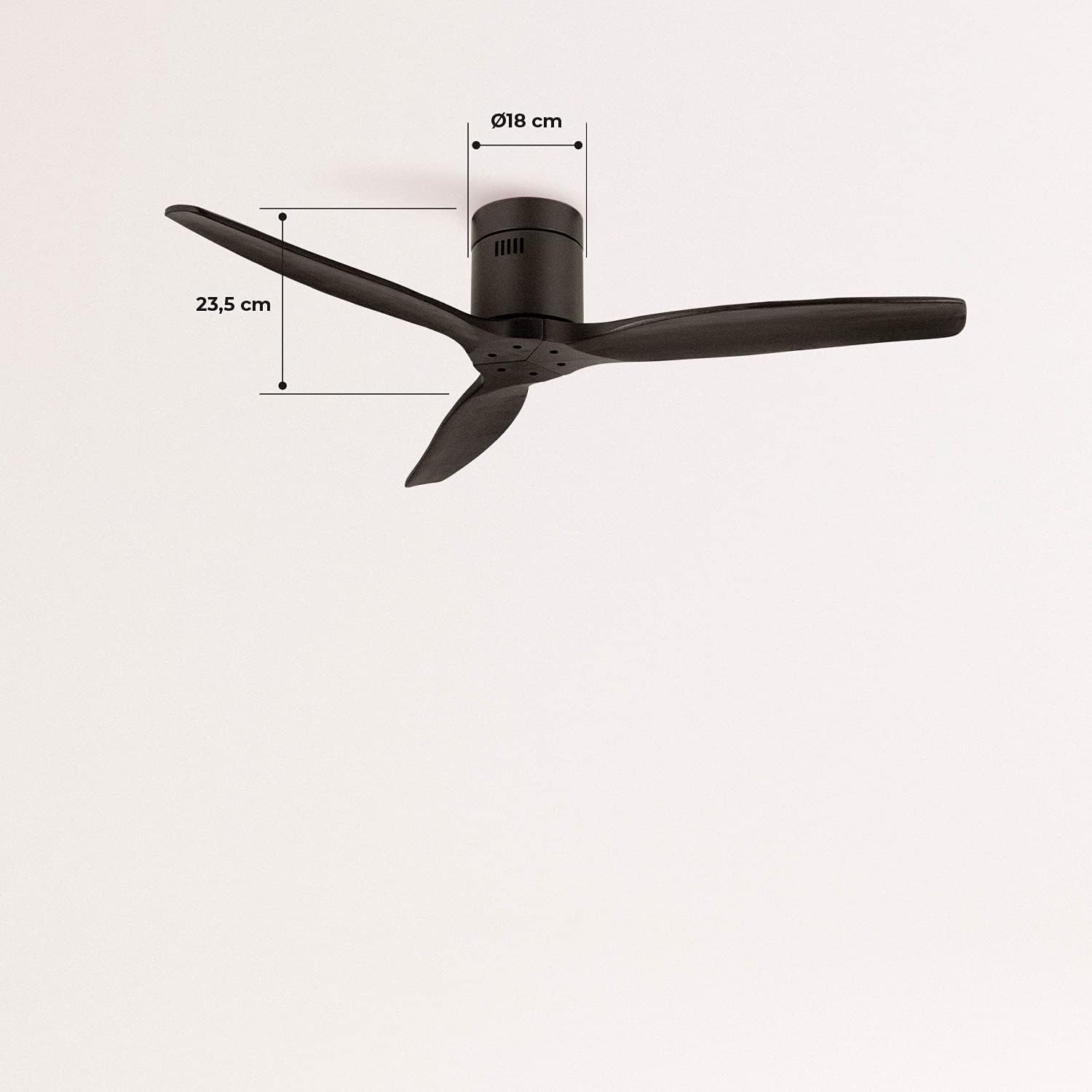
Image 5.1: Visual representation of the fan's airflow in Summer Mode, where cool air is directed downwards.
- Ụdị oyi (ntụgharị aka elekere): Draws cool air upwards, circulating warm air trapped near the ceiling downwards. This helps to distribute heat more evenly, reducing heating costs.

Image 5.2: Visual representation of the fan's airflow in Winter Mode, where warm air is recirculated from the ceiling.
5.3. Wi-Fi and App Control (Smart Option)
If your model includes the Wi-Fi option, download the CREATE app to control and program your fan from your smartphone. Follow the in-app instructions for pairing your device.
6. Nlekọta
Nlekọta anya mgbe niile na-eme ka arụmọrụ kacha mma na ogologo ndụ nke onye ofufe gị.
- Nhicha: Jiri ihe dị nro na-efesa agụba fan na ụlọ moto mgbe niile, damp akwa . Ejila ihe nchacha abrasive ma ọ bụ ihe mgbaze.
- Nyocha agụba: Lelee oge ụfọdụ na skru agụba niile siri ike. Mpempe akwụkwọ na-adịghị mma nwere ike ime ka mkpọtụ na mkpọtụ.
- Mmanya moto: The fan's DC motor is permanently lubricated and does not require additional oiling.
7. Nchọpụta nsogbu
Ọ bụrụ na ị zutere nsogbu gị na onye ofufe gị, rụtụ aka na nsogbu na azịza ndị a na-ahụkarị:
| Nsogbu | Ihe nwere ike ime | Ngwọta |
|---|---|---|
| Onye ofufe anaghị agbanwuo | No power supply; Remote control battery low; Incorrect wiring. | Check circuit breaker; Replace remote battery; Verify wiring connections. |
| Fans na-ama jijiji | Kposara agụba tọgbọrọ chakoo; Mpekere na-enweghị nha nha; Ihe nkwado mgbago rụrụ arụ. | Tighten all blade screws; Ensure blades are correctly installed; Check mounting bracket for secure attachment. |
| Oke mkpọtụ | Ihe ndị dị nro; Nsogbu injin. | Check all screws and connections; If noise persists, contact customer support. |
| Njikwa anya anaghị arụ ọrụ | Battery low/dead; Remote not paired. | Replace battery; Refer to remote pairing instructions in the full manual (if applicable). |
| Nsogbu njikọ Wi-Fi | Okwuntughe netwọkụ na-ezighi ezi; Router dị anya; Nsogbu ngwa. | Verify Wi-Fi password; Move router closer or use a Wi-Fi extender; Reinstall app or check for updates. |
8. Nkọwapụta
| Njirimara | Nkọwapụta |
|---|---|
| Ụdị | Mepụta |
| Nọmba nlereanya | 93531_182750 |
| Agba | Nwa |
| Ụdị | Enweghị Ìhè |
| Isi Iyi Ike | Igwe ọkụ eletrik |
| Voltage | 240 volts |
| Wattage | 40 Watt |
| Ofufe ikuku | 210 Cubic meters per minute |
| Ọkwa mkpọtụ | 50 dB |
| Ogologo agụba | 66 sentimita asatọ |
| Dayameta | 132 sentimita asatọ |
| Akụkụ ngwaahịa | 132D x 132W x 23.5H cm |
| Ibu Ibu | 6.22 kilogram |
| Njirimara Pụrụ Iche | Dị fechaa |

Image 8.1: Key dimensions of the fan, including its 132 cm diameter and 66 cm blade length.

Image 8.2: Additional dimensions, highlighting the fan's height of 23.5 cm and the 18 cm diameter of the motor housing.
9. Akwụkwọ ikike na nkwado
Your CREATE WINDCALM M Ceiling Fan comes with a standard warranty. For specific warranty terms and conditions, please refer to the documentation included with your purchase or visit the official CREATE website. In case of any issues or for technical support, please contact CREATE customer service. The seller, CREATE, offers support and assistance for product-related inquiries.


