1. Okwu mmalite
Daalụ maka ịzụrụasing the Daewoo DIBT2122 Mini Portable Bluetooth Speaker. This manual provides essential information for the safe and efficient operation of your device. Please read it thoroughly before use and retain it for future reference.

Foto 1: N'ihu view of the Daewoo DIBT2122 Mini Portable Bluetooth Speaker in blue, featuring a black speaker grille with the Daewoo logo and an attached carabiner clip.
2. Ozi nchekwa
- Ekwela ka onye na-ekwu okwu nọrọ n'ọnọdụ okpomọkụ dị oke elu, anwụ kpọmkwem, ma ọ bụ ọkụ mepere emepe.
- Zere idobe ma ọ bụ idobe ọkà okwu na mmetụta siri ike.
- Ewepụla, rụkwaa ma ọ bụ gbanwee ngwaọrụ n'onwe gị. Kpọtụrụ ndị ọrụ ruru eru maka enyemaka.
- Keep the speaker away from water and other liquids to prevent electric shock or damage, unless specifically designed for water resistance (this model is not specified as waterproof).
- Use only the provided or approved charging cable.
- Tụfuo batrị na ngwaọrụ ahụ dịka iwu obodo si dị.
3. Ihe ngwugwu
Biko lelee ngwungwu maka ihe ndị a:
- Daewoo DIBT2122 Mini Portable Bluetooth Speaker
- Igwe nchaji USB
- Iko mmiri ara
- Metal Hanging Hook (Carabiner)
- Akwụkwọ ntuziaka (akwụkwọ a)

Image 2: The product packaging box for the Daewoo Wireless Shower Speaker, showing the speaker image and brand logo.
4. Nhazi
4.1 Ịchaji ọkà okwu
- Locate the USB charging port on the side of the speaker, usually protected by a rubber flap.
- Connect the small end of the provided USB charging cable to the speaker's USB port.
- Jikọọ nnukwu njedebe nke eriri USB na nkwụnye ọkụ USB (anaghị etinye ya) ma ọ bụ ọdụ ụgbọ USB nke kọmputa.
- The LED indicator will illuminate to show charging status. A full charge takes approximately 2.5 hours.
- Once fully charged, disconnect the cable and ensure the rubber flap is securely closed to protect the port.

Foto 3: nso nso view of the side of the speaker, showing the micro USB charging port and the SD card slot, both protected by a rubber cover.
4.2 Gbanyụọ/ gbanyụọ
- To power on, press and hold the Power button (usually marked with a power symbol) for a few seconds until you hear an audible prompt or see the LED indicator light up.
- To power off, press and hold the Power button again for a few seconds until the device shuts down.
4.3 Njikọ Bluetooth
- Ensure the speaker is powered on and within 10 meters (33 feet) of your Bluetooth-enabled device (smartphone, tablet, computer).
- Ọkà okwu ahụ ga-abanye na ọnọdụ njikọta na akpaghị aka, nke ìhè LED na-enwu enwu gosiri.
- Na ngwaọrụ gị, gaa na ntọala Bluetooth wee chọọ ngwaọrụ dị.
- Select "DIBT2122" or a similar name from the list.
- Once paired, the LED indicator will stop flashing and remain solid, and you will hear a confirmation tone.
- Ọ bụrụ na njikọ ahụ ada ada, gbanyụọ ọkà okwu na Bluetooth nke ngwaọrụ gị, wee megharịa usoro ndị a.
4.4 Using the Suction Cup and Hanging Hook
- Iko mmiri ara: The speaker features a full-size suction cup on its back. To attach, ensure the surface is clean, smooth, and dry. Press the speaker firmly against the surface until the suction cup adheres.
- nkokogide: Use the integrated metal carabiner hook to hang the speaker from a shower rail, backpack, or any suitable loop.
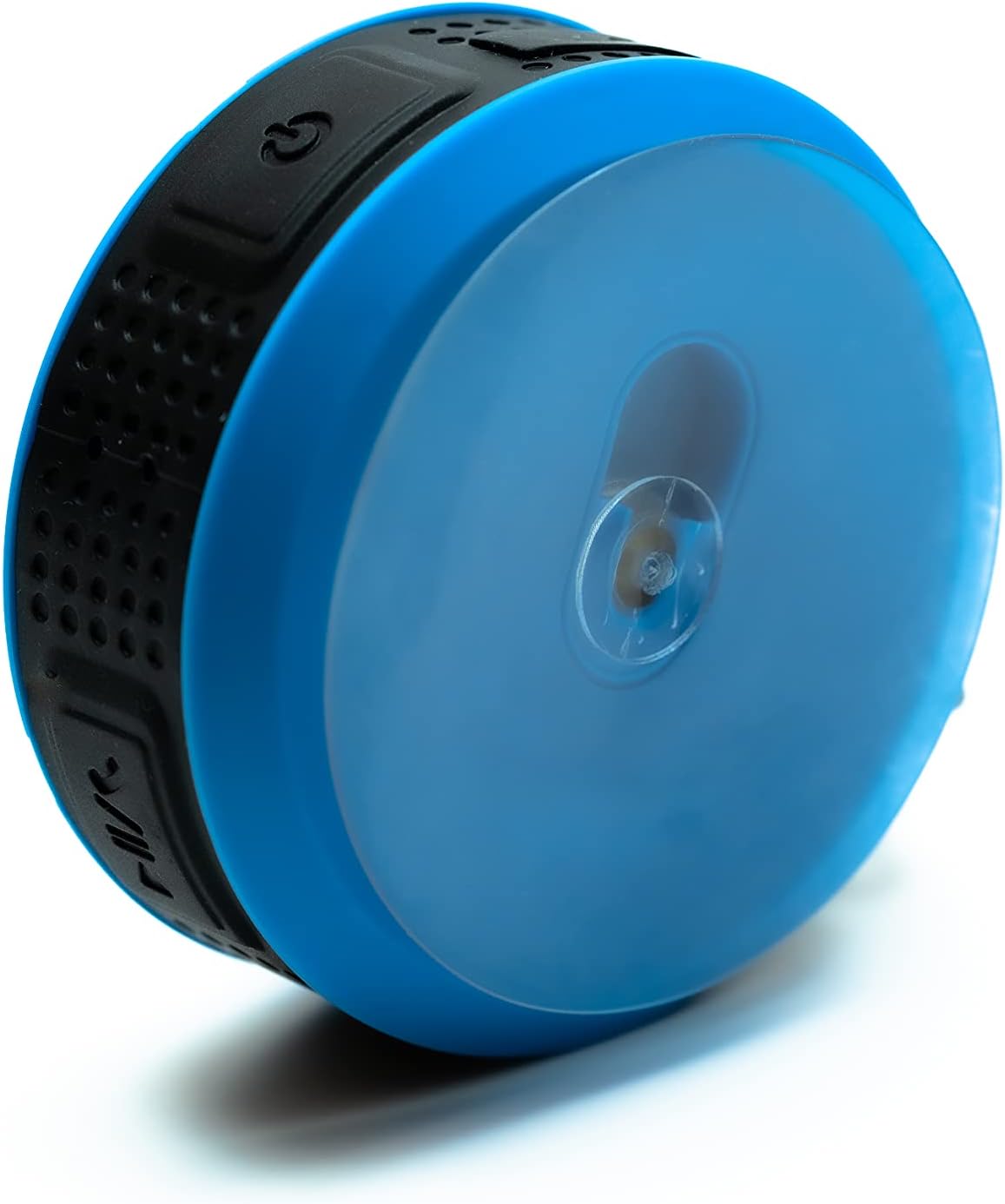
Image 4: The back of the Daewoo DIBT2122 speaker, clearly showing the large, transparent suction cup for mounting on smooth surfaces.
5. Ntuziaka ọrụ
5.1 bọtịnụ Ọrụ
The speaker features several control buttons, typically located on its side:
- Bọtịnụ Ike (Gbanyụọ/Gbanyụọ): Pịa ma jide ka ịgbanwuo/ gbanyụọ.
- Bọtịnụ Kwụsị/Kwụsị: Pịa otu ugboro ka ịkpọọ ma ọ bụ kwụsịtụ egwu.
- Bọtịnụ egwu na-esote: Press once to increase volume. Press and hold to skip to the next track.
- Mpịakọta nke ala / bọtịnụ egwu gara aga: Press once to decrease volume. Press and hold to go to the previous track.
- Call Button (Answer/End/Reject): Press once to answer or end a call. Press and hold to reject a call.

Foto 5: Akụkụ view of the Daewoo DIBT2122 speaker, highlighting the embossed control buttons for power, play/pause, volume, and track navigation.
5.2 Bluetooth Music Playback
After successfully pairing your device, open your music application and start playback. You can control volume, play/pause, and skip tracks using the speaker's buttons or your connected device.
5.3 Oku na-enweghị aka
When a call comes in while connected via Bluetooth, the music will pause. Press the Call button once to answer. Press it again to end the call. Press and hold to reject an incoming call.
Mkpọghachi kaadị SD 5.4
Insert a microSD card (not included) with MP3 audio files into the designated SD card slot. The speaker should automatically switch to SD card mode and begin playing music. Use the track control buttons to navigate your music.
6. Nlekọta
- Nhicha: Jiri ákwà dị nro ma kpọọ nkụ hichaa ọkà okwu ahụ. Ejila ihe nhicha ma ọ bụ ihe mgbaze.
- Nchekwa: Mgbe a naghị eji ya ruo ogologo oge, debe igwe okwu ahụ n'ebe dị jụụ ma kpọọ nkụ, ebe anwụ na-anaghị apụta kpọmkwem.
- Nlekọta batrị: Ka ịgbatị ndụ batrị ogologo, zere ịchaji batrị ugboro ugboro. Na-anya ọkà okwu oge niile, ọ bụrụgodị na ejighị ya.
7. Nchọpụta nsogbu
| Nsogbu | Ihe nwere ike ime | Ngwọta |
|---|---|---|
| Ọkà okwu anaghị agba ọkụ. | Batrị dị ala. | Chajie ọkà okwu ahụ ruo opekata mpe nkeji iri atọ. |
| Enweghị ike ijikọ site na Bluetooth. | Bluetooth is off on your device; speaker is too far; speaker is already paired to another device. | Ensure Bluetooth is enabled on your device. Move speaker closer. Disconnect from other devices or restart speaker. |
| Enweghị ụda. | Volume is too low; device is not playing; speaker is not connected. | Increase volume on both speaker and connected device. Ensure music is playing. Re-pair Bluetooth. |
| Ogo ụda adịghị mma. | Speaker is too far from the device; interference. | Move speaker closer to the connected device. Avoid obstacles between devices. |
8. Nkọwapụta
- Ụdị: DIBT2122
- Ụdị Bluetooth: 5.0
- Ike mmepụta: 3W
- Batrị: 300 mAh Li-ion
- Oge nchaji: Ihe dị ka awa 2.5
- Oge nkwughachi: Ihe dị ka awa 1.5
- Ogologo nnyefe: Ruo mita 10 (ụkwụ 33)
- Njikọta: Bluetooth, USB (for charging), SD Card Slot
- Akụkụ: 9 x 9 x 3.5 cm
- Arọ: 140 grams
- Atụmatụ pụrụ iche: Hands-free calling, SD card playback, suction cup mount, metal hanging hook, LED light.
9. Akwụkwọ ikike na nkwado
Daewoo Electronics products are designed and manufactured to the highest quality standards. For warranty information, technical support, or customer service inquiries, please refer to the warranty card included with your purchase or visit the official Daewoo Electronics website. Please have your model number (DIBT2122) and proof of purchase ready when contacting support.


