1. Okwu mmalite
Daalụ maka ịzụrụasing the Rapoo N300 Optical Wired Gaming Mouse. This manual provides detailed instructions for setting up, operating, and maintaining your new mouse. Please read this manual thoroughly before use to ensure optimal performance and longevity of the product.
2. Ngwaahịa gafereview
2.1 Atụmatụ
- High-Precision Optical Tracking: Equipped with a 2000 DPI tracking engine for accurate and responsive cursor control.
- 6 bọtịnụ: Includes left, right, scroll wheel, DPI switch, and two side buttons for enhanced functionality.
- 2D Anti-Slip Scroll Wheel: Provides precise scrolling and tactile feedback.
- Ambidextrous imewe: Ergonomically designed for comfortable use by both left and right-handed users.
- Njikọ USB ejiri waya: Ensures a stable and lag-free connection.
Ihe ngwugwu 2.2
- Rapoo N300 Optical Wired Gaming Mouse
- Akwụkwọ ntuziaka (akwụkwọ a)
2.3 Eserese ngwaahịa

Foto 1: N'elu view of the Rapoo N300 mouse, showing the left and right click buttons, scroll wheel, and DPI switch button. The Rapoo logo is visible at the base.

Foto 2: Akụkụ view of the Rapoo N300 mouse, highlighting the two side buttons and the textured grip area for improved handling.
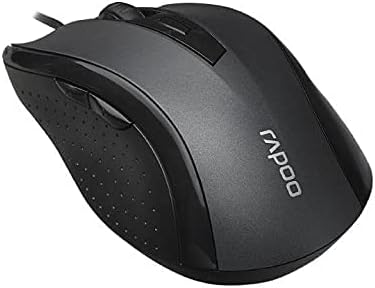
Foto 3: N'akuku view of the Rapoo N300 mouse, showcasing its ergonomic contour and the placement of the scroll wheel and side buttons.

Foto 4: N'okpuru view of the Rapoo N300 mouse, displaying the optical sensor, product model number (N300), interface type (USB), and regulatory compliance markings.
3. Nhazi ntuziaka
- Jikọọ òké: Locate an available USB port on your computer (desktop or laptop). Insert the USB connector of the Rapoo N300 mouse firmly into the USB port.
- Nwụnye ọkwọ ụgbọala: The Rapoo N300 mouse is a plug-and-play device. Your operating system (Windows XP, Windows 7, Linux, or newer versions) will automatically detect and install the necessary drivers. This process may take a few moments.
- Nyocha: Once the drivers are installed, the mouse cursor should become responsive. Move the mouse to confirm functionality.
No additional software installation is typically required for basic functionality.
4. Ntuziaka ọrụ
4.1 Ọrụ ndị bụ isi
- Pịa aka ekpe: Primary action, selection, opening items.
- Pịa aka nri: Opens contextual menus.
- Mpempe akwụkwọ mpịakọta: Akwụkwọ mpịakọta na web pages vertically. Can also be pressed for middle-click functionality (application-dependent).
4.2 DPI mmezi
The Rapoo N300 features a dedicated DPI switch button, usually located behind the scroll wheel. Press this button to cycle through different DPI (Dots Per Inch) sensitivity settings. Each press will change the cursor speed, allowing you to adjust it to your preference for various tasks, from precise editing to fast-paced gaming.
4.3 bọtịnụ akụkụ
The two side buttons typically function as "Forward" and "Backward" in web ihe nchọgharị na file explorers. Their functionality may be customizable through operating system settings or third-party software, if available.
5. Nlekọta
- Nhicha: Jiri akwa dị nro, kpọrọ nkụ hichapụ elu òké ahụ. Maka unyi isi ike, ntakịrị dampen akwa na mmiri ma ọ bụ a nwayọọ ihicha ngwọta. Zere iji kemịkalụ siri ike ma ọ bụ ihe na-emebi emebi.
- Ihe mmetụta anya: Ensure the optical sensor on the bottom of the mouse remains clean and free of dust or debris for optimal tracking performance. Do not attempt to disassemble the mouse.
- Nlekọta USB: Zenarị nrịgọ dị nkọ ma ọ bụ ịdọrọ eriri USB gabiga ókè iji gbochie mmebi.
6. Nchọpụta nsogbu
| Nsogbu | Ngwọta enwere ike |
|---|---|
| Òké anaghị aza |
|
| Ntugharị cursor na-adịghị agbanwe agbanwe ma ọ bụ na-awụlikwa elu |
|
| Bọtịnụ DPI anaghị agbanwe nghọta |
|
7. Nkọwapụta
| Njirimara | Nkọwa |
|---|---|
| Nlereanya | N300 |
| Tracking Engine | Ngwa anya |
| DPI | Ruo 2000 DPI |
| Ọnụọgụ bọtịnụ | 6 (Left, Right, Scroll Wheel, DPI, Side Button 1, Side Button 2) |
| Mpempe akwụkwọ mpịakọta | 2D Anti-Slip |
| Ntuzi aka | Ambidextrous |
| Ụdị interface | USB eriri |
| Ndakọrịta sistemụ arụmọrụ | Windows XP, Windows 7, Linux, and newer versions |
| Agba | Nwa |
| Ibu Ibu | Ihe dị ka 100 g |
| Akụkụ (Ngwugwu) | 15.4 x 8.4 x 4.2 cm |
8. Akwụkwọ ikike na nkwado
Rapoo products are designed for reliability and performance. For specific warranty information and support details, please refer to the warranty card included with your product or visit the official Rapoo websaịtị. Debe nnata nzụta gị dị ka ihe akaebe nke ịzụrụ maka nkwupụta ikike.
For technical assistance or further inquiries, please contact Rapoo customer support through their official channels.


