1. Okwu mmalite
This manual provides detailed instructions for the Cellularline HUSH Bluetooth In-Ear Earbuds. These earbuds feature an interactive touch display, Active Noise Cancelling (ANC), Noise-Free Calls technology, and customizable sound with 5 EQ modes. Please read this manual carefully to ensure proper use and optimal performance of your device.
2. Kedu ihe dị na Igbe ahụ
- Cellularline HUSH Earbuds
- Nchaji case
- Akwụkwọ ntuziaka onye ọrụ
3. Ngwaahịa gafereview
The Cellularline HUSH earbuds are designed for an advanced and personalized audio experience. The compact charging case features an interactive touch display for easy control.

Image 1: Cellularline HUSH Earbuds in their charging case, showcasing the sleek design and in-ear fit.
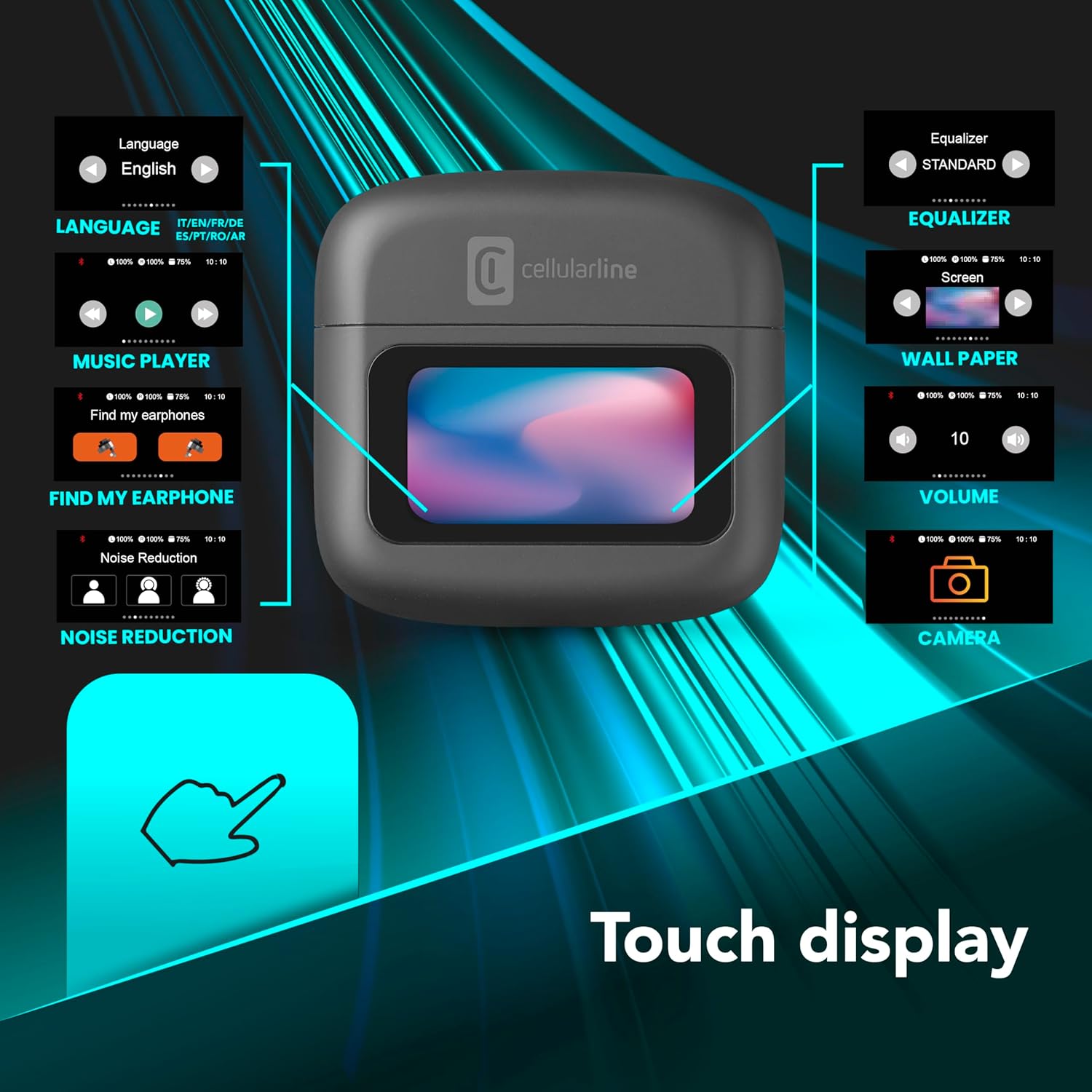
Image 2: An illustration highlighting the various functions accessible via the touch display on the charging case, including language, music player, 'Find My Earphone', noise reduction, equalizer, wallpaper, volume, and camera control.
4. Nhazi
4.1 Ịchaji
Before first use, fully charge the earbuds and the charging case. Place the earbuds into the charging case. The magnetic closure ensures proper placement for charging. The case and earbuds offer up to 42 hours of total play time.

Image 3: Graphic indicating 42 hours of total play time and 6 hours of charger time for the Cellularline HUSH earbuds.
4.2 Njikọta
The earbuds feature an Autopairing function. When removed from the charging case, they will automatically enter pairing mode or reconnect to the last paired device. To pair with a new device, ensure Bluetooth is enabled on your device and select 'Cellularline HUSH' from the list of available devices.
5. Ntuziaka ọrụ
5.1 Touch Display Controls
The interactive touch display on the charging case allows for easy management of various functions. You can control music playback, manage calls, adjust noise reduction modes, and select EQ settings directly from the display.
5.2 Mkpọtụ Na-arụ Ọrụ (ANC)
Activate Active Noise Cancelling to reduce ambient low-frequency noise, providing an immersive listening experience. This feature can be controlled via the touch display.
5.3 Noise-Free Calls
The integrated microphones utilize Noise-Free Calls technology to eliminate background noise, ensuring clear and crisp voice transmission during calls.

Image 4: The charging case display showing an incoming call with options to answer or decline, next to a smartphone displaying a similar call interface.
Ụdị nhazi nhata (EQ) 5.4
Customize your audio experience by selecting one of the 5 available EQ modes through the touch display. This allows you to tailor the sound profile na mmasị gị.
5.5 Ụdị Mbelata Mkpọtụ
Switch between different noise reduction modes, including Active Noise Cancelling, Normal Mode, and Transparency Mode, to suit your environment. These modes are accessible via the touch display.

Image 5: The charging case display showing options for Noise Reduction, including Active Noise Cancelling, Normal Mode, and Transparency Mode.
6. Nlekọta
To ensure the longevity and optimal performance of your Cellularline HUSH earbuds:
- Debe earbuds na chaja dị ọcha ma kpọọ nkụ.
- Zere ikpughe ngwaọrụ na oke okpomọkụ ma ọ bụ iru mmiri.
- Clean the ear tips regularly with a soft, dry cloth.
- Store the earbuds in their charging case when not in use.
7. Nchọpụta nsogbu
If you encounter issues with your Cellularline HUSH earbuds, refer to the following common solutions:
- Enweghị ụda:
- Gbaa mbọ hụ na akwụgoro ihe ekwe ntị.
- Check Bluetooth connection to your device.
- Adjust volume on both earbuds and connected device.
- Enweghị ike ijikọ:
- Ensure earbuds are in pairing mode (usually indicated by a flashing light).
- Gbanyụọ ma gbanye Bluetooth na ngwaọrụ gị.
- Chezọ ngwaọrụ ahụ na ntọala Bluetooth ekwentị gị wee nwaa ijikọ ọzọ.
- ANC anaghị arụ ọrụ:
- Ensure ANC is activated via the touch display.
- Check for proper fit of the earbuds in your ears.
- Okwu ịchaji:
- Gbaa mbọ hụ na ejikọrọ eriri nchaji ahụ nke ọma.
- Verify the charging case has power.
- Clean charging contacts on earbuds and case.
8. Nkọwapụta
| Njirimara | Nkọwa |
|---|---|
| Ụdị | cellline |
| Nlereanya | BTHUSHTWSK |
| Ngwa dakọtara | Ngwaọrụ Bluetooth |
| Usoro njikwa | Metụ aka |
| Atụmatụ ndị ọzọ | Active Noise Cancellation and Noise-Free Calls |
| Nkezi Ndụ batrị | Awa 42 |
| Ibu Ibu | 126 g |
| Agba | Nero |
| Ntinye ntị | N'ime ntị |
| Ụdị Ihe | N'ime ntị |
| Njikwa mkpọtụ | Nkagbu mkpọtụ nọ n'ọrụ |
| Jack ekweisi | Jack-less |
| Teknụzụ Njikọta | Ikuku |
| Teknụzụ nzikọrịta ozi ikuku | Bluetooth |
9. Akwụkwọ ikike na nkwado
For warranty information and customer support, please refer to the documentation included with your product or visit the official Cellularline websaịtị. Debe ihe akaebe nke ịzụrụ maka akwụkwọ ikike.


