1. Okwu mmalite
Thank you for choosing the hoco. ES55 Songful TWS Wireless Headset. This manual provides detailed instructions on how to set up, operate, and maintain your new wireless earbuds. Please read this manual carefully before use to ensure optimal performance and longevity of your device.
2. Ihe ngwugwu
Gbaa mbọ hụ na ihe niile dị na ngwugwu gị:
- hoco. ES55 Songful TWS Wireless Headset (Left and Right Earbuds)
- Nchaji case
- Ịchaji eriri
- Nkịta ntị (nha dị iche iche)
- Akwụkwọ ntuziaka (akwụkwọ a)
3. Ngwaahịa gafereview
Familiarize yourself with the components of your hoco. ES55 Songful headset.
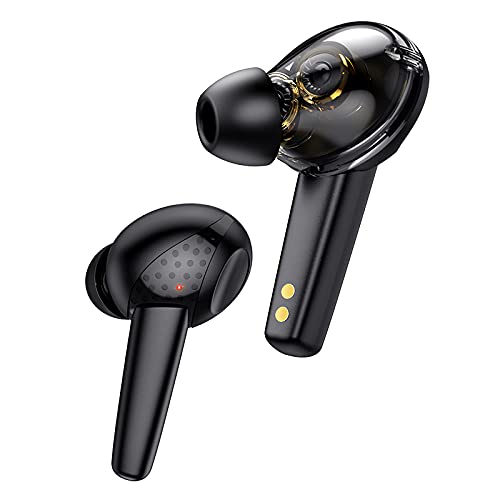
Foto 3.1: The hoco. ES55 Songful TWS Wireless Headset earbuds. These are in-ear style earbuds, black in color, with a transparent section revealing internal components and gold charging contacts at the base of the stem.
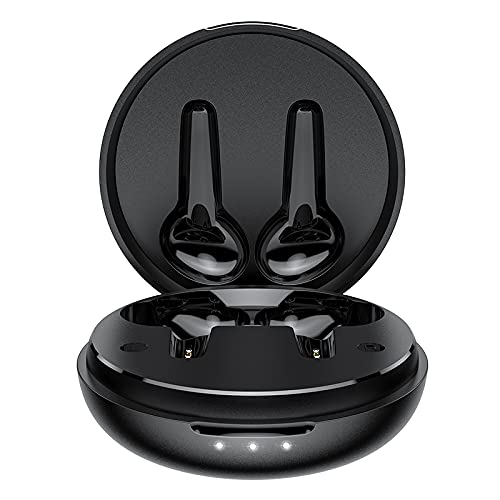
Foto 3.2: The hoco. ES55 Songful charging case shown open, revealing the molded slots for the left and right earbuds. The case is black and circular, with three LED indicator lights on the front edge.
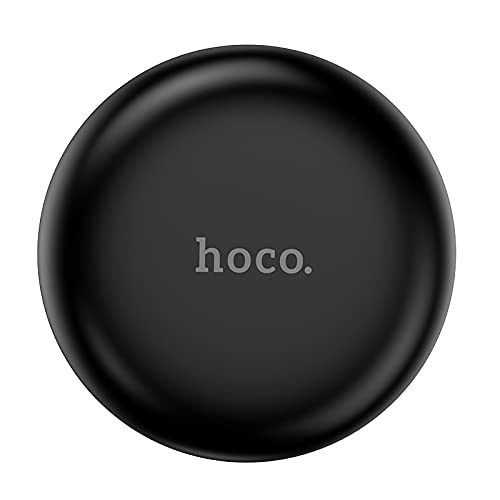
Foto 3.3: The hoco. ES55 Songful charging case shown closed. It is a compact, circular black case with the "hoco." logo subtly embossed on the top surface.
4. Ịchaji ekweisi
Tupu i jiri ya nke mbụ, chajie ma ekweisi na ihe mkpuchi chaja ahụ nke ọma.
- Ịchaji ikpe ahụ: Connect the provided charging cable to the charging port on the case and to a USB power source (e.g., computer, wall adapter). The LED indicators on the case will illuminate to show charging status. A full charge for the case takes approximately 1.5 hours.
- Ịchaji ekwe ntị: Place the earbuds into their respective slots in the charging case. Ensure the charging contacts align. The earbuds will automatically begin charging. A full charge for the earbuds takes approximately 1 hour.
The charging case has a battery capacity of 400mAh, and each headset has a 35mAh battery. A full charge provides approximately 4 hours of talk/music time and up to 200 hours of standby time.
5. Ijikọ na ngwaọrụ
Follow these steps to pair your hoco. ES55 Songful headset with your Bluetooth-enabled device:
- Mmakọ izizi:
- Hụ na e nwere chajị chajị na ekwe ntị dị n'ime.
- Open the charging case. The earbuds will automatically enter pairing mode, indicated by a flashing LED light on one or both earbuds.
- On your device (smartphone, tablet, etc.), go to the Bluetooth settings and turn Bluetooth on.
- Chọọ maka available devices. You should see "hoco. ES55 Songful" or a similar name appear in the list.
- Select "hoco. ES55 Songful" to connect. Once connected, a voice prompt will confirm successful pairing, and the earbud LED lights will stop flashing.
- Na-ejikọghachi: Once paired, the earbuds will automatically connect to the last paired device when taken out of the charging case and Bluetooth is enabled on your device.
- Otu ihe ekwe ntị eji: Either earbud can be used independently. Simply take one earbud out of the case, and it will enter pairing mode or connect to the last paired device.
The headset uses Bluetooth v5.1 technology for stable and efficient wireless communication.
6. Na-arụ ọrụ ekweisi
The hoco. ES55 Songful headset features intuitive controls for managing calls and music.
- Kpọọ/Kwụsị Egwu: Kpatụ ihe mmetụta mmetụ na ntị ntị otu ugboro.
- Track na-esote: Kpatụ ihe mmetụta mmetụ dị na ntị ntị aka nri ugboro abụọ.
- Gara aga Track: Pịa ihe mmetụta mmetụ dị na ntị ntị aka ekpe ugboro abụọ.
- Azịza/Kwụsị Oku: Tap the touch sensor on either earbud once during an incoming call.
- Jụ oku: Pịa ma jide ihe mmetụta mmetụ na ntị ntị maka sekọnd 2 n'oge oku mbata.
- Mee ka onye enyemaka olu rụọ ọrụ: Triple-tap the touch sensor on either earbud to activate your device's voice assistant (e.g., Siri, Google Assistant).
- Ụdị Ịgba Cha Cha (Ọrịa Latency): The headset supports a low-latency "BEAST Mode" for gaming. Refer to your device's settings or specific app instructions for activation, if applicable.
The headset is equipped with ENx Tech enabled quad microphones for clear voice calls, reducing background noise.
7. Nlekọta na nlekọta
Iji hụ na ekweisi gị dị ogologo ma rụọ ọrụ nke ọma, soro ntuziaka mmezi ndị a:
- Keep the earbuds and charging case clean and dry. Use a soft, dry cloth to wipe them.
- Zere ikpughe ngwaọrụ ahụ na oke okpomọkụ, iru mmiri, ma ọ bụ ihe ndị na-emebi emebi.
- Do not disassemble or attempt to repair the device yourself. This will void the warranty.
- Chekwaa ntị ntị n'ime akpa nchaji mgbe ejighị ya iji chekwaa ya ma debe ya ebubo.
- The earbuds are water-resistant and sweatproof, but not waterproof. Avoid submerging them in water.
8. Nkọwapụta
| Njirimara | Nkọwa |
|---|---|
| Aha Nlereanya | Songful |
| Ụdị Bluetooth | v5.1 |
| Chip Bluetooth | JL AC6973 |
| Ike batrị earbud | 35mAh (nke ọ bụla) |
| Ịchaji Ike batrị Case | 400mAh |
| Oge Nchaji ntị | Ihe ruru. 1 elekere |
| Oge Nchaji Okwu | Ihe ruru. awa 1.5 |
| Talk / Music Time | Ihe ruru. awa 4 |
| Oge Njikere | Ihe ruru. awa 200 |
| Ụdị ọkwọ ụgbọala | Dual Moving Coil, 6mm Dynamic Driver |
| Ikuku iche | Ruo mita 10 (ụkwụ 33) |
| Mmiri Nguzogide | Water Resistant, Sweatproof |
| Usoro njikwa | Metụ, olu |
| Ibu | 35 grams (mkpokọta) |
| Akụkụ | 5 x 2 x 7 cm |
9. Nchọpụta nsogbu
If you encounter issues with your hoco. ES55 Songful headset, refer to the following common solutions:
- Igwe ntị anaghị ejikọta ya na ngwaọrụ:
- Gbaa mbọ hụ na akwụgoro ekwe ntị abụọ ahụ.
- Gbanyụọ ma gbanye Bluetooth na ngwaọrụ gị.
- Forget "hoco. ES55 Songful" from your device's Bluetooth list and attempt to pair again.
- Tinye earbuds azụ n'ime akpa ahụ, mechie mkpuchi, chere sekọnd ole na ole, wee mepee ka ịbanye n'ụdị njikọ.
- Naanị otu earbud na-arụ ọrụ:
- Gbaa mbọ hụ na akwụgoro ekwe ntị abụọ ahụ.
- Place both earbuds back into the charging case, close the lid, and then take them out together.
- Gbalịa ịtọgharịa ntị ntị (tụ aka na ndị nrụpụta websaịtị maka ntuziaka nrụpụta akọwapụtara ma ọ bụrụ na ekpuchighị ya ebe a).
- Enweghị ụda ma ọ bụ obere olu:
- Lelee ọkwa olu na ma ngwaọrụ gị yana ntị ntị.
- Gbaa mbọ hụ na ejikọrọ ekwe ntị nke ọma na ngwaọrụ gị.
- Clean any debris from the earbud speaker mesh.
- Nsogbu ịchaji:
- Gbaa mbọ hụ na ejikọrọ eriri chajị na echekwabara na ikpe ahụ yana isi iyi ike.
- Chọpụta na isi iyi ike na-arụ ọrụ.
- Hichaa kọntaktị ịchaji na ma ntị ntị yana n'ime akpa ahụ.
10. Ozi nchekwa
Biko debe ihe nchekwa nchekwa ndị a:
- Ejila ekwe ntị dị oke elu ruo ogologo oge iji gbochie mmebi ntị.
- Be aware of your surroundings when using earbuds, especially in traffic or other potentially hazardous situations.
- Debe ngwaọrụ ahụ n'ebe ụmụaka nọ na anụ ụlọ.
- Tụfuo ngwaọrụ na batrị ya nke ọma dịka iwu mpaghara siri dị.
11. Akwụkwọ ikike na nkwado
Your hoco. ES55 Songful TWS Wireless Headset comes with a manufacturer's warranty. For detailed information regarding warranty coverage, terms, and conditions, please refer to the warranty policy provided at the time of purchase or visit the official HOCO websaịtị.
For technical support, troubleshooting assistance beyond this manual, or warranty claims, please contact HOCO customer service through their official channels.
Mara: Proof of purchase may be required for warranty services.


