Okwu mmalite
The Sennheiser EW-D ME3 Dynamic Headset System (Q1-6) is a digital UHF wireless system designed for high-quality audio transmission in various RF environments. It offers a high dynamic range, simplified setup, and reliable connection. This system is ideal for users who prioritize quality and performance, featuring advanced capabilities like frequency coordination via the Sennheiser Smart Assist app, increased bandwidth, and low latency.
This manual provides essential information for setting up, operating, and maintaining your EW-D ME3 system to ensure optimal performance and longevity.
Ihe ngwugwu
The EW-D ME3 Dynamic Headset System typically includes the following components:
- EW-D EM Rack Receiver
- EW-D SK Bodypack Transmitter
- ME 3-II Headset Microphone
- Ngalaba na-enye ọkụ
- Antenna
- Ngwa Rackmount
- Batrị

Image: Sennheiser EW-D ME3 Headset System components including receiver, bodypack, and headset microphone.
Melite
Follow these steps to set up your Sennheiser EW-D ME3 Dynamic Headset System:
- Wepu akụrụngwa: Jiri nlezianya wepụ ihe niile na nkwakọ ngwaahịa.
- Wụnye batrị: Insert the provided batteries into the EW-D SK Bodypack Transmitter.
- Onye nnata njikọ:
- Attach the antennas to the EW-D EM Rack Receiver.
- Connect the power supply unit to the receiver and plug it into an electrical outlet.
- Connect the receiver's audio output to your mixing console or amplifier using an appropriate audio cable.

Foto: N'ihu view of the Sennheiser EW-D EM Rack Receiver.
- Connect Headset Microphone: Plug the ME 3-II Headset Microphone into the bodypack transmitter.
- Ike Na: Turn on the receiver and the bodypack transmitter.
- Frequency Scan and Sync:
- Use the receiver's controls or the Sennheiser Smart Assist app to perform an automatic frequency scan to find available, interference-free channels.
- Sync the bodypack transmitter with the receiver to establish a wireless connection.
- Audio Check: Speak into the headset microphone and check the audio levels on your mixing console or amplifier. Adjust gain settings on the receiver and transmitter as needed.
Video: Introduction to Evolution Digital Wireless and Available Sets. This video demonstrates the various components and setup options for the Sennheiser EW-D series.
Ntuziaka ọrụ
Once set up, operating your EW-D ME3 system is straightforward:
- Yi ekweisi: Position the ME 3-II headset comfortably on your head, ensuring the microphone boom is positioned near your mouth for optimal sound capture. The design provides a secure fit for active use.
- Nweta mmezi: Adjust the gain on the bodypack transmitter and receiver to achieve appropriate audio levels without distortion. The system offers a high dynamic range to handle various vocal performances.
- Mechie ọrụ: The bodypack transmitter may feature a mute switch for temporary audio cutoff. Refer to the bodypack's specific controls for its mute functionality.
- Sennheiser Smart Assist App: Utilize the Smart Assist app for advanced control, monitoring, and frequency management. The app simplifies complex settings and allows for remote adjustments.
- RF Environment: The digital UHF transmission is designed to minimize noise, interference, and static bursts, providing a clear and reliable signal.
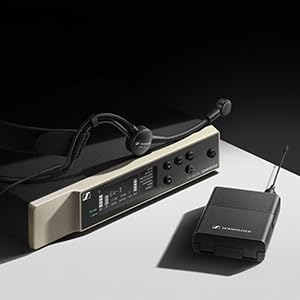
Image: Sennheiser ME 3-II Headset Microphone.
Nlekọta
Proper maintenance ensures the longevity and performance of your Sennheiser EW-D ME3 system:
- Nhicha: Use a soft, dry cloth to clean the receiver, transmitter, and headset microphone. Avoid liquid cleaners or abrasive materials.
- Nlekọta batrị: Remove batteries from the transmitter if the system will not be used for an extended period to prevent leakage. Use high-quality alkaline batteries or rechargeable equivalents.
- Nchekwa: Store the system in a cool, dry place, away from direct sunlight and extreme temperatures.
- Nyocha USB: Regularly inspect all cables for signs of wear or damage. Replace damaged cables immediately to prevent performance issues.
Nchọpụta nsogbu
If you encounter issues with your EW-D ME3 system, consider the following common troubleshooting steps:
| Nsogbu | Ihe nwere ike ime | Ngwọta |
|---|---|---|
| Enweghị mmepụta ọdịyo |
|
|
| Poor audio quality / Dropouts |
|
|
| Feedback (squealing sound) |
|
|
For more detailed troubleshooting or persistent issues, please refer to the official Sennheiser support resources or contact customer service.
Nkọwapụta
Key specifications for the Sennheiser EW-D ME3 Dynamic Headset System (Model 508710):
- Ibu ihe: 5.9 pound
- Akụkụ ngwaahịa: 15.94 x 13.78 x 2.87 sentimita asatọ
- Nọmba Nlereanya ihe: 508710
- Agba: Nwa
- Ngwa dakọtara: Bluetooth-enabled digital devices (for app control)
- Ụdị njikọ: Ikuku
- Ụdị ihe: Ọla
- Ụdị batrị: Alkaline
- Otu ugboro: Q1-6 (specific to this variant)
- Bandwit: 56 MHz (allowing for up to 90 channels)
- Mbufe: Digital UHF
Akwụkwọ ikike na nkwado
Sennheiser products are known for their quality and reliability. For warranty information, product registration, and technical support, please visit the official Sennheiser websaịtị ma ọ bụ kpọtụrụ ngalaba ọrụ ndị ahịa ha. Debe nnata nzụta gị dị ka ihe akaebe nke ịzụrụ maka nkwupụta ikike.
Ị nwere ike ịchọta ozi ndị ọzọ na nkwado na Sennheiser Store on Amazon.


